
FotoMagico
FotoMagico is a slideshow editor for photographers that combines photos, video, maps, text, audio, and snippets into presentations.
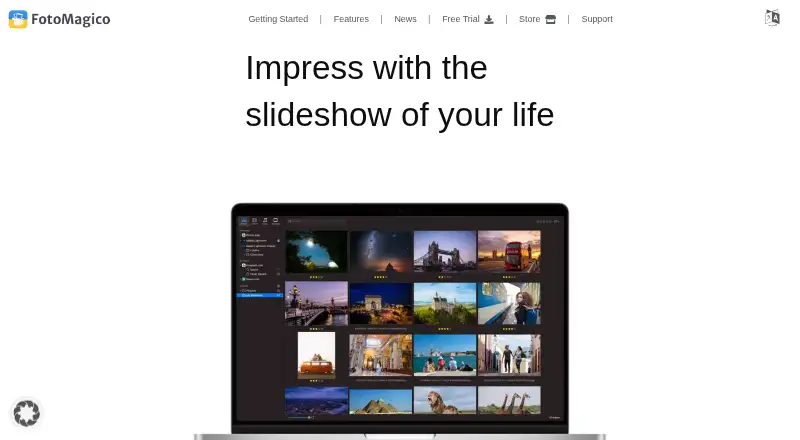
What FotoMagico is
FotoMagico is a slideshow editor for photographers that combines photos, video, maps, text, audio, and snippets into presentations. It plays slideshows at full resolution without a rendering wait. Its Animation Assistant applies movement styles, while Map Assistant animates travel routes. An image browser connects to Apple Photos, local storage, iCloud, Google Drive, and Dropbox, and projects can sync between iPad and Mac through iCloud Drive. Sharing options include direct YouTube and Vimeo uploads, standalone-player exports, and ProRes exports; presentations can also be controlled with PowerPoint-compatible remote clickers. The full feature set is available for a 14-day trial. Afterward, FotoMagico remains a free player, but editing requires a valid licence. It is available for macOS and iPadOS, with no Windows version. Mac use requires Apple Silicon or a 64-bit Intel Mac running OS X Catalina 10.15.2 or newer. Plans include a free player, $7.99 a month, or $79.99 a year.
Good
- Plays full-resolution slideshows without rendering time
- Combines photos, video, maps, text, and audio
- Syncs projects between iPad and Mac through iCloud Drive
- Supports YouTube, Vimeo, standalone-player, and ProRes exports
Watch out
- Editing requires a valid licence after the 14-day trial
- No Windows version
- Mac requires Catalina 10.15.2 or newer
- Paid subscriptions cost $7.99 USD monthly or $79.99 USD yearly
Who it suits
It suits photographers who want to assemble and present slideshows on a Mac or iPad. Its map animation and media-source integrations may also suit people building travel or photo presentations.
Verdict
FotoMagico brings slideshow assembly, animation, and publishing options together for Apple devices. Its free continuation is playback-only, so editing beyond the trial requires a subscription or other valid licence.
Plans and prices
From FotoMagico's own pricing page, checked 1 Oct 2026.
| Plan | Price | What it gives you |
|---|---|---|
| Player | Free | Slideshow playback only · editing disabled without a valid licence · free forever |
| Monthly subscription | $7.99 a month | macOS app · iPad app · updates/upgrades · addons included · per month |
| Annual subscription | $79.99 a year | macOS app · iPad app · updates/upgrades · addons included · per year |
The facts
Each one read from FotoMagico's own pages, with the date it was checked.
What it does
- Animation
- Animation Assistant applies styles that automatically make a slideshow move.checked 1 Oct 2026
- Cloud sync
- Projects can be synchronized between iPad and Mac through iCloud Drive.checked 1 Oct 2026
- Legal terms
- Downloading the software requires agreeing to the Boinx Software International GmbH EULA.checked 1 Oct 2026
- Maps
- Map Assistant animates travel routes.checked 1 Oct 2026
- Media creation
- It combines photos, videos, maps, text, audio and snippets to create slideshows.checked 1 Oct 2026
- Media integrations
- The image browser accesses Apple Photos, local storage, iCloud, Google Drive and Dropbox.checked 1 Oct 2026
- Product purpose
- FotoMagico is a real-time slideshow editor that plays slideshows in full resolution without rendering time.checked 1 Oct 2026
- Publishing
- Sharing Assistant supports direct uploads to YouTube and Vimeo plus standalone-player and ProRes exports.checked 1 Oct 2026
- Remote control
- Slides can be controlled with PowerPoint-compatible presentation remote clickers.checked 1 Oct 2026
- Support
- Boinx offers personalized 45-minute online coaching sessions with live desktop sharing.checked 1 Oct 2026
- System requirements
- The Mac version requires an Apple Silicon or 64-bit Intel Mac running OS X Catalina 10.15.2 or newer.checked 1 Oct 2026
- Target users
- FotoMagico is presented as a slideshow editor for photographers.checked 1 Oct 2026
The company
- Founded
- 1996checked 28 Sep 2026
- Headquarters
- Germering, Germanychecked 28 Sep 2026
Where it runs
- Platform limitation
- FotoMagico is exclusively available on macOS and iPadOS, with no Windows version.checked 1 Oct 2026
Money
- Trial behavior
- The full feature set is available for 14 days, after which the app continues as a free slideshow player.checked 1 Oct 2026
The full review of FotoMagico
FotoMagico is a real-time slideshow editor for photographers who want to combine still images, video, maps, text, and audio into presentations. Its animation and publishing tools give it range beyond basic playback, but editing is limited to a 14-day full-feature trial or a paid licence.
Overview
FotoMagico’s defining advantage is that it plays slideshows at full resolution without a rendering wait. That makes it well suited to building and presenting polished photo sequences, while its map and animation assistants offer useful ways to add motion without assembling every effect manually.
The trade-off is a narrow platform focus and a sharp post-trial boundary: the app continues as a free player, but editing is disabled without a valid licence. It is a poor fit for anyone who needs a lasting free editor or a Windows version.
Key features
Build and animate a slideshow
FotoMagico brings photos, video, maps, text, audio, and snippets together in one slideshow. The Animation Assistant applies styles that make a sequence move, while the Map Assistant animates travel routes. These tools suit photographers who want more than a static image sequence; users seeking fine-grained animation control may still prefer to shape movement themselves.
Find media and move between devices
The image browser reaches Apple Photos, local storage, iCloud, Google Drive, and Dropbox. Projects can synchronize between iPad and Mac through iCloud Drive, a practical combination for people who work across Apple devices. It does not extend that workflow to Windows.
Present and publish
The Sharing Assistant supports direct uploads to YouTube and Vimeo, as well as standalone-player and ProRes exports. Other export formats include HEVC, H264, JPEG, ProRes422, ProRes422HQ, ProRes444, and custom video format. Playback options include online and offline presentations, and slides can be controlled with PowerPoint-compatible presentation remote clickers. That makes FotoMagico useful both for distributing a finished slideshow and for presenting one in person.
Pricing
FotoMagico is freemium, but its free tier is for viewing rather than creating. The full feature set is available during a 14-day trial; after that, the app remains a free slideshow player, with editing disabled unless you have a valid licence.
| Plan | Price | What it includes |
|---|---|---|
| Player | free, billed free forever | Slideshow playback only; editing disabled without a valid licence. |
| Monthly subscription | $7.99 a month, billed per month | macOS app, iPad app, updates and upgrades, and addons. |
| Annual subscription | $79.99 a year, billed per year | macOS app, iPad app, updates and upgrades, and addons. |
The monthly plan fits users who need a short stretch of editing access or prefer month-to-month billing. The annual plan includes the same stated apps and extras at a lower total than twelve monthly payments, so it suits regular users prepared to commit for a year. Both subscriptions cover Mac and iPad, updates and upgrades, and addons; neither is a permanent editing licence.
Platforms
FotoMagico is available for macOS and iPadOS only, with no Windows version. The Mac app requires an Apple Silicon or 64-bit Intel Mac running OS X Catalina 10.15.2 or newer. Downloading requires agreement to the Boinx Software International GmbH EULA.
Who it's for
Photographers who build image-led presentations and want animation, travel-route maps, several media sources, and flexible playback or export options will get the most from FotoMagico. Its iPad-to-Mac project sync is especially relevant to people already working across those devices. It is less suitable for Windows users, anyone who needs editing to remain free, or someone who wants to avoid a subscription after the trial.
Boinx also offers personalized 45-minute online coaching sessions with live desktop sharing, a useful option for users who want guided help with the software.
Pros and cons
- Pro: Full-resolution playback without rendering time makes it practical to present a finished slideshow without waiting for a separate render.
- Pro: Animation and map assistants add motion and travel routes, while support for photos, video, text, audio, and snippets gives photographers several ways to shape a presentation.
- Pro: Direct YouTube and Vimeo uploads, a standalone player, multiple video formats, and remote-clicker support cover both sharing and live presentation.
- Con: The free Player plan disables editing, so creating beyond the 14-day trial requires a paid licence.
- Con: Windows is not supported, which rules out mixed-platform teams and Windows-only users.
Alternatives
Browse Photo Slideshow Makers for more options. Choose PhotoStage if you need Android or Windows support alongside Apple platforms; it has a free plan. Photopia is a paid alternative with a free trial and macOS and Windows support. For a Windows-only choice with unlimited free use and no watermark on its free plan, consider Icecream Slideshow Maker. Cofeshow offers free downloads for macOS and Windows as well as iOS support. PTE AV Studio is a paid option for Windows and macOS. MAGIX Photostory deluxe is a Windows-only paid alternative with a perpetual licence. Movavi Slideshow Maker is a paid option with a free trial for macOS and Windows. PhotoFilmStrip is a free alternative for Linux and Windows.
Verdict
FotoMagico is a strong fit for Apple-using photographers who want to assemble, animate, and present slideshows from one editor, with useful paths from live playback to online sharing and export. Its main reason to choose it is that focused presentation workflow; its main reasons to look elsewhere are the playback-only free tier after 14 days and the absence of Windows support.
Alternatives to FotoMagico
- 1
PhotoStage
Free planAndroidiOSmacOSWindows7.9From $34.99 a year - 2
Zno
Free planAndroidiOSWebmacOS7.6Free plan - 3

Cofeshow
Free planiOSmacOSWindows6.9From $49.99 a year - 4
Smilebox
Free planAndroidiOSWeb6.8Free plan - 5
SmartSHOW 3D
Windows6.7From $29.95 a year - 6
Memoriam
Free planWeb6.6From $99 a month