
SlideSpeak
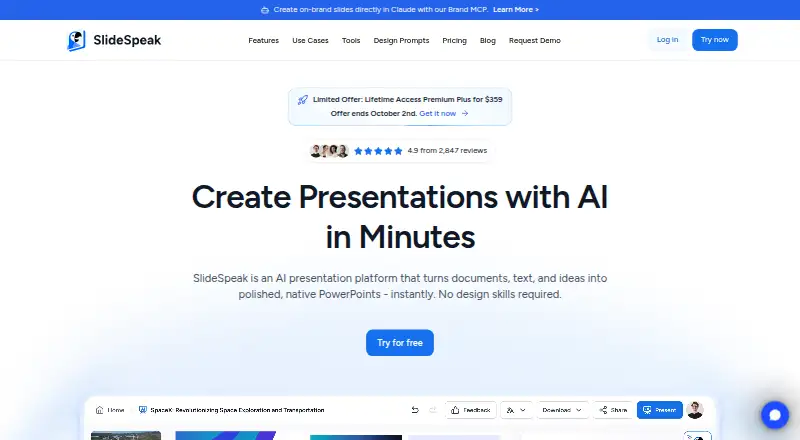
SlideSpeak uses AI to turn documents, text, and ideas into editable PowerPoint presentations.
What SlideSpeak is
SlideSpeak uses AI to turn documents, text, and ideas into editable PowerPoint presentations. A project can begin with a PowerPoint, PDF, Word file, spreadsheet, website link, or prompt. In the editor, users can rewrite text, reposition or resize elements, change layouts, edit charts, and apply templates. Brand controls support applying a user’s fonts, colors, logos, and PowerPoint templates across presentations.
SlideSpeak can narrate a deck as a video, translate the slides and narration, and export to PowerPoint, PDF, SCORM, or QTI. The enterprise page also lists Google Slides exports. Its API can create presentations from text or documents, edit slides programmatically, and export to PowerPoint and PDF; the API page describes integrations with BI, CRM, reporting tools, and AI agent workflows. The service offers web and API access with real-time collaboration. The Free plan includes 100 signup credits and a 50 MB file-size limit. Premium costs $29 a month. SlideSpeak says uploaded user-specific data is encrypted, stored by default for 180 days, and can be deleted by request. It also says customer data is not used to train AI models.
Good
- Starts from documents, links, or prompts
- Editable slides with chart and layout tools
- Brand controls for fonts, colors, and logos
- Exports include PowerPoint and PDF
- Real-time collaboration
Watch out
- Free plan is limited to 100 signup credits
- Free plan has a 50 MB file-size limit
- Premium costs $29 a month
- Uploaded data is stored by default for 180 days
Who it suits
SlideSpeak suits consultants, students, educators, creators, learning and development teams, and enterprises that need editable presentations from documents or prompts. Teams can also use its real-time collaboration and brand controls.
Verdict
SlideSpeak offers document-to-deck creation with editing, branding, narration, and multiple export formats. The Free plan has credit and file-size limits, while Premium costs $29 a month.
Plans and prices
From SlideSpeak's own pricing page, checked 8 Oct 2026.
| Plan | Price | What it gives you |
|---|---|---|
| Free | Free | 100 credits at sign-up · 50 MB file size limit · about 3 presentations · 150+ languages |
| Premium | $29 a month | 1,000 credits per month · 30-day version history · no file size limit · about 27 presentations or 13 AI videos · monthly unless otherwise stated |
| Premium Plus | $34 a month | 2,500 credits per month · 90-day version history · branded presentations · custom brand image library · about 67 presentations or 33 AI videos · monthly unless otherwise stated |
| 500 AI credits | $10, paid once | Credits last 12 months · about 13 presentations or 7 AI videos |
| 2,000 AI credits | $30, paid once | Credits last 12 months · about 53 presentations or 27 AI videos |
| 5,000 AI credits | $50, paid once | Credits last 12 months · about 133 presentations or 67 AI videos |
| Custom template add-on | $129, paid once | Import your own presentation template or get a customized template |
| Enterprise | Priced on request | Custom credit volume · SSO · priority customer support · multiple custom templates · custom quote |
The facts
Each one read from SlideSpeak's own pages, with the date it was checked.
What it does
- AI data use
- The privacy policy says customer data is not used to train AI models and is anonymized before being sent to AI language-model subprocessors.checked 8 Oct 2026
- API
- The SlideSpeak API can generate presentations from text or documents, edit slides programmatically, and export to PowerPoint and PDF.checked 8 Oct 2026
- Brand controls
- Yeschecked 20 Sep 2026
- Branding
- Users can apply their fonts, colors, logos, and PowerPoint templates across presentations.checked 8 Oct 2026
- Collaboration level
- realtimechecked 20 Sep 2026
- Document-to-deck generation
- Yeschecked 20 Sep 2026
- Editing
- The editor can rewrite text, move and resize elements, change layouts, edit charts, and apply templates.checked 8 Oct 2026
- Inputs
- It can start from a PowerPoint, PDF, Word file, spreadsheet, website link, or prompt.checked 8 Oct 2026
- Integrations
- The enterprise page lists exports to PowerPoint, PDF, and Google Slides, while the API page describes integrations with BI, CRM, reporting tools, and AI agent workflows.checked 8 Oct 2026
- PDF export
- Yeschecked 20 Sep 2026
- PowerPoint export
- Yeschecked 20 Sep 2026
- Product
- SlideSpeak turns documents, text, and ideas into editable PowerPoint presentations using AI.checked 8 Oct 2026
- Prompt-to-deck generation
- Yeschecked 20 Sep 2026
- Security
- The privacy policy says uploaded user-specific data is encrypted, is stored by default for 180 days, and can be deleted by request.checked 8 Oct 2026
- Support
- The Enterprise plan includes priority customer support.checked 8 Oct 2026
- Video and translation
- SlideSpeak can narrate a deck as a video, translate the deck and narration, and export to PowerPoint, PDF, SCORM, or QTI.checked 8 Oct 2026
- Who it serves
- SlideSpeak describes use cases for consultants, students, educators, creators, learning and development teams, and enterprises.checked 8 Oct 2026
Money
- Free plan
- Yeschecked 20 Sep 2026
- Free-plan limit
- The Free plan includes 100 signup credits and a 50 MB file-size limit.checked 8 Oct 2026
Alternatives to SlideSpeak
- 1

Pitch
Free planAndroidiOSWebAPI9.1From €10 a month - 2
AiPPT
Free planAndroidiOSWebAPI8.5From $60 a year - 3
Genspark AI Slides
Free planAndroidiOSWebExtension8.4From $24.99 a month - 4

SlideEgg
Free planAndroidiOSWeb8.4Free plan - 5
Slaide
Free planiOSWebLinuxmacOS8.4From $6.90 a month - 6

Replit
Free planAndroidiOSWebLinux8.4From $18 a month