Shedevrum
Shedevrum is a freemium generative AI service for creating images, videos, clips, and text.
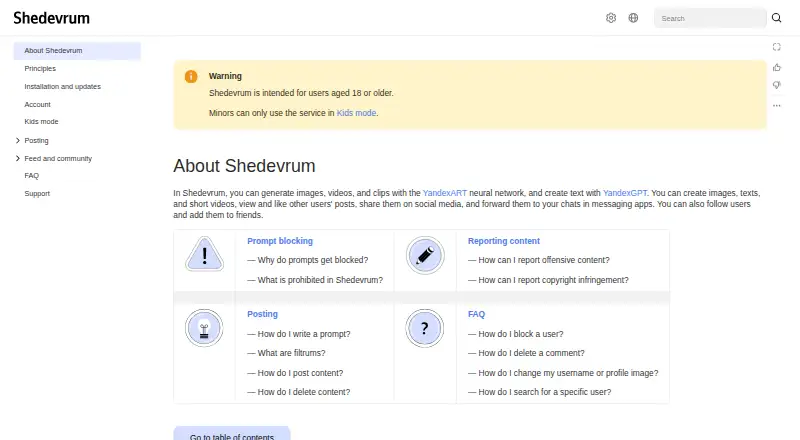
What Shedevrum is
Shedevrum is a freemium generative AI service for creating images, videos, clips, and text. YandexART powers image generation, while YandexGPT creates text; prompts can be written in any language. Available image models include Alice AI ART v.1.0 and YandexART v.2.7 and v.2.5, with generation usually taking under a minute. Users can provide reference images and edit images. For short videos, they describe an idea, choose a generated first frame, and add an animation effect. Clips combine 3 to 30 content items, may include Yandex Music, and can run for up to two minutes. A social area lets users view, like, follow, add friends, and share posts. Automatic filters and human review moderate content. Kids mode adds stricter controls and privacy protections. The free app requires internet access; Pro adds models and editing tools.
Good
- Accepts prompts in any language
- Supports reference images and editing
- Creates videos and clips with music
- Offers free access with a seven-day trial
- Provides Kids mode protections
Watch out
- Commercial use is limited
- Free app requires an internet connection
- Users under 18 are limited to Kids mode
Who it suits
Shedevrum suits adults creating AI images, videos, clips, or text on Android, iOS, or the web. Minors can use it only through Kids mode.
Verdict
Shedevrum combines image, video, clip, and text generation with a social feed and moderation controls. Check the commercial-use limits and choose between the free app and Pro features.
Plans and prices
From Shedevrum's own pricing page, checked 12 Oct 2026.
| Plan | Price | What it gives you |
|---|---|---|
| Free app | Free | Free app; internet connection required · Android 7.0+ or iOS 15.0+ |
| Shedevrum | Free | Free app · image, video, clip and text generation · Yandex ID required for generation |
| Shedevrum Pro | Priced on request | Additional paid features · Pro activation available only in Russia · Cost and conditions are governed by Yandex Plus terms |
The facts
Each one read from Shedevrum's own pages, with the date it was checked.
What it does
- Account requirement
- Unauthenticated visitors can browse recent and popular posts, but generation, likes and comments require Yandex ID login.checked 14 Oct 2026
- Age requirement
- Shedevrum is intended for users aged 18 or older; minors can use it only in Kids mode.checked 12 Oct 2026
- Clip editing
- Clips can use 3 to 30 content items, include music, and be up to two minutes long.checked 12 Oct 2026
- Clip editor
- Clips combine three to thirty posts with transitions, timing edits and music, and clips may run up to two minutes.checked 14 Oct 2026
- Commercial use
- Generated content is allowed for personal noncommercial use with attribution, while commercial use requires prior Yandex approval.checked 14 Oct 2026
- Community
- Users can view and like other users’ posts, share posts on social media or in messaging apps, follow users, and add them as friends.checked 12 Oct 2026
- Content restrictions
- Rules prohibit political, religious, violent, criminal, explicit, shocking, hateful and gambling-related prompts or posts.checked 14 Oct 2026
- Content rights
- Yandex states that rights to the service software, design and AI technology belong to Yandex.checked 14 Oct 2026
- Data protection
- Google Play reports no third-party data sharing, encryption in transit and the ability to request data deletion.checked 14 Oct 2026
- Friends limit
- A user can add up to 200 friends.checked 14 Oct 2026
- Generative AI
- Shedevrum generates images, videos, and clips with YandexART and creates text with YandexGPT.checked 12 Oct 2026
- Image editing
- Yeschecked 20 Sep 2026
- Image generation
- Image generation supports Alice AI ART v1.0 and YandexART v2.7 and v2.5 models, with prompt-based creation and photo filters.checked 14 Oct 2026
- Integrations
- Users can share posts to social media and messaging apps, and clips can use music from Yandex Music.checked 12 Oct 2026
- Kids mode
- Kids mode adds voice prompts, password-protected exit, stricter generation and feed moderation, and disables follows, friends and comments for child profiles.checked 14 Oct 2026
- Language support
- Prompts may be written in any language, while generated answers are provided in Russian according to the FAQ.checked 14 Oct 2026
- Launch and adoption
- Yandex reported that Shedevrum launched in April 2023, quickly topped Russian app charts and approached 10 million downloads by the fourth quarter of 2023.checked 14 Oct 2026
- Legal entity
- Crunchbase identifies the legal name as YANDEX LLC and lists the company as active and for-profit.checked 14 Oct 2026
- Limit: missing controls
- Google Play reviewers complain about absent negative prompts, seed control, inpainting and prompt-weight controls.checked 14 Oct 2026
- Limit: regional Pro access
- A Google Play reviewer reports that Shedevrum Pro cannot be activated outside Russia, which the developer confirms.checked 14 Oct 2026
- Limit: service incidents
- RuStore reviewers dated October 11–14, 2026 report missing creations, broken comments and notifications, login failures and generation delays of several hours.checked 14 Oct 2026
Money
- Free plan
- Yeschecked 20 Sep 2026
- Limit: reduced free allowance
- A RuStore reviewer says free image generations were reduced from 60 to 10.checked 14 Oct 2026
The company
- Headquarters
- Moscow, Russiachecked 28 Sep 2026
The full review of Shedevrum
Shedevrum is a Yandex creative service for making images, text, short videos, and assembled clips, with a built-in community feed. It is best for casual creators and multilingual users who want several generative formats in one mobile or browser workspace. Choose it for breadth and sharing; look elsewhere if unrestricted commercial use or a specialist production workflow is essential.
Overview
Shedevrum brings together YandexART image generation and YandexGPT text generation, then wraps the results in a social network where users can view, like, follow, friend, and share posts. Prompts work in any language, making the service approachable for international audiences. Image jobs usually finish in under a minute, and users can choose Alice AI ART v.1.0, YandexART v.2.7, or YandexART v.2.5. That model choice is useful when one generation style does not suit a project, although the service is less suitable for teams that need a narrowly focused, production-oriented image pipeline. Commercial use is limited, so business users should verify that their intended work fits those restrictions before committing.
Key features
Images and text
Text-to-image generation, reference images, and image editing cover the central idea-to-revision loop. Reference images help steer a result toward a visual starting point, while editing avoids having to regenerate every concept from scratch. Text generation adds copy and ideation alongside visual work rather than forcing a separate writing service. Shedevrum Pro expands this workflow with additional image-generation models, portrait editing using YandexGPT, YandexFace, and Inpainting, background removal, and the ability to upload your own images. Those are meaningful upgrades for creators who routinely refine portraits, isolate subjects, or work from source assets; users who only need occasional prompt-based images can stay with the free app.
Video and clips
Short video creation follows a simple concept-to-motion path: describe an idea, select a generated first frame, and apply an animation effect. It is suited to quick visual posts rather than long-form editing. Clips can combine three to 30 content items, include music, and run for up to two minutes. Music can come from Yandex Music, and finished posts or clips can be shared to social networks and messaging apps. These limits keep the feature practical for social publishing, but they will constrain anyone building longer or more complex edits.
Community and safety
The feed supports discovery and audience interaction through likes, follows, friendships, and sharing. Moderation uses automatic filters, manual checks for ambiguous cases, and team review for particularly complex cases; reported posts are reviewed within 24 hours. Kids mode adds stricter filtering, voice prompts, and privacy controls that block other users from following a child, adding them as a friend, or commenting. Shedevrum is intended for adults aged 18 and over; minors may use it only in Kids mode. Support is available through the feedback form by selecting “Ask support.”
Pricing
Free app
The free app costs nothing and requires an internet connection. It runs on Android 7.0 or later and iOS 15.0 or later, with web access also supported. This is the sensible starting point for experimenting with image, text, video, and clip creation, but it does not include Pro-only source-image uploads, background removal, or portrait editing.
Shedevrum Pro
Shedevrum Pro has custom pricing. It adds image-generation models and the advanced editing tools listed above, including image uploads. A seven-day trial is offered, giving prospective subscribers a short window to decide whether those workflows justify the upgrade. Readers should confirm the renewal terms and commercial-use requirements before relying on it for paid work.
Platforms
Shedevrum is available on Android, iOS, and the web. The free mobile requirements are Android 7.0+ and iOS 15.0+; an internet connection is required.
Who it's for
Choose Shedevrum for multilingual hobbyists, social creators, and anyone who wants generation and lightweight video assembly in one service. It also makes sense for users who value a community feed and direct sharing. It is a weaker choice for commercial teams needing broad usage rights, private production controls, or editing beyond two-minute clips, and for minors outside Kids mode.
Pros and cons
- Pro: Images, text, videos, and clips are handled in one workspace, reducing the need to switch between creative apps.
- Pro: Any-language prompts and three image-model options support multilingual experimentation and model choice.
- Pro: Reference images, editing, music-backed clips, and social sharing connect generation with publishing.
- Con: Commercial use is limited, which can rule it out for some client and business projects.
- Con: Background removal, portrait tools, model extras, and personal image uploads require Pro at custom pricing.
- Con: Clips stop at two minutes and use three to 30 content items, limiting more ambitious edits.
Alternatives
Browse AI image generators for a wider category comparison. Pick Adobe Firefly instead if you want a freemium Adobe service with a free tier and a paid plan offering 2,000 monthly credits. FLUX is the better fit for API, desktop, Linux, Windows, or self-hosted deployments and metered megapixel pricing. Choose Leonardo.Ai if daily token allowances and personal AI models matter. Microsoft Image Creator is a free Android, iOS, and web option with daily fast-image creations. AUTOMATIC1111 Stable Diffusion WebUI suits users seeking a free, self-hosted interface. Stable Image offers a community license for qualifying researchers, developers, small businesses, and creators. SeaArt AI provides freemium access with daily stamina and simultaneous-task limits. Stable Diffusion WebUI Forge is a free self-installed alternative with a one-click package.
Verdict
Shedevrum is a strong choice for individuals who want multilingual image and text generation plus quick videos, clips, and community sharing across phone and web. Its main reason to choose it is the unusually broad creative mix in one service. Its main reason to look elsewhere is limited commercial use, compounded by custom-priced Pro tools for serious editing and source-image workflows.
Alternatives to Shedevrum
- 1

FLUX
Free planOpen sourceWebAPILinuxmacOS9.1$0.01 one-time - 2

Recraft
Free planAndroidiOSWebAPI9.0Free plan - 3

Tensor.Art
Free planAndroidiOSWebAPI8.8Free plan - 4
Sogni
Free planAndroidiOSWebAPI8.8From $20 a month - 5

Adobe Firefly
Free planAndroidiOSWebAPI8.6Free plan - 6

Dream by WOMBO
Free planAndroidiOSWebAPI8.6Free plan