
AUTOMATIC1111 Stable Diffusion WebUI
AUTOMATIC1111 Stable Diffusion WebUI is a Gradio-based interface for generating and editing images with Stable Diffusion.
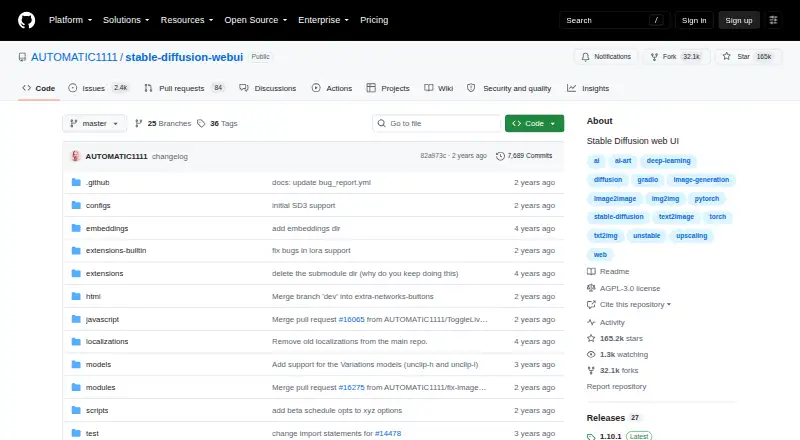
What AUTOMATIC1111 Stable Diffusion WebUI is
AUTOMATIC1111 Stable Diffusion WebUI is a Gradio-based interface for generating and editing images with Stable Diffusion. It offers text-to-image and image-to-image generation, along with inpainting, outpainting, color sketch, and prompt matrix tools. The Extras tab includes face restoration and image upscaling options such as GFPGAN, CodeFormer, RealESRGAN, ESRGAN, SwinIR, Swin2SR, and LDSR. Users can train embeddings and hypernetworks, use LoRAs, and add community scripts or extensions. The project lists support for Stable Diffusion 2.0, Alt-Diffusion, and Segmind Stable Diffusion, as well as an API. It provides installation instructions for Windows, Linux, and Apple Silicon Macs; output formats include PNG and JPEG. The README recommends NVIDIA GPUs and links setup guidance for AMD GPUs, Intel CPUs and GPUs, and Ascend NPUs. A one-click install still requires Python and Git. The project lists support for 4 GB video cards, with reports of 2 GB working. Low-VRAM options can reduce memory use at the cost of performance. The repository includes the GNU Affero General Public License version 3, which permits copying, distribution, and modification under its terms.
Good
- Provides text-to-image and image-to-image modes.
- Includes inpainting, outpainting, and color sketch tools.
- Supports embeddings, hypernetworks, LoRAs, and extensions.
- Offers an API and PNG or JPEG output.
- Installation guidance covers several operating systems and hardware types.
Watch out
- One-click installation still requires Python and Git.
- Low-VRAM options reduce memory use at the cost of performance.
- The project states it is provided without warranty.
Who it suits
It may suit people who want a local, self-hosted interface for generating and editing Stable Diffusion images, or contributors building scripts and extensions. Users should be prepared to follow installation instructions and have Python and Git installed.
Verdict
AUTOMATIC1111 Stable Diffusion WebUI brings image generation, editing, and customization tools into a self-hosted interface. Check the installation requirements and hardware guidance before setting it up.
The facts
Each one read from AUTOMATIC1111 Stable Diffusion WebUI's own pages, with the date it was checked.
What it does
- API
- The README lists an API, and the wiki says to enable it with the --api command-line argument.checked 12 Oct 2026
- API access
- Yeschecked 20 Sep 2026
- Customization
- Users can train embeddings and hypernetworks, use LoRAs, and add community custom scripts and extensions.checked 11 Oct 2026
- Editing tools
- Listed tools include outpainting, inpainting, color sketch, and prompt matrix.checked 12 Oct 2026
- Extensions
- The project supports custom scripts and community extensions, including optional History and Aesthetic Gradients extensions.checked 12 Oct 2026
- Hardware
- The README recommends NVIDIA GPUs and also links setup instructions for AMD GPUs, Intel CPUs and GPUs, and Ascend NPUs.checked 11 Oct 2026
- Image editing
- Features include color sketch, prompt matrix, tiling, and batch processing.checked 11 Oct 2026
- Image enhancement
- The Extras tab includes face restoration and image upscalers such as GFPGAN, CodeFormer, RealESRGAN, ESRGAN, SwinIR, Swin2SR, and LDSR.checked 11 Oct 2026
- Image generation
- The interface provides text-to-image and image-to-image modes.checked 12 Oct 2026
- Installation
- The README links installation instructions for NVIDIA and AMD GPUs, Intel CPUs and GPUs, Ascend NPUs, and Apple Silicon.checked 12 Oct 2026
- Integrations
- The README lists integrations or support for xformers, DeepDanbooru, and Composable-Diffusion.checked 12 Oct 2026
- Intended users
- The repository provides installation instructions and developer documentation for users running the interface and contributors building scripts or extensions.checked 12 Oct 2026
- License
- The repository identifies its license as AGPL-3.0.checked 12 Oct 2026
- Local installation
- The project provides installation instructions for Windows, Linux, and Apple Silicon Macs.checked 11 Oct 2026
- Local setup
- The NVIDIA setup guide describes launching the interface at a local URL and says low-VRAM options can reduce memory use at the cost of performance.checked 12 Oct 2026
- Low-memory support
- The feature list says 4 GB video cards are supported, with reports of 2 GB working.checked 11 Oct 2026
- Model support
- The project lists support for Stable Diffusion 2.0, Alt-Diffusion, and Segmind Stable Diffusion.checked 11 Oct 2026
- Model training
- The README lists a Training tab with hypernetwork and embedding options, plus image preprocessing features.checked 12 Oct 2026
- Output formats
- PNG,JPEGchecked 20 Sep 2026
- Purpose
- Stable Diffusion web UI is a browser interface for Stable Diffusion built with the Gradio library.checked 12 Oct 2026
- Reference images
- Yeschecked 20 Sep 2026
- Requirements
- The README says the one-click install and run script still requires Python and Git.checked 12 Oct 2026
- Security
- The repository's Security page opened, but the page content did not provide a security or compliance statement.checked 12 Oct 2026
Money
- Free plan
- Yeschecked 20 Sep 2026
The full review of AUTOMATIC1111 Stable Diffusion WebUI
AUTOMATIC1111 Stable Diffusion WebUI is a free, self-hosted browser interface for creating, editing, enhancing, and training image models. It suits technically inclined creators, developers, and contributors who want control over local hardware and extensions. The trade-off is clear: you get an unusually broad toolkit without a subscription, but you must install and maintain it yourself.
Overview
Built with Gradio, the WebUI puts Stable Diffusion workflows in a browser while running on your own machine. Text-to-image and image-to-image modes handle prompt-based creation and reference-image work, while inpainting, outpainting, color sketch, and prompt matrix support more deliberate revisions. That makes it a better fit for iterative image work than a tool focused only on one-shot generation.
Outputs can be saved as PNG or JPEG, and the interface accepts reference images and offers API access. The project lists support for Stable Diffusion 2.0, Alt-Diffusion, and Segmind Stable Diffusion. Its GNU Affero General Public License version 3 permits copying, distribution, and modification under the license terms, with no warranty to the extent permitted by law.
Key features
Generation, editing, and enhancement
Inpainting lets you replace selected areas and outpainting extends a composition beyond its original edges. Color sketch and prompt matrix add controlled ways to explore variations. These tools favor users who want to refine an image in stages rather than repeatedly regenerate an entire frame.
The Extras tab adds face restoration and upscaling through GFPGAN, CodeFormer, RealESRGAN, ESRGAN, SwinIR, Swin2SR, and LDSR. That selection gives restoration and enlargement a place in the same workflow, although the number of engines and settings will appeal more to users comfortable choosing and tuning them than to people seeking a simplified preset.
Customization and training
A Training tab provides hypernetwork and embedding options plus image preprocessing. Users can also train embeddings and hypernetworks, use LoRAs, and install community scripts and extensions. Optional History and Aesthetic Gradients extensions, along with integrations or support for xformers, DeepDanbooru, and Composable-Diffusion, make the project unusually extensible. The benefit is control over specialized workflows; the cost is that extension selection and upkeep become part of the user’s responsibility.
API and models
An API supports programmatic access, which is useful for developers building tools around a local interface. The documented model support broadens the starting point beyond one Stable Diffusion release, while custom extensions allow contributors to add functionality.
Pricing
Free plan: $0, with the full software distributed under the GNU Affero General Public License version 3. There is no paid tier or free trial to compare, and no seat or usage quota is stated. The price advantage is strongest for users who already have suitable hardware; installation, model management, storage, and electricity remain local responsibilities rather than included services.
Platforms
The WebUI is offered for self-hosted use across Windows, Linux, macOS, web, and API workflows. Installation guidance covers Windows, Linux, and Apple Silicon Macs, with separate instructions for NVIDIA and AMD GPUs, Intel CPUs and GPUs, and Ascend NPUs. The one-click install and run script still requires Python and Git. NVIDIA GPUs are recommended, while low-memory guidance says 4 GB video cards are supported and reports of 2 GB working exist; low-VRAM launch options can reduce memory use at the cost of performance.
Who it's for
This is a strong choice for creators who want local image generation, model experimentation, custom scripts, and repeatable API workflows. It also suits developers and contributors building extensions, supported by setup, usage, troubleshooting, and developer documentation in the wiki. It is a weaker choice for users who want a managed web service, minimal configuration, or hardware-independent generation.
Pros and cons
- Pros: Free self-hosted software with no stated usage cap; combines generation, editing, restoration, training, and API access; broad extension and model customization; support for low-memory hardware and several accelerator families.
- Cons: Python and Git are still required; users must select and maintain hardware, models, and extensions; low-VRAM modes trade speed for lower memory use; the license provides no warranty.
Alternatives
Choose Adobe Firefly instead if you prefer a freemium, managed service across Android, iOS, API, and web, with limited daily generations on its free plan. FLUX is an alternative for freemium access across local and web platforms, with model plans priced by usage and megapixels. Leonardo.Ai suits users who want a hosted API with a free daily token allowance and paid monthly tiers. Microsoft Image Creator is a simpler free option on Android, iOS, and web with 15 fast image creations per day. Shedevrum is a freemium Android, iOS, and web alternative with additional models and portrait-editing tools on its Pro plan. Stable Image is worth considering for API, web, or self-hosted use under a community license for qualifying researchers, developers, small businesses, and creators. SeaArt AI offers hosted freemium access, including 130 stamina per day and two simultaneous tasks on its free plan. Stable Diffusion WebUI Forge is another free self-installed interface whose one-click package includes Git and Python.
Verdict
Choose AUTOMATIC1111 Stable Diffusion WebUI if you want the broadest control over Stable Diffusion generation, editing, training, and extensions on hardware you manage yourself. Look elsewhere if avoiding installation, hardware decisions, and ongoing maintenance matters more than local control and a zero software price.
Alternatives to AUTOMATIC1111 Stable Diffusion WebUI
- 1

FLUX
Free planOpen sourceWebAPILinuxmacOS9.1$0.01 one-time - 2

Recraft
Free planAndroidiOSWebAPI9.0Free plan - 3
Tensor.Art
Free planAndroidiOSWebAPI8.8Free plan - 4
Sogni
Free planAndroidiOSWebAPI8.8From $20 a month - 5

Adobe Firefly
Free planAndroidiOSWebAPI8.6Free plan - 6

Dream by WOMBO
Free planAndroidiOSWebAPI8.6Free plan