screenpipe
screenpipe is a local-first desktop memory tool that records screen content, app text, browser context, and audio for AI-powered search.
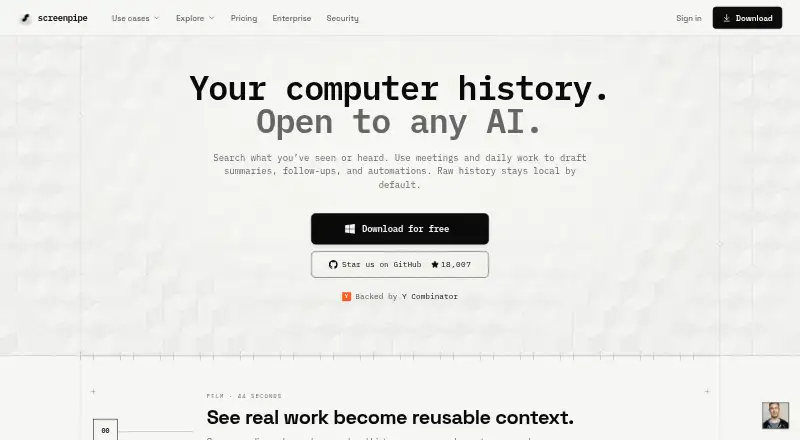
What screenpipe is
screenpipe is a local-first desktop memory tool that records screen content, app text, browser context, and audio for AI-powered search. It captures connected monitors when activity changes, extracting accessibility text with OCR as a fallback, and records the active app, window title, and browser URL when available. System audio and microphone input are transcribed locally with OpenAI Whisper, including speaker identification for conversations.
Users can search history in natural language and filter by date, application, window title, or browser URL. Results can include screenshots, audio clips, and extracted text; a timeline lets users inspect screen history and play audio from a selected period. By default, captures and transcriptions remain in a local SQLite database rather than going to external servers. screenpipe also provides a localhost REST API, a JavaScript/TypeScript SDK, and an MCP server. It runs on macOS, Windows, and Linux, with no mobile app. The free plan includes one device; Basic costs $21 per month billed annually. The site recommends 8 GB RAM and estimates 5–10 GB of disk space per month of continuous recording.
Good
- Local transcription with speaker identification
- Search history by date, app, or browser URL
- Captures remain local by default
- REST API, SDK, and MCP server available
- Free plan includes one device
Watch out
- No mobile app
- Continuous recording is estimated at 5–10 GB monthly storage
- Basic costs $21 per month billed annually
Who it suits
It suits desktop users who want searchable screen and audio history, including people using its listed developer integrations or API. It is not currently available as a mobile app.
Verdict
screenpipe combines screen and audio capture with searchable history, a timeline, and developer access. Its default local storage and one-device free plan are useful distinctions; the listed Basic plan is $21 per month billed annually.
Plans and prices
From screenpipe's own pricing page, checked 1 Oct 2026.
| Plan | Price | What it gives you |
|---|---|---|
| Free | Free | one device · screen, audio, and meeting capture · recent-work search · AI-tool context sharing |
| Basic | $21 a month | full searchable history · MCP context for Claude and Codex · unlimited installed scheduled workflows · $250/yr billed annually · save $50 |
| Business | $42 a month | personal device sync · recurring workflows · centralized billing and managed seats · shared teammate context not currently included · $500/seat/yr billed annually · save $100 |
| Enterprise | Priced on request | managed searchable history · dedicated support · custom models · SSO, MDM, retention, and device controls · custom |
The facts
Each one read from screenpipe's own pages, with the date it was checked.
What it does
- AI search
- Natural-language search can filter history by date, application, window title, or browser URL and return screenshots and audio clips with extracted text.checked 1 Oct 2026
- Audio transcription
- System audio and microphone input are transcribed locally with OpenAI Whisper, with speaker identification for conversations.checked 1 Oct 2026
- Compliance status
- Screenpipe states that a SOC 2 Type 2 report is available under NDA and that ISO 27001 certification is in progress and not yet certified.checked 1 Oct 2026
- Developer access
- Screenpipe provides a localhost REST API for screen content, audio transcriptions, and frames, plus a JavaScript/TypeScript SDK and MCP server.checked 1 Oct 2026
- Integrations
- Officially listed integrations include Cursor, Claude Code, Cline, Continue, OpenCode, Gemini CLI, ChatGPT via MCP, Claude Desktop via MCP, Obsidian, Notion, Ollama, and OpenAI-compatible model servers.checked 1 Oct 2026
- Local privacy
- By default, captures, audio, extracted text, and transcriptions stay in a local SQLite database and are not sent to external servers.checked 1 Oct 2026
- Mobile availability
- Screenpipe states that it does not currently have a mobile app and is a desktop application for macOS, Windows, and Linux.checked 1 Oct 2026
- Resource limits
- The site recommends 8 GB RAM, estimates 5–10 GB of disk space per month of continuous recording, and reports typical modern-hardware CPU usage of 5–15%.checked 1 Oct 2026
- Screen capture
- It captures connected monitors when activity changes, extracts accessibility text with OCR fallback, and records the active app, window title, and browser URL when available.checked 1 Oct 2026
- Security controls
- The security page states that data can be encrypted at rest with a zero-knowledge key hierarchy and that users can filter apps or URLs and redact passwords and PII on-device.checked 1 Oct 2026
- Support
- The pricing comparison lists community support for Free and Basic, priority support for Business, and dedicated support for Enterprise.checked 1 Oct 2026
- Timeline
- A visual timeline lets users scroll through screen history, inspect screenshots and extracted text, and play audio from any period.checked 1 Oct 2026
- What it does
- Screenpipe is a local-first desktop memory layer that records screen content, app text, browser context, and audio for AI search.checked 1 Oct 2026
The company
- Founded
- 2024checked 28 Sep 2026
The full review of screenpipe
Screenpipe turns a computer’s screen and audio activity into a searchable work history. It is best for people who want to revisit past work or give AI tools context from it. Its local storage and developer access are strong differentiators, but continuous recording has a real storage cost and the product is desktop-only.
Overview
Screenpipe records screen content, app text, browser context and audio, then makes that history searchable in natural language. Searches can be narrowed by date, application, window title or browser URL and return screenshots or audio clips with extracted text. A visual timeline offers a more deliberate way to inspect screenshots, text and audio from a particular period.
Captures, extracted text and transcriptions stay in a local SQLite database by default rather than being sent to external servers. Users can filter apps or URLs and redact passwords and personally identifiable information on-device; data can also be encrypted at rest through a zero-knowledge key hierarchy. That makes the privacy controls meaningful for individual workflows, while organizations should note the SOC 2 Type 2 report is available under NDA and ISO 27001 certification is still in progress.
Key features
Screenpipe captures connected monitors when activity changes, extracting accessibility text and falling back to OCR. It also records the active app, window title and browser URL when available. This context makes the resulting history more useful than screenshots alone, though search can only work with text and metadata the application can capture.
System audio and microphone input are transcribed locally with OpenAI Whisper, with speaker identification for conversations. The timeline lets users play audio alongside the corresponding screen history, which is useful when a meeting or conversation needs to be revisited in context.
For developers, a localhost REST API exposes screen content, audio transcriptions and frames, with JavaScript/TypeScript SDK and MCP server access. Official integrations include Cursor, Claude Code, Cline, Continue, OpenCode, Gemini CLI, ChatGPT via MCP, Claude Desktop via MCP, Obsidian, Notion, Ollama and OpenAI-compatible model servers. This breadth makes Screenpipe a strong fit for AI-assisted workflows, though its value is less obvious for readers who do not need to search or reuse computer history.
Continuous recording carries practical resource costs: Screenpipe recommends 8 GB of RAM, estimates 5–10 GB of disk space per month of continuous recording and reports typical CPU use of 5–15% on modern hardware. That is manageable for a dedicated desktop, but worth considering before keeping it running on a storage-constrained machine.
Pricing
The free plan costs nothing and supports one device, screen, audio and meeting capture, recent-work search and AI-tool context sharing. Community support is included. It is a sensible way to try the capture workflow, but the one-device cap and recent-work search make it a limited substitute for a full searchable archive.
Basic costs $21 per month, billed $250/yr billed annually, with $50 savings. It adds full searchable history, MCP context for Claude and Codex, and unlimited installed scheduled workflows; community support remains the support tier. Basic is the clearest fit for an individual who needs durable history and AI context, though it does not include the device sync and managed seats of Business.
Business costs $42 per month, billed $500/seat/yr billed annually, with $100 savings. It adds personal device sync, recurring workflows, centralized billing and managed seats, with priority support. It suits teams coordinating licenses and individual device histories, but shared teammate context is not currently included.
Enterprise has custom pricing and includes managed searchable history, dedicated support, custom models, SSO, MDM, retention and device controls. It is aimed at organizations that need administrative and security controls beyond Business; the plan has no published fixed price.
A free trial is available. The annual billing terms on the paid plans matter: Basic and Business show monthly equivalents, but charge annually.
Platforms
Screenpipe is a desktop application for macOS, Windows and Linux, with API access. There is no mobile app, so it is not the right choice for people who need to capture or search a phone’s activity.
Who it's for
Screenpipe is most compelling for developers and knowledge workers who want to search their computer history or pass captured context to AI tools. Its local-first defaults and on-device redaction also suit users who want more control over sensitive work records. Readers who need mobile capture, shared teammate context or a lighter storage footprint should look elsewhere.
Pros and cons
- Local-first by default: Captures, text and transcriptions remain in local SQLite rather than going to external servers.
- Useful context for search: App, window and browser details accompany screen capture, while audio transcription and speaker identification add meeting context.
- Developer-friendly access: REST API, SDK and MCP server connect the history to a wide range of listed AI and productivity tools.
- Continuous recording uses resources: The recommended 8 GB RAM and estimated 5–10 GB monthly storage requirement may be a poor fit for lower-capacity devices.
- No mobile app: Capture and search are limited to desktop platforms.
- Business lacks shared teammate context: Managed seats and billing do not provide a shared team history.
Alternatives
For teams focused on process analysis rather than personal screen memory, mindzie Desktop Process Mining offers a free edition with up to 1,000 cases and full functionality, and a Professional edition with custom pricing. Automation Anywhere Document Automation is a better match for document automation: its free Community Edition includes up to 5 machines and 100 pages per month for eligible small businesses. EdgeVerve AssistEdge offers a free single-user Community Edition for learning and building automations.
Celonis Process Mining Platform is another process-mining option with a free plan. Operavix and ARIS are paid alternatives. MemoryLane is a freemium option for macOS and Windows, with an Individual plan at $100 a month. Nintex Automation CE is a paid alternative with a free trial. For broader category comparisons, see Task Mining Software and AI Screen Recorders.
Verdict
Choose Screenpipe if you want a searchable, locally stored record of desktop work that can feed developer and AI workflows. Its combination of screen and audio history, timeline, privacy controls and developer access is the main reason to choose it. Look elsewhere if you need mobile capture, shared team context or a low-resource always-on recorder.
Getting started
- Open the Screenpipe website
- Choose the Free plan or a paid plan, with a free trial available
- Install the desktop application on macOS, Windows, or Linux
- Enable screen, audio, or meeting capture
- Use natural-language search or the visual timeline to review history
- Connect supported tools through integrations, the API, SDK, or MCP server
Limits worth knowing
The Free plan is limited to one device and recent-work search. Screenpipe currently has no mobile app, and continuous recording is estimated at 5–10 GB of disk space per month.
Questions
Is Screenpipe free?
Yes. The Free plan costs $0 and includes one device, screen, audio, and meeting capture, recent-work search, and AI-tool context sharing.
What do paid plans cost?
Basic is $21.00 per month billed annually, and Business is $42.00 per month billed annually. Enterprise uses custom billing.
Which operating systems are supported?
Screenpipe runs on macOS, Windows, and Linux. The site states that it does not currently have a mobile app.
Does Screenpipe send recordings to external servers?
By default, captures, audio, extracted text, and transcriptions stay in a local SQLite database.
Can developers access Screenpipe data?
Yes. Screenpipe provides a localhost REST API, a JavaScript/TypeScript SDK, and an MCP server for screen content, audio transcriptions, and frames.
Which AI and productivity integrations are listed?
Integrations include Cursor, Claude Code, Cline, Continue, OpenCode, Gemini CLI, ChatGPT via MCP, Claude Desktop via MCP, Obsidian, Notion, Ollama, and OpenAI-compatible model servers.
Alternatives to screenpipe
- 1
Nintex Process Platform
AndroidiOSWebAPI7.8From $25,000 a year - 2
Microsoft Power Automate
WebWindows6.9From $15 a month - 3
mindzie Desktop Process Mining
Free planWebAPISelf-hostedWindows6.4Free plan - 4

Celonis Process Mining Platform
Free planWebAPIWindows6.3Free plan - 5

Pega RPA
WebSelf-hostedWindows6.3 - 6

ABBYY Timeline
WebAPILinuxSelf-hosted6.1