
School Console
School Console is a campus platform for K-12 schools, colleges, universities, and coaching or training institutes.
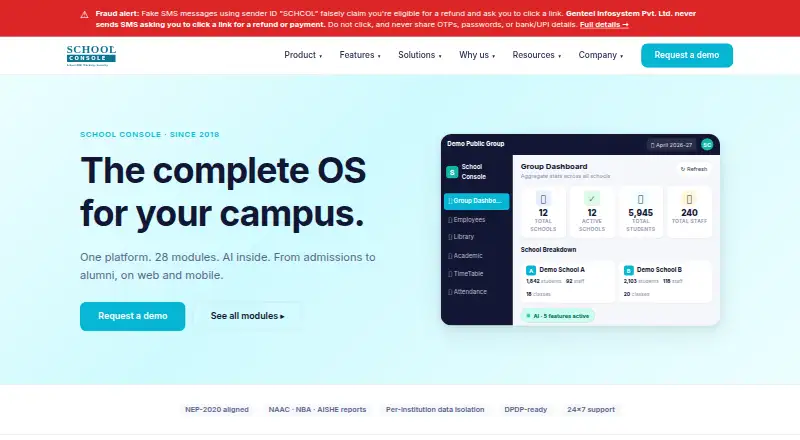
What School Console is
School Console is a campus platform for K-12 schools, colleges, universities, and coaching or training institutes. Its 28 modules cover workflows including admissions, fees, attendance, examinations, learning management, transport, hostel and mess, communication, payroll, finance, procurement, placement, and alumni. The K-12 offering describes support for CBSE, ICSE, IGCSE, IB, and most state boards. AI tools can generate quizzes, evaluate descriptive answers, fill admissions forms, recommend lessons, and draft announcements; a human review step is required before using generated output. Schools can configure OpenAI, Anthropic, or Gemini by school and feature, or switch AI off. Security provisions described include role-based permissions, audit logs, per-device sessions, TLS 1.2 or higher, and separate customer databases, backups, and encryption keys. The web portal is described as offline-first and installable as a PWA; Android, iOS, and web are listed platforms. There is no freemium tier or self-serve trial. The maker offers a no-cost, no-commitment demo using an institution's data, while subscription and implementation pricing are supplied by quote.
Good
- Covers 28 campus modules.
- K-12 offering lists support for several school boards.
- AI-generated content requires human review.
- Separate databases, backups, and encryption keys per customer.
- No-cost demo uses the institution's data.
Watch out
- No freemium tier.
- No self-serve trial.
- Subscription and implementation prices require a quote.
- Every customer receives an implementation.
Who it suits
School Console is intended for K-12 schools, colleges, universities, and coaching or training institutes. Schools looking for a broad set of campus workflows and configurable AI tools may find its listed modules relevant.
Verdict
School Console covers a wide range of campus operations and offers a demo using an institution's data. Plan for an implementation and request a quote to understand the subscription and one-time implementation costs.
Plans and prices
From School Console's own pricing page, checked 3 Oct 2026.
| Plan | Price | What it gives you |
|---|---|---|
| Annual subscription | Priced on request | Written quote provided within 5 business days · No multi-year lock-in beyond the contract · Per school per year; payable yearly or quarterly. Price varies by institution size, modules, and implementation length. |
| Implementation | — | Implementation typically takes 8–12 weeks for a K-12 school of 1,500–2,500 students · One-time fee, separate from subscription; amount not published. |
The facts
Each one read from School Console's own pages, with the date it was checked.
What it does
- AI
- The AI suite includes quiz generation, descriptive answer evaluation, admissions form filling, lesson recommendations, and announcement drafting, with teacher review steps described for generated content.checked 2 Oct 2026
- AI features
- The maker lists five AI features: quiz generation, answer evaluation, form filling, lesson recommendations, and announcement drafting; each requires human review before its output is used.checked 3 Oct 2026
- AI providers
- Schools can configure OpenAI, Anthropic, or Gemini per school and feature, or turn AI off with a NoOp adapter.checked 3 Oct 2026
- Audience
- Its K-12 offering is designed for schools and describes support for CBSE, ICSE, IGCSE, IB, and most state boards.checked 2 Oct 2026
- Availability
- The homepage states the product has been in production since 2018 and advertises a 99.9% uptime SLA.checked 2 Oct 2026
- Core features
- Modules include admissions, fees, attendance, examinations, learning management, transport, communication, payroll, finance, procurement, and alumni.checked 2 Oct 2026
- Core workflows
- Modules include admissions, fees, attendance, examinations, learning management, transport, hostel and mess, communication, payroll and HR, finance, procurement, and placement and alumni.checked 3 Oct 2026
- Data isolation
- The maker says each customer institution receives a dedicated database with separate backups and encryption keys; a multi-branch organisation shares one customer database.checked 3 Oct 2026
- Implementation
- The K-12 page says a typical school with 1,500–2,500 students goes live in 8 to 12 weeks.checked 2 Oct 2026
- Integrations
- Listed integrations include Razorpay, PayU, CCAvenue, biometric and RFID devices, GPS providers, messaging channels, Google Workspace, Microsoft Entra, OIDC, and OpenAI, Anthropic, and Gemini.checked 2 Oct 2026
- Notable limit
- The maker says it does not offer a freemium tier and that every customer receives an implementation.checked 3 Oct 2026
- Other integrations
- Listed integrations include biometric and RFID devices, GPS trackers, communication providers, and staff SSO through Google Workspace, Microsoft Entra, or OIDC.checked 3 Oct 2026
- Payment integrations
- Live payment gateway adapters include Razorpay, PayU, CCAvenue, HDFC SmartHub, Paytm, and PhonePe.checked 3 Oct 2026
- Product
- School Console is a campus management platform with 28 modules, covering workflows from admissions to alumni.checked 3 Oct 2026
- Security
- The modules page lists per-customer databases, 935+ permissions, audit logs, device management, and DPDP-ready data residency under Security & Devices.checked 2 Oct 2026
- Security controls
- The security page describes role-based permissions, entity audit logs, per-device session management, DPDP-Act readiness, and TLS 1.2 or higher.checked 3 Oct 2026
- Support
- The FAQ says post-launch support includes daily check-ins for the first four weeks, weekly check-ins for weeks 5–12, then monthly check-ins and quarterly business reviews.checked 3 Oct 2026
- Web portal
- The web portal is described as offline-first, installable as a PWA, push-notified, and equipped with per-device sessions and six persona homes.checked 2 Oct 2026
- Who it serves
- The product is for K-12 schools, colleges, universities, and coaching or training institutes.checked 3 Oct 2026
The company
- Company
- The AI page footer identifies Genteel Infosystem Pvt. Ltd. and says the product is made in India.checked 2 Oct 2026
- Founded
- 2018checked 28 Sep 2026
- Headquarters
- Noida, Uttar Pradesh, Indiachecked 28 Sep 2026
Where it runs
- Mobile app
- The native Android and iOS app provides role-specific experiences for ten roles and supports offline-first use and push notifications.checked 3 Oct 2026
Money
- Trial and demo
- There is no self-serve trial; the maker offers a no-cost, no-commitment demo using the institution's data.checked 3 Oct 2026
The full review of School Console
School Console is a cloud campus platform for K–12 schools, higher-education institutions, and coaching or training providers. It suits organisations that want admissions, academics, finance, transport, HR, and alumni work in one system, with configurable AI and institution-specific data controls.
Its breadth, dedicated customer databases, and implementation support make it a serious choice for multi-department operations; the trade-off is a quote-based purchase with a mandatory implementation rather than a self-serve subscription.
Overview
School Console has been in production since 2018 and is made in India by Genteel Infosystem Pvt. Ltd. The platform spans 28 modules, linking workflows from admissions and fee collection through examinations, learning management, transport, payroll, finance, procurement, placement, and alumni relations. Its K–12 positioning covers CBSE, ICSE, IGCSE, IB, and most state boards, while the wider product serves colleges, universities, and coaching or training institutes.
A typical K–12 school with 1,500–2,500 students is expected to go live in 8–12 weeks. The maker advertises 24×7 support and a 99.9% uptime SLA. There is no self-serve trial, but institutions can request a no-cost, no-commitment demo using their own data.
Key features
One system for campus operations
Admissions, fees, attendance, examinations, learning, transport, hostel and mess, communication, payroll and HR, finance, purchasing, placement, and alumni modules reduce the need to stitch together specialist products. Budget management, a general ledger, purchasing workflows, and financial reporting make the finance layer relevant to schools that need operational and accounting processes in the same environment.
AI with configurable oversight
The AI suite generates quizzes, evaluates descriptive answers, fills admissions forms, recommends lessons, and drafts announcements. Each workflow includes a teacher or staff review step, so generated material is an aid rather than an automatic final decision. Schools can select OpenAI, Anthropic, or Gemini per school and feature, or disable AI through a NoOp adapter. That flexibility suits institutions with differing policy or data-governance requirements, but it still leaves staff responsible for approving outputs.
Integrations and access
Payment adapters include Razorpay, PayU, CCAvenue, HDFC SmartHub, Paytm, and PhonePe. Other listed connections cover biometric and RFID devices, GPS trackers, communication providers, Google Workspace, Microsoft Entra, and OIDC. The web portal is an offline-first, installable PWA with push notifications, per-device sessions, and six persona-specific home screens. One mobile app serves ten roles, including parents, students, teachers, drivers, administrators, security staff, and alumni.
Security and isolation
Each K–12 customer receives a dedicated database, separate backups, and separate encryption keys. Role-based controls include more than 935 permissions, entity audit logs, device management, and per-device session management. TLS 1.2 or higher and DPDP-Act-ready data residency address baseline institutional security needs, although schools should still review the proposed configuration during procurement.
Pricing
| Plan | Cost and terms | Best fit |
|---|---|---|
| Annual subscription | Custom pricing, billed per school per year and payable yearly or quarterly. The quote varies with institution size, selected modules, and implementation length. A written quote is provided within five business days, with no multi-year lock-in beyond the contract. | Schools or groups ready to scope a tailored deployment. |
| Implementation | Custom, one-time fee separate from the subscription; the amount is not published. Typical K–12 implementation takes 8–12 weeks for a 1,500–2,500-student school. | Every customer, because implementation is required rather than optional. |
There is no free plan, freemium tier, or free trial. The demo is the low-risk way to validate workflows, but budgeting requires a formal quote and should include both recurring and one-time costs.
Platforms
School Console is delivered through the cloud on web, Android, and iOS. The PWA approach helps web users continue working with limited connectivity, while mobile coverage supports the product’s ten role-based audiences.
Who it's for
Choose it when a school or education group needs a broad administrative backbone, board-specific K–12 support, integrated payments and devices, and strict tenant separation. It is particularly suitable for institutions willing to plan an 8–12-week rollout and assign staff to review AI-generated content. Smaller organisations seeking instant activation, transparent pricing, or a free tier should look elsewhere.
Pros and cons
Pros
- Wide operational coverage: 28 modules connect academic, administrative, financial, transport, and alumni workflows.
- Strong tenant controls: Dedicated databases, backups, and encryption keys limit cross-customer exposure.
- Flexible AI governance: Human review, provider selection, and a NoOp option let schools set their own AI policy.
- Useful ecosystem: Multiple Indian payment gateways, identity providers, biometric/RFID, GPS, and messaging integrations reduce integration work.
- Multi-role delivery: Web and mobile experiences cover parents, students, staff, drivers, security, and alumni.
Cons
- No transparent entry price: Subscription and implementation costs require a quote, complicating early budget comparisons.
- No self-serve trial or free tier: Prospective buyers must arrange a demo and procurement process before evaluating fit.
- Implementation commitment: Every customer receives an implementation, with a typical K–12 rollout lasting 8–12 weeks.
Alternatives
For a focused accounting shortlist, see School Accounting Software.
- OpenEduCat is the better starting point for organisations wanting a freemium product, a 15-day no-card trial, or self-hosted deployment.
- Software Unlimited School Accounting System fits buyers seeking a paid accounting system with a free trial and local or hosted options.
- PowerSchool Behavior Support is an alternative for institutions specifically evaluating behavior-support software.
- Sparkrock Ed K-12 ERP offers another paid K–12 ERP route with proposals based on employees or students.
- Skyward School Business Suite is a custom-proposal school business suite priced around enrollment, campuses, and selected features.
- Blackbaud Financial Edge NXT is a finance-focused option with custom pricing and possible implementation, training, and support services.
- EduVizio is a paid Android, iOS, and web alternative that offers a free trial.
- Ellucian Finance is another paid, web and API-based finance product sold through a demo-led process.
Verdict
School Console is best for schools and education groups that want one deeply integrated platform across campus operations, finance, communications, and alumni work, backed by dedicated data isolation and configurable AI. Choose it when a structured implementation and negotiated pricing are acceptable; look elsewhere if you need an immediate trial, a free plan, or a simple published price.
Alternatives to School Console
- 1

OpenEduCat
Free planAndroidiOSAPILinux7.9Free plan - 2
Software Unlimited School Accounting System
AndroidiOSWebAPI7.8From $3,250 a year - 3
Workday Professional Services
AndroidiOSWebAPI6.5 - 4
EduVizio
AndroidiOSWeb6.4 - 5
 6.3
6.3 - 6

Skyward School Business Suite
AndroidiOSWeb6.1