Satisfactory Mod Manager
Satisfactory Mod Manager (SMM) manages Satisfactory mod setups and installs Satisfactory Mod Loader (SML).
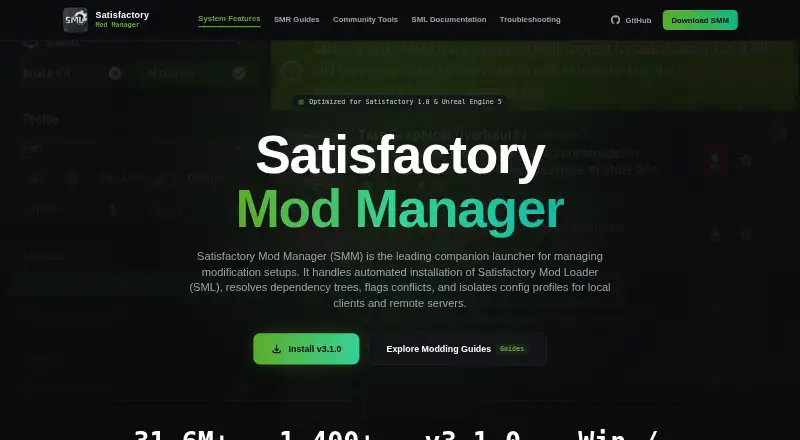
What Satisfactory Mod Manager is
Satisfactory Mod Manager (SMM) manages Satisfactory mod setups and installs Satisfactory Mod Loader (SML). It is a free, unofficial community tool for Windows, Linux, and macOS, with mod installation from a built-in source. The manager resolves dependency trees, processes required components such as SML Core or ContentLib, and flags conflicts. Separate profiles isolate settings for local clients and remote servers. Before launching with newly installed mods, SMM archives the save-file directory to local backup folders. The site lists over 1,400 active mods and describes the project as optimized for Satisfactory 1.0 and Unreal Engine 5. Profiles can be applied for Steam or Epic Games Store launches. Downloads include Windows, Linux, and macOS releases, including a portable Linux AppImage described as suitable for Steam Deck. Downloaded archives remain in local storage, including the Windows User AppData location. GPL-3.0 licensing and community Discord support are listed.
Good
- Free plan with no listed subscription cost
- Supports Windows, Linux, and macOS
- Resolves dependencies and flags conflicts
- Automatically backs up save-file directories
- Built-in source lists over 1,400 active mods
Watch out
- Unofficial tool unaffiliated with Coffee Stain Studios
- Modded multiplayer requires matching SML versions and mod lists
- Major game updates can cause crashes until SML compatibility
- Downloaded archives are stored locally
Who it suits
It suits Satisfactory players who manage mods across supported desktop systems, Steam, or Epic Games Store. Separate profiles and dependency handling also fit users maintaining different local or server configurations.
Verdict
SMM combines mod installation, dependency processing, profiles, conflict warnings, and save backups in a free desktop utility. Players should account for multiplayer matching requirements and possible breakage after major Satisfactory updates.
The facts
Each one read from Satisfactory Mod Manager's own pages, with the date it was checked.
What it does
- Automatic updates
- Yeschecked 20 Sep 2026
- Backups
- SMM automatically archives the save file directory to local backup folders before launching with newly installed mods.checked 8 Oct 2026
- Cache location
- Downloaded mod archives are stored locally under the Windows User AppData path %localappdata%\SatisfactoryModManager.checked 8 Oct 2026
- Conflict flags
- The manager flags mod conflicts.checked 8 Oct 2026
- Dependencies
- The manager resolves mod dependency trees and automatically processes required components such as SML Core or ContentLib.checked 8 Oct 2026
- Dependencies and conflicts
- SMM resolves mod dependencies and flags conflicts.checked 8 Oct 2026
- Deployment method
- copychecked 20 Sep 2026
- Desktop systems
- The maker’s site lists Windows and Linux as compatible systems and describes a Windows installer and Linux or Steam Deck AppImage.checked 8 Oct 2026
- Downloads
- The site offers a Windows ZIP package and a portable Linux AppImage described as suitable for Steam Deck.checked 8 Oct 2026
- Game launch
- After applying a profile, users can close SMM and launch the game directly through Steam or Epic.checked 8 Oct 2026
- Game launchers
- The site says SMM supports mod installation for Epic Games Store and Steam, and the game can be launched through either after applying a profile.checked 8 Oct 2026
- Guides
- The site provides community guides for installing mods, adjusting settings, and developing configurations.checked 8 Oct 2026
- License
- The GitHub repository lists the project under the GPL-3.0 license.checked 8 Oct 2026
- Mod compatibility
- The site lists over 1,400 active mods and describes the manager as optimized for Satisfactory 1.0 and Unreal Engine 5.checked 8 Oct 2026
- Mod profiles
- Yeschecked 20 Sep 2026
- Mod source access
- built-inchecked 20 Sep 2026
- Multiplayer requirement
- Players joining a modded session must use the same SML version and identical mod lists; only client-side modifications can be used on vanilla servers.checked 8 Oct 2026
- Package storage
- Downloaded mod archives are stored locally in the Windows User AppData folder at %localappdata%\SatisfactoryModManager.checked 8 Oct 2026
- Patch compatibility
- The site says major Satisfactory updates can cause crashes and recommends bypassing mods until compatible SML binaries are available.checked 8 Oct 2026
- Profiles
- SMM isolates configuration profiles for local clients and remote servers.checked 8 Oct 2026
- Project status
- The site describes SMM and SML as unofficial tools developed by community volunteers and says they are not associated with Coffee Stain Studios.checked 8 Oct 2026
- Publisher relationship
- The maker’s site says SMM and SML are unofficial tools made by community volunteers and are not associated with Coffee Stain Studios.checked 8 Oct 2026
Money
- Free plan
- Yeschecked 20 Sep 2026
Where it runs
- macOS builds
- The project’s GitHub release page lists downloads for Windows, Linux, and MacOS.checked 8 Oct 2026
Alternatives to Satisfactory Mod Manager
- 1
Modrinth
Free planOpen sourceWebAPILinuxmacOS9.1From $4.99 a month - 2
CurseForge
Free planWeb8.0Free plan - 3
Mod Organizer 2
Free planOpen sourceWindows7.7Free plan - 4
CKAN
Free planLinuxmacOSWindows7.6Free plan - 5
G3M
Free planLinuxmacOSWindows7.5Free plan - 6
Zephyr
Free planLinuxmacOSWindows7.5Free plan