SadTalker
SadTalker creates a talking-head video from one portrait image and speech audio.
What SadTalker is
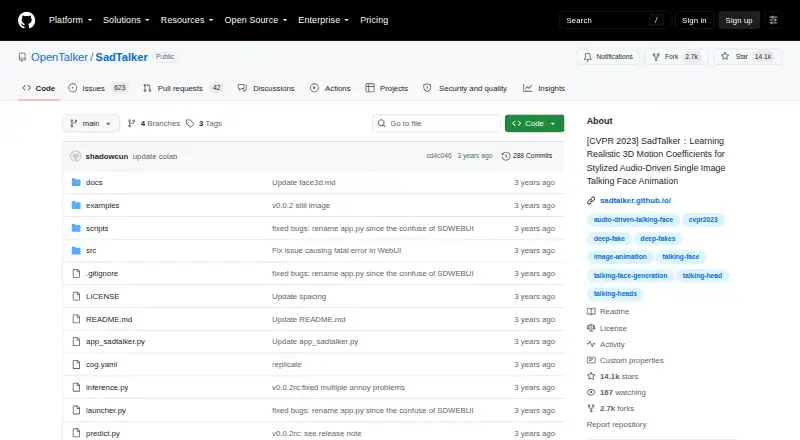
SadTalker creates a talking-head video from one portrait image and speech audio. It derives 3D head-pose and expression coefficients from the audio to animate the face, with still, reference, resize, and full-image animation modes. The project documents local use through a Gradio demo and command-line inference, with setup paths for Windows, Linux, and macOS. Online demos are also linked through Hugging Face and Colab. The documented Linux setup calls for Python 3.8, PyTorch, FFmpeg, and the repository requirements; Windows setup includes Python, Git, FFmpeg, and model files. Pre-trained models are linked from Google Drive, GitHub Releases, and Baidu. Command-line examples support GFPGAN enhancement. SadTalker is open source under Apache 2.0, except for listed third-party components, and the project says its code runs offline without collecting personal information or other data. Output is 720p or lower and has no watermark. The project also links a Discord integration and a Stable Diffusion WebUI extension. Its README restricts unlawful or harmful use, including fraud and infringement of portrait rights.
Good
- Generates animation from one portrait and speech audio.
- Offers several animation modes, including full-image animation.
- Local Gradio and command-line use are documented.
- Code can run offline without collecting personal information.
- Output has no watermark.
Watch out
- Output is limited to 720p or lower.
- Setup requires dependencies and model files.
- License has listed third-party component exceptions.
Who it suits
SadTalker suits users who want to generate an animated talking portrait locally or through the linked online demos. It is aimed at people comfortable setting up dependencies and model files on a supported desktop operating system.
Verdict
SadTalker provides a free, open-source path from a portrait and audio to an animated video, with local and demo-based options. Expect setup work and output at 720p or below.
Plans and prices
From SadTalker's own pricing page, checked 4 Oct 2026.
| Plan | Price | What it gives you |
|---|---|---|
| SadTalker open-source software | Free | Apache 2.0 except listed third-party components · offline code |
The facts
Each one read from SadTalker's own pages, with the date it was checked.
What it does
- Enhancement
- The CLI examples support GFPGAN enhancement for generated videos.checked 4 Oct 2026
- Integrations
- The README says SadTalker is integrated into Discord and offers a Stable Diffusion WebUI extension.checked 4 Oct 2026
- License
- The repository license identifies Apache 2.0 as the SadTalker license, except for listed third-party components.checked 4 Oct 2026
- Local use
- The README documents a local Gradio demo, command-line inference, and Windows, Linux, and macOS setup paths.checked 4 Oct 2026
- Models
- Pre-trained models are linked for download from Google Drive, GitHub Releases, and Baidu.checked 4 Oct 2026
- Modes
- The project describes still, reference, and resize modes, as well as full-image animation.checked 4 Oct 2026
- Motion generation
- It generates 3D head-pose and expression coefficients from audio to animate a face.checked 4 Oct 2026
- Offline operation
- The project says the open-source code runs completely offline and collects no personal information or other data.checked 4 Oct 2026
- Purpose
- SadTalker generates a talking-head video from a single portrait image and speech audio.checked 4 Oct 2026
- Research context
- The project page identifies SadTalker as a CVPR 2023 work by researchers affiliated with Xi'an Jiaotong University, Tencent AI Lab, and Ant Group.checked 4 Oct 2026
- Setup requirements
- The documented Linux setup uses Python 3.8, PyTorch, FFmpeg, and the repository requirements; Windows setup also requires Python, Git, FFmpeg, and model files.checked 4 Oct 2026
- Support
- The README directs users to its FAQs before opening an issue and links to project discussions.checked 4 Oct 2026
- Use restrictions
- The README prohibits use that harms others' rights or violates applicable law or social ethics, including fraud and portrait-rights infringement.checked 4 Oct 2026
The company
- Founded
- 2022checked 28 Sep 2026
Where it runs
- Online demos
- The project links to Hugging Face and Colab demos.checked 4 Oct 2026
The full review of SadTalker
SadTalker turns a portrait and speech audio into a talking-head video by generating facial expressions and head motion from the audio. It is best suited to people comfortable setting up open-source software who want local, offline control; those seeking a ready-made, high-resolution editor should look elsewhere.
Overview
The project offers several ways to animate an image, including still, reference, resize, and full-image modes. Its approach generates 3D head-pose and expression coefficients from speech, giving users a focused route from a single portrait to an animated clip rather than a general-purpose video-editing suite.
SadTalker is open source under Apache 2.0, except for listed third-party components. The project says its code can run completely offline and collects no personal information or other data. That is a meaningful advantage for users who want to keep processing on their own machine, though local control comes with setup and model-download work.
Key features
Portrait animation and enhancement
Still, reference, resize, and full-image animation modes provide different ways to handle the source image. The command-line examples also support GFPGAN enhancement for generated videos, useful for users who want an optional enhancement step in their workflow. Output is limited to 720p or lower, so SadTalker is a poor fit when higher-resolution delivery is a requirement. Output is watermark-free.
Local and demo-based workflows
Users can work through a local Gradio demo or command-line inference, or try the linked Hugging Face and Colab demos. The README also describes a Discord integration and a Stable Diffusion WebUI extension. These paths make the project adaptable to different workflows, but the local route asks users to install and manage its software dependencies and model files.
Pricing
SadTalker open-source software: free. The free plan includes the open-source software under Apache 2.0, except for listed third-party components, and offline code. There is no paid tier to unlock a higher output resolution or other plan-specific features in this offer; the trade-off is that users handle installation and model setup themselves. The project links pre-trained models for download from Google Drive, GitHub Releases, and Baidu.
Platforms
SadTalker supports Linux, macOS, Windows, and self-hosted use. Setup is not one-click: the documented Linux path uses Python 3.8, PyTorch, FFmpeg, and the repository requirements; Windows setup also calls for Python, Git, FFmpeg, and model files. Users who do not want to maintain a local environment may prefer one of the online demos.
Who it's for
SadTalker suits technically capable creators, developers, and researchers who want a free portrait-animation workflow they can run locally and offline. It is less suitable for users who need a polished, hosted editing experience, output above 720p, or a setup that avoids managing dependencies and model files.
Pros and cons
- Pros: Free and open source, with offline local operation for users who value control over where processing happens.
- Pros: Multiple animation modes, command-line inference, a local Gradio demo, and links to hosted demos give users several ways to approach a project.
- Pros: Watermark-free output avoids branding on generated videos.
- Cons: Output tops out at 720p, excluding workflows that require higher-resolution video.
- Cons: Installation requires software dependencies and model files, adding real setup overhead compared with a hosted tool.
- Cons: Use is restricted: the README prohibits harming others' rights or violating law or social ethics, including fraud and portrait-rights infringement.
Alternatives
For a broader comparison, browse AI Video Lip Sync Tools.
- VEED is a better fit for users who want a web, mobile, or browser-extension option; its free plan exports at 720p and adds a watermark, while Creator exports up to 1080p and removes it.
- Morph Studio is worth considering for web-based text- or image-to-video work, with 75 monthly credits on its free plan.
- CHAMELAION LipSync API suits API-oriented video translation and lip-sync workflows; its free Starter plan includes 24,000 tokens and two minutes of video translation plus lip sync, with a watermark.
- LipDub may suit users seeking AI dubbing, voice cloning, and lip sync through an API or web app; its free Seed tier includes one minute at 1080p with a watermark.
- lipsyn.cc offers a five-second free preview for users who want a brief preview before choosing a paid option.
- Muse is a free open-source option for Linux, macOS, and Windows users who need MIDI output rather than talking-head video.
- Sync Labs may fit API or web users who want a hosted generation service with a free monthly allowance and trial.
- Rendley is another freemium API and web option for users considering an alternative to local software.
Verdict
Choose SadTalker if you want a no-cost, watermark-free way to animate a portrait from speech and are willing to set up the software yourself. Its offline operation and open-source license are the strongest reasons to pick it; its 720p ceiling and installation demands are the clearest reasons to look elsewhere.
Getting started
- Open the SadTalker GitHub repository
- Choose the Windows, Linux, or macOS setup path
- Install the documented Python and FFmpeg dependencies
- Install PyTorch and the repository requirements where required
- Download the linked pre-trained model files
- Run the local Gradio demo or command-line inference
Limits worth knowing
SadTalker output is limited to 720p or lower. The setup requires the documented dependencies and model files, including Python, FFmpeg, and platform-specific tools.
Questions
Is SadTalker free?
Yes. The open-source software plan costs nothing and uses Apache 2.0, except for listed third-party components.
Which platforms can run SadTalker?
The project documents setup paths for Linux, Windows, and macOS, including local use.
Does SadTalker work offline?
The project says its open-source code runs completely offline and collects no personal information or other data.
What does SadTalker generate?
It creates a talking-head video from a single portrait image and speech audio, using generated head-pose and expression coefficients to animate the face.
Are integrations available?
The README describes a Discord integration and a Stable Diffusion WebUI extension, and links demos on Hugging Face and Colab.
What resolution and licensing apply?
Output is 720p or lower and has no watermark. The license is Apache 2.0 except for listed third-party components.
Alternatives to SadTalker
- 1
Sync Labs
Free planAndroidiOSWebAPI8.0From $5 a month - 2

Morph Studio
Free planiOSWeb7.8From $12 a month - 3
VEED
Free planAndroidiOSWebExtension7.5Free plan - 4
Muse
Free planOpen sourceLinuxmacOSSelf-hostedWindows7.4Free plan - 5

CHAMELAION LipSync API
Free planWebAPI7.3From €5 a month - 6
lipsyn.cc
Free planWebAPI7.3€11.99 one-time