
Morph Studio
Morph Studio is a web-based AI platform for generating images and videos from prompts.
What Morph Studio is
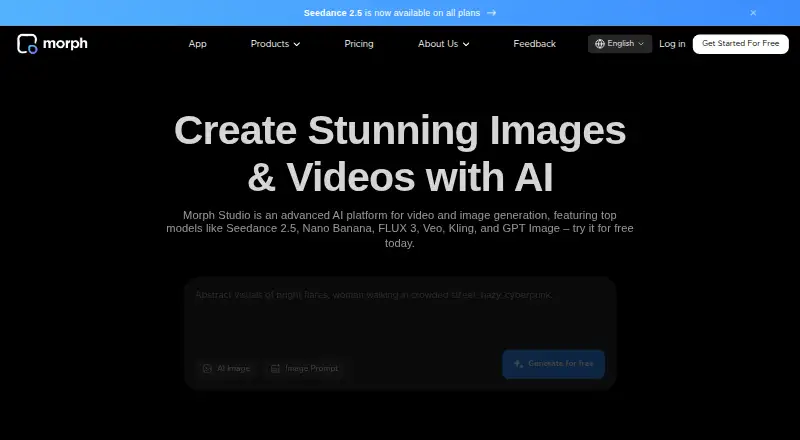
Morph Studio is a web-based AI platform for generating images and videos from prompts. It combines an immersive prompt-based generation space with an open canvas for arranging, editing, and connecting creations into stories. Text and image prompts can be used to generate videos with multiple AI models, while image tools support prompt-based and image-based creation and transformation. Video Style Transfer can convert footage into up to 8 distinct artistic styles. The platform lists models including Wan, Kling, Seedance, FLUX, Veo, MiniMax, Hunyuan, Runway, Luma, and Imagen. Videos can be up to 0.5 in length and 1080p resolution. The free plan provides 75 credits monthly, text- and image-to-video with two models, about 50 text-to-images, style transfer, and 90-day asset retention. Basic costs $12 a month and includes 3,000 credits, generation with 10+ models, unlimited asset retention, and commercial use. Pro costs $35 a month and Premier costs $90 a month, with higher credit allotments and the same listed paid-tier generation, retention, and commercial-use terms. Failed video generations do not use credits.
Good
- Generates video from text or image prompts.
- Video Style Transfer offers up to 8 artistic styles.
- Failed video generations do not consume credits.
- Free plan includes 75 monthly credits.
- Paid plans include commercial use.
Watch out
- Free plan retains assets for 90 days.
- Listed maximum video resolution is 1080p.
- Free tier provides access to two video models.
Who it suits
Morph Studio may suit video creators, marketers, and e-commerce professionals who want to generate or transform images and videos through a web interface. The free tier offers a way to explore its generation and style-transfer tools.
Verdict
Morph Studio brings prompt-based generation, editing, and style transfer into a web canvas workflow. Compare the free tier’s retention and model limits with the paid plans’ monthly credits, broader model access, and commercial-use terms.
Plans and prices
From Morph Studio's own pricing page, checked 15 Oct 2026.
| Plan | Price | What it gives you |
|---|---|---|
| Basic | $12 a month | 3,000 credits/month · 10+ video and image-to-video models · ~1,500 images · unlimited retention · commercial use · $8.40/month; $100.80 billed annually |
| Pro | $35 a month | 12,000 credits/month · 10+ video and image-to-video models · ~5,000 images · unlimited retention · commercial use · $24.50/month; $294 billed annually |
| Premier | $90 a month | 40,000 credits/month · 10+ video and image-to-video models · ~15,000 images · unlimited retention · commercial use · $63/month; $756 billed annually |
| Free | Free | 75 credits/month · 2 video models · ~50 images · video style transfer · assets retained 90 days |
The facts
Each one read from Morph Studio's own pages, with the date it was checked.
What it does
- Account access
- Users can sign in with Google, Discord or email.checked 15 Oct 2026
- API and SDKs
- The public site pages reviewed provide browser access and feature pages but do not present a public API or SDK reference.checked 15 Oct 2026
- Audio tools
- The product navigation includes AI voiceover and AI music tools.checked 15 Oct 2026
- Automatic renewal
- Paid subscriptions renew automatically at the then-current rate unless cancelled before the renewal date.checked 15 Oct 2026
- Commercial use
- Commercial use is listed as a feature of the Basic, Pro, and Premier plans.checked 7 Oct 2026
- Complaint: reliability and support
- A Trustpilot reviewer alleges slow processing, failed generations, rejected projects, wasted credits and ineffective customer support.checked 15 Oct 2026
- Content training
- The terms grant Morph a broad licence to use inputs, outputs and interactions to improve models, moderation and related services.checked 15 Oct 2026
- Creative workflow
- It combines an immersive prompt-based generation space with an open canvas for arranging, editing, and connecting creations into stories.checked 7 Oct 2026
- Creative workspaces
- The product combines an Immersive Space for prompt generation with an Open Canvas for arranging and connecting visual assets into stories.checked 15 Oct 2026
- Credit policy
- The pricing page says failed video generations do not consume credits.checked 15 Oct 2026
- Founder
- Crunchbase identifies Huaizhe Xu as Morph Studio's founder and CEO, with the role beginning in March 2023.checked 15 Oct 2026
- Generation credits
- Failed video generations do not consume credits.checked 7 Oct 2026
- Image editing
- Listed image tools include hairstyle changes, background replacement, face swap, watermark removal, upscaling and object removal.checked 15 Oct 2026
- Image tools
- Its image generator supports prompt-based and image-based creation and transformation.checked 7 Oct 2026
- Image-to-video
- Users can animate still images into video clips with control over pacing, style and realism.checked 15 Oct 2026
- Intended users
- Morph Studio describes its intended users as video creators, marketers, and e-commerce professionals.checked 7 Oct 2026
- Limit: expiring credits
- A FirmCritics reviewer reports losing credits after the 30-day cycle during a low-usage month.checked 15 Oct 2026
- Limit: final editing
- The Rundown says detailed editing, sound work, rights review and final sequencing may still require a separate editor.checked 15 Oct 2026
- Limit: output resolution
- FirmCritics reports a 1080p ceiling on paid plans and says this makes the product unsuitable for workflows requiring 4K output.checked 15 Oct 2026
Where it runs
- Apple App Store listing
- The iPhone listing offers text-to-image, image-to-image, text-to-video and image animation, requires iOS 17 or later, and says there are not enough ratings to display an overview.checked 15 Oct 2026
The company
- Company profile
- LinkedIn describes Morph Studio as an independent AIGC visual-content research lab with 2–10 employees, based in Santa Clara, California, and privately held.checked 15 Oct 2026
- Founded and funding
- TechCrunch reports that a team from HKUST founded Morph Studio in 2023, that it employed about 10 people, and that it had raised $2.5 million from Baidu Ventures by February 2024.checked 15 Oct 2026
Money
- Complaint: billing and duration
- Another Trustpilot reviewer alleges an unexpected annual charge, shorter-than-expected video duration and an unsuccessful refund request.checked 15 Oct 2026
- Free plan
- Yeschecked 19 Sep 2026
The full review of Morph Studio
Morph Studio suits video creators, marketers, and e-commerce professionals building related images and clips in one workspace. Its mix of generation models, image tools, and a story-oriented canvas is more useful for developing a sequence than for making a single isolated clip.
Overview
Morph Studio is a web-based AI workspace for creating images and videos, then arranging, editing, and connecting the results on an open canvas. Text and image prompts can drive video generation, while image tools support creation and transformation from either prompts or existing images. The canvas gives users a place to develop related assets into stories rather than leaving each output as a separate result.
Video generation supports clips up to 0.5 in length and resolutions up to 1080p. Failed video generations do not consume credits, which reduces the cost of unsuccessful attempts against a monthly allowance. Commercial use is included in paid plans; the Free plan is better treated as a way to explore the workflow than as a commercial production tier.
Key features
Generation and canvas workflow
The combination of an immersive prompt space and an open canvas is the product’s clearest distinction: generate material, then arrange and connect it into a story. That is a sensible fit for campaigns or other work involving related assets. If the job is simply to produce one clip, the canvas offers less reason to choose Morph Studio over a focused generator.
Models and style transfer
Morph Studio lists models including Wan, Kling, Seedance, FLUX, Veo, MiniMax, Hunyuan, Runway, Luma, and Imagen. Video Style Transfer can convert footage into as many as eight artistic styles, adding a way to reinterpret existing video as well as generate new material. The Free plan restricts text- and image-to-video to two models; paid plans open access to 10 or more, making a subscription the practical choice for users who need broader model selection.
Pricing
Morph Studio uses a freemium model. The Free plan costs nothing and provides 75 credits monthly, text- and image-to-video with two models, about 50 text-to-images, video style transfer, and 90-day asset retention. That is enough to explore more than one part of the workflow, but the small credit pool, model limit, and finite retention make it a poor fit for sustained production.
- Basic — $12 a month, billed monthly: 3,000 monthly credits, text- and image-to-video with 10+ models, video style transfer, unlimited asset retention, and commercial use. It is the entry point for regular work or commercial output, though its smaller credit pool is best suited to lighter workloads.
- Pro — $35 a month, billed monthly: 12,000 monthly credits with the same stated model access, style transfer, retention, and commercial-use terms as Basic. It suits users whose generation needs exceed the entry allowance without requiring Premier’s larger quota.
- Premier — $90 a month, billed monthly: 40,000 monthly credits and the same stated paid-plan capabilities. This is the tier for high-volume generation; the higher monthly cost is justified only if that larger allowance matters.
All paid tiers share the same core feature set in these plan details, so the main distinction is monthly credits. Failed video generations do not spend those credits. The Free plan lacks the paid tiers’ commercial-use terms and unlimited retention, so users with commercial work or a need to preserve assets should budget for Basic or above.
Platforms
Morph Studio is accessed through a web interface with an online sign-in flow. It is a straightforward option for users who want a browser-based workspace, but it is not presented as a native desktop or mobile app.
Who it's for
Morph Studio is best for video creators, marketers, and e-commerce professionals who need both generation and a place to organize related outputs. The Free plan can help occasional users assess the tools; paid plans make more sense for recurring projects, wider model choice, commercial use, or keeping assets beyond 90 days. Users focused on a single specialized task, or unwilling to work within monthly credits, may be better served elsewhere.
Pros and cons
- Pro: Text-to-video, image-to-video, image creation and transformation, and canvas editing sit in one web workflow, which supports projects built from connected assets.
- Pro: Paid tiers combine 10+ models with unlimited asset retention and commercial use, while failed video generations do not consume credits.
- Con: Free video generation is limited to two models and 75 monthly credits, with assets retained for only 90 days.
- Con: The maximum video length is 0.5 and resolution tops out at 1080p, limiting its fit when longer or higher-resolution output is required.
- Con: Commercial use begins on the $12 a month Basic plan, so the free tier does not cover commercial projects.
Alternatives
For a wider set of lip-sync-focused options, browse AI Video Lip Sync Tools; for broader generator choices, compare AI video generators.
- VEED is a better fit for users who want a freemium video editor across web, mobile, and browser extension, and can accept 720p exports with a watermark on its Free plan.
- SadTalker suits users who want free, offline, open-source software on Linux, macOS, or Windows rather than a web generation canvas.
- CHAMELAION LipSync API is the more targeted choice for video translation and lip sync, with a free Starter tier offering 24,000 tokens and two minutes of video translation plus lip sync, with a watermark.
- LipDub is an alternative for users seeking AI dubbing, voice cloning, and lip sync, with a free tier that includes one minute of 1080p output with a watermark.
- lipsyn.cc offers a no-sign-up, no-card five-second preview for users who want to preview lip-sync output before paying.
- Muse is a free, open-source option for users whose goal is MIDI output rather than image or video generation.
- Sync Labs is an alternative for users who want a web or API lip-sync workflow with a free tier of three generations per month, each up to 20 seconds.
- Rendley is another freemium web or API option for users comparing alternatives.
Verdict
Choose Morph Studio if you want text- and image-led video generation, image tools, and a canvas for shaping related creations into a story. Its strongest case is the breadth of that workflow, backed by paid access to more models, commercial use, and unlimited retention. Look elsewhere if you need longer than 0.5 video, output above 1080p, or a tool focused on a specific task such as lip sync.
Getting started
- Open the Morph Studio website in a web browser.
- Use the online sign-in flow to access the platform.
- Start with the Free plan or choose a paid plan starting at $12 a month.
- Enter a text or image prompt for video generation, or use the image creation tools.
- Arrange, edit, or connect creations on the open canvas.
Limits worth knowing
The Free plan includes 75 credits monthly, two models for text-to-video and image-to-video, about 50 text-to-images, and 90-day asset retention. Basic starts at $12 a month and includes 3,000 credits, access to 10+ models for both video workflows, unlimited retention, and commercial use.
Questions
Is Morph Studio free?
Yes. The Free plan costs nothing and includes 75 credits monthly.
What do the paid plans cost?
Basic is $12 a month, Pro is $35 a month, and Premier is $90 a month. Each is billed monthly.
What platforms does Morph Studio support?
Morph Studio is accessed through a web interface, with an online sign-in flow.
Can I use Morph Studio commercially?
Commercial use is included on the Basic, Pro, and Premier plans.
How long can its videos be, and what resolution is supported?
The maximum listed video length is 0.5, and the maximum resolution is 1080p.
What does the Free plan include?
It includes 75 monthly credits, text- and image-to-video with two models, about 50 text-to-images, video style transfer, and 90-day asset retention.
Alternatives to Morph Studio
- 1
Sync Labs
Free planAndroidiOSWebAPI8.0From $5 a month - 2
VEED
Free planAndroidiOSWebExtension7.5Free plan - 3
Muse
Free planOpen sourceLinuxmacOSSelf-hostedWindows7.4Free plan - 4

CHAMELAION LipSync API
Free planWebAPI7.3From €5 a month - 5

lipsyn.cc
Free planWebAPI7.3€11.99 one-time - 6
LatentSync
Free planOpen sourceAPILinuxSelf-hosted6.9Free plan