Ruzu
Ruzu is a free, open-source Nintendo Switch emulator for desktop computers, written in Rust.
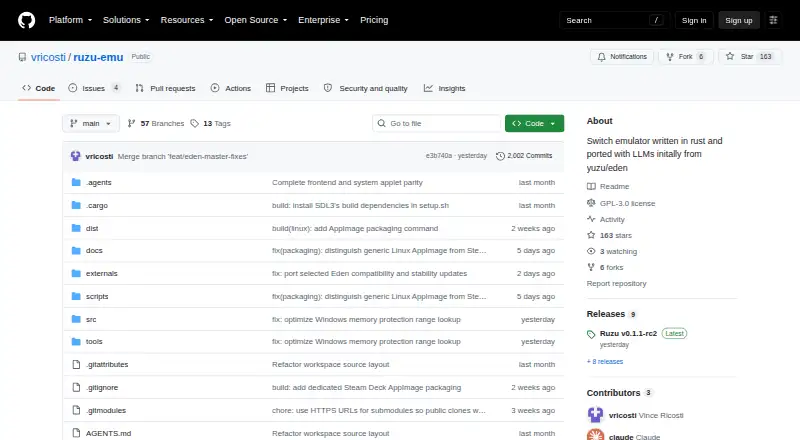
What Ruzu is
Ruzu is a free, open-source Nintendo Switch emulator for desktop computers, written in Rust. Its graphical library lets you browse game directories, adjust settings per game, and view detected updates and add-ons. You can navigate with a controller or use a keyboard and mouse. Ruzu supports Vulkan and OpenGL, with an experimental native Metal backend on macOS. For CPU emulation, it runs ARM32 and ARM64 guest code through the rdynarmic dynamic recompiler, with x86-64 and ARM64 host backends. The interface includes themes, translations, configurable hotkeys, and game-list display options. It can also run homebrew applications through graphical and command-line frontends. Packages are listed for Windows, macOS, Linux, Ubuntu, and Steam Deck. The latest listed release, v0.1.1-rc4, is a pre-release for testing before v0.1.1. Compatibility and performance vary by game, hardware, and graphics backend, and bugs, crashes, and incomplete features are expected. Ruzu does not include Nintendo games, keys, or system files; the project says to use it only with legally obtained games.
Good
- Free and open-source under GPL-3.0-or-later.
- Game library supports per-game settings and detected add-ons.
- Offers Vulkan, OpenGL, and experimental macOS Metal.
- Runs homebrew through graphical and command-line frontends.
Watch out
- Compatibility and performance vary by game and hardware.
- Bugs, crashes, and incomplete features are expected.
- Latest listed release is a pre-release.
Who it suits
Ruzu suits desktop users who want to run legally obtained Nintendo Switch games or homebrew applications, and who are comfortable with an experimental emulator. Its game library tools and keyboard, mouse, and controller input support different ways to navigate and configure games.
Verdict
Ruzu combines a configurable desktop game library with multiple graphics backends and support for homebrew. Its pre-release status and stated compatibility limits are important to weigh before relying on it.
Plans and prices
From Ruzu's own pricing page, checked 4 Oct 2026.
| Plan | Price | What it gives you |
|---|---|---|
| Ruzu | Free | Open-source Nintendo Switch emulator · desktop packages for Windows, macOS and Linux |
| Ruzu open-source emulator | Free | No paid tiers or usage limits stated |
The facts
Each one read from Ruzu's own pages, with the date it was checked.
What it does
- API and SDK
- The published documentation describes graphical and command-line frontends but does not describe a public web API or SDK.checked 15 Oct 2026
- Build requirements
- Building requires Rust 1.85 or newer, GTK 4.6 or newer, graphics and audio libraries, and a C/C++ toolchain; SDL3 is built by Cargo.checked 15 Oct 2026
- Build workflow
- The repository supplies build.sh for Linux, macOS, and BSD and build.bat for Windows, with dependency-checking options.checked 15 Oct 2026
- Command-line frontend
- A separate ruzu-cmd binary can load a game file and run with configurable logging and XDG cache/config paths.checked 15 Oct 2026
- Community support
- The repository directs users to a Discord community and GitHub issue tracker for discussion and bug reports.checked 15 Oct 2026
- Compatibility limits
- The project says compatibility and performance vary by game, hardware, and graphics backend, and that bugs, crashes, and incomplete features are expected.checked 4 Oct 2026
- Controller navigation
- Menus, the game library, and supported dialogs can be operated with a controller as well as keyboard and mouse.checked 15 Oct 2026
- Controls
- The interface supports controller navigation as well as keyboard and mouse input.checked 4 Oct 2026
- CPU emulation
- The emulator runs ARM32 and ARM64 guest code through the rdynarmic dynamic recompiler on x86-64 and ARM64 hosts.checked 15 Oct 2026
- Customization
- The interface offers themes, translations, configurable hotkeys, and game-list display options.checked 4 Oct 2026
- Development basis
- The project says it builds on the work of Yuzu and Eden and is developed with assistance from AI coding agents, testing, and user feedback.checked 4 Oct 2026
- Documentation depth
- Developer guidance includes AGENTS.md and CLAUDE.md with file-parity, behavioral-parity, traceability, testing, and DIFF.md requirements for the Rust port.checked 15 Oct 2026
- Downloads
- The project lists Windows installer or ZIP packages, macOS application ZIPs for Apple Silicon and Intel, Linux AppImage and Ubuntu DEB packages, and a Steam Deck AppImage.checked 4 Oct 2026
- Game library
- The graphical interface browses game directories, supports per-game settings, and shows detected updates and add-ons.checked 15 Oct 2026
- Graphics
- It supports Vulkan and OpenGL, plus an experimental native Metal backend on macOS.checked 4 Oct 2026
- Graphics backends
- Ruzu supports Vulkan and OpenGL, with an experimental native Metal backend on macOS.checked 15 Oct 2026
- Homebrew
- Ruzu can launch Switch homebrew through both its graphical frontend and a command-line frontend.checked 15 Oct 2026
- Independent category context
- The Japanese wiki places Ruzu in a list of software intended to reproduce Nintendo Switch operation.checked 15 Oct 2026
- Independent classification
- The Japanese emulator wiki describes Ruzu as a Rust port derived from Yuzu and Eden.checked 15 Oct 2026
- Independent legal warning
- The Japanese emulator wiki warns that Nintendo has previously caused emulator projects to stop development or publication and advises users to proceed at their own risk.checked 15 Oct 2026
- Independent listing version
- A Japanese emulator wiki listed Ruzu version 0.1.1-rc5 with an October 8, 2026 update date.checked 15 Oct 2026
- Interface customization
- Themes, translations, configurable hotkeys, and game-list display settings are available.checked 15 Oct 2026
- Legal contents
- The project says it does not include Nintendo games, keys, or system files and is not affiliated with Nintendo.checked 15 Oct 2026
- Licence
- Ruzu is licensed under GPL-3.0-or-later, while third-party dependencies keep their own licences.checked 15 Oct 2026
The full review of Ruzu
Overview
Ruzu is an experimental, open-source Nintendo Switch emulator for desktop computers. It suits users who want configurable library management and homebrew support across major desktop platforms. The trade-off is a pre-release build where compatibility and performance vary, and bugs or crashes are expected.
Key features
Its graphical library browses game directories, lets users set options per game, and surfaces detected updates and add-ons. That is useful for organizing a collection without relying on a separate launcher, though Ruzu does not provide games, keys, or system files.
Users can navigate the interface with a controller or use keyboard and mouse. Vulkan and OpenGL are supported, alongside an experimental native Metal backend on macOS. The choice of graphics backend gives users some flexibility, but results depend on the game, hardware, and backend; the Metal option is explicitly experimental.
Ruzu handles ARM32 and ARM64 guest execution through the rdynarmic dynamic recompiler, with x86-64 and ARM64 host backends. It can run homebrew through graphical and command-line frontends. Themes, translations, configurable hotkeys, and game-list display options add interface control, but do not overcome the emulator's compatibility limits.
Pricing
Ruzu costs nothing. Its free plan is the open-source emulator, with no paid tier or free trial. It is licensed under GPL-3.0-or-later, and should be used only with legally obtained games.
Platforms
Ruzu supports Windows, macOS, Linux, and Steam Deck, with Windows installer or ZIP packages, macOS application ZIPs for Apple Silicon and Intel, Linux AppImage and Ubuntu DEB packages, and a Steam Deck AppImage. This range makes it practical to consider across desktop setups, though packaging options do not guarantee that a given game will run well.
Who it's for
Ruzu is a fit for desktop users comfortable with experimental software, variable game compatibility, and troubleshooting. Homebrew users may also value its graphical and command-line frontends. It is a poor fit for anyone who needs predictable compatibility or wants a finished, dependable emulator.
Pros and cons
- Pros: Free and open source, with packages spanning Windows, macOS, Linux, and Steam Deck.
- Pros: Per-game settings, detected update and add-on visibility, and both controller and keyboard-and-mouse navigation make the library more configurable.
- Pros: Vulkan, OpenGL, and experimental macOS Metal support provide graphics backend options; homebrew works through both graphical and command-line frontends.
- Cons: The latest listed release, v0.1.1-rc4, is a pre-release for testing ahead of v0.1.1, and bugs, crashes, and incomplete features are expected.
- Cons: Compatibility and performance vary by game, hardware, and graphics backend, so users cannot count on consistent results.
Alternatives
Nintendo Switch Emulators is a useful starting point for comparing options in the category. Consider Eden for its broader listed platform coverage, including Android and web as well as desktop. NeXium is another free, open-source option whose builds and features are not paywalled. Pineapple Pictures is an image viewer, rather than a direct emulator alternative. Voland, NxEmu, Citron NEO, Hydra, and MeloNX are other options to consider.
Verdict
Choose Ruzu if you want a free desktop emulator with configurable library tools, multiple graphics backends, and homebrew support, and can accept an experimental release. Look elsewhere if dependable game compatibility is your priority: Ruzu's pre-release status and variable results are central limitations, not minor caveats.
Alternatives to Ruzu
- 1

Eden
Free planOpen sourceAndroidWebAPILinux7.7Free plan - 2

GitHub CodeQL
Free planWebExtensionLinuxmacOS7.5From $30 a month - 3
Hydra
Free planOpen sourceWebAPILinuxSelf-hosted7.3Free plan - 4
Pineapple Pictures
Free planOpen sourceLinuxmacOSSelf-hostedWindows7.3Free plan - 5
MeloNX
Free planOpen sourceiOS7.0Free plan - 6

NeXium
Free planAndroidLinuxWindows6.9Free plan