RustScan
RustScan is a free, open-source command-line port scanner for finding open network ports.
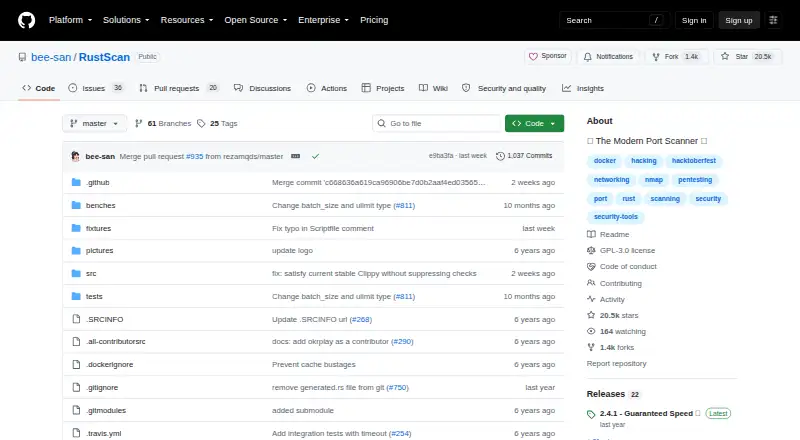
What RustScan is
RustScan is a free, open-source command-line port scanner for finding open network ports. The project says it can scan all 65,000 ports in three seconds and can automatically send discovered ports to Nmap for further analysis. It supports IPv6, CIDR ranges, and file input, with scripting in Python, Lua, and Shell. Listed capabilities include service detection, operating-system detection, and greppable-text output. RustScan describes adaptive learning that uses information about the scan environment and usage to improve over time. Cargo is its only officially supported installation method, though releases and package-manager options are also provided. The installation guide recommends Docker and says its image works on all systems, including Windows, which is not officially supported. The maintainer says testing has been limited to Linux, and macOS or Windows may have issues. The guide also warns that macOS's low open-file limit can significantly affect scanning. The project is licensed under GPL-3.0 and directs users with issues to GitHub.
Good
- Scans IPv6, CIDR ranges, and file inputs.
- Can pass discovered ports to Nmap automatically.
- Scripting supports Python, Lua, and Shell.
- Offers service and operating-system detection.
Watch out
- Cargo is the only officially supported installer.
- macOS and Windows may have issues.
- macOS open-file limits can affect scanning.
Who it suits
RustScan suits users who want a command-line scanner with Nmap handoff and scripting support. It is especially relevant to Linux users, since the installation guide reports testing only on Linux.
Verdict
RustScan pairs fast port discovery with Nmap handoff and several scan input options. Keep the platform caveats in mind, particularly if using macOS or Windows.
Plans and prices
From RustScan's own pricing page, checked 30 Sep 2026.
| Plan | Price | What it gives you |
|---|---|---|
| RustScan | Free | Open-source port scanner |
The facts
Each one read from RustScan's own pages, with the date it was checked.
What it does
- Accessibility
- The project says its continuous integration testing aims to ensure accessibility.checked 30 Sep 2026
- Adaptive learning
- RustScan says its adaptive learning features use information about the scan environment and usage to improve over time.checked 30 Sep 2026
- Docker
- The installation guide recommends Docker and says its image works on all systems, including Windows, which it does not officially support.checked 30 Sep 2026
- Install methods
- The project lists Cargo as its only officially supported installation method and also provides releases and package-manager options.checked 30 Sep 2026
- License
- The repository identifies GPL-3.0 as the project license.checked 30 Sep 2026
- Nmap
- RustScan can automatically pipe discovered ports into Nmap for further analysis.checked 30 Sep 2026
- Performance checks
- The project says its continuous integration checks whether RustScan becomes significantly slower than the previous version.checked 30 Sep 2026
- Purpose
- RustScan is a modern port scanner that finds open ports quickly.checked 30 Sep 2026
- Resource limit
- The installation guide notes that macOS has a low open-file limit that can significantly affect RustScan.checked 30 Sep 2026
- Scan options
- The README lists IPv6, CIDR, and file input support.checked 30 Sep 2026
- Scripting
- Its scripting engine supports Python, Lua, and Shell.checked 30 Sep 2026
- Speed
- The README says RustScan can scan all 65,000 ports in 3 seconds.checked 30 Sep 2026
- Support
- The installation guide directs users who encounter issues to open a GitHub issue.checked 30 Sep 2026
Where it runs
- Platform limitation
- The installation guide says the maintainer had tested RustScan only on Linux and that macOS or Windows may have issues.checked 30 Sep 2026
The full review of RustScan
RustScan is a command-line network port scanner for users who want rapid discovery and a route into Nmap for further analysis. It is most compelling for technically comfortable users on Linux; macOS and Windows users should weigh the installation caveats carefully.
Its appeal is a focused, free tool that combines quick port discovery with flexible scan inputs. It is less suited to anyone who needs a dependable, polished cross-platform setup or a graphical interface.
Overview
RustScan concentrates on finding open ports, rather than serving as a complete network-analysis suite. The project says it can scan all 65,000 ports in three seconds, a striking speed claim for initial discovery, though actual performance will depend on the scan environment. Automatic Nmap handoff makes the result more useful: discovered ports can move directly into a tool built for further analysis.
RustScan is a free, GPL-3.0-licensed CLI with network scan scope, service detection, OS detection, and greppable-text export. Those capabilities make it a practical fit for command-line workflows, but not a substitute for a graphical scanner.
Key features
- Rapid port discovery: The project’s claim of scanning all 65,000 ports in three seconds makes RustScan worth considering when fast initial discovery matters. Treat that as a stated capability, not a promise for every network or machine.
- Nmap handoff: RustScan can automatically pipe discovered ports into Nmap. This gives users a straightforward discovery-to-analysis workflow, especially if Nmap is already part of their toolkit.
- Multiple scan inputs: IPv6, CIDR, and file input support offer useful flexibility for different targets and workflows. Its scan scope is network-focused.
- Scripting: The scripting engine supports Python, Lua, and Shell, giving technically capable users options to extend their workflow.
- Adaptive learning: RustScan says it uses information about the scan environment and usage to improve over time. That is a potentially useful approach, but the project does not describe a specific user-facing outcome to expect.
- Performance and accessibility checks: Continuous integration checks whether a release becomes significantly slower than its predecessor and aims to ensure accessibility. These checks show attention to regressions and accessibility, without guaranteeing performance or accessibility in every setup.
Pricing
RustScan has one free plan: RustScan — free. It is an open-source port scanner, so the core price is easy to assess and there is no paid tier to compare. The repository identifies GPL-3.0 as its license.
There are no paid-plan trade-offs or free-plan caps to weigh. The practical cost is setup: Cargo is the only officially supported installation method, while releases and package-manager options are also provided. For a less manual setup, the installation guide recommends Docker.
Platforms
RustScan is listed for Android, Linux, macOS, self-hosted use, and Windows. That breadth comes with an important qualification: the installation guide says the maintainer had tested it only on Linux and warns that macOS or Windows may have issues. macOS users also face a low open-file limit that can significantly affect the scanner.
Cargo is the sole officially supported installation route; releases and package-manager options are also available. The guide recommends Docker and says its image works across systems, including Windows, which the project does not officially support. Users who hit problems are directed to open a GitHub issue.
Who it's for
RustScan suits command-line users who prioritize quick port discovery and want their results passed into Nmap for further analysis. Its IPv6, CIDR, and file inputs also make it a useful candidate for users who need more than a single-target scan workflow. The free price and open-source license are attractive for users comfortable installing and configuring software themselves.
Look elsewhere if you need a graphical interface, or if you depend on well-established macOS or Windows support. On macOS in particular, the open-file limit can constrain performance; on either platform, the guide's testing caveat makes Linux the safer choice.
Pros and cons
- Pro — Fast discovery focus: The project cites a three-second scan across all 65,000 ports, making speed its clearest reason to consider RustScan.
- Pro — Direct Nmap workflow: Automatic handoff avoids a manual step between finding ports and further analysis.
- Pro — Flexible inputs and scripting: IPv6, CIDR, file input, and Python, Lua, and Shell support suit varied technical workflows.
- Pro — Free and open source: The free plan and GPL-3.0 license make the cost and licensing model explicit.
- Con — Platform uncertainty: The maintainer's testing is limited to Linux, and macOS or Windows may have issues; that weakens RustScan as a choice for users who need reliable cross-platform support.
- Con — macOS resource constraint: A low open-file limit can significantly affect RustScan, adding a platform-specific performance concern.
- Con — Official installation support is narrow: Cargo is the only officially supported method. Docker, releases, and package-manager options broaden the routes, but users seeking a supported graphical installer will not find one described.
Alternatives
Browse Port Scanner Software for more options in the category.
- Naabu is another free, open-source port scanning tool, with Linux, macOS, Windows, API, and self-hosted platform listings. Choose it if its MIT license or broader listed platform coverage better fits your needs.
- NetsCLI is free, MIT-licensed, and its library and MCP server are published on crates.io for Rust projects. Consider it if that Rust-project integration is the priority.
- Nmap is a free option for Linux, macOS, Windows, and self-hosted use, with a free end-user license that does not allow redistribution within commercial software or hardware products. Choose it when you want Nmap itself rather than RustScan's discovery-first handoff.
- ScanSearch offers an Internet Scanner plan at $0.30 a month, billed per kpps/month, with 100–10,000 kpps, unlimited results per scan, full CSV/JSON export, and a queue of up to 10 scans. Consider it if those internet-scanning quotas and export options suit your needs.
- Masscan is free software under the GNU Affero General Public License v3. Choose it if that license or its Linux, macOS, Windows, and self-hosted platform coverage is a better fit.
- Unicornscan is free GPL software with downloadable packages and source. Consider it if that packaging and license are what you need.
- Angry IP Scanner is free and open-source under GPLv2, with Linux, macOS, and Windows platforms. Choose it if that platform and license combination better matches your requirements.
- Pentest-Tools Port Scanner has a free tier that includes open ports and services discovery, alongside a NetSec plan starting at $95 a month. Consider it if you want a web or API option with a paid tier.
Verdict
RustScan is a strong choice for Linux-based command-line users who want fast port discovery, flexible inputs, and automatic Nmap handoff without paying for the scanner. Its focused workflow is the reason to choose it; its uneven platform confidence is the reason to look elsewhere if macOS or Windows reliability is essential.
Alternatives to RustScan
- 1
Avidemux
Free planOpen sourceWebLinuxmacOSWindows7.3Free plan - 2
Masscan
Free planOpen sourceLinuxmacOSSelf-hostedWindows7.2Free plan - 3
Nmap
Free planLinuxmacOSSelf-hostedWindows7.0From $9,980 a month - 4
Naabu
Free planAPILinuxmacOSSelf-hosted6.8Free plan - 5

Pentest-Tools Port Scanner
Free planWebAPI6.8From $95 a month - 6

ScanSearch
Free planWebAPILinux6.8From $0.30 a month