rustdoc
rustdoc is the documentation generator included with the standard Rust distribution.
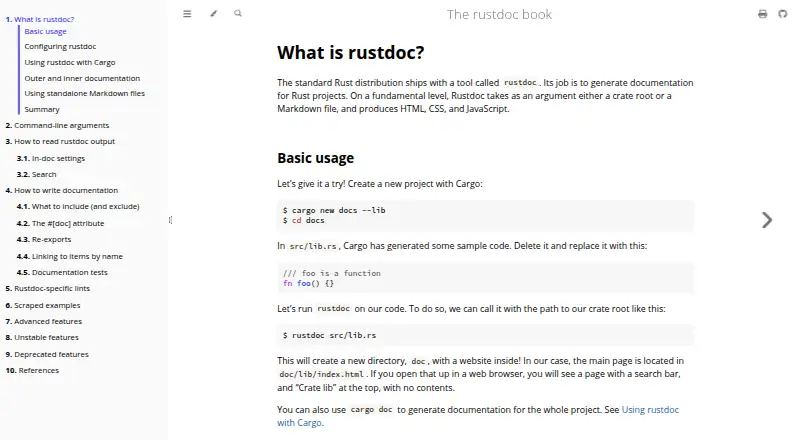
What rustdoc is
rustdoc is the documentation generator included with the standard Rust distribution. It creates HTML, CSS, and JavaScript documentation from Rust crate roots or standalone Markdown files. Cargo connects to it through `cargo doc`, placing project documentation under the `target` directory and optionally including dependency documentation. By default, rustdoc documents publicly reachable items; `--document-private-items` can include non-public items except those marked `#[doc(hidden)]`. It can run code examples in documentation as tests, with controls for examples to ignore, panic, skip execution, or fail to compile. Command-line options can set an output directory, add themes or extra CSS and HTML, and generate documentation for another target triple, subject to cross-compilation caveats. Cargo does not currently handle standalone Markdown files. Rust installation guidance recommends rustup and covers Windows, macOS, Linux, and other Unix-like systems. On Windows, Rust also requires MSVC build tools for Visual Studio 2013 or later. rustdoc is free and available on Linux, macOS, and Windows.
Good
- Ships with the standard Rust distribution.
- Cargo can generate project and dependency documentation.
- Documentation examples can be tested.
- Supports output customization and target triples.
Watch out
- Cargo does not currently understand standalone Markdown files.
- Windows requires MSVC build tools for Visual Studio 2013 or later.
- Cross-target documentation has the usual cross-compilation caveats.
Who it suits
rustdoc suits Rust developers who need project or API documentation, including documentation examples that can be checked as tests. It can also generate HTML from standalone Markdown when used outside Cargo.
Verdict
rustdoc provides an integrated documentation path for Rust projects through Cargo, along with controls for examples and output. Note that standalone Markdown generation is not handled by Cargo, and Windows setup has an additional build-tools requirement.
The facts
Each one read from rustdoc's own pages, with the date it was checked.
What it does
- Cargo integration
- Cargo integrates with rustdoc through `cargo doc` and can open generated documentation with `cargo doc --open`.checked 5 Oct 2026
- Cross compilation
- The `--target` option generates documentation for a target triple different from the host triple, subject to the usual cross-compilation caveats.checked 5 Oct 2026
- Default visibility
- By default, rustdoc generates documentation for public functions.checked 4 Oct 2026
- Distribution
- The standard Rust distribution includes rustdoc.checked 5 Oct 2026
- Documentation tests
- rustdoc can execute code examples in documentation as tests to check that they compile and run.checked 5 Oct 2026
- Included tool
- The standard Rust distribution ships with rustdoc.checked 4 Oct 2026
- Installation
- Rust's installation page recommends rustup and provides installation instructions for Windows, macOS, Linux, and other Unix-like systems.checked 4 Oct 2026
- Integration output
- Cargo places generated documentation under the project's `target` directory and can include documentation for dependencies.checked 4 Oct 2026
- Licensing
- The Rust Programming Language and official Rust projects are generally dual-licensed under Apache License 2.0 and the MIT license; the page directs readers to each project's GitHub repository for specific licensing information.checked 4 Oct 2026
- Markdown input
- rustdoc can generate HTML from standalone Markdown files; Cargo currently does not understand standalone Markdown files.checked 5 Oct 2026
- Markdown limitation
- Cargo does not currently understand standalone Markdown files.checked 4 Oct 2026
- Online documentation
- The Rust tools page says Cargo's doc builder is available locally through `cargo doc` and online for public crates through docs.rs.checked 4 Oct 2026
- Output customization
- Command-line options can select an output directory, add themes, and include extra CSS or HTML in generated documentation.checked 5 Oct 2026
- Project governance
- The Rust Project says it is composed of many teams and contributors, and that major decisions start with a Request for Comments process open to everyone.checked 4 Oct 2026
- Purpose
- rustdoc generates documentation for Rust projects from a crate root or Markdown file, producing HTML, CSS, and JavaScript.checked 5 Oct 2026
- Security reporting
- The Rust Project asks that security bugs in the Rust distribution be reported to [email protected] and says reports are acknowledged within 24 hours, with a more detailed response within 48 hours.checked 4 Oct 2026
- Security support scope
- The Rust Security Response Working Group handles vulnerability reports for software maintained and published by the Rust Project; third-party crates are outside its stated scope.checked 4 Oct 2026
- Support
- The Rust site directs users to the documentation, Rust Forge contributor documentation, and the Users Forum for help.checked 5 Oct 2026
- Supported updates
- The Rust Project says it provides support and security updates for the most recent stable release and the latest beta and nightly releases.checked 4 Oct 2026
- Test controls
- Documentation code blocks support attributes including `ignore`, `should_panic`, `no_run`, and `compile_fail`.checked 5 Oct 2026
- Visibility default
- By default, rustdoc documents publicly reachable items; `--document-private-items` includes non-public items except those marked `#[doc(hidden)]`.checked 5 Oct 2026
Where it runs
- Install platforms
- The Rust installation page provides installation instructions for Windows, macOS, and Linux or other Unix-like systems.checked 5 Oct 2026
- Windows requirement
- On Windows, Rust additionally requires the MSVC build tools for Visual Studio 2013 or later.checked 5 Oct 2026
The company
- Maker identity
- The Rust website says it is maintained by the Rust Team.checked 5 Oct 2026
Alternatives to rustdoc
- 1

Scalar
Free planOpen sourceWebAPILinuxmacOS8.4From $150 a month - 2

Redocly
WebAPIExtension7.0From $10 a month - 3

Sphinx
Free planWebAPILinuxmacOS7.0Free plan - 4

Asciidoctor
Free planWebAPIExtensionLinux6.9Free plan - 5
JSON Schema for Humans
Free planLinuxmacOSSelf-hostedWindows6.5Free plan - 6
StepShot
Free planmacOS6.5CN¥269 one-time