
Ressio
Ressio is a construction management platform for residential companies, especially custom home builders.
What Ressio is
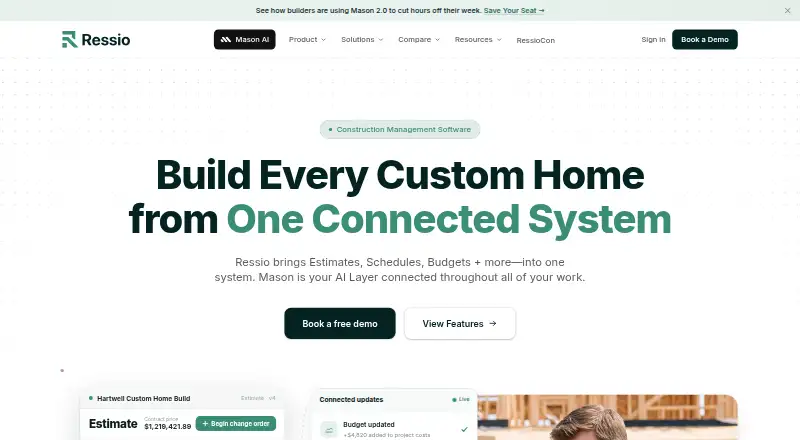
Ressio is a construction management platform for residential companies, especially custom home builders. It brings estimating, scheduling, project records, homeowner communication, and financial work into one system, supporting projects from the first estimate to the final punch list. Teams can build estimates with quantities, markups, allowances, reusable cost items, templates, and formulas, then manage tasks, daily logs, plans, specifications, and selections. Financial tools track estimated, committed, actual, and invoiced costs, along with job profitability; they also support cost-plus billing, invoices, bills, online payments, change orders, and purchase orders. Homeowners can access updates, approvals, files, selections, and invoices through a client portal, including via a link without downloading the app. Mason, Ressio’s AI layer, can answer questions using project data and help draft estimates, bid requests, change orders, daily logs, and job summaries. It connects with QuickBooks Online and other listed services, and can be saved to a mobile device as a Progressive Web App. Pricing is available on request; there is no free plan.
Good
- Combines estimating, scheduling, project files, and financial tools.
- Homeowners can access project details through a link.
- Mason answers questions and helps draft project materials.
- QuickBooks Online syncs bills, expenses, and invoices.
- Available on Android, iOS, and web.
Watch out
- No free plan; pricing is available on request.
- AI providers process submitted information to provide and improve services.
- No system is guaranteed to be completely secure.
- Direct competitors need written consent to access the service.
Who it suits
Ressio suits residential construction companies that want estimating, project management, client communication, and financial tracking together. Its homeowner portal and mobile access may also suit teams that need clients to review project information without installing an app.
Verdict
Ressio brings core residential construction workflows and homeowner access into a single platform, with Mason assisting on project-related tasks. Consider its request-based pricing, AI data processing, and security caveat when assessing fit.
The facts
Each one read from Ressio's own pages, with the date it was checked.
What it does
- Access model
- The Ressio solution is provided as software as a service through a web interface or mobile application.checked 1 Oct 2026
- AI assistant
- Mason turns Ressio data into answers, updates, and actions, including estimates, daily logs, and project questions.checked 1 Oct 2026
- AI data processing
- The privacy policy says AI and machine-learning providers process platform-submitted information for the purpose of providing and improving Ressio's services.checked 30 Sep 2026
- AI data use
- Ressio says its AI and machine-learning technologies process information submitted to the platform to provide and improve its services.checked 1 Oct 2026
- Audience
- Ressio describes itself as modern construction management software for residential builders who want to run better jobs and close on time.checked 1 Oct 2026
- Client access
- Clients can review, approve, pay, and communicate from a link on a phone, tablet, or computer without downloading an app.checked 1 Oct 2026
- Construction workflow
- Ressio supports residential construction companies from the first estimate to the final punch list in one platform.checked 1 Oct 2026
- Core workflow
- Ressio brings estimates, schedules, budgets, and other work into one connected system, with Mason as an AI layer.checked 30 Sep 2026
- Estimating
- Estimating provides a spreadsheet-style grid with quantities, units, markups, allowances, and categories.checked 1 Oct 2026
- File storage
- Ressio supports importing files from Google Drive, OneDrive, and Dropbox, with public or private upload permissions.checked 1 Oct 2026
- Financials
- The platform tracks estimated, committed, actual, and invoiced costs and supports cost-plus billing.checked 1 Oct 2026
- Financial tools
- Ressio supports budget tracking, job profitability tracking, cost-plus billing, bills, invoices, online payments, change orders, and purchase orders.checked 30 Sep 2026
- Integrations
- Listed integrations include QuickBooks Online, Claude, ChatGPT, Adaptive, Payabli, Vertical Insurance, CompanyCam, Google Drive, Gmail, Google Calendar, iCal, and Microsoft Outlook.checked 1 Oct 2026
- Mason AI
- Mason can answer questions across project data and help draft estimates, bid requests, change orders, daily logs, and job summaries.checked 30 Sep 2026
- Mobile access
- Ressio is available as a Progressive Web App that can be saved to a mobile device home screen as an app icon.checked 30 Sep 2026
- Notable restriction
- The terms prohibit direct competitors from accessing the services without Ressio's prior written consent.checked 1 Oct 2026
- Product
- Ressio is an all-in-one platform purpose-built for custom home builders, combining project management, client communication, financials, and AI.checked 1 Oct 2026
- Project management
- Features include schedules, task management, daily logs, project files, plan storage, specifications, and selections.checked 30 Sep 2026
- Purpose
- Ressio describes itself as an all-in-one platform purpose-built for custom home builders, combining project management, client communication, financials, and AI.checked 30 Sep 2026
- QuickBooks
- Ressio says its QuickBooks Online integration syncs bills, expenses, invoices, and related financial data.checked 30 Sep 2026
- Security
- Ressio says it takes steps to keep information secure but does not warrant that any system is 100% secure.checked 1 Oct 2026
- Security and privacy
- Ressio's privacy policy says it takes steps to handle information securely, while also stating that no system is 100% secure.checked 30 Sep 2026
- Support
- The terms state that Ressio will use commercially reasonable efforts to provide customer support and keep the solution operational and available.checked 1 Oct 2026
The company
- Company
- The site identifies the company as Ressio Software, Inc.; the About page describes its mission but does not state a headquarters or founding year.checked 30 Sep 2026
The full review of Ressio
Overview
Ressio is residential construction software for custom home builders, bringing estimating, project management, finances, homeowner communication, and AI together. It suits builders who want a connected workflow from estimate through punch list; its main trade-offs are custom pricing and AI processing of platform data.
Key features
Estimates, schedules, budgets, and project records share one system, which can help builders keep job information together rather than split across tools. Estimating supports quantities, units, markups, allowances, categories, reusable cost items, templates, and formulas—useful for repeatable bids, though the platform’s breadth may be more than a small operation needs.
Project tools cover schedules, tasks, daily logs, files, plans, specifications, and selections. Financial features track estimated, committed, actual, and invoiced costs, as well as job profitability; cost-plus billing, bills, invoices, online payments, change orders, and purchase orders support work beyond the initial estimate.
Homeowners can use a portal to view project information, updates, files, selections, approvals, and invoices. They can enter through a link without installing the app, reducing friction for clients who do not want another app. Mason, Ressio’s AI assistant, can answer questions across project data and help draft estimates, bid requests, change orders, daily logs, and job summaries. That may speed routine work, but Ressio says AI and machine-learning providers process submitted information to provide and improve its services.
Integrations include QuickBooks Online, Claude, ChatGPT, Adaptive, Payabli, Vertical Insurance, CompanyCam, Google Drive, Gmail, Google Calendar, iCal, and Microsoft Outlook. QuickBooks Online syncs bills, expenses, invoices, and related financial data. Files can also be imported from Google Drive, OneDrive, and Dropbox, with public or private upload permissions.
Pricing
Ressio is paid software with custom pricing. Builders must request a quote, so it is harder to compare costs upfront than with alternatives offering published plans. There is no free plan.
Platforms
Ressio runs on Android, iOS, and the web. Its Progressive Web App can be saved to a mobile device’s home screen as an app icon. The service is delivered through a web interface or mobile application. A help center provides getting-started and feature guides, FAQs, troubleshooting, and integration tips.
Who it's for
Ressio is best suited to residential and custom home builders who need estimating, project coordination, financial tracking, and homeowner access in one platform. Its connected costs and cost-plus billing are relevant for builders managing job finances, while the client portal is useful when customers need updates and approvals without downloading an app.
It is a weaker fit for buyers who need transparent pricing before contacting a vendor, or who do not want AI providers processing platform-submitted information. Ressio says it takes steps to handle information securely, but does not warrant that any system is 100% secure. Its terms also prohibit direct competitors from using the services without prior written consent.
Pros and cons
- Pro: Estimates, schedules, job costs, and client communication sit in one workflow, reducing the need to coordinate those core functions across separate systems.
- Pro: Homeowners can access project details and take part in approvals through a link, without an app download.
- Pro: QuickBooks Online syncs bills, expenses, invoices, and related financial data, helping connect job management with accounting.
- Con: Custom pricing and no free plan make it difficult to assess cost without requesting a quote.
- Con: AI providers process submitted information to provide and improve services, which may not suit builders with stricter data preferences.
- Con: Ressio acknowledges that no system is 100% secure, a caveat buyers should weigh when storing financial and project information.
Alternatives
Buildshop is worth considering if a free plan and basics such as estimates, invoices, a to-do list, contact management, messaging, a project portfolio, and bid center matter more than Ressio’s broader residential workflow.
Workhand may suit a small team seeking a free starting point: its Free plan allows one active job and one teammate, with three estimates and three invoices monthly, plus unlimited customers and per-job chat.
GoBuild is another paid option, with an Everything plan that includes unlimited jobs, every feature, and the whole crew; it may appeal to teams that want those inclusions rather than Ressio’s quote-based approach.
Build Method may suit buyers who prefer a published entry price: its one-user plan is $99 a month, billed $1,188.00 USD Annually, with unlimited projects, customers, and vendors and all features included.
Buildxact offers a free Go plan with five complimentary credits, AI estimating, professional proposals, and Home Depot material ordering, making it an option for buyers who want to start with those capabilities at no cost.
JobTread is an alternative for teams comparing a published monthly price; its plan is $20 a month, with tiered price breaks beginning after 10 users.
BuildBook is another alternative for builders to compare.
Buildertrend is another paid option for builders to consider.
For broader category comparisons, see Remodeling Contractor Software and Home Builder Software.
Verdict
Choose Ressio if you are a residential builder who wants estimates, project work, job finances, and homeowner access in one system, with Mason available for project questions and drafting tasks. Its main appeal is that connected construction workflow; look elsewhere if you need upfront pricing, a free plan, or prefer not to have AI providers process submitted platform data.
Alternatives to Ressio
- 1
Buildxact
Free planAndroidiOSWebAPI8.3From $199 a month - 2
ConstructionOnline
Free planAndroidiOSWebAPI8.3From $300 a year - 3

BuildBook
AndroidiOSWeb7.9From $200 a year - 4

Build Method
AndroidiOSWeb7.6From $99 a month - 5

ClickHome
AndroidiOSWebAPI7.6 - 6
Buildern
AndroidiOSWeb7.4From $50 a month