
Workhand
Workhand is a mobile-first field operations app for construction contractors, bringing job management, estimates, invoices, crew messaging, costs, time, and …
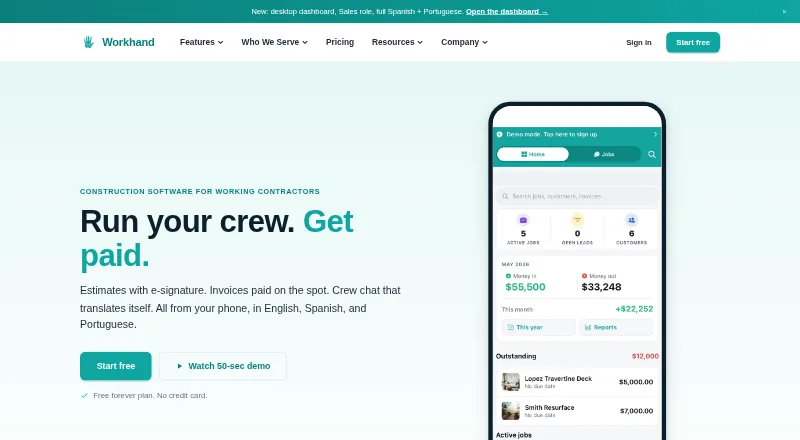
What Workhand is
Workhand is a mobile-first field operations app for construction contractors, bringing job management, estimates, invoices, crew messaging, costs, time, and payments together. Contractors can prepare estimates for e-signature, send Stripe invoices, chat by job, track time and mileage, manage subcontractor certificates of insurance, keep daily logs and punch lists, and scan receipts with AI. The app is available on Android, iOS, and the web. Its Free plan costs nothing and allows one active job, one teammate, three estimates, and three invoices each month. Pro costs $34.99 a month, supports unlimited active jobs and up to five teammates, and includes recurring invoices, time and mileage tracking, and an AI receipt scanner. Team costs $89.99 a month for up to 15 teammates and includes cost tracking, job profitability, QuickBooks Online sync, and a customer-facing portal. QuickBooks Desktop is not supported. Some previously loaded records can be viewed offline, and chat, photo uploads, and new estimates can queue locally, but creating a new job fully offline is not supported. The interface and customer documents support English, Spanish, and Brazilian Portuguese.
Good
- Job estimates can be signed electronically
- Includes job chat, daily logs, and punch lists
- Free plan includes subcontractor COI tracking
- Team includes QuickBooks Online sync
- Interface and customer documents support three languages
Watch out
- Free plan allows one active job and teammate
- Free plan limits estimates and invoices to three monthly
- QuickBooks Desktop is not supported
- New jobs cannot be created fully offline
Who it suits
It suits solo operators and small construction crews, including general contractors, remodelers, HVAC and plumbing installers, landscapers, concrete crews, and pool builders. Crews needing QuickBooks integration should note that sync is listed for Team and applies to QuickBooks Online.
Verdict
Workhand combines job administration and field communication in one app, with free and paid plan choices for different crew sizes. Its offline support is partial, and QuickBooks sync is listed for the Team plan only.
Plans and prices
From Workhand's own pricing page, checked 15 Oct 2026.
| Plan | Price | What it gives you |
|---|---|---|
| Free | Free | 1 active job · 1 teammate · unlimited customers · 3 estimates/month · 3 invoices/month · chat, photos, punch list, daily logs · unlimited subcontractors with COI tracking · $0 /month |
| Pro | $34.99 a month | 14-day free trial · unlimited active jobs · up to 5 teammates · recurring invoices · time tracking and mileage · AI receipt scanner · review funnel · public profile · pool chemical logs · $34.99 /month |
| Team | $89.99 a month | 14-day free trial · up to 15 teammates · cost tracking · per-job profit · sales commissions · yearly ledger and 1099 exports · QuickBooks Online sync · CRM pipeline · customer portal · priority support · $89.99 /month |
The facts
Each one read from Workhand's own pages, with the date it was checked.
What it does
- AI data handling
- When a user taps AI Suggest, the project description and catalog or template item descriptions go to Anthropic's Claude API; Workhand says customer personal details, photos, payment data, and QuickBooks data are not sent.checked 29 Sep 2026
- API and extensibility
- Workhand explicitly says it has no public API; CSV exports and requested import scripts are the documented alternatives.checked 15 Oct 2026
- COI tracking
- The app stores subcontractor general-liability, workers-compensation and auto certificates and alerts at 30, 14 and 7 days before expiration.checked 15 Oct 2026
- Crew chat
- Each job has chat channels with one-tap translation between English, Spanish and Portuguese, plus photo annotations and offline queuing.checked 15 Oct 2026
- Customer portal
- Customers receive a no-login link showing job status, progress photos and outstanding balances.checked 15 Oct 2026
- Documentation
- The help center provides setup guides, feature how-tos and troubleshooting articles written by the product builders.checked 15 Oct 2026
- Estimates
- Users can create line-item estimates, capture e-signatures on phones and convert accepted estimates into invoices.checked 15 Oct 2026
- Google Play availability
- The Android listing shows 100+ downloads; no star rating or review count is displayed in the opened listing.checked 15 Oct 2026
- Integrations
- Team plan syncs customers, invoices, and payments two-way with QuickBooks Online; QuickBooks Desktop is not supported.checked 29 Sep 2026
- Key features
- Features include e-signature estimates, Stripe invoices, per-job chat, time and mileage tracking, subcontractor COI tracking, daily logs, punch lists, and an AI receipt scanner.checked 29 Sep 2026
- Languages
- The app interface and customer estimates and invoices support English, Spanish, and Brazilian Portuguese.checked 29 Sep 2026
- Lead pipeline
- A five-stage CRM pipeline tracks leads from new through contacted, qualified, estimate sent and won or lost.checked 15 Oct 2026
- Limit: enterprise scale
- Workhand positions itself for crews of 1 to 15 people and caps the Team plan at 15 teammates.checked 15 Oct 2026
- Limit: service dispatch
- The company says it does not yet provide route optimization or recurring-service dispatch for service-only shops.checked 15 Oct 2026
- Notable limits
- Free is limited to one active job, one user, three estimates and three invoices per month, while paid plans support up to five or fifteen teammates.checked 29 Sep 2026
- Notable news: launch
- The press page says Innovative Ops LLC was formed on November 7, 2023 and Workhand launched publicly in 2026.checked 15 Oct 2026
- Notable news: release
- Apple's version history records a September 1, 2026 release with crash fixes and a unified lead workspace.checked 15 Oct 2026
The company
- Company founded
- LinkedIn lists Workhand as founded in 2025.checked 15 Oct 2026
- Company headquarters
- LinkedIn lists headquarters in Wesley Chapel, Florida.checked 15 Oct 2026
- Company legal name
- Workhand is a DBA of Innovative Ops LLC.checked 15 Oct 2026
- Founded
- 2023checked 28 Sep 2026
- Founder and ownership
- Andrew Bernardo is identified as the founder; the company describes Workhand as solo bootstrapped with no venture investors or cofounder.checked 15 Oct 2026
- Headquarters
- Wesley Chapel, Florida, United Stateschecked 28 Sep 2026
Money
- Limit: billing
- A comparison page says Workhand does not support AIA progress billing and has a simpler bid manager than enterprise construction suites.checked 15 Oct 2026
The full review of Workhand
Workhand is a mobile-first field-operations service that combines estimating, billing, job records and crew communication for construction businesses. It suits solo contractors and small teams that want customer and subcontractor coordination alongside office administration. Its value depends on whether the free-plan caps and partial offline operation fit the way your crews work.
Overview
Workhand brings estimates, invoices, payments, job costs, time, mileage and field communication into one application. Its audience includes general contractors, remodelers, HVAC and plumbing installers, landscapers, concrete crews and pool builders. Selection management, change orders, client portals and subcontractor portals extend it beyond basic invoicing.
The company was founded in 2023 and is headquartered in Wesley Chapel, Florida. Customer records, job information, estimates, invoices, photos and uploaded content remain the customer's property, and Workhand says it does not sell them or share them with advertisers or data brokers.
Key features
Estimating, billing and payments
Estimates can be prepared for electronic signature, while invoices use Stripe for card payments. US card processing costs 2.9% plus $0.30, with Workhand saying it adds no payment markup. Change orders and selection management help capture scope and customer choices rather than leaving those adjustments in separate messages.
Field and crew coordination
Each job can contain chat, photos, daily logs and punch lists. Subcontractor records include certificate-of-insurance tracking, and both subcontractor and client portals are supported. Pro adds time and mileage tracking plus an AI receipt scanner. Team adds cost tracking, per-job profit, sales-commission tracking, a sales pipeline and CRM, and a customer-facing job portal.
Accounting and data handling
Team synchronizes customers, invoices and payments both ways with QuickBooks Online; QuickBooks Desktop is not supported. When a user invokes AI Suggest, the project description and catalog or template item descriptions are sent to Anthropic's Claude API. Workhand says customer personal details, photos, payment data and QuickBooks data are excluded from that transfer.
Offline work and support
Previously loaded records can be viewed without a connection, and chat, photo uploads and new estimates queue locally. A completely new job cannot be created offline, so crews working in unreliable coverage need a connection before opening new work. Support is by email, generally within one business day; Team receives priority handling, and phone support is not offered.
Pricing
Free
The free plan allows one active job and one teammate, with unlimited customers, three estimates and three invoices per month. It includes per-job chat, photos, punch lists, daily logs and unlimited subcontractors with COI tracking. This is a sensible starting point for a solo operator with light monthly billing, but the single-job and three-document caps quickly constrain an active business.
Pro
Pro costs $34.99 a month and supports unlimited active jobs and up to five teammates. Recurring invoices, time and mileage tracking, the AI receipt scanner, a customer-review funnel, public profile page and pool chemical logs justify the move for a growing crew. It does not include Team's cost-profit controls or QuickBooks Online sync.
Team
Team is $89.99 a month for up to 15 teammates. It adds cost and profitability reporting, commission tracking, yearly Ledger and 1099 exports, QuickBooks Online sync, sales pipeline and CRM, a customer job portal and priority support. Choose it when financial oversight, accounting connection or a larger crew matters; otherwise Pro keeps the recurring cost lower. Paid plans have a 14-day trial.
Platforms
Workhand runs on Android, iOS and the web. The interface, customer estimates and invoices support English, Spanish and Brazilian Portuguese, which is useful for multilingual crews and clients.
Who it's for
Workhand is best for solo operators and small construction teams that need one system for field records, estimates, invoices and communication. Free fits a one-person operation with one active job; Pro fits up to five teammates needing recurring billing and field tracking; Team suits up to 15 people that require profitability data, CRM functions or QuickBooks Online. Contractors dependent on fully offline job creation or QuickBooks Desktop should look elsewhere.
Pros and cons
- Pro: Estimates, invoices, chat, logs, punch lists, portals and COI tracking cover office and field coordination in one service.
- Pro: Stripe processing is clearly priced at 2.9% plus $0.30 in the US, with no Workhand markup.
- Pro: Team's two-way QuickBooks Online sync and profit reporting reduce duplicate financial work for larger crews.
- Con: Free is restricted to one job, one user, three estimates and three invoices monthly.
- Con: Offline support queues selected actions but cannot create a brand-new job without connectivity.
- Con: QuickBooks Desktop is unsupported, and support remains email-only.
Alternatives
Remodeling Contractor Software is a broader category shortlist for comparing remodeling tools. Buildshop is worth choosing if a free plan with estimates, invoices, tasks, contacts, messaging, portfolio and bid tools is enough; its listed two-user package is $99.00 US. Stairkey suits buyers seeking a paid product with a free trial and an accountant role at $0 CAD per month, with metered usage up to $20 per month.
Buildxact is preferable when AI estimating, proposals and Home Depot ordering are priorities; its free Go plan includes five complimentary credits. Houzz is an alternative for a free 3D floor planner with estimates and invoicing, while its Pro plan is listed at $249 a month. BuildBook is another freemium construction-management option. Clear Estimates fits estimate-focused users wanting unlimited estimates and customers, with annual Standard at $59 a month. Build Method offers a paid one-user plan at $99 a month with unlimited projects, customers and vendors. Buildern targets businesses prepared for higher pricing, starting at $225 a month billed annually for two seats.
Verdict
Choose Workhand if you run a solo or small construction crew and want estimates, payments, field records and communication connected in one workflow. Pro is the practical fit for most growing teams, while Team earns its price when QuickBooks Online, profitability controls and expanded collaboration are essential. Look elsewhere if you need QuickBooks Desktop, phone support or fully offline creation of new jobs.
Alternatives to Workhand
- 1
Buildxact
Free planAndroidiOSWebAPI8.3From $199 a month - 2
ConstructionOnline
Free planAndroidiOSWebAPI8.3From $300 a year - 3

BuildBook
AndroidiOSWeb7.9From $200 a year - 4

Clear Estimates
AndroidiOSWebAPI7.9From $59 a month - 5
Stairkey
Free planAndroidiOSWeb7.9Free plan - 6
Breche
AndroidiOSWebmacOS7.7From $99 a month