
Renderforest AI Video Generator
Renderforest AI Video Generator turns text prompts, images or audio such as a music track into videos, then connects generation to an editor.
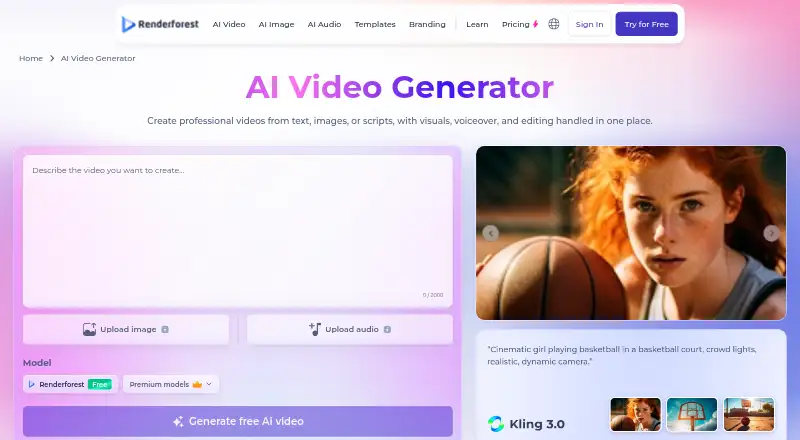
What Renderforest AI Video Generator is
Renderforest AI Video Generator turns text prompts, images or audio such as a music track into videos, then connects generation to an editor. Listed AI models include Google Veo 3.1, Kling 3.0, Seedance 2.5, MiniMax H3, Pixverse and Renderforest’s own model. Editing tools support trimming and joining scenes, replacing visuals, regenerating shots, and adding logos, brand colors, subtitles and licensed music. A single generation can produce a video up to 12 minutes long. Voiceovers support more than 50 languages with tone and emotion controls.
AI generation currently outputs HD, while pre-made video projects can be created up to 4K. The browser-based generator processes work on Renderforest’s infrastructure and does not require installation or a GPU. Mobile video maker apps are available for iOS and Android. The free plan includes unlimited HD generation with Renderforest’s model and requires no credit card. The maker names content creators, marketing and business teams, ecommerce businesses, educators, agencies and smaller organizations as potential users.
Good
- Accepts text prompts, images and audio as inputs.
- Lists six AI model options, including Renderforest’s own.
- Single generation can produce a video up to 12 minutes.
- Voiceovers support more than 50 languages.
- Free plan includes unlimited HD generation with its model.
Watch out
- AI generation currently outputs HD.
- Free videos have a watermark.
Who it suits
Renderforest AI Video Generator may suit creators, educators, ecommerce businesses, agencies and marketing teams making videos from text, images or audio. Its browser-based workflow may also suit users who do not want to install software or use a GPU.
Verdict
Renderforest combines AI video generation with editing tools, multilingual voiceovers and browser-based processing. Its free plan includes unlimited HD generation using Renderforest’s model, while paid plans start at $8/mo (annual).
Plans and prices
From Renderforest AI Video Generator's own pricing page, checked 4 Oct 2026.
| Plan | Price | What it gives you |
|---|---|---|
| Free | Free | HD videos with watermark · basic features |
| Lite | $9 a month | 800 AI credits/month · 5 HD720 template exports · premium AI models · 10 GB cloud storage · Monthly price shown as $9; yearly price shown as $15/month |
| Pro | $24 a month | 2,400 AI credits/month · unlimited HD720 AI video creations with Renderforest Fast · unlimited Full HD1080 template exports · 50 GB cloud storage · Monthly price shown as $24; yearly price shown as $39/month |
| Business | $49 a month | 6,000 AI credits/month · unlimited HD1080 AI video creations with Renderforest Fast · unlimited Ultra HD 4K template exports · team management · 100 GB cloud storage · Monthly price shown as $49; yearly price shown as $79/month |
The facts
Each one read from Renderforest AI Video Generator's own pages, with the date it was checked.
What it does
- AI models
- The page lists Google Veo 3.1, Kling 3.0, Seedance 2.5, MiniMax H3, Pixverse, and Renderforest’s own model.checked 4 Oct 2026
- Commercial use
- The FAQ says generated and edited videos may be used for commercial projects subject to Renderforest’s Terms of Service and usage guidelines.checked 4 Oct 2026
- Data protection
- Renderforest’s privacy policy describes encryption in transit, access controls, secure infrastructure, and contractual data protection obligations for third-party AI providers.checked 4 Oct 2026
- Editing
- The editor supports trimming and stitching scenes, replacing visuals, regenerating shots, adding logos, brand colors, subtitles, and licensed music.checked 4 Oct 2026
- Inputs
- Users can start with a text prompt, an uploaded image, or audio such as a music track.checked 4 Oct 2026
- Output quality
- The FAQ says AI generation currently outputs HD, while pre-made video projects can be created up to 4K.checked 4 Oct 2026
- Support
- The pricing page directs users to Renderforest’s support team for further questions.checked 4 Oct 2026
- Third-party AI processing
- The privacy policy says submitted materials may be transmitted to third-party AI providers to generate requested outputs and that those providers are not authorized to use them for independent marketing or advertising.checked 4 Oct 2026
- Video length
- The page says a single generation can produce a complete video up to 12 minutes long.checked 4 Oct 2026
- Voiceovers
- Renderforest says its voiceovers support more than 50 languages with tone and emotion controls.checked 4 Oct 2026
- What it does
- The AI video generator turns text prompts, images, or audio into videos and connects AI models to a full editor.checked 4 Oct 2026
- Who it is for
- The maker names content creators, marketing and business teams, ecommerce businesses, educators, agencies, and smaller organizations as users.checked 4 Oct 2026
Where it runs
- Browser based
- The generator runs in a browser with processing on Renderforest’s infrastructure, and the page says no installation or GPU is required.checked 4 Oct 2026
- Mobile apps
- Renderforest says its video maker app is available for iOS and Android devices.checked 4 Oct 2026
The company
- Founded
- 2013checked 28 Sep 2026
- Headquarters
- Yerevan, Armeniachecked 28 Sep 2026
Money
- Free use
- The product FAQ says the free plan includes unlimited HD generation with the Renderforest model and requires no credit card.checked 4 Oct 2026
The full review of Renderforest AI Video Generator
Overview
Renderforest AI Video Generator turns prompts, images, or audio into video and connects generation to an editing workspace. It suits creators and organizations that want to make branded videos without installing desktop software; its strongest case is a single browser workflow, while the free watermark and HD ceiling on AI output limit finished work.
Key features
Starting from text, an image, or an audio track gives users several routes into a project. The model selection includes Google Veo 3.1, Kling 3.0, Seedance 2.5, MiniMax H3, Pixverse, and Renderforest’s own model. A generation can run up to 12 minutes, which is useful for longer explainers or lessons, not just short social posts.
The connected editor can trim and stitch scenes, replace visuals, regenerate shots, and add logos, brand colors, subtitles, or licensed music. That makes the service more practical than a generator that leaves all finishing work elsewhere. Voiceovers support more than 50 languages, with tone and emotion controls. The library includes 4,104 video templates, stock media, and a brand kit; MP4 exports support TikTok, YouTube Shorts, Instagram Reels, Facebook, and LinkedIn.
AI-generated video currently tops out at HD, whereas pre-made template projects can reach 4K. That is a meaningful distinction for teams with resolution requirements: Renderforest’s higher-resolution route is template-based, not generated footage.
Generation runs in a browser on Renderforest’s infrastructure, so users need no installation or GPU. The mobile video maker app is available for iOS and Android. Renderforest’s privacy policy describes encryption in transit, access controls, secure infrastructure, and contractual protections for third-party AI providers. Submitted materials may be sent to those providers to produce requested outputs, though they are not authorized to use them for independent marketing or advertising.
Pricing
The Free plan costs nothing and provides HD videos with a watermark and basic features. It is a useful way to explore generation, including unlimited HD generation with Renderforest’s own model and no credit card requirement, but the watermark makes it a poor fit for client-ready or public-facing work.
Lite is shown at $9 per month when billed monthly and $15/month at the yearly price shown. It includes 800 AI credits per month, five HD720 template exports, premium AI models, and 10 GB of cloud storage. This is the entry paid option for occasional projects that need premium models; the five-export cap and credit allowance make it less suitable for frequent publishing.
Pro is $24 per month billed monthly, with a yearly price shown as $39/month. It includes 2,400 AI credits per month, unlimited HD720 AI video creations with Renderforest Fast, unlimited Full HD1080 template exports, and 50 GB storage. It fits regular solo production better than Lite, but the unlimited AI creations apply to Renderforest Fast, not every model.
Business is $49 per month billed monthly, with a yearly price shown as $79/month. Its 6,000 monthly AI credits, unlimited HD1080 AI creations with Renderforest Fast, unlimited Ultra HD 4K template exports, team management, and 100 GB storage make it the clearest fit for teams with heavier output needs. The unlimited AI allowance is again specific to Renderforest Fast.
Plan prices and allowances differ by billing term; compare the monthly and yearly figures against expected use before choosing. The service’s pricing note gives paid plans from $8/mo (annual), while Lite’s displayed yearly price is $15/month. Renderforest directs plan questions to its support team.
Platforms
The generator works in a browser, and video maker apps are available for Android and iOS. Commercial use of generated and edited videos is permitted subject to Renderforest’s Terms of Service and usage guidelines.
Who it's for
Content creators can use the prompt-to-editor workflow for social clips and longer videos. Marketing and business teams, ecommerce businesses, agencies, educators, and smaller organizations have reason to consider it when they need voiceovers, branding tools, templates, or a shared production workflow. It is less compelling for anyone who requires 4K AI-generated footage or watermark-free output on the free plan.
Pros and cons
- Pros: Text, image, and audio inputs plus several named AI models give projects flexible starting points.
- Pros: Editing, branding, subtitles, licensed music, and multilingual voiceovers sit alongside generation rather than requiring a separate finishing workflow.
- Pros: Unlimited free HD generation with Renderforest’s model and no credit card make experimentation accessible.
- Cons: Free videos carry a watermark, and the free plan has only basic features.
- Cons: AI output is HD, not 4K; the 4K option applies to template projects.
- Cons: Lite limits template exports to five HD720 videos, while the unlimited AI creation allowances on higher tiers apply to Renderforest Fast.
- Cons: Submitted content may be transmitted to third-party AI providers for generation, a consideration for sensitive material.
Alternatives
For a wider set of social media template options, browse Social Media Template Libraries.
Choose Content Drifter instead if the priority is AI-assisted social publishing: its free plan includes eight AI posts and ten publishes per month, rather than Renderforest’s video-generation focus.
CapCut is another freemium option for mobile-focused editing and free templates.
Pick PosterMyWall if design and email templates, a content planner, or publishing to one social account matter more than AI video generation.
VEED is an alternative with a free plan limited to 720p exports that carry a watermark.
Consider Vimeo for video hosting and storage: its free plan includes one seat and 1 GB of storage.
Kapwing offers a free plan with 10 credits, a four-minute export limit, and 720p output.
Choose Mojo if free templates and royalty-free music, photos, and videos for social sharing are the better fit.
Piktochart is an alternative with a web-based free plan that includes 60 AI credits, two downloads, and 1 GB of storage.
Verdict
Renderforest is a strong choice for creators and teams who want AI video generation, editing, brand controls, and voiceovers in one browser-based service. Its free model is unusually useful for trying generation, and paid tiers add meaningful export and storage capacity. Look elsewhere if 4K AI footage is essential or if the free watermark is unacceptable.
Alternatives to Renderforest AI Video Generator
- 1

Vimeo
Free planAndroidiOSWebAPI8.4From $12 a month - 2

Content Drifter
Free planAndroidiOSWebAPI8.3From $12.50 a month - 3

InVideo AI
Free planAndroidiOSWebAPI8.2From $4 a month - 4

PosterMyWall
Free planAndroidiOSWeb7.9From $109 a year - 5
Motion Array
Free planWebExtensionmacOSWindows7.7From $10.99 a month - 6

Kapwing
Free planWebmacOSWindows7.6From $16 a month