QuotesCover
QuotesCover is an online quote maker for turning text into graphics for social media, print, and other uses.
What QuotesCover is
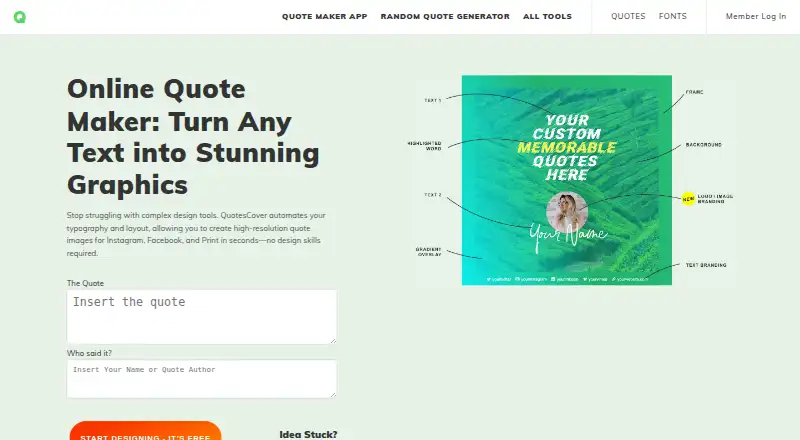
QuotesCover is an online quote maker for turning text into graphics for social media, print, and other uses. Its editor arranges text automatically and resizes it to fit the selected area, while offering controls for author names, photos, fonts, stickers, frames, overlays, logos, watermarks, gradients, and custom canvas dimensions. Designs can be downloaded as PNG or JPG, and the site also describes creating Facebook 3D photos. Listed assets include 12,000+ quotes, 2,400,000+ backgrounds, 400+ fonts, and image overlays. Preset canvases cover Facebook, Instagram, Twitter, Pinterest, YouTube, and LinkedIn. The maker says design data is processed and saved in the user's browser rather than collected by the site, and transactions are secured through PayPal. The Guest plan costs nothing, provides a simple editor and listed assets, shows ads, and requires no signup. The PRO plan is $12 a year, billed for one year, and removes ads while adding editing features. Manual font selection is reserved for subscribers; guests can use the font randomizer. The site works in phone browsers and can be added to an Android home screen through Chrome.
Good
- Automatically fits text to its selected area.
- Exports designs as PNG or JPG.
- Guest plan requires no login or signup.
- Design data is processed and saved locally in the browser.
- Offers custom canvas sizes and platform presets.
Watch out
- Guest plan displays ads.
- Manual font selection requires a subscription.
- Older Internet Explorer may have problems.
- Quote assets may have separate commercial-use restrictions.
Who it suits
QuotesCover suits people creating quote graphics for social posts, print, or other uses, including users who want preset canvases for major social platforms. Guests can make graphics without signing up, while subscribers get manual font selection.
Verdict
QuotesCover combines automatic text layout with a range of graphic-editing controls and assets. Its free Guest plan has ads and randomized rather than manual font selection; PRO costs $12 a year.
Plans and prices
From QuotesCover's own pricing page, checked 11 Oct 2026.
| Plan | Price | What it gives you |
|---|---|---|
| Guest | Free | Simple graphic editor · quotes, backgrounds, fonts and overlays · ads shown · no login or signup |
| PRO | $12 a year | One year · no ads · clean user interface · speedy performance · additional editing features · $12 / 1 Year |
The facts
Each one read from QuotesCover's own pages, with the date it was checked.
What it does
- Assets
- The maker lists 12,000+ quotes, 2,400,000+ backgrounds, 400+ fonts and image overlays among its available assets.checked 11 Oct 2026
- Automated design
- The editor automatically lays out text and adjusts font size so content fits its area.checked 11 Oct 2026
- Commercial use
- Its license guide says fonts, background photos and overlay graphics are usable commercially subject to stated conditions, while quote assets may have separate restrictions.checked 11 Oct 2026
- Editing features
- The editor supports text, author names, photos, fonts, stickers, frames, overlays, logos, watermarks, gradients and custom canvas sizes.checked 11 Oct 2026
- Integrations and formats
- The editor offers preset canvas sizes for platforms including Facebook, Instagram, Twitter, Pinterest, YouTube and LinkedIn.checked 11 Oct 2026
- Mobile use
- The maker says the site works in a phone browser and can be added to an Android home screen through Chrome.checked 11 Oct 2026
- Notable limits
- The maker says manual font selection is for subscribed members; guests can use the font randomizer instead.checked 11 Oct 2026
- Output
- Users can download designs as PNG or JPG, and the page also describes creating Facebook 3D photos.checked 11 Oct 2026
- Privacy
- The maker says graphic design data is processed and saved locally in the user's browser and is not collected by the site.checked 11 Oct 2026
- Security and payment
- The maker says transactions are backed and secured by PayPal.checked 11 Oct 2026
- Support
- Founder Dian Arismawan invites users to contact him with feature suggestions, error reports, questions, collaboration inquiries or support requests.checked 11 Oct 2026
- What it does
- QuotesCover is an online quote maker for turning text into quote graphics for social media, print and other uses.checked 11 Oct 2026
Where it runs
- Browser support
- The maker lists successful tests on Opera, Firefox, Chrome, Edge and Safari on Mac Big Sur or iOS 14, and cautions that older Internet Explorer may have problems.checked 11 Oct 2026
The full review of QuotesCover
Overview
QuotesCover is a browser-based tool for making quote graphics for social media, print and other uses. It is best for individuals who want a focused way to turn text into an image, rather than a broader publishing workflow. Automatic text fitting and a large asset library are its strongest advantages; manual font choice requires PRO.
Key features
The editor automatically arranges text and adjusts its size to fit the selected area, taking some of the repetitive resizing out of quote design. It also handles author names, photos, stickers, frames, overlays, logos, watermarks, gradients and custom canvas sizes. That range makes it useful for more than a bare text-on-background card, although guests give up a key creative control: they can randomize fonts but cannot select one manually.
QuotesCover offers more than 12,000 quotes, 2,400,000 backgrounds, 400 fonts and image overlays. Those assets provide plenty of starting points for an individual creator, but quote assets may carry restrictions distinct from the commercial-use conditions for fonts, background photos and overlays. Designs download as PNG or JPG, and the maker also describes creating Facebook 3D photos.
Preset canvas sizes cover Facebook, Instagram, Twitter, Pinterest, YouTube and LinkedIn, while custom dimensions accommodate other destinations. A brand kit and stock media are included, though the tool’s stated capabilities do not establish what the kit lets users customize. The maker says design data is processed and saved locally in the browser rather than collected by the site, and says PayPal backs and secures transactions.
The maker says the site works in a phone browser and can be added to an Android home screen through Chrome. It reports successful tests on Opera, Firefox, Chrome and Edge, as well as Safari on Mac Big Sur or iOS 14; older Internet Explorer may have problems. The founder invites questions, support requests, error reports and feature suggestions.
Pricing
The Guest plan costs nothing. It includes a simple graphic editor, quotes, backgrounds, fonts and overlays, with no login or signup required. Ads are shown, and font selection is randomized rather than manual. It suits occasional use when convenience and no-cost access matter more than control over typography.
PRO costs $12 a year, billed $12 / 1 Year. It removes ads, provides a clean interface and speedy performance, and adds editing features, including manual font selection for subscribers. The annual commitment makes sense for regular users who need that control or want an ad-free editor; casual users can stay with Guest and accept its limits.
Platforms
QuotesCover is available on web, Android, iOS, Linux, macOS and Windows. Its phone-browser support makes it accessible without a separate mobile app being required by the described workflow.
Who it's for
Choose QuotesCover if you regularly need quote-led graphics, value automatic text fitting, and want to work with preset social dimensions or custom canvases. Guest is a practical starting point for occasional designs without signup. Look elsewhere if manually choosing a typeface is essential but an annual subscription is not worthwhile, or if your central need is a broader content-production workflow rather than individual quote graphics.
Pros and cons
- Pro: Automatic layout and font sizing reduce manual fitting work when text needs to sit inside a defined canvas.
- Pro: A large collection of quotes, backgrounds and fonts, plus overlays and other editing elements, gives creators many ways to build a graphic.
- Pro: Guest access requires no signup, and PRO is an annual $12 option for ad removal and manual font selection.
- Con: Guests cannot choose a specific font, limiting typographic control on the free plan.
- Con: Ads appear in Guest, so users seeking a clean workspace must pay for PRO.
- Con: Commercial-use conditions differ by asset type, and quote assets may have separate restrictions; users need to check licensing before commercial use.
Alternatives
For a wider range of design starting points, browse Social Media Template Libraries.
Content Drifter is a better fit when the need is AI-assisted posting: its free plan includes 8 AI posts and 8 AI images per month, 10 publishes per month and one workspace.
CapCut is worth considering for mobile-focused video editing, with basic editing features, free templates and cloud storage in its Standard plan.
PosterMyWall suits users who want design and email templates alongside social publishing; its free plan includes downloads, more than 1 million templates and publishing on one social account.
Renderforest AI Video Generator is the more relevant choice for making video: its free plan offers HD videos with a watermark and basic features.
VEED is an alternative for video editing, with a free plan limited to 720p exports that carry a watermark.
Vimeo is aimed at video hosting, with a free plan of one seat and 1 GB of storage.
Kapwing is another option for video work; its free plan is limited to 10 credits, four-minute exports and 720p.
Mojo may suit social content creators who want free templates and royalty-free music, photos and videos to share across social platforms.
Verdict
QuotesCover is a sensible choice for individuals making quote graphics who want automatic text fitting, a substantial asset collection and a no-signup free plan. Its clearest reason to upgrade is manual font selection and an ad-free interface for $12 a year. If precise typography matters but the subscription does not fit, or if you need video or a wider publishing workflow, choose another tool.
Getting started
- Open https://quotescover.com/ in a browser.
- Use the free Guest plan without logging in or signing up, or subscribe to PRO for $12 a year.
- Create a design using text, assets, and a preset or custom canvas size.
- Download the finished design as PNG or JPG.
- On Android, add the site to the home screen through Chrome if desired.
Limits worth knowing
The free Guest plan shows ads and uses a font randomizer rather than manual font selection. PRO costs $12 a year and includes additional editing features; quote assets may have separate commercial-use restrictions.
Questions
Is QuotesCover free?
Yes. The Guest plan is free, includes ads, and does not require login or signup.
How much does PRO cost?
PRO is $12 a year, billed for one year.
What file formats can I download?
Designs can be downloaded as PNG or JPG.
Which platforms can I use it on?
The listed platforms are Android, iOS, Linux, macOS, web, and Windows. The maker also says the site works in a phone browser.
Can I use the assets commercially?
The license guide says fonts, background photos, and overlay graphics can be used commercially subject to stated conditions. Quote assets may have separate restrictions.
Does QuotesCover collect design data?
The maker says graphic design data is processed and saved locally in the user's browser and is not collected by the site.
Alternatives to QuotesCover
- 1

Vimeo
Free planAndroidiOSWebAPI8.4From $12 a month - 2

Content Drifter
Free planAndroidiOSWebAPI8.3From $12.50 a month - 3

InVideo AI
Free planAndroidiOSWebAPI8.2From $4 a month - 4

PosterMyWall
Free planAndroidiOSWeb7.9From $109 a year - 5
Motion Array
Free planWebExtensionmacOSWindows7.7From $10.99 a month - 6

Kapwing
Free planWebmacOSWindows7.6From $16 a month