
Quant-UX
Quant-UX is a research, usability and prototyping tool for creating interactive designs and collecting data-driven insights.
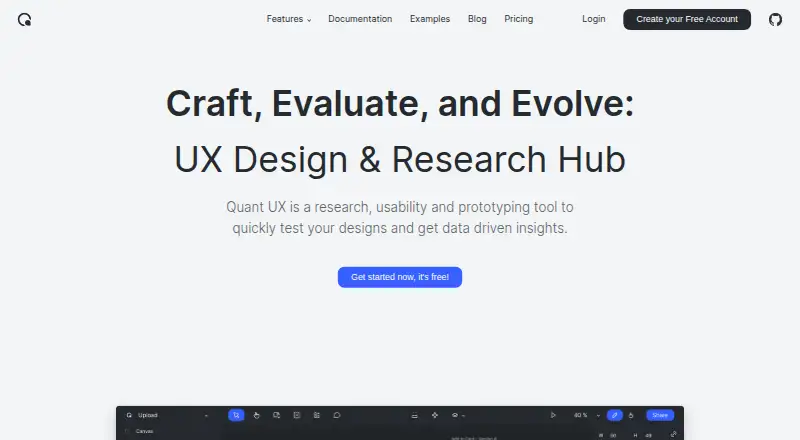
What Quant-UX is
Quant-UX is a research, usability and prototyping tool for creating interactive designs and collecting data-driven insights. Its visual designer builds screens, functional components and connected interactions. Users can create design systems with reusable components, design tokens and master screens, while real-time collaboration supports shared work. Testers open prototypes through a shared link without installing an app, or scan a QR code to launch them on phones. Built-in analytics include heatmaps, user-journey graphs, drop-off graphs, task KPIs and visual A/B comparisons. Quant-UX offers unlimited prototypes and unlimited user tests on its Free plan. It connects with Figma and runs on the web or through self-hosted deployment, with cloud hosting also available. The maker describes the code as open source and invites downloads, improvements and community contributions. Quant-UX says its servers and databases are in the EU, with SSL/TLS encryption and restricted server access. Optional AI features may send prompts and design data to a selected provider outside the user’s country.
Good
- Free plan includes unlimited prototypes and user tests
- Interactive prototypes support shared links and QR launch
- Analytics include heatmaps, journeys, drop-offs and KPIs
- Self-hosted deployment and open-source code available
- Real-time collaboration and Figma integration
Watch out
- Optional AI may process data outside your country
- Most AI features require your own provider API key
- Support is through email, community and documentation
Who it suits
Quant-UX suits solo users, small teams and mid-market organisations creating, testing and analysing prototypes. It supports researchers, designers, educators and project teams through web or self-hosted use.
Verdict
Quant-UX combines prototyping, design systems, user testing and analytics in a free product available online or self-hosted. Review the optional AI data handling and provider-key requirements before enabling those features.
Plans and prices
From Quant-UX's own pricing page, checked 9 Oct 2026.
| Plan | Price | What it gives you |
|---|---|---|
| Free | Free | Unlimited Prototypes · Unlimited User Tests · Prototyping Canvas · Real-Time Collaboration · Analytics · Questionnaires |
The facts
Each one read from Quant-UX's own pages, with the date it was checked.
What it does
- AI data handling
- Optional AI features send prompts and design data to the selected third-party provider, which may process them outside the user's country; most AI features require the user's own provider API key.checked 9 Oct 2026
- Analytics
- Built-in analytics include heatmaps, user journey graphs, drop-off graphs, task KPIs, and visual comparisons for A/B tests.checked 9 Oct 2026
- Audience
- The maker describes Quant-UX as a tool for prototyping, user testing, and analytics, and its site includes testimonials from researchers, designers, educators, and project teams.checked 9 Oct 2026
- Deployment
- cloud, self hostedchecked 21 Sep 2026
- Design systems
- Users can build design systems with components, design tokens, and master screens.checked 9 Oct 2026
- Hosting and security
- The maker says its servers and databases are in the EU, internet traffic is encrypted with SSL/TLS, and server access is restricted and secured.checked 9 Oct 2026
- Integrations
- Users can import Figma projects and image files; prototypes can also send or load data from external servers when configured to do so.checked 9 Oct 2026
- Interactive prototyping
- Its visual designer lets users create screens, add functional components, and connect them through interactions.checked 9 Oct 2026
- Open source
- Quant-UX says its code is open source and can be downloaded, improved, and contributed back to the community.checked 9 Oct 2026
- Purpose
- Quant-UX is a research, usability and prototyping tool for testing designs and getting data-driven insights.checked 9 Oct 2026
- Support
- The maker invites users to contact it through a form or Discord chat.checked 9 Oct 2026
- Support channels
- email, community, docschecked 21 Sep 2026
- User testing
- Testers can use a shared link to try prototypes, with no app required; prototypes can also be launched on phones by scanning a QR code.checked 9 Oct 2026
The company
- Company size fit
- solo, small, mid marketchecked 21 Sep 2026
- Headquarters
- Warburg, Germanychecked 28 Sep 2026
Money
- Free plan
- Yeschecked 21 Sep 2026
Alternatives to Quant-UX
- 1

Userfeel
Free planAndroidiOSWebmacOS8.3From $3,000 a year - 2

Maze
Free planAndroidiOSWebAPI8.1From $99 a month - 3

Ballpark
AndroidiOSWebAPI7.7From $125 a month - 4

PlaybookUX
Free planAndroidiOSWebmacOS7.7From $5,400 a year - 5

UXArmy
Free planAndroidiOSWeb7.6From $29 a month - 6

Lyssna
Free planAndroidiOSWeb7.5From $166 a month