QTerminal
QTerminal is a lightweight Qt terminal emulator based on QTermWidget and maintained by the LXQt project.
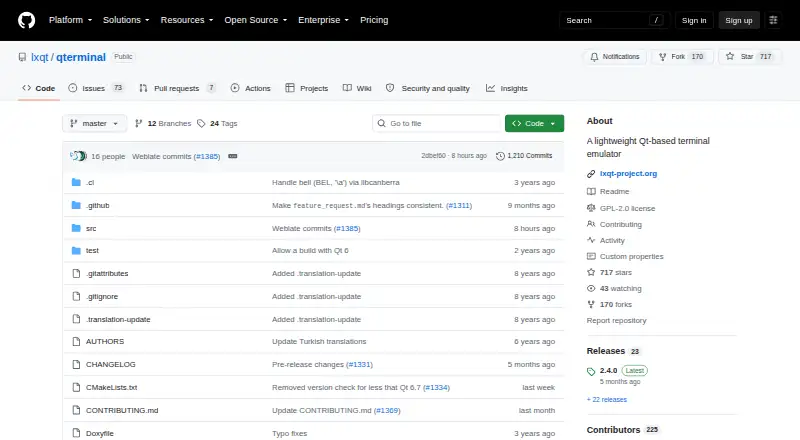
What QTerminal is
QTerminal is a lightweight Qt terminal emulator based on QTermWidget and maintained by the LXQt project. It can be used independently of the LXQt desktop environment. The interface supports multiple tabs and vertical or horizontal splits, plus a dropdown mode and text search. Users can configure the interface and edit shortcuts; QTerminal also integrates with the system clipboard and supports bookmarks for commands. The project lists Linux and macOS as supported platforms and says official binary packages are provided by major Linux and BSD distributions. The README identifies its license as GPLv2 or any later version, and the software is free. Building from source requires Qt 6.6.0 or later, QTermWidget, CMake 3.18.0 or later, and lxqt-build-tools. libcanberra is optional for terminal bells. The LXQt site lists discussions, a bug tracker, a wiki, and community chat channels. These options give readers several ways to customize and navigate terminal sessions, whether using QTerminal alongside LXQt or independently.
Good
- Supports multiple tabs and vertical or horizontal splits.
- Includes dropdown mode and text search.
- Offers interface configuration and shortcut editing.
- Integrates with the system clipboard and command bookmarks.
Watch out
- Building from source requires Qt 6.6.0 or later.
- Source builds require QTermWidget, CMake, and lxqt-build-tools.
- libcanberra is needed for terminal bells.
Who it suits
QTerminal suits Linux and macOS users who want tabs, split terminal views, and a configurable interface. It can also suit users who want a terminal emulator without adopting the LXQt desktop environment.
Verdict
QTerminal combines tabs, splits, search, and interface customization in a lightweight Qt terminal emulator. Its documented source-build requirements are worth checking if distribution packages are not the route you plan to use.
Plans and prices
From QTerminal's own pricing page, checked 9 Oct 2026.
| Plan | Price | What it gives you |
|---|---|---|
| QTerminal | Free | GPL-2.0-or-later; install via source or Linux/BSD distribution packages |
The facts
Each one read from QTerminal's own pages, with the date it was checked.
What it does
- Availability
- The project says official binary packages are provided by major Linux and BSD distributions.checked 9 Oct 2026
- Bookmarks
- QTerminal supports bookmarks for commands.checked 9 Oct 2026
- Build requirements
- Building from source requires Qt 6.6.0 or later, QTermWidget, CMake 3.18.0 or later, and lxqt-build-tools; libcanberra is optional for playing bells.checked 9 Oct 2026
- Clipboard
- QTerminal integrates with the system clipboard.checked 9 Oct 2026
- Clipboard and bookmarks
- QTerminal integrates the system clipboard and supports bookmarks for commands.checked 9 Oct 2026
- Community support
- The LXQt site lists discussions, a bug tracker, a wiki, and community chat channels.checked 9 Oct 2026
- Customization
- QTerminal has a configurable user interface and a shortcut editor.checked 9 Oct 2026
- Dropdown mode
- QTerminal includes a dropdown mode.checked 9 Oct 2026
- Independence
- The LXQt project maintains QTerminal, and it can be used independently of the LXQt desktop environment.checked 9 Oct 2026
- Interface and shortcuts
- The interface is configurable and includes a shortcut editor.checked 9 Oct 2026
- License
- The project is licensed under GPLv2 or any later version.checked 9 Oct 2026
- Optional dependency
- libcanberra is an optional dependency for playing terminal bells.checked 9 Oct 2026
- Product
- QTerminal is a lightweight Qt terminal emulator based on QTermWidget.checked 9 Oct 2026
- Purpose
- QTerminal is a lightweight Qt-based terminal emulator based on QTermWidget.checked 9 Oct 2026
- Scripting API
- Yeschecked 20 Sep 2026
- Search
- QTerminal includes text search.checked 9 Oct 2026
- Split panes
- Yeschecked 20 Sep 2026
- Standalone use
- The LXQt project maintains QTerminal, and it can be used independently of the LXQt desktop environment.checked 9 Oct 2026
- Support and community
- The LXQt site lists project discussions, a bug tracker, a wiki, and Matrix, Telegram, and IRC contact channels.checked 9 Oct 2026
- Tabs and splits
- Features include multiple tabs and vertical or horizontal terminal splits.checked 9 Oct 2026
Money
- Free plan
- Yeschecked 20 Sep 2026
Where it runs
- Linux and BSD availability
- The project says official binary packages are provided by all major Linux and BSD distributions.checked 9 Oct 2026
- Supported platforms
- linux,macoschecked 20 Sep 2026
The full review of QTerminal
Overview
QTerminal is a lightweight, Qt-based terminal emulator maintained by the LXQt project, though it runs independently of the LXQt desktop. It is a sensible fit for people who want a configurable terminal workspace with tabs and split sessions at no cost. Its focus is command-line work, not a general-purpose development environment.
Key features
Multiple tabs and vertical or horizontal splits let users keep several sessions together, making it easier to move between related command-line tasks without managing separate windows. Dropdown mode adds another way to open the terminal, and text search helps find output in a session. These conveniences serve regular terminal use well, but do not expand QTerminal beyond its role as a terminal emulator.
The configurable interface and shortcut editor give users control over layout and keyboard operation. Clipboard integration supports moving text between the terminal and other applications, while command bookmarks provide a way to return to useful commands. A scripting API, color management, and a metadata viewer add further capabilities for users who need them.
Because QTerminal is based on QTermWidget, building it from source requires Qt 6.6.0 or later, QTermWidget, CMake 3.18.0 or later, and lxqt-build-tools. The optional libcanberra dependency enables terminal bells. Those requirements matter most to people compiling their own copy; official binary packages are provided by major Linux and BSD distributions.
Pricing
QTerminal costs nothing under the QTerminal plan and is licensed under GPL-2.0-or-later. There is no paid tier or free trial to weigh against it. Users can install it from Linux or BSD distribution packages or build it from source; the latter route calls for the Qt, QTermWidget, CMake, and lxqt-build-tools dependencies. This suits anyone seeking a no-cost terminal without a subscription or seat limit.
Platforms
QTerminal supports Linux and macOS. Official binary packages are provided by major Linux and BSD distributions, while source builds have the documented dependency requirements above. The project also identifies BSD package availability, although BSD is not included in the supported-platform listing. Linux users have the clearest package route; macOS users should consider the platform support in light of their preferred installation method.
Who it's for
QTerminal suits Linux users who want tabs, splits, search, and interface controls in a free application, including people who do not use LXQt. Command bookmarks and shortcut editing are useful for users who want a more tailored terminal workflow. It is less compelling for readers looking for a broader development suite or who want to avoid checking build dependencies when compiling from source.
Pros and cons
- Pros: Tabs and horizontal or vertical splits keep multiple sessions in one workspace.
- Pros: Interface configuration, shortcut editing, clipboard integration, and command bookmarks support a customizable workflow.
- Pros: Free, GPL-2.0-or-later software with Linux and BSD distribution packages.
- Cons: Source compilation requires several specific dependencies, including Qt 6.6.0 or later and CMake 3.18.0 or later.
- Cons: QTerminal remains a terminal emulator rather than a broader development environment.
Alternatives
For other terminal-emulator choices, browse Terminal Emulators. The other linked alternatives are image viewers rather than terminal tools: ImageGlass is a freemium image viewer for Linux, macOS, and Windows; XnConvert is a freemium option with a free plan for private, educational, and nonprofit use; Geeqie, nomacs, Pineapple Pictures, and qView are free or freemium image-viewing options; ApolloOne is a macOS image viewer with a free version and a paid annual subscription; and FastStone Image Viewer is a Windows image viewer with free personal and educational use and a paid commercial license. For image-viewer recommendations, see Photo Viewer Software.
Verdict
Choose QTerminal if you want a free, independent-of-LXQt terminal with tabs, splits, and useful interface customization, particularly on Linux. Its practical strengths are session organization and workflow controls without a purchase cost. Look elsewhere if you need more than a terminal emulator or are unwilling to manage the dependencies involved in a source build.
Alternatives to QTerminal
- 1
Termalin
Free planiOSWebAPILinux7.7From $8 a month - 2

Warp
Free planLinuxmacOSSelf-hostedWindows7.6From $50 a month - 3

MobaXterm
Free planWindows7.4From $69 a year - 4
Cool Retro Term
Free planOpen sourceLinuxmacOSSelf-hosted7.1Free plan - 5

Contour
Free planLinuxmacOSWindows6.8Free plan - 6
gitsome
Free planLinuxmacOSSelf-hostedWindows6.8Free plan