
ImageGlass
ImageGlass is a desktop application for browsing and viewing image files on Windows, macOS, and Linux.
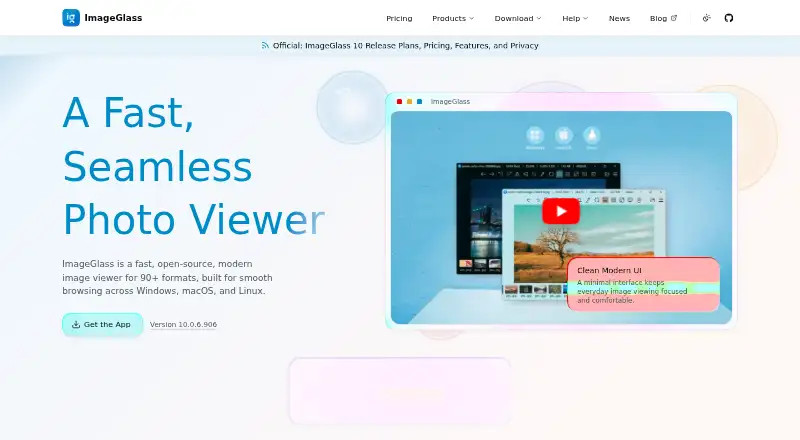
What ImageGlass is
ImageGlass is a desktop application for browsing and viewing image files on Windows, macOS, and Linux. It supports more than 90 formats, including WEBP, GIF, SVG, PNG, JXL, HEIC, and RAW. Viewing tools include slideshows, thumbnails, color picking, hardware-accelerated rendering, and EXIF viewing through ExifGlass. Built-in editing covers rotation, flipping, cropping, lossless compression, and resizing. The free Classic edition is GPLv3. Pro Individual costs $14.90 USD as a one-time purchase for one user or device, while Pro Team costs $69.00 USD once for up to three users or devices. Pro adds an HDR Tone Mapper, free and margin panning, File Watcher, custom mouse clicks, and settings and feature locks. ImageGlass can associate external apps for editing, and developers can build extensions with its SDK. The app says it does not scan image libraries for analytics or send images, file names, or folder paths elsewhere. Listed ImageGlass 10 requirements include Windows 10/11, macOS 14+ on Apple Silicon, or Linux Desktop X11 x64.
Good
- Supports more than 90 image formats.
- Classic edition is free and GPLv3.
- Includes rotating, cropping, and resizing tools.
- Pro licensing uses local verification without an account.
Watch out
- macOS 14+ requirement specifies Apple Silicon.
- Linux requirement specifies Desktop X11 x64.
- Pro Business is subscription-priced at $9,917 a year.
Who it suits
ImageGlass suits people who want a desktop viewer for varied image formats, with basic editing and metadata viewing. Pro may appeal to individuals or teams needing its extra viewing controls and commercial-use licensing.
Verdict
ImageGlass combines broad format support with viewing and basic editing tools across desktop platforms. Check the edition license and operating-system requirements, especially for Pro features or a specific Linux setup.
Plans and prices
From ImageGlass's own pricing page, checked 15 Oct 2026.
| Plan | Price | What it gives you |
|---|---|---|
| Classic | Free | unlimited users · GPLv3 · all versions · community support · none |
| Pro Business | $9.99 a month | seat-based commercial use · priority support · all versions · graduated volume pricing · from $9.99 per seat per month; yearly option from $99 per seat per year |
| Pro Individual | $14.90, paid once | 1 user or device · personal use · ImageGlass 10.x · standard purchase help · one-time |
| Pro Team | $69, paid once | up to 3 users or devices · personal and commercial use · ImageGlass 10.x · standard purchase help · one-time |
| Pro Commercial Source License | Priced on request | negotiated non-exclusive MIT source grant for an agreed version · future versions and support excluded unless separately agreed · custom price |
The facts
Each one read from ImageGlass's own pages, with the date it was checked.
What it does
- Animation support
- Animated GIF, WEBP, APNG and SVG content can be viewed, with frame controls for pausing, saving or exporting frames.checked 15 Oct 2026
- API examples
- The API reference includes commands for navigation, default-viewer registration, file watching and applying JSON settings.checked 15 Oct 2026
- Codec plugins
- Native codec plugins can add opening or saving support for formats not handled by built-in engines.checked 15 Oct 2026
- Color tools
- A built-in color picker supports multiple color representations.checked 15 Oct 2026
- Deployment limit
- The documentation says locked settings do not prevent a user who can run command-line arguments from changing file associations.checked 15 Oct 2026
- Editing
- Built-in editing features include rotating, flipping, cropping, lossless compression, and resizing.checked 3 Oct 2026
- Enterprise deployment
- Administrators can deploy MSI or MSIX packages, machine-wide policies and Pro licenses; MSI supports x64 installation for all users.checked 15 Oct 2026
- External tools
- The documentation describes external applications that can follow photo navigation and run host commands.checked 15 Oct 2026
- Format conversion
- Classic includes conversion between many common image formats.checked 15 Oct 2026
- Format coverage
- The product advertises support for more than 90 formats, including WEBP, GIF, SVG, PNG, JXL, HEIC and RAW.checked 15 Oct 2026
- Format support
- The product supports over 90 image formats, including WEBP, GIF, SVG, PNG, JXL, HEIC, and RAW formats.checked 3 Oct 2026
- Hardware rendering
- Images are rendered with hardware acceleration, including very large files.checked 15 Oct 2026
- Input methods
- Images can be opened by drag-and-drop or by pasting image data, files or paths from the clipboard.checked 15 Oct 2026
- Integrations
- External apps can be associated for editing, custom hotkeys can integrate with external apps, and developers can build extensions with the ImageGlass SDK.checked 3 Oct 2026
- Licence
- Classic source code is GPLv3, while the published SDK uses the MIT license.checked 15 Oct 2026
- Licensing privacy
- Pro uses local license verification and requires no account, online activation, or device lock.checked 3 Oct 2026
- Limit: editing depth
- The independent roundup said ImageGlass has fewer editing and effects options than larger competing products.checked 15 Oct 2026
- Limit: organization
- The G2 reviewer wanted built-in functionality for organizing or managing image collections.checked 15 Oct 2026
The company
- Company headquarters
- LinkedIn lists headquarters in Singapore.checked 15 Oct 2026
- Company size
- LinkedIn lists ImageGlass as a self-employed organization with one employee.checked 15 Oct 2026
- Founded
- LinkedIn gives 2010 as the founding year.checked 15 Oct 2026
- Maker
- Creator Dương Diệu Pháp describes himself as a software engineer from Vietnam.checked 3 Oct 2026
- Maker identity
- Official copyright and licence pages identify Duong Dieu Phap as the author.checked 15 Oct 2026
Where it runs
- Limit: older independent platform assessment
- A 2025 review listed ImageGlass as Windows-only and therefore did not credit macOS or Linux support available in the later ImageGlass 10 release.checked 15 Oct 2026
The full review of ImageGlass
Overview
ImageGlass is a desktop image viewer for people who work with varied image formats and want basic image adjustments in the same application. It is a strong fit for viewers who value local privacy and extensibility, but Pro features and platform requirements make edition choice worth checking first.
Support for more than 90 formats, including RAW, HEIC, SVG and JXL, gives ImageGlass useful breadth for mixed image collections. Color management and metadata viewing add practical context, while the absence of side-by-side comparison makes it less suited to workflows centered on comparing images.
Its privacy stance is unusually direct: ImageGlass says it does not scan image libraries for analytics or send images, filenames or folder paths elsewhere. External editing apps can be associated, custom hotkeys can connect to them, and developers can build extensions with the ImageGlass SDK. Plugin safeguards require permission on first load and disable a plugin if its binary signature changes unexpectedly.
Key features
- Broad format handling: More than 90 formats, including WEBP, GIF, PNG, HEIC, JXL and RAW, reduce the need to switch viewers for different file types. Conversion tools add utility, though ImageGlass is principally a viewer rather than a full editing suite.
- Browsing tools: Hardware-accelerated rendering and smart caching support image viewing, with thumbnails and slideshows for navigating collections. Color picking is useful for checking colors; EXIF details are accessed through ExifGlass.
- Basic edits: Rotate, flip, crop, resize and lossless compression cover routine adjustments. These are convenient for quick changes, but users needing a more extensive editing workflow should pair ImageGlass with an external editor.
- Pro controls: Pro adds an HDR Tone Mapper, free and margin panning, File Watcher, custom mouse clicks, settings lock and feature lock. These additions are most relevant to people who need those specific viewing and control options; the Classic edition remains the free route for core viewing.
- Local licensing and privacy: Pro license verification is local, with no account, online activation or device lock. The app also says it does not transmit image content or file and folder names.
Pricing
ImageGlass is freemium, with a free 14-day Business license to evaluate Pro features across an organization. The paid options differ substantially by audience, permitted use and update scope:
| Plan | Price and terms | Best fit |
|---|---|---|
| Classic | free; unlimited users, GPLv3, all versions and community channels. | Individuals or organizations that can use the free GPLv3 edition and do not need Pro capabilities. |
| Pro Individual | $14.90, paid once; one user or device, personal use, Pro v10.x and standard purchase help. | One personal user who wants Pro v10.x features. |
| Pro Team | $69, paid once; up to three users or devices, commercial use, Pro v10.x and standard purchase help. | Small commercial use within the three-user/device limit. |
| Pro Business | $9,917 a year; subscription with monthly or yearly options, seat-based commercial Pro, all versions while active, priority support and volume pricing as low as $19/seat. | Organizations needing commercial seats, ongoing versions or priority support; volume pricing may suit larger deployments. |
Classic gives up Pro features, while the two one-time Pro purchases are limited to v10.x rather than all versions. Business includes all versions only while its subscription is active. Pro Individual is personal-use only, and Pro Team caps coverage at three users or devices; Business is the commercial, seat-based option.
Platforms
ImageGlass supports Windows, macOS and Linux, but the ImageGlass 10 requirements are specific: Windows 10 or 11 x64 or arm64, version 1809 or later; macOS 14 or later on Apple Silicon; and Linux Desktop X11 x64. The Linux requirement is narrower than the general platform label, so users should confirm their setup matches before choosing it.
Who it's for
ImageGlass suits people who want a privacy-conscious desktop viewer for mixed-format collections, with color management, metadata viewing, conversion and quick basic edits. Its extension options also suit users who want to connect external editors or build add-ons. It is a less convincing choice for image comparison workflows or anyone expecting a complete editing environment in one app.
Pros and cons
Pros
- More than 90 supported formats, including RAW, HEIC, SVG and JXL, cover a wide range of collections.
- Local handling claims and local Pro license verification avoid sending image-library data or requiring online activation.
- Classic is free for unlimited users and includes all versions under GPLv3.
- Pro offers organization-oriented features, with a 14-day Business evaluation and priority support for Business subscribers.
Cons
- No side-by-side comparison, a meaningful omission for users who regularly judge two images together.
- Basic edits are limited to routine operations such as cropping and resizing, so more involved editing calls for an external app.
- ImageGlass 10's Linux support is restricted to Desktop X11 x64, and macOS requires version 14 or later on Apple Silicon.
- Pro Individual is personal-use only; the one-time paid plans cover v10.x, while all-version coverage requires an active Business subscription.
Alternatives
Photo Viewer Software is a useful starting point for comparing viewers across the category.
- XnConvert is another freemium option for Windows, macOS and Linux; its private, educational and nonprofit plan is free, while a company license is offered for 100 or more licenses.
- Geeqie is a free, GPLv2 option for Linux, macOS and Windows if you prefer free open software.
- Ghost Commander is a free Android alternative.
- nomacs is free for private and commercial use under GPLv3 across Linux, macOS and Windows.
- ApolloOne is a macOS-only freemium alternative, with a free version and a paid annual Standard subscription.
- FastStone Image Viewer is a Windows-only freemium alternative, free for personal and educational use, with a commercial lifetime license.
- IrfanView is a Windows-only freemium alternative with free private, non-commercial use and a commercial license.
- QTerminal is a free alternative available for Linux and macOS.
Verdict
Choose ImageGlass if you want a desktop viewer with unusually broad format support, useful basic edits and a clear local-privacy approach. The free Classic edition is compelling for straightforward viewing; choose Pro when its specific controls or commercial terms matter. Look elsewhere if side-by-side comparison is essential, if you need deeper editing, or if your device falls outside the stated ImageGlass 10 requirements.
Getting started
- Visit https://imageglass.org/ to get started.
- Choose the Classic edition or a Pro license.
- Install on Windows, macOS, or Linux, checking the listed ImageGlass 10 requirements for your system.
- Use Classic for free, or use the free 14-day Business license to evaluate Pro features across an organization.
- Associate external editing apps or explore the SDK if those connections are useful.
Limits worth knowing
Classic includes community channels for support. The least expensive paid option, Pro Individual at 14.90 USD once, covers one user or device, personal use, and Pro v10.x; its purchase help is standard.
Questions
Is ImageGlass free?
Yes. Classic costs nothing, is GPLv3, and allows unlimited users.
How much do the Pro licenses cost?
Pro Individual costs 14.90 USD once, and Pro Team costs 69.00 USD once.
Is there a free trial?
The site offers a free 14-day Business license to evaluate Pro features across an organization.
Which platforms does ImageGlass support?
It supports Windows, macOS, and Linux. Listed ImageGlass 10 requirements are Windows 10/11 x64 or arm64 version 1809 or later, macOS 14+ on Apple Silicon, and Linux Desktop X11 x64.
What does Pro add?
Pro adds an HDR Tone Mapper, free and margin panning, File Watcher, custom mouse clicks, settings lock, and feature lock.
Does ImageGlass connect to external apps?
External apps can be associated for editing, and custom hotkeys can integrate with external apps. Developers can build extensions with the ImageGlass SDK.
Alternatives to ImageGlass
- 1
Pineapple Pictures
Free planOpen sourceLinuxmacOSSelf-hostedWindows7.3Free plan - 2

ApolloOne
Free planmacOS7.2From $14.99 a year - 3

Pictureflect Photo Viewer
Free planWindows7.2$4.99 one-time - 4
FastStone Image Viewer
Free planWindows6.8Free plan - 5
IrfanView
Free planWindows6.8Free plan - 6

Photo Mechanic
macOSWindows6.5From $149 a year