
QOwnNotes
QOwnNotes is a free, GPL-licensed plain-text Markdown note-taking application for GNU/Linux, macOS and Windows.
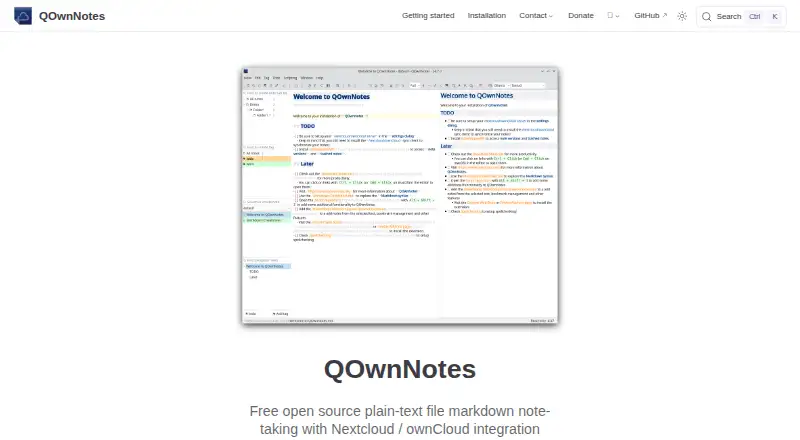
What QOwnNotes is
QOwnNotes is a free, GPL-licensed plain-text Markdown note-taking application for GNU/Linux, macOS and Windows. It stores notes as Markdown files in a folder on the user's computer, and supports offline access. Editing features include Markdown highlighting and preview, hierarchical tags and subfolders, wiki-style links, Vim mode and portable mode. Optional encryption includes built-in AES-256 and support for custom methods such as PGP. The app can integrate with Nextcloud and ownCloud for note sharing, task lists, note history and trashed-note access. It also supports Evernote and Joplin imports and can use existing text or Markdown files directly. QOwnNotes does not sync notes or media files itself; the site recommends using a sync client such as Nextcloud or ownCloud. Its browser extension can clip text, capture screenshots and manage bookmarks, and works offline. A web companion can send phone photos to the current desktop note; its communication is transport encrypted, and the site says images are not stored on the server. The software is open source, with no paid plans stated.
Good
- Notes remain plain-text Markdown files locally.
- Offline access is supported.
- Optional encryption includes built-in AES-256.
- Supports Nextcloud and ownCloud note sharing.
Watch out
- Does not sync notes or media files itself.
- No paid plans are stated.
Who it suits
QOwnNotes suits people who want notes stored as local Markdown files and prefer to choose their own sync client. It also fits users seeking offline access, note encryption or Nextcloud and ownCloud integrations.
Verdict
QOwnNotes gives users local Markdown notes, offline access and a range of editing and integration options. Plan to choose a separate sync client if you need notes or media synchronized between devices.
Plans and prices
From QOwnNotes's own pricing page, checked 11 Oct 2026.
| Plan | Price | What it gives you |
|---|---|---|
| QOwnNotes | Free | Free open source software; no paid plans stated |
The facts
Each one read from QOwnNotes's own pages, with the date it was checked.
What it does
- AI integrations
- Built-in AI support includes script integration for providers such as OpenAI and Groq, plus an MCP server for searching and fetching notes.checked 11 Oct 2026
- Editor features
- Features include Markdown highlighting and preview, hierarchical tags and subfolders, wiki-style links, Vim mode, and portable mode.checked 11 Oct 2026
- Encryption
- Optional note encryption includes built-in AES-256 and support for custom methods such as PGP.checked 11 Oct 2026
- Imports
- The feature list includes Evernote and Joplin imports and use of existing text or Markdown files without importing them.checked 11 Oct 2026
- Integrations
- Nextcloud,ownCloud,Nextcloud Notes,QOwnNotesAPI,Nextcloud Deck,CalDAV,Dropbox,Syncthing,Seafile,BitTorrent Sync,Gitchecked 20 Sep 2026
- Local files
- Notes are stored as plain-text Markdown files in a folder on the user's computer.checked 11 Oct 2026
- Nextcloud and ownCloud
- It can integrate with Nextcloud and ownCloud for note sharing, task lists, note history, and trashed-note access.checked 11 Oct 2026
- Note sharing
- Yeschecked 20 Sep 2026
- Offline access
- Yeschecked 20 Sep 2026
- Privacy metrics
- Optional usage metrics are stored on a self-hosted Matomo server, are anonymized after receipt, and can be turned off in the application settings.checked 11 Oct 2026
- Purpose
- QOwnNotes is a GPL-licensed plain-text Markdown note-taking application for GNU/Linux, macOS, and Windows.checked 11 Oct 2026
- Support
- The project directs users with package or repository problems to its GitHub issues page and invites community discussion in its Telegram group.checked 11 Oct 2026
- Sync limit
- QOwnNotes does not sync notes or media files itself; the site recommends using a sync client such as Nextcloud or ownCloud.checked 11 Oct 2026
- Web companion
- The web app lets users send phone photos to the current desktop note; its communication is transport encrypted and the site says images are not stored on the server.checked 11 Oct 2026
- Who it suits
- Its local Markdown files and optional sync-client workflow suit users who want to keep notes as files and choose how to sync them.checked 11 Oct 2026
Where it runs
- Browser extension
- The browser extension can clip selected text, take screenshots, and manage bookmarks, and the concept page says it works offline.checked 11 Oct 2026
- Supported platforms
- web,windows,macos,linux,android,chrome_extensionchecked 20 Sep 2026
Money
- Free plan
- Yeschecked 20 Sep 2026
The company
- Maker
- The site credits Patrizio Bekerle as the maker, and says the application is developed mostly by one person in spare time.checked 11 Oct 2026
The full review of QOwnNotes
QOwnNotes is a free, GPL-licensed Markdown note application built around ordinary files on your computer. It is best for people who want control over storage and are prepared to choose their own synchronization method. The tradeoff is clear: the editor is flexible, but syncing is your responsibility.
Overview
QOwnNotes stores notes as plain-text Markdown files in a folder, so they remain readable and editable outside the application. You can open existing text or Markdown files without importing them, or bring in notes from Evernote and Joplin. This file-first approach suits users with an established folder-based workflow and avoids a proprietary note format. It is less suitable if you want a managed cloud workspace that synchronizes immediately without additional setup.
The project is GPL-licensed and developed mostly by one person in spare time. That makes the software free and community-oriented, while users with package or repository problems are directed to GitHub issues and community discussion is available through Telegram.
Key features
The editor combines Markdown highlighting and preview with hierarchical tags, subfolders, wiki-style links, Vim mode, and portable mode. These tools support both structured knowledge bases and keyboard-focused writing without hiding the underlying files. Optional encryption includes built-in AES-256 and custom methods such as PGP, giving privacy-conscious users a choice of protection approaches.
QOwnNotes does not synchronize notes or media files itself. A separate client such as Nextcloud or ownCloud is required for that workflow; their integrations can add note sharing, task lists, note history, and access to trashed notes. The broader integration set includes Nextcloud Notes, QOwnNotesAPI, Nextcloud Deck, CalDAV, Dropbox, Syncthing, Seafile, BitTorrent Sync, and Git. This range is valuable for users who already operate one of those services, but selecting, configuring, and maintaining the sync path remains part of the job.
The browser extension clips selected text, captures screenshots, and manages bookmarks, with offline operation described for the extension. Built-in AI support connects through scripts to providers such as OpenAI and Groq, while an MCP server can search and fetch notes. A web companion sends phone photos to the current desktop note using transport encryption; the images are not stored on the server. Optional usage metrics go to a self-hosted Matomo server, are anonymized after receipt, and can be disabled in settings.
Pricing
QOwnNotes costs nothing under its single free plan. It is free open-source software, with no paid plans stated and no free trial because there is no paid tier to trial. This is a strong fit for individuals, hobbyists, and technically comfortable teams that can provide their own sync infrastructure. The price does not include a hosted synchronization service, so any separate provider or server remains your responsibility.
Platforms
Supported applications cover Windows, macOS, Linux, Android, and the web, with a Chrome extension. The broader platform listing also includes API, extension, and self-hosted options. Offline access is supported, which matters when working away from a connection, but cross-device consistency still depends on the sync client you select.
Who it's for
Choose QOwnNotes if you want Markdown files you can manage directly, offline work, and the freedom to pair notes with Nextcloud, ownCloud, Git, Syncthing, or another supported integration. It is particularly well suited to privacy-minded users, Vim users, and people migrating from Evernote or Joplin. Look elsewhere if you expect built-in, turnkey synchronization or do not want to administer a separate service.
Pros and cons
Pros
- Plain-text Markdown storage: Notes remain portable and usable with other tools.
- Strong editor controls: Tags, subfolders, wiki links, Vim mode, preview, and portable mode support demanding workflows.
- Flexible privacy options: AES-256, PGP methods, offline access, and disableable anonymized metrics give users control.
- Broad integration choice: Nextcloud, ownCloud, Git, Dropbox, Syncthing, and others accommodate existing setups.
Cons
- No built-in synchronization: Notes and media require a separate client and its ongoing maintenance.
- Setup burden: Sharing, history, tasks, and trash access depend on configuring compatible services.
- Solo-led development: The project is developed mostly by one person in spare time.
Alternatives
Notesnook is a freemium option with mobile, desktop, and web apps, a free tier, and a free trial.
Cryptee suits readers seeking an open-source, freemium privacy-focused service with a 100 MB free tier.
PrivacyNotes offers AGPL-published apps and encryption across mobile, desktop, and web on a freemium model.
Dash is an open-source freemium choice with offline web PWA use and no account required to begin.
Standard Notes is a freemium alternative centered on end-to-end encryption, offline access, and device sync.
Turtl is a freemium option with collaboration Spaces and storage tiers.
Nolio provides free encrypted notes across desktop, mobile, and web.
Notyra is free, requires no account to begin, and describes its code as auditable.
For broader comparisons, see Secure Notes Apps and Note-taking apps.
Verdict
QOwnNotes is a strong recommendation for users who want durable Markdown files, offline access, encryption choices, and control over how synchronization works. Choose it when supplying a separate sync client is acceptable; look elsewhere when seamless, provider-managed cross-device syncing is the priority.
Alternatives to QOwnNotes
- 1

Cryptee
Free planOpen sourceAndroidiOSWebLinux8.6From €3 a month - 2
PrivacyNotes
Free planOpen sourceAndroidiOSWebAPI8.4Free plan - 3
Turtl
Free planOpen sourceAndroidAPIExtensionLinux8.4From $3 a month - 4
Notesnook
Free planAndroidiOSWebLinux8.0From $1.99 a month - 5

Dash
Free planAndroidiOSWebmacOS7.7Free plan - 6

Joplin
AndroidiOSWebExtension7.6From €2.99 a month