Ptions+
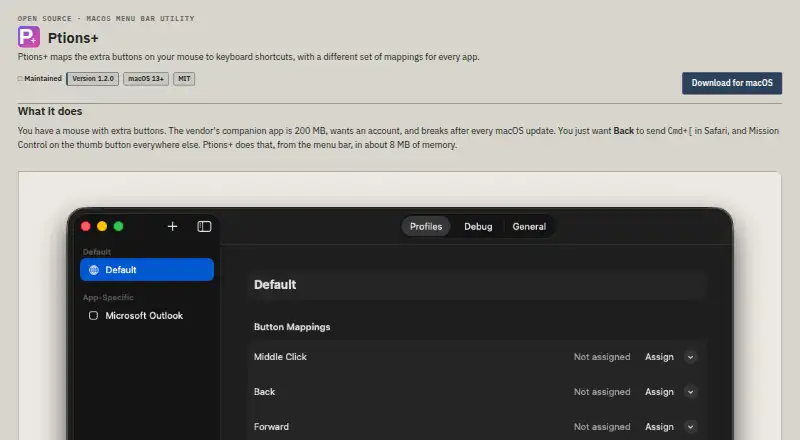
The facts below are what the maker publishes about Ptions+, checked and dated. Our editors have not written about it yet.
Plans and prices
From Ptions+'s own pricing page, checked 12 Oct 2026.
| Plan | Price | What it gives you |
|---|---|---|
| Free | Free | MIT-licensed app; macOS 13 Ventura or later; Accessibility permission required |
The facts
Each one read from Ptions+'s own pages, with the date it was checked.
What it does
- Accessibility
- Settings are keyboard-operable and controls expose names to VoiceOver; recording a custom shortcut requires a physical key press.checked 12 Oct 2026
- Actions
- It includes system actions such as Mission Control, App Exposé, Show Desktop, and Launchpad, plus 18 preset actions.checked 12 Oct 2026
- Compatibility
- Ptions+ requires macOS 13 Ventura or later and supports Apple silicon and Intel Macs.checked 12 Oct 2026
- Download security
- The maker says release downloads are signed with a Developer ID certificate, notarised by Apple, and include a SHA-256 file for verification.checked 12 Oct 2026
- Mouse support
- The maker lists Logitech MX and G models and generic three- or five-button mice; other mice may work if they send HID otherMouseDown events.checked 12 Oct 2026
- Multiple mice
- Each connected mouse can have its own model and mappings; without Input Monitoring, mice use shared mappings.checked 12 Oct 2026
- Notable limitation
- Ptions+ cannot work alongside vendor mouse software that captures the same buttons before the app can see them.checked 12 Oct 2026
- Permissions
- Accessibility permission is required for mouse and keyboard events, while Input Monitoring is optional and used to distinguish multiple mice.checked 12 Oct 2026
- Preset actions
- It includes 18 preset actions, including switching Spaces, Spotlight, Screenshot Tool, Notification Center, and Lock Screen.checked 12 Oct 2026
- Privacy
- The maker says the app makes no network requests and has no telemetry, analytics, crash reporting, update check, or account; configuration stays in a JSON file on the Mac.checked 12 Oct 2026
- Project license
- The maker describes Ptions+ as open source and lists the MIT license.checked 12 Oct 2026
- Purpose
- Ptions+ maps extra mouse buttons to keyboard shortcuts, with different mappings for each app.checked 12 Oct 2026
- Release security
- The maker says release downloads are signed with a Developer ID certificate, notarised by Apple, and accompanied by a SHA-256 file.checked 12 Oct 2026
- Shortcut recorder
- The shortcut recorder captures combinations that macOS normally reserves, including Control plus Arrow.checked 12 Oct 2026
- Support
- The project says issues and pull requests are read and links to its support guidance and issue tracker.checked 12 Oct 2026
- Supported operating systems
- macoschecked 22 Sep 2026
- System actions
- It supports Mission Control, App Exposé, Show Desktop, and Launchpad, with a fallback when macOS does not offer an action.checked 12 Oct 2026
- Vendor software limitation
- Ptions+ cannot work alongside vendor mouse software that captures the same buttons first.checked 12 Oct 2026
- What it does
- Ptions+ maps extra mouse buttons to keyboard shortcuts, with separate mappings for each app.checked 12 Oct 2026
Where it runs
- App profiles
- Per-app profiles let apps such as Safari and Xcode use different button mappings, with defaults for other apps.checked 12 Oct 2026
- Per-app profiles
- Yeschecked 22 Sep 2026
- Platform requirements
- Ptions+ requires macOS 13 Ventura or later and supports Apple silicon or Intel Macs.checked 12 Oct 2026
Money
- Free plan
- Yeschecked 22 Sep 2026
Alternatives to Ptions+
- 1
SteelSeries GG
Free planAndroidiOSWebAPI8.3Free plan - 2
be quiet! IO Center
Free planWebLinuxmacOSWindows7.9Free plan - 3

Akko Cloud Driver
Free planWebmacOSWindows7.8Free plan - 4
MonsGeek Driver
Free planWebLinuxmacOSWindows7.8Free plan - 5
ROCCAT Swarm II
Free planAndroidiOSWindows7.8Free plan - 6
Rebind
Free planmacOSWindows7.7$140 one-time