ProtoSketch
ProtoSketch is vector graphics design software for work spanning web, app, logo, icon, print, illustration, UI, and UX design.
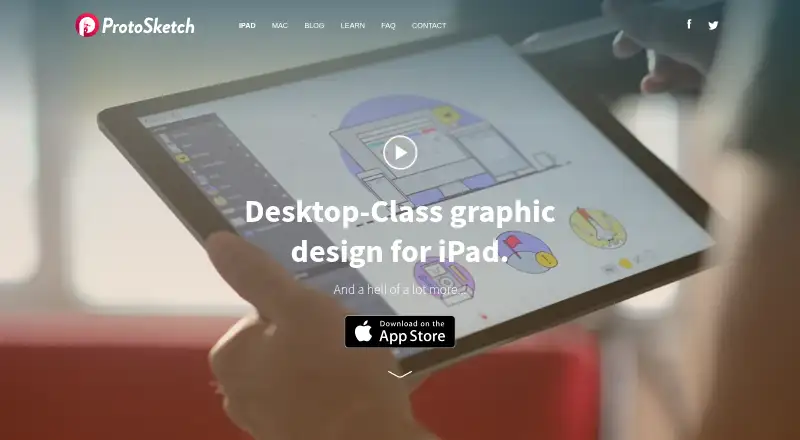
What ProtoSketch is
ProtoSketch is vector graphics design software for work spanning web, app, logo, icon, print, illustration, UI, and UX design. Its stated audience also includes product and marketing designers. The app provides vector tools, icons, fonts, UI elements, and basic and complex shapes. For layout precision, it offers smart guides, snapping to objects and an adjustable grid, plus alignment and distribution commands. Styling controls include fills, strokes, gradients, RGB sliders, color wheels, hex input, blending modes, and opacity. Users can draw and edit paths, work with layers and groups, and apply divide, exclude, minus front, unite, and intersect operations. ProtoSketch currently exports PDF and supports PNG and JPG import and export, as well as SVG data exchange; SVG import is planned for a future version. On iOS, Dropbox can import documents and images, while iCloud syncing across Mac, iPad, and iPhone is planned. ProtoSketch Lite costs nothing and allows up to five documents, with some libraries locked and exports restricted to social shares and ProtoSketch files. The Mac version is in development.
Good
- Provides smart guides, snapping, and adjustable grid
- Supports layers, groups, and path editing
- Exports PDF and supports PNG and JPG
- Lite plan includes all listed core vector tools
Watch out
- Lite limits users to five documents
- Some libraries are locked in Lite
- Lite export is restricted to social shares and ProtoSketch files
- Mac version is in development
Who it suits
ProtoSketch may suit designers creating vector artwork for web, apps, logos, print, UI, or UX. Its Lite plan is for people who can work within a five-document limit and restricted exports.
Verdict
ProtoSketch combines vector editing, layout controls, and multiple styling options for a range of design work. Check the Lite document and export limits, and note that its Mac version is still in development.
Plans and prices
From ProtoSketch's own pricing page, checked 9 Oct 2026.
| Plan | Price | What it gives you |
|---|---|---|
| ProtoSketch Lite | Free | Maximum 5 documents · Some libraries locked · Export restricted to social shares and ProtoSketch files |
The facts
Each one read from ProtoSketch's own pages, with the date it was checked.
What it does
- Audience
- The maker describes it as a design tool for web, logo, mobile, icon, UX, UI, product, print, and marketing designers.checked 9 Oct 2026
- Collaboration
- The Mac page describes planned real-time collaboration where teammates can work in one document and see changes immediately.checked 9 Oct 2026
- Design tools
- The homepage describes vector tools, icons, fonts, UI elements, basic and complex shapes, and says the app is easy to learn.checked 8 Oct 2026
- File formats
- The FAQ says ProtoSketch currently exports PDF and supports PNG and JPG import and export; it describes SVG import and export support for exchanging data.checked 8 Oct 2026
- Imports and exports
- The FAQ says ProtoSketch currently exports PDF, imports and exports PNG and JPG, and supports SVG exchange; it says SVG import support is planned for a future version.checked 9 Oct 2026
- Integrations
- The FAQ says iOS supports Dropbox for importing documents and images, and that iCloud syncing across Mac, iPad, and iPhone is planned.checked 9 Oct 2026
- Integrations and sync
- The FAQ says iCloud syncing across Mac, iPad, and iPhone is planned, and iOS will support Dropbox import; it also mentions “Open in…” functionality.checked 8 Oct 2026
- Interactive prototypes
- Nochecked 22 Sep 2026
- Layers and groups
- The app supports layers with locking and opacity controls, as well as groups.checked 9 Oct 2026
- Lite limits
- The App Store listing says ProtoSketch Lite allows up to 5 documents, locks some libraries, and restricts export to social shares and ProtoSketch files.checked 9 Oct 2026
- Precision
- The app provides smart guides, snapping to objects and an adjustable grid, plus alignment and distribution commands.checked 8 Oct 2026
- Pricing
- The FAQ describes the price as subscription-free but does not state an amount.checked 8 Oct 2026
- Privacy
- The privacy policy says the application collects cookie and usage data, including through Google Analytics, and describes registration and authentication as data-use purposes.checked 8 Oct 2026
- Product
- ProtoSketch is vector graphics design software for web, app, logo, icon, print, illustration, and UI/UX design.checked 9 Oct 2026
- Security and privacy
- The privacy policy says the application collects cookie and usage data and that the controller takes appropriate security measures to prevent unauthorized access, disclosure, modification, or destruction.checked 9 Oct 2026
- Styling
- Object styling includes fills, strokes, shadows, RGB and HSB sliders, a color wheel, HEX input, swatches, line weights, caps, angles, opacity, and blending modes.checked 9 Oct 2026
- Support
- The FAQ directs users to contact the maker through Facebook, Twitter, or its email form.checked 9 Oct 2026
- Vector editing
- The FAQ says users can draw and edit paths, perform divide, exclude, minus front, unite, and intersect operations, and use layers and groups.checked 8 Oct 2026
Money
- Free plan
- Yeschecked 22 Sep 2026
The company
- Headquarters
- Sofia, Bulgariachecked 28 Sep 2026
- Maker
- The site identifies Codemotion, Ltd. as the owner of ProtoSketch and lists Vasil Enchev as CEO/Product; it does not state headquarters or founding year.checked 9 Oct 2026
- Team collaboration
- Nochecked 22 Sep 2026
Where it runs
- Mac status
- The maker’s Mac page says ProtoSketch for Mac is in development and invites users to sign up for the beta.checked 9 Oct 2026
- Platforms
- The FAQ says the iPhone version was expected after iPad; it says there were no plans for Linux, Windows, or Android, while the Mac page says the Mac app is in development.checked 9 Oct 2026