Project Kestrel
Project Kestrel is a bird-photography app for organizing, culling, reviewing, and searching image collections.
What Project Kestrel is
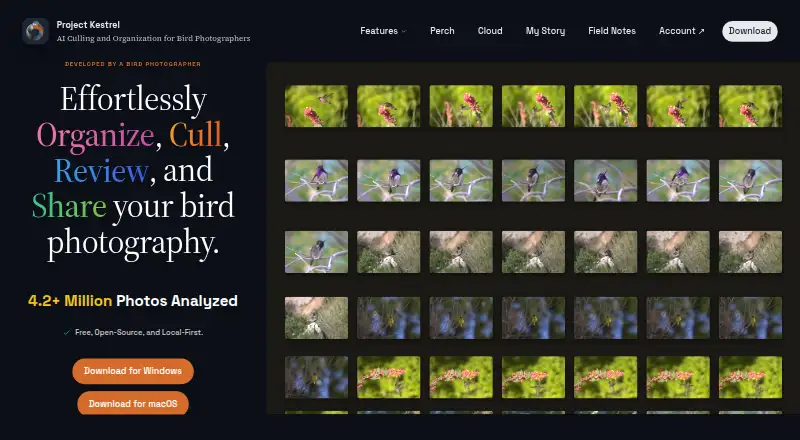
Project Kestrel is a bird-photography app for organizing, culling, reviewing, and searching image collections. Its desktop app runs locally on Linux, macOS, and Windows without an account or internet connection; photos stay on the user’s machine unless an optional cloud or sharing feature is used. Kestrel groups rapid bursts into scenes for comparison, detects and segments birds, and scores frames for noise, motion blur, and focus to bring sharper shots forward. Detected birds can be tagged by species and family, making them searchable across folders and outings. Automatic classification covers North American species, while manual tagging can be used for birds worldwide. Ratings can be exported to Lightroom, Darktable, Capture One, and other editors. Perch lets users upload an outing, add timeline notes, and share it. The desktop app is free and open source, and the Apple App Store version is listed at 10.00 USD as a one-time purchase. Cloud Compute includes 2,500 free images for each new account. The maker describes Kestrel as a one-person project built for the developer’s own bird photography.
Good
- Groups burst photos into scenes for comparison.
- Scores frames for noise, blur, and focus.
- Searches detected birds by species and family.
- Exports ratings to Lightroom, Darktable, and Capture One.
- Desktop app works offline without an account.
Watch out
- Automatic classification currently covers North American species.
- The App Store version costs 10.00 USD once.
- Optional cloud or sharing features involve uploading photos.
Who it suits
Project Kestrel suits bird photographers who want to sort and review image collections, search detected species, and export ratings to editing software. Users who need automatic species classification beyond North America can add manual tags for birds worldwide.
Verdict
Project Kestrel combines local photo culling and bird search with optional sharing and cloud analysis. Its free desktop app and editor exports will appeal to bird photographers who want these tools in a local workflow.
Plans and prices
From Project Kestrel's own pricing page, checked 7 Oct 2026.
| Plan | Price | What it gives you |
|---|---|---|
| Cloud Compute — free allowance | Free | 2,500 images · 2,500 images free for every new account; no card required. |
| Project Kestrel desktop app | Free | Windows and macOS downloads; Linux run from source · Free and open source; always free. |
| Apple App Store version | $10, paid once | macOS; same app as the free direct download · One-time purchase; includes automatic updates. |
| Blue Jay | $20 a month | 15,000 images / month · $20/mo |
| Sandpiper | $50 a month | 50,000 images / month · $50/mo |
The facts
Each one read from Project Kestrel's own pages, with the date it was checked.
What it does
- Bird detection
- Its object-detection model locates and segments birds so background pixels do not affect quality scores.checked 7 Oct 2026
- Cloud image handling
- Cloud Compute says source images are deleted after analysis, with automatic cleanup and storage expiry safeguards if deletion fails.checked 7 Oct 2026
- Cloud result retention
- Cloud results are deleted when downloaded or after 30 days if they are not downloaded; job records retain counts and timestamps for billing.checked 7 Oct 2026
- Editor integrations
- Kestrel can export ratings for Lightroom, Darktable, Capture One, and other editors.checked 7 Oct 2026
- Intended users
- The maker describes Project Kestrel as a one-person project built for the developer's own bird photography.checked 7 Oct 2026
- Local privacy
- The desktop app runs locally without requiring an account or internet connection, and photos stay on the user's machine unless an optional cloud or sharing feature is used.checked 7 Oct 2026
- Perch sharing
- Perch lets users upload an outing, add notes to its timeline, and share it with others.checked 7 Oct 2026
- Purpose
- Project Kestrel organizes, culls, reviews, and helps search bird photography.checked 7 Oct 2026
- Scene grouping
- It groups high-speed bursts into scenes so similar frames can be compared together.checked 7 Oct 2026
- Sharpness scoring
- A machine-learning model scores each frame for noise, motion blur, and focus, sorting the sharpest shots first.checked 7 Oct 2026
- Species coverage
- Automatic classification currently covers North American species; manual tagging can cover birds worldwide.checked 7 Oct 2026
- Species search
- Kestrel tags detected birds by species and family so users can search across folders and outings.checked 7 Oct 2026
- Support and feedback
- The download page asks users to send feedback through the button inside the app.checked 7 Oct 2026
The full review of Project Kestrel
Overview
Project Kestrel is a bird-photography culling and search app for photographers working through bursts and large outings. It suits people who want a local desktop workflow with editor exports, alongside optional cloud analysis and outing sharing. Its specialized bird-aware scoring is the draw; automatic species classification is currently limited to North American birds.
Key features
Culling and species search
Kestrel groups high-speed bursts into scenes, keeping similar frames together for comparison. Its detection model locates and segments birds before quality scoring, so background pixels do not affect the score. A machine-learning model assesses noise, motion blur, and focus, then sorts sharper frames first. That gives photographers a useful way to prioritize a review, but it does not remove the need to choose the final keepers themselves.
Detected birds are tagged by species and family, allowing searches across folders and outings. Automatic classification currently covers North American species. Photographers elsewhere can tag birds manually, but give up the convenience of automatic identification. Ratings can be exported to Lightroom, Darktable, Capture One, and other editors, so Kestrel can fit into an existing editing workflow rather than replace it.
Local work, cloud analysis, and sharing
The desktop app runs locally without an account or internet connection, and photos stay on the user's machine unless an optional cloud or sharing feature is used. Perch sharing lets users upload an outing, add timeline notes, and share it with others. That is useful for collaboration, but it means the outing is no longer confined to the local workflow.
Cloud Compute says source images are deleted after analysis and has automatic cleanup and storage-expiry safeguards if deletion fails. Results are deleted when downloaded or after 30 days if left there; job records retain image counts and timestamps for billing. Users who prefer not to send photos to a cloud service can stick to the desktop app, while those using cloud analysis should weigh its convenience against that data handling.
Pricing
The free Project Kestrel desktop app is open source and always free. Windows and macOS downloads are provided; Linux users run it from source. This is the right starting point for photographers who want local culling and search without a subscription, though it does not include a paid cloud image allowance.
Cloud Compute includes 2,500 images free for every new account, with no card required. For larger cloud workloads, Blue Jay costs $20 per month for 15,000 images per month, while Sandpiper costs $50 per month for 50,000 images per month. The higher allowance suits regular high-volume use; the cheaper tier is the more measured option. Both are image-limited monthly plans, so the included volume matters more than the desktop app's free status for users relying on cloud analysis.
The Apple App Store version costs $10.00 USD once and includes automatic updates. It is the same app as the free direct download, making the one-time purchase a choice for macOS users who prefer that distribution route rather than a different feature tier.
Platforms
Project Kestrel supports Linux, macOS, and Windows. Windows and macOS downloads are available, while Linux users run the app from source. The Apple App Store purchase applies to macOS.
Who it's for
Kestrel is best suited to bird photographers sorting many burst frames who want bird-aware quality scoring, cross-outing species search, and ratings that carry into their editor. The local desktop app makes it a strong fit for users who want to keep photos on their own machine. Photographers outside North America can still use the culling workflow, but should expect to tag species manually; users who want cloud processing or sharing should consider the separate image quotas and upload tradeoff.
Pros and cons
- Pros: Scene grouping and bird-focused scoring help narrow down similar burst frames by noise, blur, and focus.
- Pros: Local operation needs no account or internet connection, and ratings export to major photo editors including Lightroom.
- Pros: Free desktop software and a 2,500-image cloud allowance let users begin without a subscription or payment card.
- Cons: Automatic species classification currently covers North American species only; other regions require manual tagging.
- Cons: Cloud Compute has monthly image caps, and using cloud analysis or Perch sharing means uploading photos.
- Cons: Linux users run the app from source rather than downloading a packaged build.
Alternatives
Browse our AI Photo Culling Software category to compare more culling tools. Choose Zno if you want a freemium photo workflow that spans mobile, desktop, and web platforms. Facet is a free, local option for users who want no cloud, accounts, or subscriptions. PixCull is another free option, with MIT-licensed open-source software and optional cloud model calls that may incur API costs. Optyx offers free image rating and metadata with Lightroom support, making it an option for users focused on that workflow. RawPicker is another freemium choice. Kepla has a free private preview and is a macOS option. ShotSieve is free and open source for Linux, macOS, and Windows, though its learned-IQA dependencies and model weights have separate terms. Futura Photo offers a free Community plan with unlimited analyses of up to 100 images each, for users who can work within that per-analysis limit.
Verdict
Choose Project Kestrel if you photograph birds and want local-first culling, bird-aware scoring, species search, and editor exports in one desktop workflow. Its main advantage is that focused combination without requiring an account or connection for local work. Look elsewhere if automatic species classification beyond North America is essential, or if your preferred workflow depends on packaged Linux downloads or avoiding cloud uploads altogether.
Alternatives to Project Kestrel
- 1

Selekt
Free planWebmacOSWindows7.7From A$16 a month - 2
Zno
Free planAndroidiOSWebmacOS7.6Free plan - 3

AccioPix Photo Culling
Free planWebAPImacOSWindows7.5₹0.20 one-time - 4

Facet
Free planOpen sourceWebAPILinuxmacOS7.5Free plan - 5
Memory Ease
AndroidiOSWebmacOS7.0From $7.50 a month - 6

Cull AI Studio
macOSWindows6.9From $159 a year