
Positron
Positron is a free data science IDE for Python and R on Linux, macOS, and Windows.
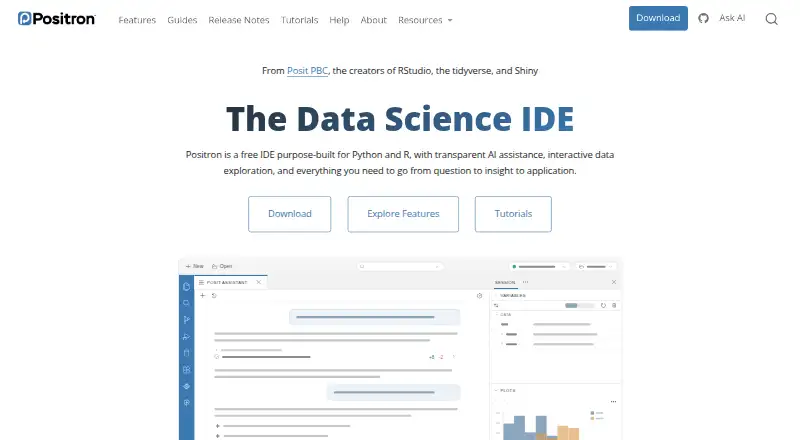
What Positron is
Positron is a free data science IDE for Python and R on Linux, macOS, and Windows. Its Data Explorer provides an interactive interface for exploring and manipulating large local or remote datasets. It supports Jupyter notebooks and Quarto for developing reproducible reports and presentations, and includes a Connections pane for database connections and a Catalog Explorer. Listed capabilities also include an integrated debugger, advanced code intelligence, remote development, and Python environment tools. Posit Assistant can use a live Python or R session as context, including loaded data, plots, and console history. AI features require users to bring their own provider key, and the user or organization pays that provider directly. When an external model provider is used, Posit says it does not track, collect, or store prompts, code, or conversations entered through Positron AI features. Posit does not support code written or generated in Positron. Publishing projects to Posit Connect requires a subscription. Positron Pro on Posit Workbench is listed for enterprise governance, scalable compute, SSO, and dedicated support.
Good
- Free desktop IDE supports both Python and R.
- Data Explorer handles large local or remote datasets.
- Supports Jupyter notebooks and Quarto.
- AI Assistant can use live session context.
Watch out
- AI features require a provider key and direct provider payment.
- Posit does not support code written or generated in the IDE.
- Publishing to Posit Connect requires a subscription.
Who it suits
Positron suits data science work in Python or R, particularly for people who use notebooks, Quarto, database connections, or local and remote datasets. Its AI assistance requires a separate provider key and payment arrangement.
Verdict
Positron brings data exploration, notebooks, and database connections into a free desktop IDE for Python and R. Consider the separate AI provider costs and Posit Connect subscription requirement if those capabilities matter to your workflow.
Plans and prices
From Positron's own pricing page, checked 2 Oct 2026.
| Plan | Price | What it gives you |
|---|---|---|
| Positron (Desktop) | Free | Desktop IDE for local computers · Supports R and Python · Posit Connect subscription required to publish there · Free |
| Positron Pro (Posit Workbench) | Priced on request | Requires Posit Workbench · Enterprise governance, scalable compute, SSO, and dedicated support · Talk to sales |
The facts
Each one read from Positron's own pages, with the date it was checked.
What it does
- AI assistance
- Posit Assistant connects to live Python or R sessions and can use loaded data, plots, and console history as context.checked 2 Oct 2026
- AI privacy
- When using an external model provider, Posit says it does not track, collect, or store prompts, code, or conversations entered through Positron AI features.checked 2 Oct 2026
- AI support limit
- Posit does not provide support for code written or generated in Positron, including code produced with AI features.checked 2 Oct 2026
- Database connectivity
- Positron provides a Connections pane for database connections and a Catalog Explorer.checked 2 Oct 2026
- Data exploration
- The Data Explorer is described as a way to explore and manipulate large local or remote datasets through an interactive UI.checked 2 Oct 2026
- License
- Positron is licensed under the Elastic License 2.0, which Posit describes as source-available.checked 2 Oct 2026
- Notebooks and reports
- Positron supports Jupyter notebooks and Quarto for developing reproducible reports and presentations.checked 2 Oct 2026
- Publishing
- Positron can publish projects to Posit Connect and Posit Connect Cloud using Posit Publisher; a Posit Connect subscription is required for publishing to Posit Connect.checked 2 Oct 2026
- Purpose
- Positron is a data science IDE purpose-built for Python and R.checked 2 Oct 2026
Money
- AI provider billing
- Positron AI features use a bring-your-own-key model, and users or their organizations pay their selected model provider directly.checked 2 Oct 2026
The company
- Headquarters
- Boston, Massachusetts, United Stateschecked 28 Sep 2026
- Maker
- Posit says RStudio, now Posit, was founded in 2009 to create high-quality open-source software for data scientists.checked 2 Oct 2026
- Team security
- Positron Pro on Posit Workbench offers server-based development, integration with existing SSO identity providers, and data governance tools such as AWS, Databricks, and Snowflake.checked 2 Oct 2026
Where it runs
- Platforms
- The download page provides desktop installers for Windows, macOS, and Linux.checked 2 Oct 2026
The full review of Positron
Positron is a desktop IDE built for data science in Python and R. It is best suited to people who want analysis, notebooks, and database access in one workspace. Its free desktop edition is compelling, though AI use may bring separate provider charges and publishing to Posit Connect requires a subscription.
Overview
Positron brings together tools for exploring data, writing code, and developing reports. Its emphasis on Python and R makes it a focused choice for data-science work rather than a general-purpose IDE pitch. A useful distinction is that the desktop IDE is free, while some adjacent services and capabilities have separate costs or requirements.
The Data Explorer provides an interactive way to explore and manipulate large local or remote datasets. Connections and a Catalog Explorer extend the workspace to database access. These tools make Positron a practical fit for analysis that moves between code, data, and reports; they do not remove the need to account for external provider billing or a Posit Connect subscription where those services are part of the workflow.
Key features
Python and R development
Positron supports both Python and R, with an integrated debugger, advanced code intelligence, and Python environment tools. Remote development is also supported. Together, these capabilities suit developers who need more than a basic editor, particularly when their work spans data exploration and code.
Data, notebooks, and publishing
The Data Explorer is designed for interactive work with large local or remote datasets. Jupyter notebook support and Quarto let users develop reproducible reports and presentations alongside their code. Posit Publisher can publish projects to Posit Connect and Posit Connect Cloud, but publishing to Posit Connect requires a Posit Connect subscription. That makes the IDE a better fit for users who already have access to that service than for someone seeking an all-in-one, no-subscription publishing setup.
AI assistance and privacy
Posit Assistant can connect to live Python or R sessions and use loaded data, plots, and console history as context. That session-aware context can be useful when asking for help with analysis, but it comes with two important caveats: users or their organizations pay the selected model provider directly, and Posit does not support code written or generated in Positron, including AI-generated code. When an external provider is used, Posit says it does not track, collect, or store prompts, code, or conversations entered through Positron AI features.
Team deployment
Positron Pro on Posit Workbench adds server-based development, integration with existing SSO identity providers, and governance tools for services such as AWS, Databricks, and Snowflake. It requires Posit Workbench, so it is aimed at organizations with enterprise deployment and governance needs rather than individuals looking for a paid desktop upgrade.
Pricing
| Plan | Price | What it includes |
|---|---|---|
| Positron (Desktop) | free | Free desktop IDE for local computers, supporting R and Python. A Posit Connect subscription is required to publish there. |
| Positron Pro (Posit Workbench) | Custom pricing | Requires Posit Workbench; includes enterprise governance, scalable compute, SSO, and dedicated support. |
The free desktop plan is the clear choice for individuals who need local Python or R development and do not need the Pro deployment model. There is no free trial because the desktop edition is free. Pro is for teams that need governed, scalable server-based development and can justify a sales-led enterprise arrangement. AI provider charges are separate from either plan, and a Posit Connect subscription is needed for publishing to Posit Connect.
Positron is licensed under the Elastic License 2.0, which Posit describes as source-available. That is worth considering for organizations evaluating licensing as part of adoption.
Platforms
The desktop IDE supports Windows, macOS, and Linux. This broad desktop coverage makes it a viable option for mixed-platform teams, while remote development and the Workbench offering address workflows that are not confined to local machines.
Who it's for
Choose Positron if you work in Python or R and want data exploration, database connections, notebooks, and reporting tools in the same IDE without paying for the desktop edition. It is especially suitable for analysts and data scientists who value interactive exploration and reproducible reports. Teams with SSO, governance, and scalable-compute requirements should evaluate Positron Pro alongside the Workbench requirement and custom pricing.
Look elsewhere if you need AI assistance with provider costs bundled into the IDE, support for AI-generated code, or Posit Connect publishing without a separate subscription. Users who only need a straightforward Python IDE may also prefer a narrower tool.
Pros and cons
Pros
- Free desktop edition for Python and R: Individuals can use the core IDE on local computers without a subscription.
- Data work in the IDE: Interactive exploration, database connections, notebooks, and Quarto reports support a connected analysis workflow.
- Advanced development tools: An integrated debugger, advanced code intelligence, Python environment tools, and remote development go beyond a bare editor.
- Session-aware AI context: Posit Assistant can draw on live sessions, loaded data, plots, and console history.
- Enterprise option: Workbench-based Pro adds SSO, governance tools, scalable compute, and dedicated support.
Cons
- AI is not bundled: Model-provider charges are paid separately by users or their organizations.
- No support for generated code: Posit does not support code written or generated in Positron, including code produced with its AI features.
- Publishing has a subscription dependency: Publishing to Posit Connect requires a Posit Connect subscription.
- Pro depends on Workbench: Enterprise capabilities require Posit Workbench, and the plan uses custom pricing.
- Source-available licensing: The Elastic License 2.0 may matter to organizations assessing licensing terms.
Alternatives
For a wider range of Python IDE choices, browse Python IDEs; for broader development environments, see IDE Software.
PyCharm is worth considering if you want a freemium IDE with a free tier and a paid Pro plan at $200 a year, billed per user annually; its free plan includes one month of Pro. For a free, open-source scientific Python IDE, Spyder is a more focused alternative. Spyder is also described as 100% free and open source, with no paid version.
Anvil is the alternative to consider when you want a free forever plan for cloud-hosted apps, including unlimited apps and one developer, with a 50,000-row Data Table cap. For a free IDE available on Windows, macOS, and Linux, Eric is another option. TigerJython is a free IDE maintained by a community focused on computer science education and Python.
NINJA-IDE is a free Python IDE with Windows and Linux installers; its macOS download is unavailable. PyScripter is a free option if you use Windows and Python 3.8 or later.
Verdict
Positron is a strong choice for Python and R data scientists who want a free desktop IDE that connects exploration, databases, notebooks, and reporting. Its main advantage is that breadth at no desktop cost; its main drawback is that AI provider charges and Posit Connect publishing sit outside that free offer. Choose it for integrated data work, and look elsewhere if you need those costs or code-support expectations covered within the IDE itself.
Alternatives to Positron
- 1

Anvil
Free planOpen sourceAndroidiOSWebAPI8.5From $12 a month - 2

PyCharm
Free planOpen sourceAPILinuxmacOSSelf-hosted8.2From $100 a year - 3
Wing Python IDE
APILinuxmacOSSelf-hosted7.3From $27 a year - 4
Eric
Free planLinuxmacOSWindows6.8Free plan - 5
Pyto
Free planiOSmacOS6.7$7.99 one-time - 6
Spyder
Free planWebLinuxmacOSWindows6.4Free plan