Eric
Eric is a Python editor and IDE built on Qt and Scintilla.
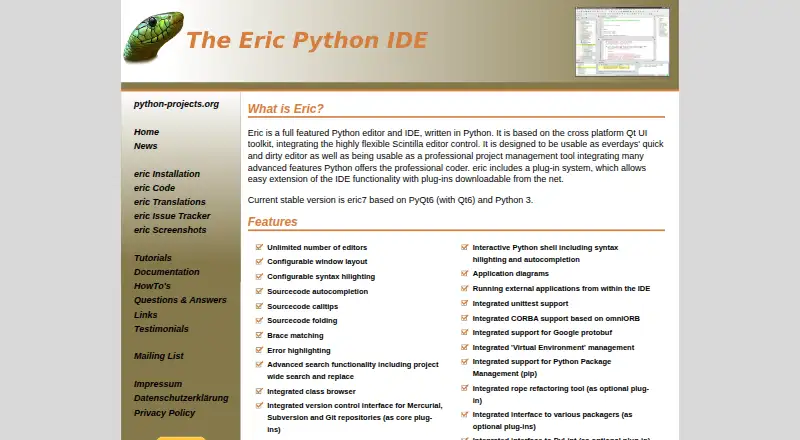
What Eric is
Eric is a Python editor and IDE built on Qt and Scintilla. The current stable version identified by its maker, eric7, uses PyQt6, Qt6, and Python 3. Editing features include syntax highlighting, autocompletion, calltips, source folding, brace matching, error highlighting, and project-wide search and replace. Development tools include a Python debugger with multi-thread and multiprocessing support, profiling, code coverage, code checking, task management, and unittest support. Python tooling covers pip, virtual environments, and an interactive shell, with rope available as an optional refactoring plug-in. Core plugins provide interfaces for Mercurial, Subversion, and Git repositories, while additional extensions can be loaded from the Plugin Repository. Eric also lists chat and a shared editor as cooperation functions. It runs on Linux, macOS, and Windows, and installation is available through PyPI or a distribution archive. The maker recommends using a Python virtual environment for installation; Windows users are directed to a ZIP archive. The site lists English, German, Russian, and Spanish language options.
Good
- Includes Python debugger, profiler, and unittest support
- Supports Git, Mercurial, and Subversion interfaces
- Provides pip and virtual environment management
- Extensible through its Plugin Repository
Watch out
- Maker recommends installation in a Python virtual environment
- Windows users are directed to a ZIP archive
Who it suits
Eric suits Python developers looking for an editor with debugging, testing, profiling, and version-control interfaces. It is available across Linux, macOS, and Windows.
Verdict
Eric combines editing, project tools, debugging, testing, and Python environment management in a free IDE. Its broad feature set may fit project work as well as quick editing.
Plans and prices
From Eric's own pricing page, checked 30 Sep 2026.
| Plan | Price | What it gives you |
|---|---|---|
| eric7 | Free | No price or usage limits stated |
The facts
Each one read from Eric's own pages, with the date it was checked.
What it does
- Additional integrations
- The site lists support for Google protobuf, omniORB based CORBA, PyLint and packaging interfaces through optional plug-ins, plus Django, Pyramid, and Flask among optional development tools.checked 30 Sep 2026
- Collaboration
- The IDE includes chat and a shared editor as cooperation functions.checked 30 Sep 2026
- Current version
- The site identifies eric7, based on PyQt6, Qt6, and Python 3, as the current stable version.checked 30 Sep 2026
- Debugging and testing
- The IDE includes a Python debugger with multi-thread and multiprocessing support, profiling, code coverage, and unittest support.checked 29 Sep 2026
- Development tools
- Eric includes a class browser, project wide search and replace, a Python debugger, profiling, code coverage, code checking, task management, and unittest support.checked 30 Sep 2026
- Download and installation
- The maker offers downloads through SourceForge and describes installation through PyPI or a distribution archive.checked 29 Sep 2026
- Editing
- Features include unlimited editors, configurable layouts and syntax highlighting, autocomplete, calltips, code folding, brace matching, and error highlighting.checked 30 Sep 2026
- Extensions
- Eric has a plugin system, and plugins can be loaded from its Plugin Repository.checked 29 Sep 2026
- Installation
- Eric can be installed through PyPI or from a distribution archive, and the site recommends installing it in a Python virtual environment.checked 30 Sep 2026
- Intended use
- The maker says Eric is designed for both quick editing and professional project management.checked 29 Sep 2026
- Languages
- The site says Eric is available in English, German, Russian, and Spanish.checked 29 Sep 2026
- License
- The official site displays a GPLv3 logo for Eric.checked 30 Sep 2026
- Operating systems
- The installation instructions cover Linux, macOS, and Windows; Windows users are directed to download the ZIP archive.checked 30 Sep 2026
- Plugins
- Users can load plug-in extensions from the IDE's Plugin Repository, and the site documents a plug-in API for developers.checked 30 Sep 2026
- Privacy
- The maker's website privacy policy says the site uses cookies and server logs that may include IP addresses, and describes data subject rights under GDPR.checked 30 Sep 2026
- Product
- Eric is a Python editor and IDE written in Python and based on Qt and Scintilla.checked 30 Sep 2026
- Python tooling
- Eric includes virtual environment management, pip support, an interactive Python shell, and an optional rope refactoring plug-in.checked 30 Sep 2026
- Support
- The maker provides user questions and answers, an issue tracker link, and a mailing list link.checked 29 Sep 2026
- Version control
- Core plug-ins provide interfaces for Mercurial, Subversion, and Git repositories.checked 30 Sep 2026
The company
- Maker
- The site identifies Detlev Offenbach as the maker and lists an address in Freising, Germany.checked 30 Sep 2026
The full review of Eric
Eric is a desktop Python IDE for developers who want editing, debugging, testing, and project tools in one workspace. It is best suited to people managing Python projects across Linux, macOS, or Windows; its main trade-off is a broad, plugin-based environment that may be more than a quick script needs.
Overview
Eric is written in Python and built on Qt and Scintilla. The current stable version, eric7, is based on PyQt6, Qt6, and Python 3. Its focus is unusual in a useful way: it aims to serve both quick editing and professional project management, so it can cover a substantial range of Python work without a paid plan.
For everyday editing, Eric offers syntax highlighting, autocompletion, calltips, source folding, brace matching, error highlighting, and project-wide search and replace. That combination is well suited to developers working through larger codebases, where navigation and search matter as much as typing. For isolated edits or scripts, the full IDE may be unnecessary.
Key features
Editing, debugging, and testing
Eric includes a Python debugger with support for multithreaded and multiprocessing programs, along with profiling, code coverage, code checking, and unittest support. A class browser, task management, and an interactive Python shell add project context and a place to run code. This makes Eric a stronger fit for developers who want to move between writing, diagnosing, and checking code in one application than for users who only need a lightweight editor.
Project workflow and extensibility
Core plugins provide interfaces for Git, Mercurial, and Subversion repositories, while the plugin system lets users add extensions from Eric’s Plugin Repository. The IDE also includes chat and a shared editor for cooperation. These tools give project work more structure, though users who need only version control and editing can avoid much of the surrounding feature set.
Python environment tools include pip and virtual environment management. Eric also supports Google protobuf and CORBA through omniORB, with optional integrations such as rope refactoring and PyLint. The documented plugin API is useful for developers who want to build extensions, though the value of the plugin model depends on whether the built-in capabilities fit the work at hand.
Pricing
Eric’s eric7 plan costs free. It is a free IDE with no stated usage caps, so it suits individuals and project teams seeking a full Python toolset without a subscription. There is no cheaper tier that trades away debugging, testing, or environment management; the practical cost is choosing and maintaining a feature-rich desktop workflow.
Platforms
Eric supports Linux, macOS, and Windows. Installation is offered through PyPI or a distribution archive, and the maker recommends using a Python virtual environment. Windows users should download the ZIP archive. The interface is available in English, German, Russian, and Spanish.
Who it's for
Eric is a sensible choice for Python developers who want project-wide editing, debugging, profiling, testing, version-control interfaces, and environment management in a single free IDE. Its cross-platform support also suits developers who move among Linux, macOS, and Windows. A user focused on quick edits, or one who prefers a narrower tool, may be better served by a simpler editor.
Pros and cons
- Pros: Debugging, profiling, coverage, code checking, and unittest support give developers tools for diagnosing and checking Python projects, not just editing them.
- Pros: Git, Mercurial, and Subversion interfaces, plus pip and virtual environment management, bring common project tasks into the IDE.
- Pros: It is free across Linux, macOS, and Windows, with a plugin system for extensions.
- Cons: The breadth of project and development tools may be unnecessary for users who only want to edit a short script.
- Cons: Windows installation uses a ZIP archive, while the other installation paths are PyPI or a distribution archive; users should choose the route suited to their setup.
Alternatives
For a different Python IDE, browse Python IDEs; for a broader comparison, see Integrated Development Environments or IDE Software.
- Anvil is a better fit for someone who wants a cloud-hosted app-building workflow: its free plan includes unlimited apps, cloud hosting, any library, one developer, and 50,000 Data Table rows.
- Spyder is worth considering for a free scientific Python IDE across Linux, macOS, Windows, and web.
- Positron is another free desktop option for Linux, macOS, and Windows.
- NINJA-IDE is a free GPLv3+ Python IDE; its listed installers cover Windows and Linux, while a macOS download is unavailable.
- PyCharm offers a free plan with one month of Pro included, while Pro costs $200 a year per user; it is the alternative to consider if that paid tier fits the required workflow.
- PyScripter is a free alternative for Windows users running Python 3.8 or later.
- Pyzo is a free, open-source computing environment for Linux, macOS, and Windows.
- QPython is an Android Python IDE, with a standard edition and a plus edition that has extended Android permissions.
Verdict
Choose Eric if you want a free, cross-platform Python IDE that brings editing, project tools, debugging, testing, and environment management together. Its strongest reason to choose is the breadth of that integrated toolkit at no cost. Look elsewhere if your work is limited to quick edits or you would rather use a more focused Python environment.
Getting started
- Open the Eric website.
- Choose an installation route through PyPI or a distribution archive.
- On Windows, download the ZIP archive.
- Install Eric in a Python virtual environment, as the maker recommends.
- Load extensions from the IDE's Plugin Repository if needed.
Questions
Is Eric free?
Yes. The eric7 plan is free, and no price or usage limits are stated.
Which operating systems does it support?
Eric runs on Linux, macOS, and Windows.
How can I install Eric?
The maker offers installation through PyPI or a distribution archive. Windows users should download the ZIP archive, and the maker recommends a Python virtual environment.
What is the current stable version?
The site identifies eric7 as the current stable version, based on PyQt6, Qt6, and Python 3.
Is Eric open source?
The official site displays a GPLv3 logo for Eric.
Who makes Eric?
The site's copyright and imprint identify Detlev Offenbach; the imprint lists an address in Freising, Germany.
Alternatives to Eric
- 1

Anvil
Free planOpen sourceAndroidiOSWebAPI8.5From $12 a month - 2

PyCharm
Free planOpen sourceAPILinuxmacOSSelf-hosted8.2From $100 a year - 3
Wing Python IDE
APILinuxmacOSSelf-hosted7.3From $27 a year - 4
Pyto
Free planiOSmacOS6.7$7.99 one-time - 5
Spyder
Free planWebLinuxmacOSWindows6.4Free plan - 6
TigerJython
Free planWebLinuxmacOSWindows6.4Free plan