Portfolio Performance
Portfolio Performance is a free desktop application for tracking securities across accounts and examining portfolio results.
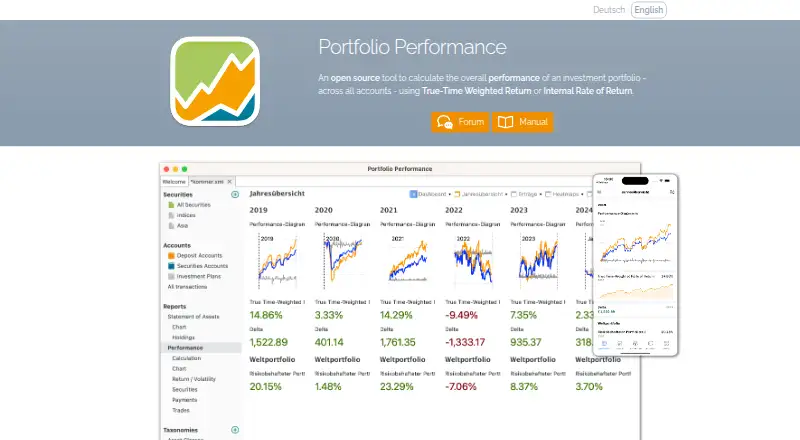
What Portfolio Performance is
Portfolio Performance is a free desktop application for tracking securities across accounts and examining portfolio results. It calculates performance using true-time weighted return and internal rate of return, and provides overviews, key figures, charts, historical prices, security classification, allocation analysis, risk analysis, and rebalancing tools. Users can enter purchases, sales, taxes, fees, and other transactions, or import statements from online banks and brokers. Historical prices can be drawn from sources including Yahoo Finance, Quandl, AlphaVantage, CoinGecko, Yahoo Finance, HTML, and JSON, as well as a built-in provider for German and US stocks. Portfolio data is stored in XML and can be exported as CSV or JSON. Its mobile app reads a desktop portfolio file for viewing and analysis, but portfolio data cannot be edited there. It supports Android and iOS, alongside desktop versions for Linux, macOS, and Windows. Optional mobile subscriptions are listed at $3 a month or $25 a year.
Good
- Calculates time-weighted return and internal rate of return
- Supports transaction entry and statement imports
- Includes allocation, risk, and tax-lot analysis
- Exports portfolio data as CSV or JSON
Watch out
- Mobile app cannot edit portfolio data
- Mobile app supports 36 of 48 desktop dashboard widgets
- Larger files and complex calculations may need a more powerful device
Who it suits
It suits investors who want to track securities across accounts and review performance, allocation, risk, or tax lots. Mobile users should be comfortable viewing portfolio files without editing them in the app.
Verdict
Portfolio Performance combines detailed portfolio tracking and analysis with a free desktop application. Its mobile app is for viewing and analysis rather than portfolio editing, and optional mobile subscriptions unlock dashboards.
Plans and prices
From Portfolio Performance's own pricing page, checked 4 Oct 2026.
| Plan | Price | What it gives you |
|---|---|---|
| Desktop | Free | Open-source desktop application |
| Premium (Monthly) | $3 a month | Optional mobile subscription; unlocks dashboards · Automatically renews unless canceled at least 24 hours before the current period ends |
| Premium (Yearly) | $25 a year | Optional mobile subscription; unlocks dashboards · Automatically renews unless canceled at least 24 hours before the current period ends |
The facts
Each one read from Portfolio Performance's own pages, with the date it was checked.
What it does
- Allocation analysis
- Yeschecked 20 Sep 2026
- Asset class coverage
- multi_assetchecked 20 Sep 2026
- Cloud storage
- The mobile app uses the mobile operating system and third-party cloud apps for file access; users report success with iCloud, Google Drive, OneDrive, and Jottacloud.checked 4 Oct 2026
- Data and export
- Portfolio data is stored in XML and can be exported as CSV or JSON.checked 4 Oct 2026
- License and history
- The project began in 2012 and its source code is licensed under the Eclipse Public License 1.0.checked 4 Oct 2026
- Mobile compatibility
- The app is compatible with iOS 12 and Android 7 or later, and the FAQ says larger files and complex calculations may require a more powerful device.checked 4 Oct 2026
- Mobile limits
- The FAQ says the mobile app supports 36 of 48 desktop dashboard widgets and lists several unsupported widgets, including volatility and portfolio fee rate.checked 4 Oct 2026
- Performance reporting
- Yeschecked 20 Sep 2026
- Portfolio analysis
- It provides portfolio overviews, key figures, charts, historical price tracking, security classification, asset allocation, and rebalancing.checked 4 Oct 2026
- Purpose
- The desktop application tracks securities portfolios across accounts and calculates performance using true-time weighted return and internal rate of return.checked 4 Oct 2026
- Risk analysis
- Yeschecked 20 Sep 2026
- Security and privacy
- The mobile app says password-protected files use AES256 encryption, financial bookings are processed on the phone, and basic local app usage does not transmit portfolio files to the service.checked 4 Oct 2026
- Support
- The maker directs users to its forum for help with the desktop product and provides support by email for the mobile app.checked 4 Oct 2026
- Tax-lot tracking
- Yeschecked 20 Sep 2026
- Transactions
- Users can record purchases, sales, taxes, fees, and other transactions, or import statements from online banks and brokers.checked 4 Oct 2026
The company
- Founded
- 2012checked 28 Sep 2026
Money
- Free plan
- Yeschecked 20 Sep 2026
- Mobile price feeds
- The mobile app supports configured historical price sources including Portfolio Report, Yahoo Finance, HTML, JSON, CoinGecko, and Eurostat HICP, but does not use latest-price configurations.checked 4 Oct 2026
- Price sources
- The desktop app supports historical prices from sources including HTML, JSON, Yahoo Finance, Quandl, AlphaVantage, CoinGecko, and a built-in provider for German and US stocks.checked 4 Oct 2026
Where it runs
- Mobile app
- The mobile app reads the desktop portfolio file for viewing and analysis, but users cannot edit portfolio data in the app.checked 4 Oct 2026
The full review of Portfolio Performance
Overview
Portfolio Performance is a free, open-source desktop application for tracking securities portfolios across accounts and analyzing their returns. It suits investors who want detailed portfolio records and analysis without paying for desktop software. The main trade-off is that its mobile app is for viewing and analysis, not editing.
Key features
The desktop application calculates both true time-weighted return and internal rate of return, giving investors complementary ways to assess performance. Overviews, charts, historical prices, security classification, allocation analysis, risk analysis, tax-lot tracking and rebalancing make it useful for examining both results and portfolio composition.
Users can record purchases, sales, taxes, fees and other transactions, or import statements from online banks and brokers. Historical prices can come from sources such as HTML, JSON, Yahoo Finance, Quandl, AlphaVantage and CoinGecko, alongside a built-in provider for German and US stocks. This flexibility helps cover different holdings, though it also makes price data dependent on the sources configured.
Portfolio data is stored in XML and can be exported as CSV or JSON. The source code is licensed under the Eclipse Public License 1.0. For mobile use, the app reads the desktop portfolio file; it does not let users edit portfolio data. It supports configured historical-price sources such as Yahoo Finance, CoinGecko and Eurostat HICP, but not latest-price configurations. Mobile users can access files through the operating system and third-party cloud apps; reported services include iCloud, Google Drive, OneDrive and Jottacloud.
The mobile app supports 36 of the desktop app's 48 dashboard widgets, with volatility and portfolio fee rate among those unavailable. It is compatible with iOS 12 and Android 7 or later, though large files and complex calculations may need a more powerful device. Password-protected files use AES256 encryption, financial bookings are processed on the phone, and basic local use does not transmit portfolio files to the service. Desktop help is directed to the maker's forum; mobile support is by email.
Pricing
| Plan | Price | What it includes |
|---|---|---|
| Desktop | free | Open-source desktop application |
| Premium (Monthly) | $3 a month | Optional mobile subscription that unlocks dashboards; renews automatically unless canceled at least 24 hours before the current period ends |
| Premium (Yearly) | $25 a year | Optional mobile subscription that unlocks dashboards; renews automatically unless canceled at least 24 hours before the current period ends |
The free desktop plan is the clear fit for investors who can manage their portfolio on a computer. The paid plans are for users who want dashboards in the mobile app; the annual subscription costs less than paying the monthly rate for a full year, but both renew automatically unless canceled in time.
Platforms
The desktop application is available for Linux, macOS and Windows; mobile apps are available for Android and iOS. The mobile app requires Android 7 or later or iOS 12 or later. It is a companion for reading and analyzing the desktop portfolio, not a standalone way to maintain it.
Who it's for
Portfolio Performance is a strong fit for investors who want detailed, multi-account securities tracking, multiple return calculations and control over transaction and price-source data, and who are comfortable using desktop software as the editing hub. It is a weaker fit for people who need to add or change transactions from their phone, or who expect every desktop dashboard widget and latest-price configuration to work in the mobile app.
Pros and cons
- Pros: The desktop application is free and open-source, with performance, allocation and risk analysis alongside tax-lot tracking.
- Pros: Transaction entry and statement imports support detailed portfolio records, while XML storage and CSV or JSON export offer portable data formats.
- Cons: Mobile access is limited to viewing and analysis, so portfolio changes still require the desktop application.
- Cons: The mobile app omits 12 desktop dashboard widgets, including volatility and portfolio fee rate, and does not use latest-price configurations.
- Cons: Large files and complex calculations may strain less powerful phones.
Alternatives
For more options, browse Portfolio Management Software. Tamarac is a paid alternative with web, iOS and Android platforms. Addepar is paid and web-based. Black Diamond Wealth Solutions is a paid option with web and mobile apps and no free plan. FinFolio is a paid option for web, iOS and Android. SimCorp One is paid. Wealthfolio offers a free plan and broader platform coverage, including self-hosted and web access; its Basic plan costs $2.99 a month, billed monthly, or $29 billed yearly, for one person and up to six devices with device sync but no broker connections. Landytech Sesame One is paid with no free plan and supports web and mobile; Sesame One Professional is under £100m AUM, while Sesame One adds a dedicated success manager and SLA, with custom pricing. Masttro is a paid option for web, iOS and Android.
Verdict
Choose Portfolio Performance if you want a free desktop base for rigorous portfolio tracking and analysis, with a mobile companion for checking rather than changing records. Look elsewhere if phone-based portfolio editing is essential or you need the full desktop dashboard set on mobile.
Alternatives to Portfolio Performance
- 1
rotki
Free planOpen sourceWebAPILinuxmacOS8.8From €25 a month - 2
Stock Rover
Free planAndroidiOSWebWindows8.7From $24 a month - 3
Sharesight
Free planAndroidiOSWebAPI8.6From $7 a month - 4
Snowball Analytics
Free planAndroidiOSWeb8.6From $79.99 a year - 5
Finary
Free planAndroidiOSWebAPI8.5From €44.99 a year - 6

FundCount
AndroidiOSWebAPI8.3From $4,000 a year