
Pixivite
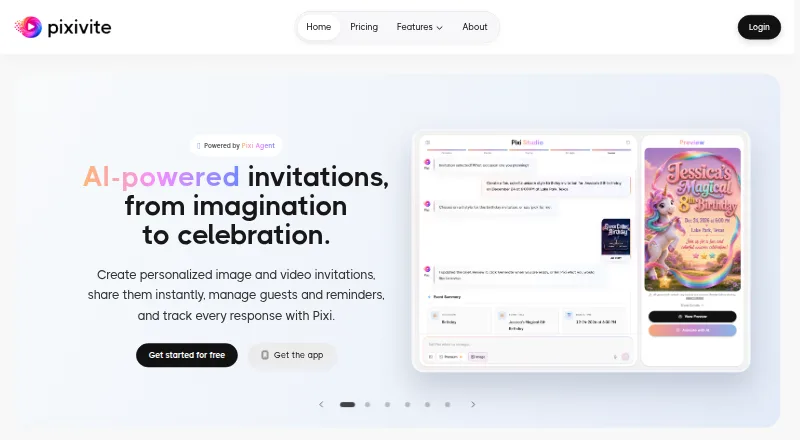
Pixivite creates personalized image and video invitations and greeting cards using AI, with tools for sharing and managing event responses.
What Pixivite is
Pixivite creates personalized image and video invitations and greeting cards using AI, with tools for sharing and managing event responses. Its Pixi Agent turns a text prompt into an invitation by coordinating creative models. Users can also choose from hundreds of templates, select an art style or describe their own direction. Event tools track RSVPs, manage plus-ones, send reminders and support AI-powered timelines. Invitations can be distributed through links, QR codes, Instagram, Snap, WhatsApp, email and SMS. Dedicated apps are available for iOS and Android, alongside the web service. The free plan includes five AI generations, image output only and events with up to 50 guests. Plus costs $15.99/mo and includes image and video output and up to 500 guests per event; Pro costs $29.99/mo and supports up to 1,000 guests. The privacy policy says the service does not sell personal data and is designed to comply with applicable data protection laws.
Good
- Creates image and video invitations from prompts.
- Hundreds of templates and style choices.
- Tracks RSVPs and manages plus-ones.
- Shares through email, SMS, links and QR codes.
- Free plan includes RSVP tracking and analytics.
Watch out
- Free plan provides image output only.
- Free plan allows up to 50 guests per event.
- No free trial is listed.
Who it suits
Pixivite may suit people arranging events who want AI-created invitations alongside guest and RSVP management. Its Pro plan is described as designed for event planners and creators.
Verdict
Pixivite pairs invitation creation with guest tracking, reminders and multiple sharing channels. Consider the generation and guest limits when deciding whether the free plan is sufficient.
Plans and prices
From Pixivite's own pricing page, checked 29 Sep 2026.
| Plan | Price | What it gives you |
|---|---|---|
| Free | Free | 5 AI generations · Image output only · 50 guests per event · Email & WhatsApp · RSVP tracking & analytics · $0 /forever |
| Plus | $15.99 a month | 15 AI generations/month · Image + Video output · 500 guests per event · Email + SMS or WhatsApp · 5 image refinements · $15.99 /mo |
| Pro | $29.99 a month | 40 AI generations/month · Image + Video output · 1,000 guests per event · Email + SMS + WhatsApp · 10 image refinements · $29.99 /mo |
| Credit Packs | — | 2 or 5 AI generation credits · Purchased credits never expire · From $4.99 |
The facts
Each one read from Pixivite's own pages, with the date it was checked.
What it does
- AI and cloud providers
- The privacy policy names Azure OpenAI and Google Cloud Vertex AI for image and video generation, and Microsoft Azure for hosting and storage.checked 29 Sep 2026
- AI creator
- Pixi Agent turns a text prompt into an invitation, coordinating creative models for images and videos.checked 29 Sep 2026
- Contact support
- Pixivite lists [email protected] and says it typically responds within 24 hours.checked 29 Sep 2026
- Event management
- The service tracks guest responses, manages plus-ones, sends reminders, and supports AI-powered event timelines.checked 29 Sep 2026
- Intended users
- The Pro plan is described as designed for event planners and creators.checked 29 Sep 2026
- Payments
- The privacy policy says Stripe handles web payments and Apple and Google handle in-app purchases, and Pixivite does not store credit card numbers.checked 29 Sep 2026
- Privacy and compliance
- Its privacy policy says it is designed to comply with GDPR, CCPA, and other applicable data protection laws, and says it does not sell personal data.checked 29 Sep 2026
- Product
- Pixivite uses AI to create personalized image and video invitations and greeting cards, with sharing, guest management, and RSVP tracking.checked 29 Sep 2026
- Sharing channels
- Pixivite describes sharing invitations through links, QR codes, Instagram, Snap, WhatsApp, email, and SMS.checked 29 Sep 2026
- Templates and styles
- Pixivite offers hundreds of templates and lets users choose from art styles or define their own direction.checked 29 Sep 2026
The company
- Headquarters
- Cedar Park, Texas, United Stateschecked 23 Sep 2026
Where it runs
- Mobile apps
- Pixivite offers dedicated apps for iOS and Android.checked 29 Sep 2026
The full review of Pixivite
Overview
Pixivite is an AI invitation and greeting-card maker that pairs visual creation with guest and RSVP management. It suits hosts who want more than a static invite, especially when an event needs reminders or a larger guest list. Its strength is combining those jobs in one service; the free plan’s five image-only generations make it better for trying the workflow than for frequent design work.
Pixi Agent turns a text prompt into an invitation, while templates and selectable or user-defined styles offer other creative starting points. The service can manage plus-ones, track responses, send reminders and create AI-powered event timelines. It also supports printable output. Privacy policy commitments include not selling personal data and design for compliance with GDPR, CCPA and other applicable data-protection laws.
Key features
- AI design: Pixi Agent coordinates image and video generation from a prompt. Hundreds of templates and configurable art direction give users alternatives to starting with a blank prompt.
- Guest coordination: RSVP tracking, plus-one management and reminders bring practical event follow-up alongside invitation design. AI-powered timelines may also help with planning, though the plan quotas make the number of designs a meaningful constraint.
- Sharing and output: Invitations can be shared by link, QR code, Instagram, Snap, WhatsApp, email or SMS, and printable output is supported. Channel access varies by plan, so the broad list should not be mistaken for inclusion in every tier.
- Privacy and payments: Pixivite names Azure OpenAI and Google Cloud Vertex AI for image and video generation, and Microsoft Azure for hosting and storage. Stripe handles web payments; Apple and Google handle in-app purchases. Pixivite says it does not store card numbers. Support is reachable at [email protected], with a typical response within 24 hours.
Pricing
Pixivite is freemium, with no free trial. The free tier costs $0 /forever and includes five AI generations, image output only, up to 50 guests per event, email and WhatsApp delivery, RSVP tracking and analytics. It is a useful low-risk option for modest events, but the generation cap and lack of video will quickly matter to users making several invitations.
Plus — $15.99 /mo: 15 AI generations/month, image and video output, up to 500 guests per event, email plus SMS or WhatsApp, and five image refinements. This is the clearest fit for hosts who need video or a larger guest list without the higher Pro quota.
Pro — $29.99 /mo: 40 AI generations/month, image and video output, up to 1,000 guests per event, email, SMS and WhatsApp, and 10 image refinements. Described as designed for event planners and creators, it suits recurring or larger-scale work that can use the higher quotas and all three delivery channels.
Credit Packs — from $4.99: Packs contain two or five AI generation credits, and purchased credits never expire. They may suit occasional extra generation needs, but no pack price breakdown is given. The paid monthly plans’ generation quotas and guest caps are the trade-off for their broader output and delivery options.
Platforms
Pixivite is available on web, Android and iOS, with dedicated mobile apps. That makes it a reasonable choice for users who want to create or manage invitations across desktop and mobile.
Who it's for
Choose Pixivite if invitation design and event administration belong together for you: it combines customizable AI-generated visuals with guest tracking, reminders and support for up to 1,000 guests on Pro. It is less compelling for a one-off, small event if five free image generations are enough, or if you do not need its paid video and delivery options.
Pros and cons
- Pro: RSVP tracking, plus-one management and reminders sit alongside invitation creation, reducing the need to separate design from guest follow-up.
- Pro: The paid tiers add video output and raise guest limits to 500 on Plus and 1,000 on Pro, accommodating events beyond the free tier’s 50-person cap.
- Con: Free use is limited to five image generations, with no video; frequent creators will need a paid plan or credits.
- Con: Delivery options differ by tier: Free has email and WhatsApp, Plus offers email plus SMS or WhatsApp, and Pro includes all three.
Alternatives
For smaller, simpler invitations, AInviter offers roughly four AI designs and about 12 RSVPs per event free, with link, QR and email sharing; its Pro is $6.99 per event. RevelPost keeps free events to 10 guests but includes RSVPs, reminders and guest messaging, so it may suit very small gatherings where those coordination tools matter more than Pixivite’s larger quotas. Click2Invite is another web-based option with a free Starter plan.
A2ZEvents is a free web service whose core features include events, invitations, greeting cards and RSVP collection without premium tiers. DigitalRSVPs offers three events and unlimited guests free, but includes only three AI generations and shows its branding. POOK gives one free publication, one invitation and 30 guests, with a watermark; its One Day plan is a one-time purchase.
AI Invites is available on Android, iOS and web, with larger guest lists and premium features requiring paid plans. Ryvite has a free first event with one AI-designed invitation, but no SMS delivery or design regeneration on that tier.
Browse the AI Invitation Generators category for more options.
Verdict
Pixivite is a strong fit for event planners, creators and hosts who want AI invitation design plus guest coordination, especially when video, reminders or larger guest lists matter. The free tier is a useful starting point, but its five image generations and 50-guest limit are tight; choose a paid plan for recurring events, or look elsewhere for a cheaper one-off invitation workflow.
Getting started
- Open Pixivite on the web or install its iOS or Android app
- Choose the Free, Plus, Pro, or Credit Packs option
- Create an invitation with Pixi Agent, a template, or an art direction
- Set the event guests and RSVP options
- Share the invitation by link, QR code, social app, email, or SMS
Limits worth knowing
The Free plan includes five AI generations, image output only, and events capped at 50 guests. Plus costs $15.99 a month with 15 monthly generations and 500 guests; Pro costs $29.99 a month with 40 monthly generations and 1,000 guests.
Questions
Is Pixivite free?
Yes. The Free plan costs nothing, billed $0 /forever.
What platforms does Pixivite support?
Pixivite is available on the web, Android, and iOS.
How much do the paid plans cost?
Plus costs $15.99 a month. Pro costs $29.99 a month.
Does Pixivite track RSVPs?
Yes. RSVP tracking and analytics are included, with tools for plus-ones and reminders.
Can purchased credits expire?
No. Purchased credit-pack credits never expire.
Who is the Pro plan for?
Pixivite describes Pro as designed for event planners and creators.
Alternatives to Pixivite
- 1

Greetings Island
Free planAndroidiOSWebmacOS8.2From $26.99 a year - 2

Joy (WithJoy)
Free planAndroidiOSWeb8.0$0.39 one-time - 3

Paperless Post
Free planAndroidiOSWeb8.0From $250 a year - 4

Minted Wedding Websites
Free planiOSWeb7.7Free plan - 5

A2ZEvents
Free planiOSWebmacOS7.6From $3,500 a year - 6

Evite
Free planAndroidiOSWeb7.6Free plan