
Paperless Post
Paperless Post is an online service for creating, sending, and managing digital invitations and stationery.
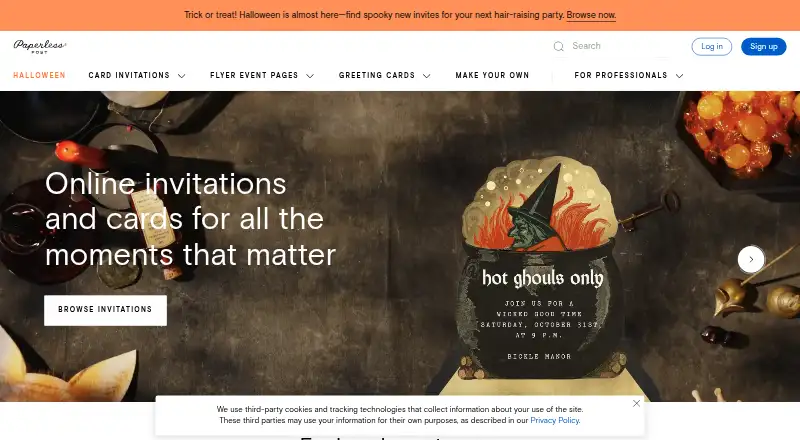
What Paperless Post is
Paperless Post is an online service for creating, sending, and managing digital invitations and stationery. It offers card invitations and Flyer event pages for weddings, birthdays, parties, and other occasions. Hosts can adjust colors, fonts, and layouts, add stickers, or upload logos, photos, videos, and predesigned images. Event management tools cover RSVP tracking, guest messaging, guest list imports, co-hosts, capacity settings, and check-in through the app. Invitations can go by email, text, or shareable link, but text delivery is available only in the US and Canada. The service is available on Android, iOS, and the web. Its mobile app supports RSVP and message notifications, contact importing, and sharing through Instagram, Messenger, and WhatsApp; Android push notifications are not available. Custom URLs, password protection, Guest Tags, and guest check-in require All Access pricing or Paperless Pro. The free feature set covers the first 50 invitations.
Good
- Offers card invitations and Flyer event pages.
- Hosts can track RSVPs and message guests.
- Invitations can be sent by email, text, or link.
- Free feature set covers the first 50 invitations.
- Supports guest list imports and co-hosts.
Watch out
- Text delivery is limited to the US and Canada.
- Android push notifications are unavailable.
- Some guest and customization features require paid plans.
- Paperless Pro costs $250 a year.
Who it suits
Paperless Post suits people organizing events who want custom digital invitations and tools for managing guest responses. Paperless Pro is positioned for business hosts and larger, more complex events.
Verdict
Paperless Post combines invitation design with guest management across web and mobile. Check regional text delivery and plan requirements for specific guest-management tools before choosing an option.
Plans and prices
From Paperless Post's own pricing page, checked 15 Oct 2026.
| Plan | Price | What it gives you |
|---|---|---|
| Free | Free | first 50 direct email or phone invitations free · free designs available · per guest |
| Basic | $0.50, paid once | pay per event · email, text or shareable link · RSVP tracking · broadcasts and private messages · per guest |
| Premium | $1.05, paid once | envelopes · backdrops · premium page styles · premium colors · photo gallery · Blocks · guest questions · per guest |
| All Access | $1.44, paid once | full pay-per-event feature set · custom URL · password protection · guest tags · guest check-in · analytics · per guest |
| Paperless Pro | $250 a year | unlimited feature access · no Coins or per-event fees · annual guest allowance · upgradeable guest tiers · annual subscription for 250 guests |
The facts
Each one read from Paperless Post's own pages, with the date it was checked.
What it does
- Accessibility
- The company says it aims for WCAG 2.1 Level AA and states that guest and receiver experiences conform to that level.checked 15 Oct 2026
- AI Magic Art
- Magic Art uses generative AI to create custom stickers from user prompts.checked 15 Oct 2026
- Audience
- Paperless Pro is positioned for business hosts and larger, complex events; the pricing page describes subscriptions as suited to hosts holding three or more events a year.checked 3 Oct 2026
- Co-hosting
- Co-hosts can be assigned to help send invitations, edit guest lists, manage RSVPs, message guests and check attendees in.checked 15 Oct 2026
- Design customization
- The editor supports colors, fonts, layouts, stickers, page styles, backgrounds and custom email styles.checked 15 Oct 2026
- Design tools
- Users can customize colors, fonts, layouts, stickers, and add uploaded logos, photos, videos, or predesigned images.checked 3 Oct 2026
- Event Blocks
- Blocks can add galleries, schedules, registries, directions, speakers, videos, wedding-party details, travel and accommodations.checked 15 Oct 2026
- Feature limits
- Custom URLs, password protection, Guest Tags, and guest check-in require All Access pricing or a Paperless Pro subscription.checked 3 Oct 2026
- Funding and users
- LinkedIn states that Paperless Post has 175 million users and $37 million in venture financing.checked 15 Oct 2026
- Guest check-in
- Guest check-in is available in the iOS and Android apps for Card and Flyer events.checked 15 Oct 2026
- Guest management
- Hosts can track RSVPs, message guests, import guest lists, add co-hosts, set event capacity, and manage guest check-in through the app.checked 3 Oct 2026
- Guest questions
- Hosts can collect addresses, meal choices and other information through guest questions or surveys.checked 15 Oct 2026
- Integrations
- Paperless Pro integrations are being introduced in beta for Raiser’s Edge, Salesforce, Mailchimp and HubSpot.checked 15 Oct 2026
- Invitations
- The service offers card invitations and textable Flyer event pages for occasions including weddings, birthdays, and parties.checked 3 Oct 2026
- Limit: confusing Coins pricing
- Trustpilot reviewers repeatedly describe the Coins model as confusing, expensive or a bait-and-switch after designing an apparently free invitation.checked 15 Oct 2026
- Limit: international and messaging gaps
- Trustpilot reviewers complain about weak WhatsApp integration, inability to import iPhone contacts directly and rejection of non-US phone numbers.checked 15 Oct 2026
- Limit: mobile editing
- Apple App Store reviewers report slow or freezing editing, keyboard obstruction, confusing navigation and lost work on iPhone or iPad.checked 15 Oct 2026
The company
- Company facts
- LinkedIn lists Paperless Post as privately held, founded in 2009, headquartered in New York, with 51–200 employees.checked 15 Oct 2026
- Company identity
- The Google Play listing identifies the developer as Paperless Inc.checked 15 Oct 2026
- Company reach
- Paperless Post says more than 175 million people use its technology and designs to celebrate life occasions.checked 3 Oct 2026
- Founded
- 2009checked 28 Sep 2026
Where it runs
- Limit: Android workflow
- A Google Play reviewer reports that pressing Back can exit the app and lose progress, with limited guest sorting and editing after sending.checked 15 Oct 2026
- Mobile app
- The mobile app is free to download and provides push notifications, guest-list management, RSVP tracking and sharing through Instagram, Messenger and WhatsApp.checked 15 Oct 2026
Money
- Limit: delivery and billing problems
- Trustpilot reviews report invitations marked sent but not received, missing purchased Coins and difficulty obtaining customer-service responses.checked 15 Oct 2026
The full review of Paperless Post
Overview
Paperless Post pairs designed invitations and stationery with tools for handling guest responses, making it a strong fit for hosts who want a polished look without giving up event coordination. Its pay-per-guest options keep one-off events straightforward, but the price can rise with the guest list and some management controls require higher-tier pricing.
Key features
Hosts can create card invitations or textable Flyer event pages for occasions from birthdays and parties to weddings. Design options include colors, fonts, layouts, stickers, and uploaded logos, photos, videos, or predesigned images. That breadth lets invitations feel tailored to an event; Premium adds premium page styles, a color collection, and a photo gallery, while Basic is limited to card invitations.
Sending works by email, text, or shareable link. Text delivery is limited to the US and Canada, so hosts inviting guests elsewhere will need to use email or a link. RSVP tracking, guest messaging, list importing, co-hosts, and event capacity tools cover the main planning needs. Custom URLs, password protection, Guest Tags, and guest check-in are reserved for All Access or Paperless Pro, which makes the lower-cost options less suitable for events needing tighter access or on-site check-in.
Hosts can link to virtual events, add calendar entries, and include third-party gift registries such as Amazon. The mobile app supports contact importing and sharing through Instagram, Messenger, and WhatsApp. RSVP and message push notifications are supported, but not on Android, limiting the app's usefulness for hosts who depend on timely alerts there.
Paperless Post says it uses encryption, secure password handling, a web application firewall, trusted payment processors, and ongoing monitoring and updates. It also cautions that internet transmission cannot be guaranteed completely secure. Customer support is available at +1 877-605-8644, alongside contact and help links.
Pricing
The Free plan costs nothing and covers the first 50 invitations by email or phone number when using the free feature set. That is enough for a modest gathering, but larger lists or paid card designs move into per-guest charges.
Basic costs $0.50, paid once, billed per guest, for card invitations. It is the leanest paid choice for hosts who want card designs without the added styles and gallery included in Premium, which costs $1.05, paid once, also billed per guest. All Access costs $1.44, paid once per guest and includes the full listed feature bundle, making it the pay-per-event option for hosts who need gated tools such as custom URLs, password protection, Guest Tags, or check-in.
Paperless Pro costs $250 a year, billed $250/year, and includes 250 annual guests plus the full suite of customization and guest-management features. It is positioned for business hosts and larger, complex events; subscriptions are described as suited to hosts holding three or more events a year. For occasional small gatherings, the annual commitment is harder to justify than paying per guest for one event.
Platforms
Paperless Post is available on web, iOS, and Android. Mobile tools include contact importing and social sharing, though Android lacks push notifications. Text invitations can be sent only to recipients in the US and Canada.
Who it's for
It suits people planning celebrations or business events who value design choice and a single place to monitor RSVPs and message guests. Frequent hosts or organizers of complex events have a clearer case for Paperless Pro; a one-time host should compare the per-guest total and feature needs before choosing. It is less suitable when Android push alerts are essential or text delivery must reach guests outside the US and Canada.
Pros and cons
- Pros: Multiple invitation formats and substantial design customization let hosts shape the invitation around the occasion.
- Pros: RSVP tracking, guest messaging, list importing, co-hosts, and capacity settings bring useful planning tools together.
- Cons: Text delivery is restricted to the US and Canada, and Android does not receive RSVP or message push notifications.
- Cons: Custom URLs, password protection, Guest Tags, and check-in require All Access or Paperless Pro, so the lowest-cost choices lack those controls.
- Cons: Paid event plans charge per guest, while Paperless Pro is an annual subscription, so costs depend on list size and hosting frequency.
Alternatives
For a free core platform with optional paid invite designs and fees on ticket purchases, consider Partiful. Evite is another freemium option with paid single-event packages priced at $17.99 a month for 12 guests or $36.99 a month for 30 guests. If slideshow creation is the priority, Smilebox offers free slideshow creation.
InviteDrop, POOK, AInviter, Greenvelope, and Punchbowl are other invitation options to compare. Browse Invitation Maker Software or AI Invitation Generators for broader category choices.
Verdict
Choose Paperless Post if invitation design and guest coordination matter equally, especially for recurring or complex events that can make use of its higher-tier tools. Its main trade-offs are per-guest costs, gated management controls, and regional limits on text delivery; hosts who need simpler free invitations or Android alerts should look elsewhere.
Getting started
- Visit https://www.paperlesspost.com/.
- Use the web service or choose the Android or iOS app.
- Start with the free feature set for up to 50 invitations, or choose a paid plan.
- Create an invitation or Flyer event page and customize its design.
- Send invitations by email, text where available, or shareable link.
Limits worth knowing
The free feature set covers the first 50 invitations sent by email or phone number. Custom URLs, password protection, Guest Tags, and guest check-in require All Access or Paperless Pro.
Questions
Is there a free plan?
Yes. The free feature set is 0.00 USD and covers the first 50 invitations sent by email or phone number.
How much do paid plans cost?
Basic costs $0.50 per guest, Premium $1.05 per guest, and All Access $1.44 per guest, each billed per event. Paperless Pro costs $250 a year and includes 250 annual guests.
Which platforms are supported?
Paperless Post is available on Android, iOS, and the web.
How can invitations be sent?
Invitations can be sent by email, text, or shareable link. Text delivery is available only in the US and Canada.
Which features require All Access or Paperless Pro?
Custom URLs, password protection, Guest Tags, and guest check-in require All Access or Paperless Pro.
Alternatives to Paperless Post
- 1

Greetings Island
Free planAndroidiOSWebmacOS8.2From $26.99 a year - 2

Evite
Free planAndroidiOSWeb7.6Free plan - 3
Greenvelope
AndroidiOSWebAPI7.6From $125 a year - 4
Snap Post
Free planWeb7.4$7.49 one-time - 5

AInviter
Free planWeb7.3$6.99 one-time - 6
InvitiApp
Free planAndroidiOSWeb7.3$19.99 one-time