PicoToolkit Banner Editor
PicoToolkit Banner Editor is a browser-based tool for making promotional banners for shops, ads, newsletters, blogs, and social posts.
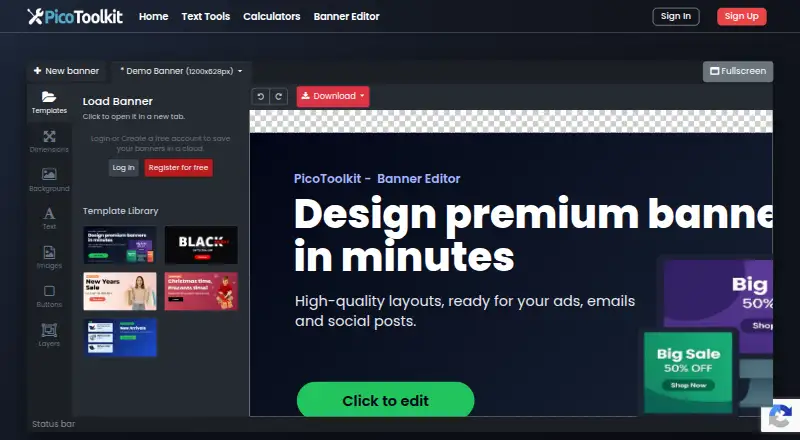
What PicoToolkit Banner Editor is
PicoToolkit Banner Editor is a browser-based tool for making promotional banners for shops, ads, newsletters, blogs, and social posts. You can begin with a template or an empty canvas, then set preset or custom dimensions. The editor provides controls for text, images, colors, gradients, fonts, icons, buttons, shadows, text effects, and movable layers. AI prompts can help revise a banner’s headline, layout, colors, or size. A project can hold multiple banners and includes undo, redo, and change history. Finished designs can be downloaded as PNG, JPG, WebP, or HTML5. Projects stay in the browser’s local storage, and the maker recommends downloading backups. The editor runs in a browser without installation and is designed for larger screens. Use is free without an account or credit card, and exports have no watermark; there is no trial period or paid upgrade. The service operator is RR-Soft in Warsaw, Poland, and PicoToolkit says it began in 2022.
Good
- Free to use without an account or credit card
- Exports PNG, JPG, WebP, and HTML5
- Supports templates and custom dimensions
- AI prompts can revise headline, layout, colors, or size
Watch out
- Designed for larger screens
- Projects are stored locally in the browser
Who it suits
It suits people who need promotional graphics for shops, ads, newsletters, blogs, or social posts and want to work in a browser. It is intended for larger screens, and users should download backups because projects are stored locally.
Verdict
PicoToolkit Banner Editor combines banner design tools, AI-assisted edits, and several export formats in a free browser editor. Its larger-screen focus and local project storage are worth considering before starting a project.
Plans and prices
From PicoToolkit Banner Editor's own pricing page, checked 7 Oct 2026.
| Plan | Price | What it gives you |
|---|---|---|
| Free | Free | All features currently free · no login required · no watermark on exports |
The facts
Each one read from PicoToolkit Banner Editor's own pages, with the date it was checked.
Money
- Account and trial
- The editor is free to use without an account, credit card, paid upgrade, watermark, or trial period.checked 7 Oct 2026
What it does
- AI editing
- The editor offers AI prompts to improve a banner, including its headline, layout, colors, or size.checked 7 Oct 2026
- Design tools
- The editor supports text, images, colors, gradients, fonts, icons, buttons, shadows, text effects, and movable layers.checked 7 Oct 2026
- Exports
- Banners can be downloaded as PNG, JPG, WebP, or HTML5.checked 7 Oct 2026
- Operator
- The service operator is RR-Soft, located at ul. Kierbedzia 8A, 00-728 Warszawa, Poland.checked 7 Oct 2026
- Privacy
- The privacy policy says submitted content is processed to provide requested functionality and is not used for marketing or training external machine-learning models unless the user is informed and agrees.checked 7 Oct 2026
- Project storage
- Projects are stored locally in the browser, and the maker recommends downloading backups of finished graphics.checked 7 Oct 2026
- Project workflow
- The editor supports undo and redo, change history, and multiple banners in one project.checked 7 Oct 2026
- Purpose
- Creates promotional banners for shops, ads, newsletters, blogs, and social posts.checked 7 Oct 2026
- Security and analytics
- The privacy policy says account passwords are stored hashed, and Google Analytics 4 is used with consent where required; IP anonymisation is used where available.checked 7 Oct 2026
- Support
- Users can report bugs or request features through the linked contact form; service complaints are reviewed within 14 days.checked 7 Oct 2026
- Templates and sizing
- Users can start from templates or an empty canvas and choose preset or custom banner dimensions.checked 7 Oct 2026
Where it runs
- Device requirement
- The editor is designed for larger screens and asks users to open it on a larger device; it runs in a browser without installation.checked 7 Oct 2026
The company
- Founded
- 2022checked 28 Sep 2026
- Headquarters
- Warsaw, Polandchecked 28 Sep 2026
- Maker history
- The maker says PicoToolkit was started in 2022 to make routine tasks quicker.checked 7 Oct 2026
Alternatives to PicoToolkit Banner Editor
- 1

Visme
Free planAndroidiOSWebAPI8.4From $12.25 a month - 2

PosterMyWall
Free planAndroidiOSWeb7.9From $109 a year - 3

BannerNow
Free planWebAPIExtension7.5From $34 a month - 4

Fotor
Free planAndroidiOSWebAPI7.5Free plan - 5

Bannersnack
Free planWebAPI7.4From $12 a month - 6
Google Web Designer
Free planAPILinuxmacOSWindows7.0Free plan