Google Web Designer
Google Web Designer is desktop software for creating HTML5 ads, images, videos and other web content.
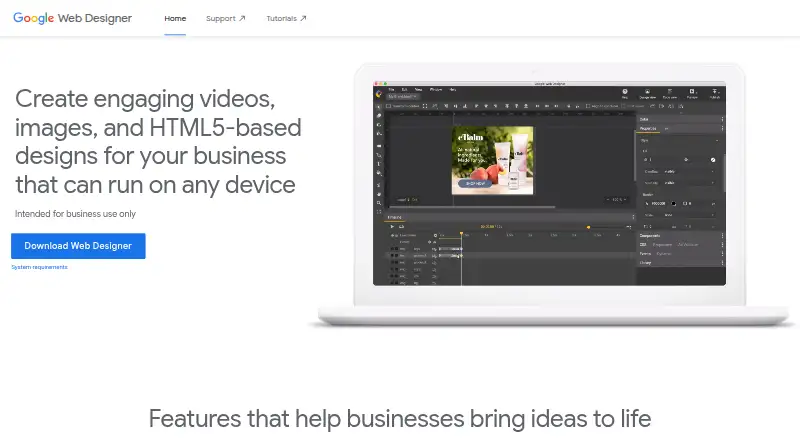
What Google Web Designer is
Google Web Designer is desktop software for creating HTML5 ads, images, videos and other web content. It gives business users visual and code-based ways to build and animate content, with a timeline, drawing tools, text and 3D objects. Its code editor works with CSS, JavaScript and XML, including syntax highlighting and autocomplete. Components can add items such as galleries, maps and visual effects, while events can respond to user actions or run at scheduled times. For video ads, it can edit video and audio clips. Layouts can adapt to screen sizes, and dynamic bindings can personalize ads using data feeds. Integrations include Studio, Display & Video 360, Campaign Manager 360, Ads Creative Studio and Google Drive. Some publishing, upload, preview and asset-library functions require a Google Account. It is free for business use and is intended for professional business use. An internet connection is required; listed minimum memory is 2 GB, with 4 GB recommended.
Good
- Free for business use
- Supports CSS, JavaScript and XML editing
- Can create timeline animations and 3D objects
- Layouts adapt to different screen sizes
- Integrates with several Google products
Watch out
- Google Account required for some functions
- Internet connection required
- Minimum memory is 2 GB
- Intended for professional business use
Who it suits
It suits business users creating HTML5 ads and other web content, especially those who need animation, code editing or responsive layouts. Google describes it as intended for professional business use.
Verdict
Google Web Designer combines visual authoring and code editing for business-focused web content and ads. Check its system requirements and account requirements before relying on specific publishing or preview functions.
Plans and prices
From Google Web Designer's own pricing page, checked 15 Oct 2026.
| Plan | Price | What it gives you |
|---|---|---|
| Free | Free | Business use · desktop download · no paid tiers stated |
| Google Web Designer | Free | No cost to download or use for business · intended for business use only |
The facts
Each one read from Google Web Designer's own pages, with the date it was checked.
What it does
- Ad environments
- The help center documents Google Ads, AdMob, Studio, Display & Video 360 and Campaign Manager 360 workflows.checked 15 Oct 2026
- Animation
- Animations can be built in Quick mode scene by scene or Advanced mode with per-element timeline layers.checked 15 Oct 2026
- Automatic updates
- The installer adds a Google Repository so Web Designer can update automatically; users can disable repository installation before installing Linux packages.checked 15 Oct 2026
- Code editing
- Code view supports CSS, JavaScript, and XML with syntax highlighting and autocomplete.checked 30 Sep 2026
- Custom component limit
- Components made before version 8.0.0 use an unsupported v0 specification and require upgrading; JavaScript knowledge is required.checked 15 Oct 2026
- Custom components
- Developers can create JavaScript custom elements packaged with a JSON manifest and install them from ZIP files.checked 15 Oct 2026
- Design and code views
- Design view provides drawing, text and 3D tools, while Code view edits CSS, JavaScript and XML with syntax highlighting and autocomplete.checked 15 Oct 2026
- Documentation and support
- Google provides a broad help center covering layouts, animation, components, ad creation, publishing, troubleshooting and a user community forum.checked 15 Oct 2026
- Dynamic ads
- Dynamic bindings can connect designs to data feeds for personalized advertising.checked 15 Oct 2026
- Events
- Events can react to user gestures such as touch, rotation or shaking and can also trigger at timeline points.checked 15 Oct 2026
- Google Drive integration
- Publishing to Google Drive uploads the generated files for sharing and offers options such as minification, inline assets and polite loading.checked 15 Oct 2026
- Google integrations
- Integrations include Studio, Display & Video 360, Campaign Manager 360, Ads Creative Studio, and Google Drive.checked 30 Sep 2026
- Hardware requirements
- The stated minimum memory is 2 GB, with 4 GB recommended, and the minimum screen resolution is 1280×1024.checked 30 Sep 2026
- Intended users
- Google states that Web Designer is intended for professional business use only.checked 30 Sep 2026
- Interactive components
- Built-in modules include galleries, audio and video, YouTube, maps, Street View, gestures, forms, buttons, image effects and 3D model viewing.checked 15 Oct 2026
- Internet requirement
- An internet connection is required by the stated system requirements.checked 30 Sep 2026
- Licence
- Google Web Designer itself is proprietary freeware; Google separately documents bundled open-source packages under Apache, MIT, BSD, GPL and other licenses.checked 15 Oct 2026
- Limit: export formats
- A Capterra reviewer reports that exports are limited to HTML variants, without MOV, GIF or MP4 output, complicating client proofing.checked 15 Oct 2026
The company
- Company founded
- Google says the company was officially born in August 1998 after Andy Bechtolsheim invested $100,000 in Larry Page and Sergey Brin's newly incorporated company.checked 15 Oct 2026
- Company headquarters and size
- LinkedIn lists Google headquarters in Mountain View, California and a company size of 10,001+ employees.checked 15 Oct 2026
- Company legal name
- Crunchbase identifies the maker as Google LLC, a sub-organization of Alphabet.checked 15 Oct 2026
- Company ownership and investors
- Crunchbase lists Alphabet as Google's parent and names Sequoia Capital and Kleiner Perkins among six investors.checked 15 Oct 2026
- Founded
- 1998checked 28 Sep 2026
- Headquarters
- Mountain View, California, United Stateschecked 28 Sep 2026
The full review of Google Web Designer
Google Web Designer is a free desktop application for creating HTML5 advertising and business web content with visual tools and direct code control. It suits professional marketers, designers, and developers who need animated, interactive, responsive, or data-driven creative. Its strongest case is integrated ad production across Google’s ecosystem; people seeking a general consumer design tool should look elsewhere.
Overview
The application combines visual authoring with editing of the underlying CSS, JavaScript, and XML. That combination gives designers a quicker route to layouts while preserving the control developers need for implementation. Its scope extends from images and banners to video ads and interactive experiences.
Google positions Web Designer for professional business use only. It is free to download and use for business, with no trial period because there is no paid tier. An internet connection is required, and Google Account sign-in is needed for Google Drive publishing, supported advertising-product publishing, Ads Creative Studio uploads, shareable previews, mobile previews, and the Studio Asset Library.
Key features
- Visual and code authoring: Build designs visually, then refine CSS, JavaScript, or XML in code view with syntax highlighting and autocomplete. This is a better fit for mixed designer-developer teams than a visual-only editor.
- Animation and 3D: Timeline animation, drawing tools, text, and 3D objects support motion-rich creative instead of limiting campaigns to static artwork.
- Interactive components: Galleries, maps, visual effects, and other components add functionality, while events can respond to user actions or run at scheduled times. Choose it when an ad needs participation rather than a single click target.
- Video editing: Video and audio clips can be edited for video ads, keeping basic creative work in the same application as display content.
- Responsive and dynamic ads: Layouts can adapt to different screen sizes, and dynamic bindings can draw on data feeds for personalized advertising. These capabilities are more relevant to campaign production than to ordinary static web pages.
- Google integrations: Connections with Studio, Display & Video 360, Campaign Manager 360, Ads Creative Studio, and Google Drive align the tool with organizations already using Google advertising workflows.
- Workflow coverage: Responsive design, prototype interactions, code export, and design-system support make it suitable for structured creative production rather than one-off image editing.
Pricing
Google Web Designer — free: There is no cost to download or use it for business, and there is no free-trial deadline or recurring renewal to manage. The trade-off is that it is explicitly intended for professional business use, not positioned as a general-purpose personal design application. Google Account sign-in still applies to the publishing, preview, upload, and asset-library workflows described above.
Platforms
Google Web Designer is a desktop application for Linux, macOS, and Windows. System requirements specify Windows 10 or later, macOS Big Sur 11.0 or later, and 64-bit Linux distributions including Ubuntu 18.04 or later, Debian 10 or later, openSUSE 15.5 or later, or Fedora Linux 38 or later. Minimum memory is 2 GB, with 4 GB recommended, and the minimum screen resolution is 1280×1024. It is not a mobile app, and internet access is required.
Who it's for
This is a strong choice for business marketing teams, agencies, and developers producing HTML5 ads, responsive creative, interactive units, or personalized campaigns. It is especially sensible when Google advertising and Drive integrations matter. It is a weaker fit for casual users, non-business projects, or anyone wanting a browser-first or mobile-first editor.
Pros and cons
Pros
- Free business use: The complete product has a 0.00 USD price rather than a subscription barrier.
- Visual and code control: Designers and developers can share one workflow instead of handing work between separate visual and coding tools.
- Broad ad capability: Animation, 3D, interaction, video, responsive layouts, and data bindings cover substantially more than static banners.
- Google workflow integration: Support for major Google advertising products can reduce friction for teams already operating in that ecosystem.
Cons
- Business-only positioning: Personal and general-purpose creative work falls outside its stated audience.
- Desktop dependence: Linux, macOS, and Windows are supported, but there is no mobile platform option.
- Online and account dependencies: Internet access is required, and several publishing, preview, and library functions require Google sign-in.
- Hardware floor: A 1280×1024 display and at least 2 GB of memory are required, with 4 GB recommended.
Alternatives
For a browser-based option with a free tier and exports limited to five static JPG credits per month, consider Flexitive; its Premium plan is $29 a year billed annually, while Google Web Designer remains free and desktop-based.
Adacado is worth considering when a web service with a free start and impression-based advertising allowance is preferable.
Choose ADExhibit for an API/web workflow whose free plan includes 100MB storage, all features, no credit card, and no time limit.
BannerBoo suits browser users who need a free allowance of four banners, 15,000 embedded ad views, 100MB storage, and JPG/PNG export.
Marpipe is an alternative for teams exploring catalog creative, generative design previews, or feed-management workflows.
Quickads is aimed at self-service creative production, with a free starting tier offering AI image and video ads, one saved brand kit, and basic analytics.
Adzymic is a paid option for specialist Smart Survey creative support and dashboard access.
Predis.ai is a paid, trial-enabled alternative spanning Android, iOS, web, and API platforms.
For broader category comparisons, see Ad Design Software, Banner Design Software, and Web Design Software.
Verdict
Choose Google Web Designer if you produce professional HTML5 ads and want one free desktop tool for visual authoring, code editing, animation, interaction, video, responsive layouts, and Google campaign integrations. Look elsewhere if you need a consumer-oriented, browser-based, or mobile workflow, or if Google-account-dependent publishing and preview features do not suit your process.
Alternatives to Google Web Designer
- 1

Visme
Free planAndroidiOSWebAPI8.4From $12.25 a month - 2

PosterMyWall
Free planAndroidiOSWeb7.9From $109 a year - 3

BannerNow
Free planWebAPIExtension7.5From $34 a month - 4

Fotor
Free planAndroidiOSWebAPI7.5Free plan - 5

Bannersnack
Free planWebAPI7.4From $12 a month - 6

BannerBoo
Free planWeb6.9From $144 a year