Photomator
Photomator is a photo editor for Mac, iPhone, iPad, and Apple Vision Pro.
What Photomator is
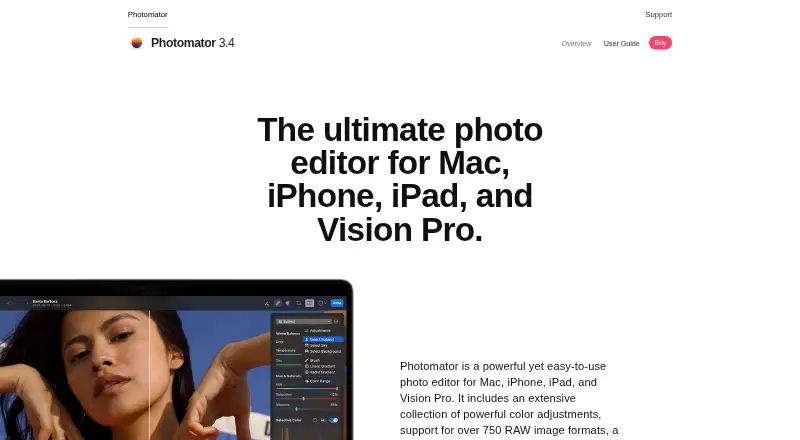
Photomator is a photo editor for Mac, iPhone, iPad, and Apple Vision Pro. It supports more than 750 RAW formats, including Apple ProRAW, and offers nondestructive adjustments for brightness, contrast, exposure, curves, and color balance. AI selection can identify subjects, skies, and backgrounds, alongside masks and brush selections. Its Repair tool can remove small imperfections or entire objects. Other listed machine-learning features include Auto Enhance, Super Resolution, Smart Deband, Denoise, and ML Crop. Photomator works with the Photos library and Apple File System, and can edit files on devices, external drives, and cloud services. Edits sync with Photos or Files, and iCloud Drive supports syncing edits across Mac, iPhone, and iPad. The App Store listing describes a free download with in-app purchases. A monthly subscription is listed at $7.99 a month; an exclusive lifetime offer is listed at 79.99 USD once. Compatibility requirements include iOS 17 or later, iPadOS 17 or later, macOS 13 or later, and visionOS 1 or later for Apple Vision.
Good
- Supports more than 750 RAW formats, including Apple ProRAW.
- AI selections, masks, and brush selections are available.
- Repair tool can remove imperfections or entire objects.
- Edits can sync through Photos, Files, or iCloud Drive.
Watch out
- Requires iOS 17 or later on iPhone.
- Requires macOS 13 or later on Mac.
- Monthly subscription is $7.99 a month.
- Listed compatibility requires visionOS 1 or later for Apple Vision.
Who it suits
Photomator suits Apple-device users who want RAW support, detailed color adjustments, selection and repair tools, and edit syncing. Check the listed operating-system requirements for each device first.
Verdict
Photomator pairs broad RAW support with nondestructive adjustments, AI selections, repair, and Apple-library workflows. Its compatibility requirements and listed subscription price are worth checking against your devices and preferred payment option.
Plans and prices
From Photomator's own pricing page, checked 9 Oct 2026.
| Plan | Price | What it gives you |
|---|---|---|
| Monthly Subscription | $7.99 a month | One license for Mac, iPad, iPhone, and Apple Vision Pro · Monthly Subscription $7.99 |
| Free download | Free | App Store listing describes Photomator as free with in-app purchases · Free · In-App Purchases |
| Yearly Subscription | $29.99 a year | One license for Mac, iPad, iPhone, and Apple Vision Pro · Yearly Subscription $29.99 |
| Exclusive Lifetime Offer | $79.99, paid once | One license for Mac, iPad, iPhone, and Apple Vision Pro · Exclusive Lifetime Offer $79.99 |
| Lifetime | $119.99, paid once | One license for Mac, iPad, iPhone, and Apple Vision Pro · Lifetime $119.99 |
The facts
Each one read from Photomator's own pages, with the date it was checked.
What it does
- AI retouching
- Yeschecked 20 Sep 2026
- AI selections
- Photomator can use AI to select subjects, skies, and backgrounds, and also supports masks and brush selections.checked 9 Oct 2026
- Batch editing
- Photomator can apply workflows to hundreds of photos and copy and paste adjustments between photos.checked 9 Oct 2026
- Cloud sync
- Yeschecked 20 Sep 2026
- Color adjustments
- It offers nondestructive color adjustments including brightness, contrast, exposure, curves, and color balance.checked 9 Oct 2026
- Compatibility limits
- The App Store lists requirements of iOS 17 or later, iPadOS 17 or later, macOS 13 or later, and visionOS 1 or later for Apple Vision.checked 9 Oct 2026
- Integrations
- The App Store listing says edits sync with Photos or Files and that iCloud Drive supports edit syncing across Mac, iPhone, and iPad.checked 9 Oct 2026
- LUT support
- Photomator can import LUTs from Pixelmator Pro or other image, video, or graphics apps, and export LUTs for use in other apps.checked 9 Oct 2026
- Masking tools
- Yeschecked 20 Sep 2026
- Photo editing
- Photomator is a photo editor for Mac, iPhone, iPad, and Vision Pro.checked 9 Oct 2026
- Photo library
- The app works with the Photos library and Apple File System, and supports editing files on devices, external drives, and cloud services.checked 9 Oct 2026
- Privacy disclosure
- The App Store privacy section says purchase history, crash data, and performance data may be collected without being linked to the user.checked 9 Oct 2026
- RAW photo support
- Yeschecked 20 Sep 2026
- RAW support
- The product page says Photomator supports over 750 RAW image formats, including Apple ProRAW.checked 9 Oct 2026
- Repair tool
- Its Repair tool can remove small imperfections or entire objects from photos.checked 9 Oct 2026
- Support
- The product page links to a user guide and support site, and lists [email protected] as a contact email.checked 9 Oct 2026
Where it runs
- Apple technologies
- Photomator uses Apple technologies including SwiftUI, Core ML, Core Image, and Metal.checked 9 Oct 2026
- Machine learning tools
- The product lists Auto Enhance, Super Resolution, Smart Deband, Denoise, ML Crop, and other machine-learning features.checked 9 Oct 2026
- Platform
- multi-platformchecked 20 Sep 2026
The full review of Photomator
Photomator is an Apple-device photo editor for photographers who need extensive RAW compatibility, nondestructive controls, and library-based work across Mac, iPhone, iPad, and Vision Pro. It is best suited to people already invested in Apple’s Photos, Files, and iCloud workflows. The trade-off is a paid product whose device requirements and subscription choices narrow its appeal outside that ecosystem.
Overview
Photomator combines a full photo-editing toolset with direct access to Apple photo libraries and file locations. It can edit images stored on the device, external drives, and cloud services, rather than forcing every project into a separate catalog. That flexibility makes it practical for photographers moving between local files and Apple-managed libraries, while users on Android, Windows, or Linux need another editor.
Its Apple-only positioning is reinforced by support for Photos, Apple File System, and iCloud Drive synchronization. Edits can sync through Photos or Files, with iCloud Drive keeping work aligned across Mac, iPhone, and iPad. The App Store privacy disclosure says purchase history, crash data, and performance data may be collected without being linked to the user.
Key features
Photomator supports more than 750 RAW formats, including Apple ProRAW. That breadth is a meaningful advantage for photographers handling files from varied cameras, while ProRAW support fits users shooting with compatible Apple devices. Nondestructive adjustments cover brightness, contrast, exposure, curves, and color balance, allowing repeated revisions without overwriting the original image.
AI selection can identify subjects, skies, and backgrounds. Masks and brush selections provide a manual route when an automatic boundary needs correction or a more specific area is required. The Repair tool removes small imperfections or entire objects, making it useful for both routine cleanup and more substantial removals.
Machine-learning tools include Auto Enhance, Super Resolution, Smart Deband, Denoise, and ML Crop. These options address common enhancement and preparation tasks, although photographers who require precise control still have the regular adjustment, mask, and brush tools. LUTs can be imported from Pixelmator Pro or other image, video, and graphics applications, then exported for use elsewhere, which helps maintain a consistent look between editing tools.
Photomator is built with Apple technologies including SwiftUI, Core ML, Core Image, and Metal. The result is a workflow designed around Apple hardware and software rather than a cross-platform setup. Support documentation includes a user guide and support site, with [email protected] provided for contact.
Pricing
The free download costs nothing and is billed as Free with in-app purchases. It is the lowest-risk way to start, but paid access is required for the product’s broader editing offering.
The Monthly Subscription costs $7.99 a month and provides one license for Mac, iPad, iPhone, and Apple Vision Pro. This suits users who want access across their Apple devices without committing beyond each monthly billing period, though recurring cost matters for long-term use.
A Yearly Subscription includes Photomator photo-editing features with custom pricing. It is the plan to consider for regular annual use, but its cost must be compared directly with the monthly option before choosing it. The Lifetime plan offers lifetime access with custom pricing, favoring users who expect to keep Photomator for years and prefer to avoid recurring billing.
The Exclusive Lifetime Offer costs $79.99, paid once and includes one license for Mac, iPad, iPhone, and Apple Vision Pro. For an eligible buyer, that is the clearest one-time-payment route; the single-license wording still means it is intended for one user’s Apple-device set rather than multiple seats.
Platforms
Photomator runs on iOS, iPadOS, macOS, and visionOS. Requirements are iOS 17 or later, iPadOS 17 or later, macOS 13 or later, and visionOS 1 or later for Apple Vision. Older Apple hardware or anyone needing Android, Windows, or Linux support should rule it out before considering a purchase.
Who it's for
Choose Photomator if you photograph in RAW, rely on Apple Photos or Files, and want the same nondestructive editing approach on Mac, iPhone, and iPad. It is particularly well matched to Apple ProRAW users and photographers who value AI-assisted selections, repair, and LUT interchange without leaving Apple’s ecosystem.
It is less suitable for mixed-device households, teams needing several seats, or buyers seeking a permanently free desktop RAW workflow. Its platform coverage and paid structure are deliberate constraints, not incidental details.
Pros and cons
Pros
- Very broad RAW coverage: support for more than 750 formats, including Apple ProRAW, accommodates varied camera workflows.
- Nondestructive control: tonal and color adjustments can be revisited without altering originals.
- Useful selection and cleanup tools: AI subject, sky, and background selections work alongside masks, brushes, and object repair.
- Apple-library integration: Photos, Files, external drives, cloud locations, and iCloud Drive sync support reduce file shuffling across Apple devices.
- LUT exchange: import and export supports consistent looks with other image, video, and graphics applications.
Cons
- Apple-only platform scope: there is no Android, Windows, or Linux version.
- Recent operating-system requirements: iOS 17, iPadOS 17, macOS 13, or visionOS 1 is required.
- Paid access for the full product: the free download relies on in-app purchases, while subscription and lifetime prices vary by plan.
- One-license wording: the published paid license covers one Mac, iPad, iPhone, and Apple Vision Pro setup rather than multiple seats.
Alternatives
Adobe Lightroom is the better pick when Android, Windows, or web access matters, and its listed Lightroom plan includes 1 TB of cloud storage and 250 monthly generative credits.
darktable suits users who want a free, open-source RAW workflow on Linux, macOS, or Windows instead of Apple-library integration.
RawTherapee is a free GPLv3 option for RAW processing on Linux, macOS, and Windows, but its plan excludes digital asset management, printing, and uploading features.
ART provides a free, open-source raw image processing program for Linux, macOS, and Windows.
vkdt is a free, open-source photography workflow toolbox for Linux, macOS, and Windows.
Hasselblad Phocus is a free RAW-processing download for macOS and Windows.
Nikon NX Studio is a free desktop choice for macOS and Windows, with Nikon camera and file-format support varying by use case.
dcraw is free for all uses on Linux and Windows.
For broader category comparisons, see RAW Photo Processing Software and Photo Editing Software.
Verdict
Photomator is a strong choice for Apple photographers who want extensive RAW support, reversible adjustments, AI-assisted selections, repair, and synchronized Photos or Files workflows in one app. Choose it when those Apple integrations and cross-device editing matter more than platform breadth or a permanently free license. Look elsewhere if you need Windows, Linux, or Android support, multiple seats, or a fully free RAW editor.
Alternatives to Photomator
- 1

Picsart
Free planAndroidiOSWebAPI9.0From $10.50 a month - 2

Photoroom
Free planAndroidiOSWebAPI9.0From $7.50 a month - 3
PhotoPad
Free planAndroidiOSWebExtension8.8Free plan - 4

Adobe Photoshop
AndroidiOSWebmacOS8.7 - 5

Adobe Lightroom
AndroidiOSWebmacOS8.7 - 6
BeFunky
Free planAndroidiOSWeb8.7Free plan