PhotoGuard
PhotoGuard is an Android photo vault for hiding private photos and videos.
What PhotoGuard is
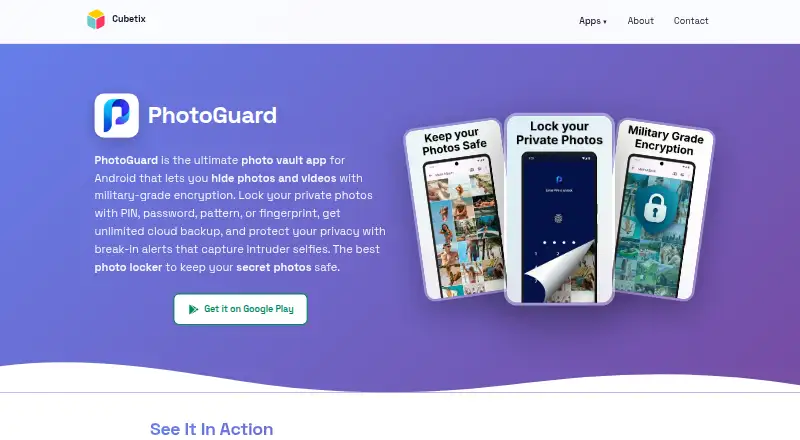
PhotoGuard is an Android photo vault for hiding private photos and videos. You can lock the vault with a PIN, pattern, password, or fingerprint, and add separate passwords to individual albums. The maker says hidden files are encrypted on the device and are not uploaded to a server. A secret camera saves pictures directly into the vault with encryption applied as they are taken. For recovery, Trash Recovery temporarily holds deleted files, and the maker says the vault can be restored automatically if the app is uninstalled by mistake.
Privacy controls include a decoy vault with its own PIN and an option to close the vault when you press the home button. After a failed unlock, Break-In Alerts record the time and take a photo. Private Cloud offers backup and sync across devices running PhotoGuard; the product page describes unlimited space, while the privacy policy identifies cloud storage as a premium feature. The free plan includes ads, and Premium removes them and unlocks premium features. Google Play lists personal information, photos and videos, and device or other IDs among data types the app may collect.
Good
- Choose PIN, pattern, password, or fingerprint lock.
- Set passwords for individual albums.
- Secret camera saves directly to the hidden vault.
- Trash Recovery temporarily holds deleted files.
- Free plan is available.
Watch out
- Android is the only listed platform.
- Free plan includes advertisements.
- Private Cloud is a premium feature.
- The app is provided without a warranty of uninterrupted operation.
Who it suits
PhotoGuard suits Android users who want to keep photos and videos in a locked vault, with options such as album passwords, a decoy vault, and a private camera. Users who want cloud backup should note that it is a premium feature.
Verdict
PhotoGuard combines on-device file encryption with several access controls, recovery tools, and a decoy vault. Its free plan is available, while cloud backup and ad removal are among the stated Premium benefits.
Plans and prices
From PhotoGuard's own pricing page, checked 3 Oct 2026.
| Plan | Price | What it gives you |
|---|---|---|
| Free download | Free | Free download; Google Play lists ads and in-app purchases; premium unlocks features and removes ads |
| PhotoGuard Premium Monthly | — | Premium features; removes advertisements; price not stated on the opened page · Billed monthly; auto-renews unless canceled at least 24 hours before the period ends |
The facts
Each one read from PhotoGuard's own pages, with the date it was checked.
What it does
- Album lock
- Users can set passwords for individual private albums.checked 2 Oct 2026
- Album protection
- Users can set passwords for individual private albums.checked 3 Oct 2026
- Backup and restore
- The maker says the vault can be restored automatically if the app is uninstalled by mistake.checked 2 Oct 2026
- Break-in alerts
- After a failed unlock attempt, PhotoGuard logs the incident time and captures a photo of the intruder.checked 3 Oct 2026
- Cloud backup
- Private Cloud provides automatic backup and sync with unlimited space for access from devices running PhotoGuard.checked 2 Oct 2026
- Data handling
- The privacy policy says premium cloud users may store encrypted photos and videos, and that passphrase-based encryption keys are not uploaded to the maker’s servers.checked 2 Oct 2026
- Encryption
- The maker says PhotoGuard uses AES-256 encryption and that the passphrase based key is not uploaded to its servers.checked 3 Oct 2026
- Fake vault and quick exit
- The app offers a decoy vault with a separate PIN and exits the vault automatically when the home button is pressed.checked 3 Oct 2026
- Intruder alerts
- After a failed unlock, Break-In Alerts log the incident time and take a photo of the intruder.checked 2 Oct 2026
- Notable limit
- The app is provided as is, without a warranty of uninterrupted or error-free operation.checked 3 Oct 2026
- Premium subscription
- Google Play says Premium unlocks premium features and removes advertisements, and its monthly subscription is billed monthly; the listing does not state a price.checked 2 Oct 2026
- Privacy controls
- Quick Exit closes the vault when the home button is pressed, and Fake Vault opens a decoy vault with a separate PIN.checked 2 Oct 2026
- Private cloud
- The product page advertises private cloud backup and sync with unlimited space, accessible from any device with PhotoGuard; the privacy policy describes this as a premium feature.checked 3 Oct 2026
- Purpose
- PhotoGuard is an Android photo vault for hiding and protecting personal photos and videos.checked 3 Oct 2026
- Recovery
- Deleted files are kept temporarily in a trash folder for recovery before permanent removal.checked 3 Oct 2026
- Secret camera
- The secret camera saves photos directly into the hidden vault with on-the-fly encryption.checked 3 Oct 2026
- Store data safety
- Google Play lists personal info, photos and videos, and device or other IDs as data types the app may collect, and says data is encrypted in transit.checked 3 Oct 2026
- Support
- PhotoGuard support is available at [email protected]; the maker says it typically responds within 24–48 hours on business days.checked 3 Oct 2026
- Third-party services
- The privacy policy says the app may link to or integrate with social media, advertising, and other third-party services, which are listed in the app's About section.checked 3 Oct 2026
- Vault lock
- The vault can be locked with a PIN, password, pattern, or fingerprint.checked 3 Oct 2026
The company
- Headquarters
- Ramat Gan, Israelchecked 28 Sep 2026
Where it runs
- On-device storage
- The product page says hidden photos and videos are encrypted on the device and are not uploaded to a server.checked 3 Oct 2026
The full review of PhotoGuard
Overview
PhotoGuard is an Android vault for hiding private photos and videos, with several ways to lock the vault and protect individual albums.
Key features
The vault can be opened with a PIN, pattern, password, or fingerprint, and users can set separate passwords for private albums. The extra album-level lock is useful when a shared vault needs more than one boundary; the main vault still depends on keeping its unlock credentials private.
PhotoGuard says hidden files are encrypted on the device with AES-256 and are not uploaded to a server. Its secret camera saves pictures directly into the vault with encryption applied as they are captured, avoiding a separate move into protected storage. The maker also offers Private Cloud backup and sync with unlimited space across devices running PhotoGuard. That is the more convenient option for access across devices, but it means private media may be stored in encrypted form in the cloud and is a Premium feature.
Quick Exit closes the vault when the home button is pressed, while Fake Vault opens a decoy with a separate PIN. These are practical safeguards against casual discovery, not substitutes for securing the device itself. Break-In Alerts record the time of a failed unlock and take a photo of the person trying to get in. Trash Recovery keeps deleted files temporarily for restoration before permanent removal, and the maker says the vault can be restored automatically if the app is accidentally uninstalled.
Google Play says the app may collect personal info, photos and videos, and device or other IDs, and that data is encrypted in transit. That sits alongside the product's claim that hidden files remain on-device unless a user chooses its cloud service. The privacy policy says passphrase-based encryption keys are not uploaded to the maker's servers. PhotoGuard is provided without a warranty of uninterrupted or error-free operation; support is available by email, with Cubetix typically responding within 24–48 hours on business days.
Pricing
Free download — free. The free plan is ad-supported and includes in-app purchases. It gives Android users a way to use the vault without a subscription, but the stated Premium benefits—cloud backup and sync, other premium features, and ad removal—are not part of the free offer.
PhotoGuard Premium Monthly — custom pricing. Premium unlocks premium features and removes advertisements. The subscription is billed monthly and auto-renews unless canceled at least 24 hours before the current period ends.
Platforms
PhotoGuard is available on Android. Its private cloud is described as accessible from devices running PhotoGuard, but no other supported platform is identified.
Who it's for
Choose PhotoGuard if you want an Android-only private media vault with on-device encryption, album passwords, a secret camera, and a decoy vault. It is less compelling if cross-device cloud backup is essential but you need a clearly priced subscription, or if you need to use the same vault on iOS.
Pros and cons
- Pros: AES-256 on-device encryption and direct-to-vault camera capture keep the core protection focused on local storage.
- Pros: Separate album passwords, a decoy vault, Quick Exit, and failed-unlock photos offer several distinct privacy controls.
- Pros: Trash Recovery and automatic restoration after accidental removal address common file-loss risks.
- Cons: Android is the only identified platform, limiting its fit for households or users relying on iOS.
- Cons: The app is offered without a warranty of continuous, error-free operation.
Alternatives
Keepsafe Photo Vault is the better fit for readers who need both Android and iOS support or want a stated Premium monthly price of $9.99 a month; its free Basic plan is limited to 200 cloud items and includes ads.
Weave Vault is another Android and iOS option, with a free plan capped at three vaults and 50 files per vault, and a Pro annual plan that includes a seven-day free trial for new subscribers.
Obscura Photo Vault is for iOS users; its free plan allows 50 photos in one vault, while Pro costs $6.99 a month for unlimited photos, videos, and vaults.
Private Photo Vault suits readers looking for a free Android or iOS on-device vault; its Basic plan deletes Cloud Backup when switching to that plan.
Secret Album: Photo Vault is an iPhone and iPad option with encrypted photo and video storage in its free plan.
Vaulty is another Android choice: its free plan includes ads and automatic Google Drive backup, while Pro is ad-free and adds advanced security and other features.
Photo Vault by Mightys is an iPhone and iPad app with no subscription, cloud sync, or account requirement.
GalleryVault is an Android and iOS alternative; its listed monthly plan costs CN¥9.90 a month and includes 100GB of cloud storage.
Browse more options in Photo Vault Apps.
Verdict
PhotoGuard is a sound fit for Android users who value local file encryption and want privacy layers beyond a single vault password. Its strongest case is the combination of direct-to-vault capture, album locks, recovery, and discreet access controls. Look elsewhere if you need iOS support or want to compare a definite Premium price before deciding.
Alternatives to PhotoGuard
- 1
Hide it Pro
Free planAndroidiOSExtensionmacOS7.9From $9.99 a month - 2

Weave Vault
Free planAndroidiOSmacOS7.8From $9.99 a year - 3

Keepsafe Photo Vault
Free planAndroidiOS7.6From $23.99 a year - 4

NullVault
Free planAndroidiOS7.6From $19.99 a year - 5
Obscura Photo Vault
Free planiOS7.3From $29.99 a year - 6

LockMyPix
Free planAndroidiOS6.8$29.99 one-time