Hide it Pro
Hide it Pro is an app for hiding private photos, videos, music, and apps, as well as keeping secret notes.
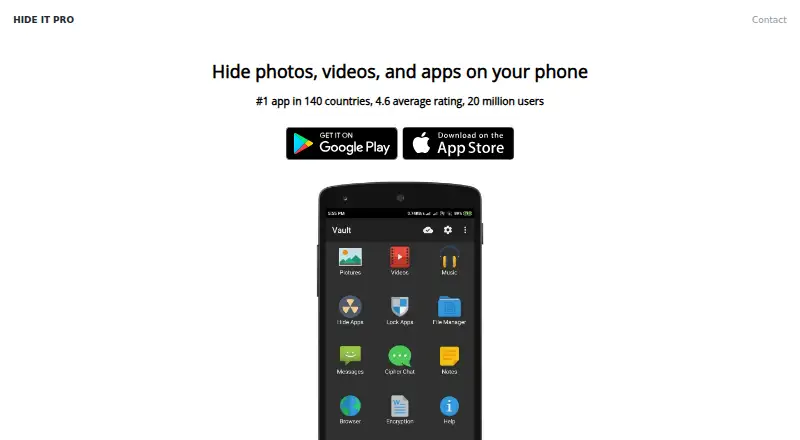
What Hide it Pro is
Hide it Pro is an app for hiding private photos, videos, music, and apps, as well as keeping secret notes. It is available for Android, iOS, macOS, and Windows, with hidden data encrypted and stored on the device. The app says its maker cannot access media added to it. Users can open the vault with a fingerprint and lock other apps with a fingerprint or password. Hide it Pro also includes a private browser with ad blocking and tracking protection, plus chat for private conversations and photo exchange. Optional plugins add functions: one can remove the app icon, after which the app is opened by dialing ## followed by the PIN. The VBrowser plugin offers incognito browsing, a download manager, video downloads from over 14 streaming sites, and picture saving. An SMS hider plugin is described as early development, with no guarantee it will work. The free plan is free; no paid plans are listed. Its privacy policy says third-party ad SDKs may collect IP address, device type, screen resolution, OS version, session data, and diagnostic data. The homepage advertises 24x7 support.
Good
- Encrypts and stores hidden data on-device
- Vault access can use a fingerprint
- Locks other apps with fingerprint or password
- Includes private browsing with ad blocking and tracking protection
- Free plan listed as free
Watch out
- Third-party ad SDKs may collect device and session data
- SMS hider plugin has no guarantee of working
- No paid plans are listed on the official site
Who it suits
Hide it Pro suits people who want to keep media, apps, and notes private on supported devices. Its fingerprint access, app locking, and browser protections may also suit users seeking those controls.
Verdict
Hide it Pro combines media hiding, app locking, private browsing, and chat in a free app. Consider the stated ad SDK data collection and the early-development SMS plugin before relying on those features.
Plans and prices
From Hide it Pro's own pricing page, checked 14 Oct 2026.
| Plan | Price | What it gives you |
|---|---|---|
| Free app | Free | Hide photos, videos, apps, messages and calls · unlimited use · contains ads |
| Hide it Pro | Free | Free to use, share and distribute · No paid plans listed on the official site |
| Password Reset | $4.99, paid once | One password-reset purchase |
| Cloud Storage | $9.99 a month | Unlimited cloud-storage space · Automatically renews monthly unless cancelled at least 24 hours before renewal |
The facts
Each one read from Hide it Pro's own pages, with the date it was checked.
Where it runs
- App hiding
- Hide it Pro can remove its icon from the app drawer and disappear from the recent-apps list.checked 14 Oct 2026
- App locking
- The app can lock other apps with a fingerprint or password.checked 7 Oct 2026
- Browser plugin
- The VBrowser plugin is described as including incognito browsing, a download manager, video downloads from over 14 streaming sites, and saving pictures to Hide it Pro.checked 7 Oct 2026
- iOS release note
- The App Store lists version 6.1.5 with bug fixes dated 26 May 2025.checked 14 Oct 2026
- Limit: iOS backup failures
- App Store reviewers report slow uploads, incomplete subscription backups, lost photos after iPhone upgrades and unanswered support emails.checked 14 Oct 2026
- Lock apps plugin
- The plugins page describes a free plugin that locks apps and can only be launched from inside Hide it Pro.checked 7 Oct 2026
What it does
- Chat
- The app includes a chat feature for private conversations and photo exchange.checked 7 Oct 2026
- Cloud backup
- The Android listing advertises free cloud backup, while Apple offers an optional unlimited-cloud-storage subscription.checked 14 Oct 2026
- Desktop access
- The maker links a PC/Mac Chrome extension and says the app works on laptops and MacBooks.checked 14 Oct 2026
- Desktop availability
- A support page says Hide it Pro is also available for Windows and Mac.checked 7 Oct 2026
- Disguised launcher
- The Android app presents itself as a functional Audio Manager, with calculator and other disguises available, and opens the vault after a concealed gesture.checked 14 Oct 2026
- Encryption claim
- The maker says hidden data is encrypted and stored on the device, and that it cannot access users’ media.checked 14 Oct 2026
- Escape code
- An escape PIN or password opens an empty-looking vault when a user needs to conceal the real contents.checked 14 Oct 2026
- Limit: lost files
- Google Play reviewers report that deleted files reappeared and that photos disappeared from the vault on multiple phones.checked 14 Oct 2026
- Limit: permissions
- AppBrain lists broad permissions including camera, storage, microphone and location, while noting that the disguise may attract security scrutiny.checked 14 Oct 2026
- Limit: support and paid features
- A Google Play reviewer said premium activation stopped working, ads remained despite payment and repeated support attempts received no help.checked 14 Oct 2026
- Lock methods
- The app supports PIN, password, pattern and fingerprint unlocking.checked 14 Oct 2026
- Media organization
- Users can organize hidden media into custom folders or albums and sort, move, batch-delete, unhide and share files.checked 14 Oct 2026
- Media playback
- The app includes an integrated gallery slideshow and video player with stated VLC and MPlayerX support.checked 14 Oct 2026
- No icon plugin
- A plugin can remove the Hide it Pro icon, after which the app is launched by dialing ## followed by the PIN.checked 7 Oct 2026
The company
- Company founding
- The opened company pages do not state a founding year, funding round or parent owner for Hide it Pro or Goaffpro.checked 14 Oct 2026
- Company headquarters and size
- LinkedIn lists Goaffpro as self-owned, headquartered in Sirsa, Haryana, with 2–10 employees.checked 14 Oct 2026
- Company identity
- Google Play identifies the developer as ARV TECH, while the app is branded Goaffpro and the iOS seller is Anuj Tenani.checked 14 Oct 2026
- Headquarters
- Sirsa, Haryana, Indiachecked 28 Sep 2026
The full review of Hide it Pro
Hide it Pro is a free privacy app for hiding photos, videos and music, locking apps, and keeping notes. It suits people who want several privacy tools in one place, particularly on Android; its broad feature set is balanced by ad-SDK data collection and an SMS plugin that is still in early development.
Overview
The app combines a media vault with app locking, a private browser, secret notes and private chat. Hidden data is encrypted and stored on the device, and the maker says it cannot access media added to the app. Users can open the vault with a fingerprint, while app locks can use a fingerprint or password.
Cloud backup and a private camera are also offered. The privacy policy says third-party advertising SDKs may collect an IP address, device type, screen resolution, operating-system version, session data and diagnostics. That is a material trade-off for people choosing a privacy app: local media storage does not mean the app’s surrounding services collect no device data.
Key features
- Media vault and app lock: Hide photos, videos and music, and protect other apps with a fingerprint or password. This is a useful combination for someone seeking basic privacy controls in one app.
- Private browsing: The browser includes ad blocking and tracking protection. The VBrowser plugin adds a download manager, video downloads from more than 14 streaming sites, and the ability to save pictures to Hide it Pro.
- Chat and notes: Private conversations and photo exchange sit alongside secret notes, extending the app beyond a conventional media vault.
- Plugins: A free app-locking plugin can only be launched from inside Hide it Pro. Another plugin removes the app icon; afterward, the app is opened by dialing ## followed by the PIN. These options add concealment, but require users to understand the extra launch steps.
- SMS and call blocking: The SMS hider plugin is described as early development, with no guarantee it will work. It is not a dependable choice for protecting private conversations by SMS.
Pricing
Hide it Pro costs free. There is no free trial, and no paid plans are listed. The free option is therefore the only stated plan; there are no paid tiers with different quotas or seats to weigh against it. The app is free to use, share and distribute.
The available pricing terms do not give a cap for vault contents or cloud backup, so users should not assume a particular storage quota. The absence of a paid plan also means there is no stated subscription renewal term to factor in.
Platforms
Hide it Pro is available for Android and iOS, with desktop versions for Windows and Mac. That range makes it relevant to people who want the app beyond a single mobile platform, though the core app is most clearly suited to mobile privacy needs.
Who it's for
Choose Hide it Pro if you want a free mobile app that brings media hiding, app locks, private browsing and chat together, and value local encrypted storage for hidden media. It is a weaker fit if your privacy decision depends on avoiding third-party ad SDK data collection, or if SMS hiding needs to work reliably. The early-development warning makes that plugin a poor basis for protecting sensitive messages.
Pros and cons
Pros
- Broad set of tools at no charge: The free app combines a media vault, app locking, notes, chat and private browsing.
- Local encrypted media storage: The maker says hidden media is encrypted on the device and inaccessible to it.
- Extra concealment options: A no-icon plugin and a browser plugin offer more than the core vault alone.
Cons
- Ad SDKs may collect device and usage data: The policy names IP address, device details, session data and diagnostics, which may put privacy-focused users off.
- SMS hider is not guaranteed to work: Its early-development status makes it unsuitable as a reliable messaging safeguard.
- Plugin access can be less direct: The app-lock plugin must be launched from within Hide it Pro, while removing the icon means opening the app by dialing a PIN sequence.
Alternatives
Browse Photo Vault Apps for more choices in the category. Consider Keepsafe Photo Vault if you want a vault with a free tier capped at 200 cloud items, or a paid monthly option at $9.99 a month. PhotoGuard is an Android alternative with a free download; its premium unlocks features and removes ads.
Weave Vault may suit Android and iOS users who prefer a defined free allowance of three vaults and 50 files per vault, with a 7-day trial for new subscribers to its annual Pro plan. Choose LockMyPix if you want a one-time 29.99 USD Premium purchase to remove ads and unlock premium features.
Obscura Photo Vault is an iOS option with a free single vault for up to 50 photos, or unlimited photos, videos and vaults on Pro Monthly for $6.99 a month. Private Photo Vault offers Android and iOS users a basic on-device photo and video vault; switching to Basic deletes Cloud Backup.
Secret Album: Photo Vault is an iPhone and iPad option with encrypted photo and video storage in its free plan. SecurePix offers all features in its free, ad-supported Android and iOS plan.
Verdict
Hide it Pro is a sensible choice for someone who wants a free, multi-tool privacy app and values keeping hidden media encrypted on-device. Its range is the main reason to choose it; the ad SDK data collection and unreliable early SMS plugin are the main reasons to look elsewhere, especially if minimizing data collection or protecting messages is the priority.
Getting started
- Visit the Hide it Pro website.
- Choose a supported platform: Android, iOS, macOS or Windows.
- Use the free plan; no free trial is offered.
- For optional functions, review the plugins, including app locking, icon removal and VBrowser.
Limits worth knowing
The SMS hider plugin is described as early development, and there is no guarantee that it will work. The free lock apps plugin can only be launched from inside Hide it Pro.
Questions
Is Hide it Pro free?
Yes. Its free plan is listed as free, and no paid plans are listed on the official site.
Which platforms does it support?
Hide it Pro is available for Android, iOS, macOS and Windows.
How is hidden data stored?
The site says hidden data is encrypted and stored on the device. Its privacy policy says the maker cannot access media added to the app.
What privacy features does it include?
Vault access can use a fingerprint, and app locking can use a fingerprint or password. It also includes a private browser with ad blocking and tracking protection.
Does it include private messaging?
It includes chat for private conversations and photo exchange. An SMS hider plugin is described as early development and is not guaranteed to work.
Can third parties collect information?
The privacy policy says third-party ad SDKs may collect IP address, device type, screen resolution, OS version, session data and diagnostic data.
Alternatives to Hide it Pro
- 1

Weave Vault
Free planAndroidiOSmacOS7.8From $9.99 a year - 2

Keepsafe Photo Vault
Free planAndroidiOS7.6From $23.99 a year - 3

NullVault
Free planAndroidiOS7.6From $19.99 a year - 4
Obscura Photo Vault
Free planiOS7.3From $29.99 a year - 5

LockMyPix
Free planAndroidiOS6.8$29.99 one-time - 6
Blackbox
Free planAndroidiOS6.7From $49.99 a year