Phoenix APS
Phoenix APS helps planners create feasible schedules for machines, people, and equipment while accounting for calendars, setups, dependencies, and materials.
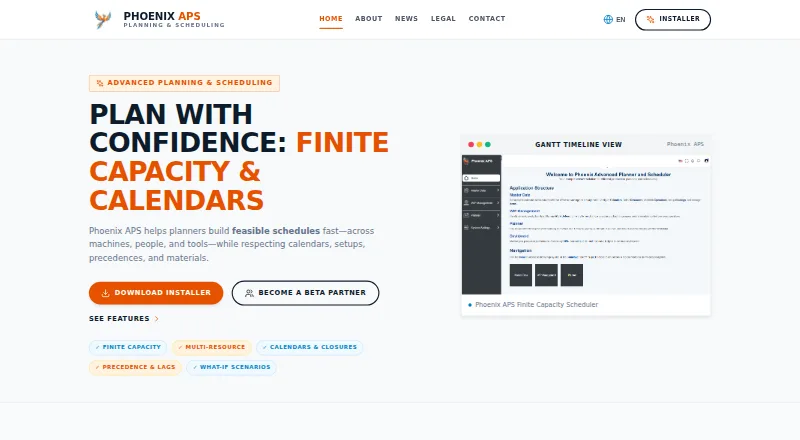
What Phoenix APS is
Phoenix APS helps planners create feasible schedules for machines, people, and equipment while accounting for calendars, setups, dependencies, and materials. It enforces capacity limits for machines, lines, and human skills to avoid double booking, and models parallel, alternative, and sequential operation routings. A single plan can schedule machines, operators, and equipment together. The tool handles closures, working-time variations, finish-to-start dependencies with configurable lags, and bill-of-material availability under listed consumption laws. Planners can change assignments and rules to see their impact; infeasible jobs can be parked with reasons and retried using targeted relaxations. The interface includes a Gantt timeline, an operations table with filters, and a what-if solver. HTTP JSON endpoints allow ERP or MES systems to send master data and retrieve dated plans. The maker describes the approach as heuristic and rule-based, focused on fast, explainable feasible plans; optimization modules are on the roadmap. The free beta installer is publicly available for Windows, but its temporary evaluation license does not permit production use.
Good
- Plans machines, operators, and equipment together.
- Accounts for calendars, dependencies, and materials.
- Supports what-if changes and infeasible-job retries.
- ERP and MES systems can exchange plans through HTTP JSON endpoints.
Watch out
- Temporary beta license does not permit production use.
- Maker advises against safety-critical or regulated beta deployment.
- Multi-site scheduling is not supported.
- Optimization modules are on the roadmap.
Who it suits
Phoenix APS suits planners evaluating feasible production schedules across machines, operators, equipment, and materials. It is for beta evaluation and R&D, not production deployment.
Verdict
Phoenix APS brings finite-capacity planning and what-if scheduling into a Windows beta tool with ERP and MES connectivity. Its evaluation license is temporary and explicitly excludes production use.
Plans and prices
From Phoenix APS's own pricing page, checked 15 Oct 2026.
| Plan | Price | What it gives you |
|---|---|---|
| Free beta evaluation | Free | temporary evaluation · non-commercial R&D · no production use · Windows installer · free |
The facts
Each one read from Phoenix APS's own pages, with the date it was checked.
What it does
- API
- HTTP JSON endpoints are intended to let ERP or MES systems send master data and retrieve dated feasible plans.checked 15 Oct 2026
- Availability and support
- The Windows installer is publicly available, and the maker offers guidance for industrial pilots.checked 29 Sep 2026
- Calendars and dependencies
- It handles closures and working-time variations, plus finish-to-start precedence relationships with configurable lags.checked 29 Sep 2026
- Calendars and exceptions
- The product handles closures, exceptions and varying working times.checked 15 Oct 2026
- Custom routing
- Operations can be modeled as parallel, alternative or sequential routings with operation-level detail.checked 15 Oct 2026
- Deployment components
- The full Windows installer includes Angular, .NET APIs, and nginx, with SQL Server database backups for Starter and Demo.checked 29 Sep 2026
- ERP and MES connectivity
- HTTP JSON endpoints let ERP or MES systems send master data and retrieve dated, feasible plans.checked 29 Sep 2026
- ERP connectivity
- The FAQ describes Phoenix as API-first and designed to map ERP master data to a scheduling graph and return dated plans.checked 15 Oct 2026
- Evaluation licence
- Beta users receive a revocable, non-exclusive, non-transferable, royalty-free temporary evaluation licence.checked 15 Oct 2026
- Finite capacity
- The scheduler enforces real capacity limits on machines, lines and human skills to prevent double booking.checked 15 Oct 2026
- GitHub activity
- The repository page shows zero forks, zero issues and zero security or quality alerts at the time read.checked 15 Oct 2026
- GitHub assets
- The v1.0 release page lists three release assets and points to README.md for installation instructions.checked 15 Oct 2026
- GitHub release
- GitHub identifies Phoenix APS v1.0 as the latest release and shows it was published on August 7, 2026.checked 15 Oct 2026
- GitHub repository
- The installer is hosted in a public GitHub repository named phoenix-aps-installer.checked 15 Oct 2026
- Infeasibility handling
- Infeasible jobs can be parked with reasons and retried using targeted relaxations.checked 15 Oct 2026
- Installation documentation
- The maker says an installation guide is included under help\documentation\.checked 15 Oct 2026
- Installer contents
- The Windows package includes an Angular frontend, .NET APIs, nginx and SQL Server backups for Starter and Demo.checked 15 Oct 2026
- Interface
- The interface includes a Gantt timeline, an operations table with quick filters, and a what-if solver.checked 29 Sep 2026
- Languages
- The interface is fully translated into English, French, Spanish, German, Italian, Portuguese and Russian.checked 15 Oct 2026
- Licence status
- The legal notice reserves rights over the software and forbids copying, redistribution, sublicensing or commercial use without written permission.checked 15 Oct 2026
- License and use limit
- Phoenix APS is described as a personal, non-commercial R&D project; its beta evaluation license is temporary and does not permit production use.checked 29 Sep 2026
- Limit: documentation depth
- Public documentation is limited to an installation guide bundled in the installer; no public API reference or SDK is linked on the site.checked 15 Oct 2026
- Limit: mobile availability
- The published delivery is a Windows installer; no iOS or Android application is described on the maker's pages.checked 15 Oct 2026
The company
- Company fact
- The project says it is independently created and not affiliated with, endorsed by or sponsored by an employer or organization.checked 15 Oct 2026
The full review of Phoenix APS
Overview
Phoenix APS is a finite-capacity production scheduler for coordinating work across machines, operators, equipment, and materials. It suits planners assessing a Windows-based workflow or conducting non-commercial R&D. Its constraint-aware planning is substantial for an evaluation tool, but the beta license makes it unsuitable for production.
Key features
Phoenix APS schedules against limits on machines, lines, and human skills, reducing the risk of assigning conflicting work to the same constrained resource. It supports parallel, alternative, and sequential operation routings, and can plan machines, operators, and equipment together. This is useful where feasibility depends on several resource types at once; teams planning across multiple sites will need another option.
Calendars account for closures and changes in working time, while finish-to-start dependencies can include configurable lags. Material checks use bill-of-material availability with Fixed or Proportional requirements and AtStart, Uniform, or AtEnd consumption laws. That coverage can represent complex production constraints, but the resulting schedule depends on accurate routing, capacity, calendar, and materials rules.
For what-if work, planners can change assignments and rules and see their effect immediately. Jobs that cannot be scheduled can be parked with reasons and retried using targeted relaxations, making it easier to investigate why work does not fit. The interface combines a Gantt timeline, an operations table with quick filters, and a what-if solver.
HTTP JSON endpoints allow ERP or MES systems to submit master data and retrieve dated, feasible plans. The maker emphasizes fast, explainable schedules generated with heuristics and rules; optimization modules remain on its roadmap. That makes Phoenix APS a better fit for feasibility planning and pilot work than for buyers specifically seeking optimization capabilities today.
Pricing
Free beta evaluation: free. It includes the free installer and a temporary evaluation license. There is no paid production tier in this offer: the license explicitly excludes production use, so the free plan is for evaluation rather than ongoing operational scheduling.
The Windows installer includes Angular, .NET APIs, and nginx; SQL Server database backups are provided for Starter and Demo. The maker offers guidance for industrial pilots, but describes Phoenix APS as a personal, non-commercial R&D project. It advises reasonable safeguards and says not to deploy the beta in safety-critical or regulated environments.
Platforms
Phoenix APS is available for Windows, with API connectivity for ERP and MES integrations. Its deployment components are bundled in the Windows installer. The beta’s stated limits mean that platform availability should not be mistaken for production readiness.
Who it's for
Phoenix APS is worth considering for planners who want to evaluate finite-capacity scheduling, multi-resource constraints, material availability, and scenario changes in a Windows environment. It is also relevant to teams exploring a non-commercial industrial pilot with maker guidance. It is not the right choice for production deployment, regulated or safety-critical work, or multi-site scheduling.
Pros and cons
- Pros: Combines machine, labor, equipment, calendar, precedence, and material constraints in one plan, which is useful when job feasibility spans several kinds of resource.
- Pros: Parks infeasible jobs with reasons and supports targeted relaxations, giving planners a practical way to explore scheduling bottlenecks.
- Pros: HTTP JSON endpoints support ERP and MES exchange of master data and dated plans.
- Cons: The temporary beta license does not permit production use, sharply limiting its operational role.
- Cons: Optimization modules are only on the roadmap; its current approach relies on heuristics and rules.
- Cons: Multi-site scheduling is not supported, and the maker advises against safety-critical or regulated deployment.
Alternatives
Choose frePPLe if a free, open-source edition or Linux and self-hosted availability better matches your deployment needs; its cloud plans include a maximum of six scenarios on Cloud. PlanetTogether APS is a paid alternative with a free trial and self-hosted and web platforms; its subscription fees are paid annually in advance, or it can be licensed perpetually.
SyncManufacturing is a paid web-based alternative. SkyPlanner APS is a paid option with a free trial across web, mobile, and API platforms, and its listed plan covers five workstations. GANTTPLAN APS is another paid, trial-available web and self-hosted alternative; its Starter plan includes an ERP adapter and deadline-based optimization.
WorkCell APS is worth considering for production scheduling with shop-floor data collection, inventory, job costing, and QuickBooks or Xero integration; its Core plan is $995 a month, billed annually, plus a 2,500.00 USD implementation fee. Accevo APS is a paid web-based alternative. EDGEBIC offers a Windows and API finite-capacity scheduling option with a 25000.00 USD one-time perpetual license; its APS plan has no material planning features.
For broader comparisons, see Advanced Planning and Scheduling Software, Manufacturing Scheduling Software, and Production Scheduling Software.
Verdict
Phoenix APS is a strong evaluation candidate for planners who need to model finite capacity, materials, and what-if changes together, particularly when ERP or MES connectivity matters. Choose it for non-commercial assessment and pilot exploration, not for production operations: the temporary beta license, lack of current optimization modules, and exclusions for safety-critical and regulated environments are decisive reasons to look elsewhere for a live deployment.
Getting started
- Open the Phoenix APS website
- Download the publicly available Windows installer
- Install the package containing Angular, .NET APIs, and nginx
- Use the included SQL Server backups for Starter or Demo deployment
- Connect ERP or MES systems through the HTTP JSON endpoints
- Evaluate the beta only in non-production settings
Limits worth knowing
The free beta evaluation plan is temporary and its license does not allow production use. Phoenix APS is described as a personal, non-commercial R&D project, and the maker advises against safety-critical or regulated deployment.
Questions
What does Phoenix APS cost?
The Free beta evaluation plan is listed as free.
Which platforms are supported?
Phoenix APS provides a public Windows installer and an API platform option.
Can Phoenix APS connect to ERP or MES systems?
Yes. HTTP JSON endpoints let ERP or MES systems send master data and retrieve dated, feasible plans.
Does it support material constraints?
Yes. It checks bill-of-material availability with Fixed or Proportional rules and AtStart, Uniform, or AtEnd timing laws.
Is Phoenix APS licensed for production use?
No. The beta evaluation license is temporary and does not permit production use.
Does Phoenix APS provide optimization modules?
The maker describes heuristic and rule-based scheduling, while optimization modules are on the roadmap.
Alternatives to Phoenix APS
- 1
Timefold Platform
Free planOpen sourceWebAPILinuxSelf-hosted7.9From $3,000 a month - 2

GE Vernova Proficy Plant Applications
AndroidiOSWebAPI7.7From $5,800 a month - 3

frePPLe
Free planWebAPILinuxSelf-hosted7.2Free plan - 4

Siemens Opcenter
WebAPISelf-hostedWindows7.0 - 5
SkyPlanner APS
AndroidiOSWebAPI7.0From €199 a month - 6
Kinaxis Enterprise Scheduling
AndroidiOSWebAPI6.6