pgFormatter
pgFormatter is a free formatter for PostgreSQL queries and PL/pgSQL code, with support for SQL-92, SQL-99, SQL-2003, SQL-2008, SQL-2011, PostgreSQL syntax, a…
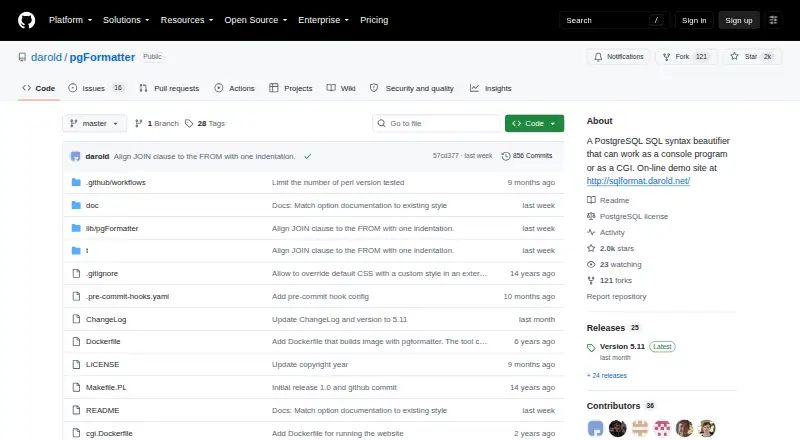
What pgFormatter is
pgFormatter is a free formatter for PostgreSQL queries and PL/pgSQL code, with support for SQL-92, SQL-99, SQL-2003, SQL-2008, SQL-2011, PostgreSQL syntax, and other databases. It can run from the console or as a CGI application, returning text or HTML according to its environment. A CGI request using an Accept: application/json header can receive JSON, though that API can be disabled in the CGI configuration. Formatting controls cover keyword, function, identifier, and type case, indentation, query wrapping, and comma placement. The --anonymize option obscures query literals before formatting. Users can install it from a GitHub source tarball, build a Docker image, or use the online demo, which limits queries to ten thousand characters. The README also describes Vim and (Neo)Vim use, links to Atom and Visual Studio Code integrations, and documents a pre-commit hook for SQL files. For other databases, custom lists can cover user-defined functions or keywords that pgFormatter cannot identify automatically. It is free software under the PostgreSQL Licence.
Good
- Free software distributed under the PostgreSQL Licence.
- Offers configurable casing, indentation, wrapping, and comma placement.
- Can obscure query literals with --anonymize.
- Supports console and CGI use, including JSON responses.
- Documents editor integrations and pre-commit use.
Watch out
- Online demo limits queries to ten thousand characters.
- Cannot automatically detect other databases’ custom functions or keywords.
Who it suits
It suits developers who want to format PostgreSQL or PL/pgSQL code and adjust layout or casing. It may also fit SQL workflows that use console, CGI, editor, Docker, or pre-commit setups.
Verdict
pgFormatter provides several ways to format SQL, from console use to editor and pre-commit workflows. Those working with other databases may need to maintain custom lists for functions and keywords.
Plans and prices
From pgFormatter's own pricing page, checked 30 Sep 2026.
| Plan | Price | What it gives you |
|---|---|---|
| pgFormatter | Free | Free software distributed under the PostgreSQL Licence |
The facts
Each one read from pgFormatter's own pages, with the date it was checked.
What it does
- Anonymization
- The command line option --anonymize obscures query literals before formatting.checked 30 Sep 2026
- Docker
- The project documents building a Docker image and piping SQL input to a container running pgFormatter.checked 30 Sep 2026
- Editor integrations
- The README describes use with Vim and (Neo)Vim and links to Atom and Visual Studio Code integrations.checked 30 Sep 2026
- Formatting options
- Options include changing keyword, function, identifier, and type case; adjusting indentation; wrapping queries; and choosing comma placement.checked 30 Sep 2026
- Installation
- The README documents installation from a GitHub source tarball using Perl Makefile.PL, make, and make install.checked 30 Sep 2026
- JSON API
- When called as a CGI application with an Accept: application/json header, pgFormatter can return a JSON response; the API can be disabled in its CGI configuration.checked 30 Sep 2026
- Online demo limit
- The README describes an online demo that limits SQL queries to ten thousand characters.checked 30 Sep 2026
- Other databases
- The project says pgFormatter also works with other databases.checked 30 Sep 2026
- Pre-commit integration
- The README documents configuring pgFormatter as a pre-commit hook for SQL files.checked 30 Sep 2026
- Purpose
- pgFormatter beautifies PostgreSQL SQL queries and PL/pgSQL code, and supports keywords from several SQL standards as well as PostgreSQL-specific keywords.checked 30 Sep 2026
- Security and privacy
- The anonymization option is described as useful for hiding confidential data before formatting; the repository page opened did not state security certifications or compliance claims.checked 30 Sep 2026
- Support and limits
- The README notes that pgFormatter cannot detect user-defined functions or keywords for other databases automatically, but allows custom lists for them.checked 30 Sep 2026
- Ways to run
- It can run as a console program or a CGI application, producing text or HTML based on its environment.checked 30 Sep 2026
The company
- Maker and license
- The README credits Gilles Darold as the original author and says pgFormatter is free software distributed under the PostgreSQL Licence.checked 30 Sep 2026
The full review of pgFormatter
pgFormatter is a free SQL formatter focused on PostgreSQL queries and PL/pgSQL code, with support for several SQL standards. It suits developers who want configurable formatting in a console, editor, web workflow or pre-commit hook; teams using other databases may need to maintain custom keyword and function lists.
Overview
pgFormatter can run as a console program or CGI application and produce text or HTML according to its environment. It also offers a JSON response when a CGI request includes an Accept: application/json header, which can be useful for integrating formatting into a service. Its range of ways to run is a practical strength for developers who want the same formatter in local and automated workflows.
The project supports SQL-92, SQL-99, SQL-2003, SQL-2008, SQL-2011 and PostgreSQL syntax, and says it works with other databases as well. That broader use has a caveat: pgFormatter cannot automatically recognize other databases' user-defined functions or keywords, so those need custom lists.
Key features
Formatting options cover keyword, function, identifier and type capitalization, indentation, line wrapping and comma placement. This gives teams control over common style choices rather than forcing one layout. Automatic fixes, a configuration file, editor extensions and CI/CD integration support repeatable formatting across individual editing and shared workflows.
The --anonymize command-line option obscures query literals before formatting, a useful safeguard when queries contain confidential values. It is not a substitute for broader security assurances: pgFormatter carries no stated security certification or compliance claim.
Developers can use it with Vim and (Neo)Vim, and the project links to Atom and Visual Studio Code integrations. A pre-commit hook can format SQL files before commits. The online demo is convenient for a quick try, but its ten-thousand-character query limit makes it a poor fit for large inputs.
Pricing
pgFormatter: free. The free software is distributed under the PostgreSQL Licence, and there is no free trial because the software is free. The project documents installation from a GitHub source tarball using Perl Makefile.PL, make and make install, as well as building a Docker image and piping SQL input to a container. Those options suit developers comfortable with command-line setup; the online demo offers a lower-effort way to format shorter queries.
Platforms
pgFormatter is available for API, Linux, self-hosted and web use. Its console and CGI modes, Docker workflow and editor integrations give developers multiple ways to fit it into a setup, though the online demo's input cap limits its usefulness for long queries.
Who it's for
Choose pgFormatter if PostgreSQL is central to your work and you want formatting options that can be used from a terminal, an editor or a pre-commit workflow without a software charge. It is also worth considering for mixed-database work if you are prepared to curate custom lists. If you need other databases' functions and keywords recognized without that maintenance, pgFormatter is a less natural fit.
Pros and cons
- Pro: Console, CGI, JSON, editor and pre-commit workflows make it adaptable to both individual and automated SQL formatting.
- Pro: Detailed controls for case, indentation, wrapping and comma placement let teams align output with their chosen style.
- Pro: Literal anonymization can hide query values before formatting.
- Con: Other databases' custom functions and keywords require user-maintained lists rather than automatic detection.
- Con: The online demo limits queries to ten thousand characters.
- Con: Installation paths documented by the project involve command-line setup, which may be less appealing to users seeking a simple standalone app.
Alternatives
For more options in this category, browse SQL Linters and Formatters or Code Formatting Tools.
- Sqruff is another free option, with extensions and support for Linux, macOS, Windows, self-hosted and web use.
- TSQLLint is free and supports extensions plus Linux, macOS and Windows.
- SQL Formatter is free, with extension, desktop and web platform support and a browser demo.
- sqlfmt is a free option for API, Linux, self-hosted and web use, including a browser formatter that runs via WebAssembly without installation.
- Sleek is a free alternative with extension, Linux, macOS and Windows support.
- SQL Formatter VSCode is a free MIT-licensed extension for formatting SQL files in VS Code.
- JSQLFormatter is a free option for Linux, macOS, Windows and self-hosted use.
- Squawk is a free alternative spanning mobile, desktop, web, extension, API and self-hosted platforms.
Verdict
pgFormatter is a strong choice for PostgreSQL developers who want configurable SQL formatting they can carry from console use into editors and commit workflows, at no cost. Its main drawback for mixed-database teams is the need to maintain custom lists for other databases' functions and keywords; look elsewhere if automatic recognition across databases matters more than its PostgreSQL-centered workflow.
Alternatives to pgFormatter
- 1

Prettier
Free planOpen sourceWebAPIExtensionLinux7.5Free plan - 2
Avidemux
Free planOpen sourceWebLinuxmacOSWindows7.3Free plan - 3
Fourmolu
Free planWebLinuxWindows6.7Free plan - 4
rustfmt
Free planLinuxmacOSWindows6.6Free plan - 5
Black
Free planLinuxmacOSSelf-hostedWindows6.5Free plan - 6

Ruff
Free planWebLinuxmacOSSelf-hosted6.5Free plan