SQLCheck
SQLCheck is a free command-line utility for identifying common SQL anti-patterns that can slow queries.
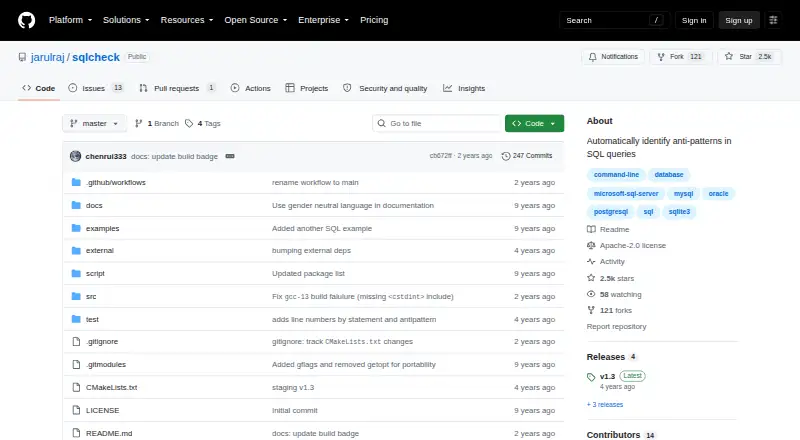
What SQLCheck is
SQLCheck is a free command-line utility for identifying common SQL anti-patterns that can slow queries. It groups findings into logical database design, physical database design, query and application development categories. Users can analyze a SQL file and choose to check all patterns, medium- and high-risk patterns, or high-risk patterns only. Color and verbose output modes are available. The project says it targets all major SQL dialects and lists Microsoft SQL Server, MySQL, Oracle, PostgreSQL and SQLite3. Downloads include Debian, RPM, macOS DMG, Windows EXE and ZIP packages; source build instructions list g++ 4.9 or later and CMake. Version 1.3 release notes list line numbers and a status code of 1 when anti-patterns are found. SQLCheck does not automatically fix findings, and the project documents file-based command-line use rather than a hosted service, graphical interface, API or mobile app. The repository identifies the Apache-2.0 license and welcomes issues, pull requests and documentation improvements.
Good
- Free Apache-2.0 command-line tool.
- Offers all, medium/high, and high-risk checks.
- Lists five supported SQL dialects.
- Downloads cover Linux, macOS and Windows.
Watch out
- No automatic fixes for findings.
- No editor extensions or configuration file.
- Documented use is file-based command line.
Who it suits
SQLCheck suits developers and database users comfortable running command-line tools to inspect SQL files. It may be useful for users who want risk-level filtering across several named SQL dialects.
Verdict
SQLCheck provides configurable command-line checks across several SQL dialects at no stated cost. Its file-oriented workflow and lack of automatic repairs may not suit users looking for an editor or graphical tool.
Plans and prices
From SQLCheck's own pricing page, checked 8 Oct 2026.
| Plan | Price | What it gives you |
|---|---|---|
| SQLCheck | Free | Open-source command-line tool · no paid tiers or usage limits stated |
The facts
Each one read from SQLCheck's own pages, with the date it was checked.
What it does
- Build requirements
- Building from source requires g++ 4.9+ and CMake, and the repository should be cloned with its recursive option.checked 8 Oct 2026
- Contributions and help
- The README welcomes contributions through issues, pull requests, and documentation improvements.checked 7 Oct 2026
- Detection categories
- It groups detected anti-patterns into logical database design, physical database design, query, and application development categories.checked 7 Oct 2026
- Detection coverage
- It lists anti-patterns in logical database design, physical database design, queries, and application development.checked 8 Oct 2026
- Downloads
- The README lists Debian, RPM, macOS DMG, Windows EXE, and ZIP downloads.checked 7 Oct 2026
- Input
- The command line accepts a SQL file name for analysis.checked 7 Oct 2026
- Input and output
- The command-line tool accepts a file name and offers color and verbose modes.checked 8 Oct 2026
- Integrations
- The maker pages opened describe a standalone command-line utility and do not state integrations with other products.checked 8 Oct 2026
- License
- The repository says SQLCheck is licensed under the Apache License.checked 7 Oct 2026
- Notable limitation
- The README documents file-based command-line use; it does not describe a hosted service, graphical interface, API, or mobile app.checked 8 Oct 2026
- Output options
- The command line provides color and verbose modes.checked 7 Oct 2026
- Purpose
- SQLCheck automatically detects common SQL anti-patterns that can slow queries.checked 8 Oct 2026
- Release features
- The v1.3 release lists line numbers and exit status 1 when anti-patterns are found.checked 8 Oct 2026
- Risk levels
- The command-line option supports checking all anti-patterns, medium and high risk only, or high risk only.checked 8 Oct 2026
- Security and compliance
- The repository identifies its license as Apache-2.0 and does not state security certifications or compliance claims.checked 8 Oct 2026
- SQL dialects
- The project says it targets all major SQL dialects.checked 8 Oct 2026
- Support
- The project invites users to open issues, submit pull requests, and improve its documentation.checked 8 Oct 2026
Where it runs
- macOS and Linux
- The README provides macOS DMG and Debian, RPM, and ZIP packages, with source-build instructions as well.checked 8 Oct 2026
- Windows
- The README provides a Windows executable download and says to run it from a terminal such as cmd.exe.checked 8 Oct 2026
The company
- Maker
- The GitHub profile identifies jarulraj as Joy Arulraj, an Associate Professor at Georgia Tech in Atlanta.checked 7 Oct 2026
The full review of SQLCheck
SQLCheck is a command-line scanner for developers who want to review SQL files for common anti-patterns across several database dialects. Its strongest case is focused, risk-filtered analysis; readers who need automatic fixes or an editor workflow should look elsewhere.
Overview
SQLCheck checks for patterns that can slow queries and groups findings across logical and physical database design, queries, and application development. That wider scope helps surface design and application concerns alongside query issues, though the file-based workflow keeps it firmly in the role of a checker rather than a SQL development environment.
It supports Microsoft SQL Server, MySQL, Oracle, PostgreSQL, and SQLite3. The project is open source under Apache-2.0 and welcomes contributions through issues, pull requests, and documentation improvements.
Key features
- Risk filters: Choose all anti-patterns, medium- and high-risk patterns, or high-risk patterns only. This lets reviewers narrow a scan to more consequential issues, but it does not repair findings or replace decisions about their impact in a specific database.
- File-based analysis: Pass a SQL file name at the command line. Version 1.3 adds line numbers and returns status code 1 when it finds anti-patterns, which helps locate issues and gives scripts a result they can act on.
- Output modes: Color and verbose options provide alternate ways to read the command-line results. The interface remains terminal-based, with no graphical interface or editor extension.
- Multiple installation routes: Downloads include Debian, RPM, macOS DMG, Windows EXE, and ZIP packages. Building from source requires g++ 4.9+ and CMake.
Pricing
SQLCheck costs nothing. The open-source command-line tool has no paid tiers or stated usage limits, making it suitable for individuals and teams seeking a no-cost file scanner without a subscription decision. There are no cheaper paid plans to compare, but the free package does not include automatic fixes or editor extensions.
Platforms
SQLCheck supports Linux, macOS, and Windows. The available packages include Debian and RPM builds for Linux, a DMG for macOS, and an EXE for Windows; Windows users run it from a terminal such as cmd.exe. The source build path is an option for users comfortable with g++ 4.9+ and CMake. It is not a hosted service or mobile app.
Who it's for
SQLCheck fits developers and database reviewers who already work with SQL files in a terminal and want checks spanning several named dialects and four categories of anti-pattern. The risk filters and line-numbered findings are useful for focused reviews and script-driven checks. It is a poor match for users who want a graphical interface, an API, an editor extension, or automated fixes.
Pros and cons
- Pro: Broad category coverage. It checks logical and physical design, queries, and application development rather than limiting its scope to query formatting.
- Pro: Actionable command-line results. Risk selection, line numbers, and a nonzero status when patterns are found help users focus reviews and scripts.
- Pro: Free and cross-platform. The open-source tool runs on Linux, macOS, and Windows without stated usage limits.
- Con: Terminal and file workflow only. Users must provide a SQL file and work from the command line; there is no graphical interface, API, hosted service, or mobile app.
- Con: No automatic fixes or editor extension. SQLCheck flags patterns but does not make corrections or integrate into an editor workflow.
Alternatives
For a wider set of options, browse SQL Linters and Formatters.
- Sqruff is another free option for readers looking across extension, desktop, self-hosted, and web platforms.
- Poor SQL suits readers seeking online or offline formatting and an SSMS/Visual Studio plugin, with an open-source AGPL-licensed library.
- Sleek is a free open-source SQL formatter for readers who want an extension or desktop platform.
- SQL Formatter is a free MIT-licensed formatting library with a browser demo, for readers prioritizing formatting over anti-pattern checks.
- sqlfmt offers a free browser formatter that runs through WebAssembly without installation, for readers who prefer browser-based formatting.
- Squawk is a free alternative for readers looking across mobile, desktop, extension, API, self-hosted, and web platforms.
- TSQLLint is a free MIT-licensed option installable with dotnet-tool, Homebrew, or NPM for readers seeking those installation routes.
- JSQLFormatter is another free SQL formatter.
Verdict
Choose SQLCheck if you want a free, cross-platform command-line check for SQL anti-patterns with risk filters and results that scripts can use. Its breadth across database design, queries, and application development is the reason to pick it; look elsewhere if your workflow depends on an editor, graphical interface, or automatic repairs.
Getting started
- Visit the SQLCheck GitHub project.
- Choose the download for your platform: Debian, RPM, macOS DMG, Windows EXE, or ZIP.
- Alternatively, build from source using g++ 4.9 or later and CMake.
- Run SQLCheck from a terminal and provide the SQL file name.
- Choose the risk levels to inspect and use color or verbose output if useful.
Limits worth knowing
The documented workflow analyzes a named SQL file from the command line. SQLCheck identifies findings but does not automatically fix them.
Questions
Is SQLCheck free?
Yes. It is listed as free, with no paid tiers or usage limits stated.
Which SQL dialects does it support?
The project names Microsoft SQL Server, MySQL, Oracle, PostgreSQL, and SQLite3, and says it targets all major SQL dialects.
Which operating systems can run SQLCheck?
Its listed platforms are Linux, macOS, and Windows. Downloads include Debian, RPM, macOS DMG, Windows EXE, and ZIP packages.
Does SQLCheck fix anti-patterns automatically?
No. Automatic fixes are listed as unavailable.
Is SQLCheck open source, and what license does it use?
The repository identifies SQLCheck as licensed under Apache-2.0.
How can users get help or contribute?
The project welcomes issues, pull requests, and documentation improvements.
Alternatives to SQLCheck
- 1
Poor SQL
Free planOpen sourceWebAPIExtensionLinux7.3Free plan - 2
RegSQL
Free planWeb7.3From $8 a month - 3
SQLFormat.org
Free planOpen sourceWebAPIExtensionSelf-hosted7.1Free plan - 4
sqlfmt
Free planWebAPILinuxSelf-hosted6.7Free plan - 5
sqlfmt
Free planWebAPI6.5From $9 a month - 6

SQLFluff
Free planAPILinuxmacOSSelf-hosted6.4Free plan