
SQL Formatter
SQL Formatter is a free, open-source JavaScript library for formatting SQL queries.
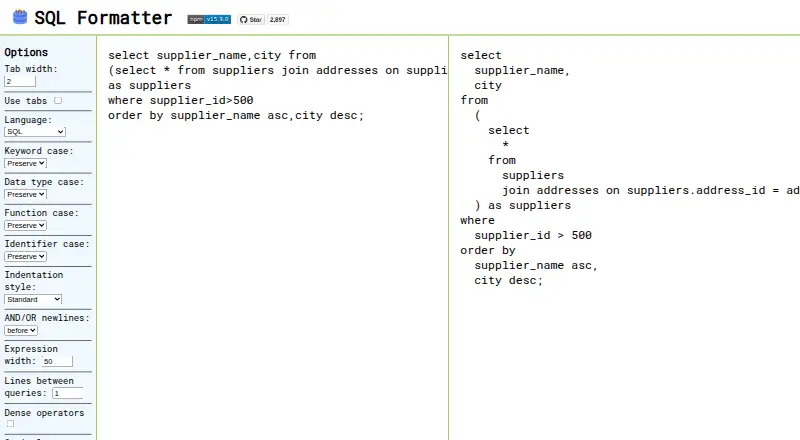
What SQL Formatter is
SQL Formatter is a free, open-source JavaScript library for formatting SQL queries. It supports many dialects, including BigQuery, ClickHouse, DB2, DuckDB, Hive, MariaDB, MySQL, TiDB, Couchbase N1QL, Oracle PL/SQL, PostgreSQL, Redshift, SingleStoreDB, Snowflake, Spark, SQL Server Transact-SQL, Trino/Presto, and SQLite. You can configure indentation, keyword and data type case, function and identifier case, operator placement and spacing, expression width, and spacing between queries. The command-line tool accepts SQL from standard input or a file, then outputs formatted SQL or updates the file in place. It can also replace prepared-statement placeholders when given parameter values. The project lists VS Code and Vim extensions, a Prettier plugin, and an ESLint integration; its JSON Schema supports configuration autocompletion and IntelliSense in editors. A browser demo provides formatting controls. SQL Formatter is MIT licensed and available for web, Linux, macOS, Windows, and as an extension. It does not support stored procedures or delimiter changes from semicolons, and templating support is limited to a workaround. Its maintainer says it is in maintenance mode, with feasible bug fixes but likely no new features.
Good
- Free and MIT licensed
- Supports a broad range of SQL dialects
- CLI can format files in place
- VS Code and Vim extensions are listed
- Configuration schema supports editor completion
Watch out
- Stored procedures are unsupported
- Delimiter cannot change from semicolon
- Templating syntax is not directly supported
- Project is in maintenance mode
Who it suits
SQL Formatter suits developers who want configurable formatting for supported SQL dialects, whether through a browser, command line, or editor integration. It may not fit workflows that rely on stored procedures, custom delimiters, or complex templating.
Verdict
SQL Formatter offers multiple ways to apply consistent formatting across many SQL dialects. Check its stored procedure, delimiter, and templating limits before adopting it, particularly since new features are unlikely.
Plans and prices
From SQL Formatter's own pricing page, checked 4 Oct 2026.
| Plan | Price | What it gives you |
|---|---|---|
| Free | Free | SQL formatting library and browser demo · MIT licensed |
The facts
Each one read from SQL Formatter's own pages, with the date it was checked.
Where it runs
- Browser demo
- The official demo page exposes controls for language, indentation, case, operator newlines, expression width, and query spacing.checked 4 Oct 2026
What it does
- CLI
- The command line tool accepts SQL from standard input or a file and can write formatted output or update a file in place.checked 4 Oct 2026
- Configuration schema
- The project provides a JSON Schema for configuration-file autocompletion and IntelliSense in editors, with usage guides for VS Code and Zed.checked 4 Oct 2026
- Dialects
- It supports BigQuery, ClickHouse, DB2, DuckDB, Hive, MariaDB, MySQL, TiDB, Couchbase N1QL, Oracle PL/SQL, PostgreSQL, Redshift, SingleStoreDB, Snowflake, Spark, SQL Server Transact-SQL, and Trino/Presto.checked 4 Oct 2026
- Editor integrations
- The project lists VS Code and Vim extensions, a Prettier plugin, and an ESLint plugin integration.checked 4 Oct 2026
- Formatting options
- Options include indentation, keyword and data type case, function and identifier case, logical operator placement, expression width, spacing between queries, and operator spacing.checked 4 Oct 2026
- License
- The software is released under the MIT license.checked 4 Oct 2026
- Limits
- It does not support stored procedures or changing the delimiter from a semicolon.checked 4 Oct 2026
- Maintenance
- The maintainer says the formatter is in maintenance mode, with feasible bug fixes and likely no new features.checked 4 Oct 2026
- Placeholder replacement
- The library can replace placeholders in prepared SQL statements using supplied parameter values.checked 4 Oct 2026
- Purpose
- SQL Formatter is a JavaScript library for pretty-printing SQL queries.checked 4 Oct 2026
- Templating
- Templating syntax is not directly supported; the README describes a parameter-type workaround that may not cover every templating construct.checked 4 Oct 2026
The full review of SQL Formatter
SQL Formatter is a free, open-source JavaScript library for making SQL consistently readable in code, editors, scripts, and a browser. It is best for developers working across several database dialects who want configurable output without a subscription. The trade-off is a maintenance-mode project with clear boundaries around procedures, delimiters, and templating.
Overview
SQL Formatter covers a notably broad set of SQL environments, including Standard SQL, BigQuery, ClickHouse, DB2 and DB2i, DuckDB, Hive, MariaDB, MySQL, TiDB, Couchbase N1QL, Oracle PL/SQL, PostgreSQL, Redshift, SingleStoreDB, Snowflake, Spark, SQLite, SQL Server Transact-SQL, and Trino/Presto. That makes it a sensible common formatter for teams whose projects span multiple engines. The dialect list should not be mistaken for full procedural-language support: stored procedures are outside its scope, and it cannot change the delimiter from a semicolon.
Key features
Formatting is configurable at a useful level. You can set indentation, the case of keywords, data types, functions, and identifiers, logical-operator placement, expression width, spacing between queries, and operator spacing. The official browser demo exposes controls for language, indentation, case, operator newlines, expression width, and query spacing, so occasional users can adjust output without building an integration.
Prepared SQL statements can have placeholders replaced with supplied parameter values. That is useful when producing readable examples or inspecting parameterized queries, but it does not turn the formatter into a general templating engine. Templating syntax is not directly supported; the documented parameter-type workaround may fail with some template constructs.
The command-line tool accepts SQL from standard input or a file. It can print formatted output or rewrite a file in place, which suits scripts and repository workflows. Editor support includes VS Code and Vim extensions, plus integrations for Prettier and ESLint. A JSON Schema provides configuration-file autocompletion and IntelliSense, with guidance for VS Code and Zed, reducing friction when teams standardize settings.
Automatic fixes are available through the formatter workflow, and the MIT license permits broad use and modification. The maintainer describes the project as being in maintenance mode: feasible bug fixes are likely, but new features are unlikely. That is reassuring for a stable formatting utility, less so for teams expecting expanding language coverage.
Pricing
| Plan | Price | Includes |
|---|---|---|
| Free | free | SQL formatting library and browser demo; MIT licensed |
There is no paid tier, free trial, or recurring renewal to manage. The free plan is the complete offering, making it appropriate for individual developers, open-source projects, and teams that can operate their own tooling. Its cost advantage does not offset the functional limits if your SQL relies on stored procedures, non-semicolon delimiters, or complex templates.
Platforms
SQL Formatter is offered as an extension, on Linux, macOS, the web, and Windows. The web demo is convenient for one-off formatting, while the CLI and editor integrations are better for repeatable project workflows.
Who it's for
Choose it for polyglot SQL teams, developers embedding formatting in JavaScript tooling, and anyone wanting consistent style in VS Code, Vim, Prettier, ESLint, or command-line pipelines. It is also a strong fit when an MIT license and zero software cost matter. Look elsewhere when procedural SQL, custom statement delimiters, or broad template syntax are central requirements, or when you need an actively expanding feature set.
Pros and cons
Pros
- Wide dialect coverage: supports major cloud, commercial, and open-source SQL variants in one formatter.
- Granular style controls: case, indentation, operators, width, and query spacing can be aligned with a team's conventions.
- Strong workflow integration: CLI, browser demo, VS Code and Vim extensions, Prettier, ESLint, and configuration IntelliSense cover common development paths.
- Free and permissively licensed: the MIT license and 0.00 USD price remove procurement and redistribution barriers.
Cons
- No stored-procedure support: procedural SQL-heavy codebases cannot rely on it for complete formatting.
- Fixed semicolon delimiter: scripts requiring delimiter changes need another tool or manual handling.
- Templating is indirect: the parameter workaround may not accommodate every template construct.
- Maintenance mode: bug fixes remain possible, but new capabilities are unlikely.
Alternatives
For a broader directory of tools, see SQL Linters and Formatters.
SQLCheck is a free open-source command-line option for Linux, macOS, and Windows, suited to readers who prefer a focused CLI tool.
Sqruff is another free choice with extension, desktop, self-hosted, and web availability, useful when deployment flexibility matters.
Poor SQL offers free online and offline formatting, plus SSMS/Visual Studio and command-line support, for Microsoft-oriented workflows.
Sleek is a free open-source formatter delivered through extensions and desktop platforms.
sqlfmt provides a free browser formatter running through WebAssembly with no installation required.
Squawk is a free option spanning mobile, desktop, web, API, extension, and self-hosted deployments.
TSQLLint is free MIT-licensed software installable through dotnet-tool, Homebrew, or NPM, particularly relevant to T-SQL users.
JSQLFormatter is a free formatter for Linux, macOS, self-hosted environments, and Windows.
Verdict
SQL Formatter is a strong choice for developers who need free, configurable formatting across many SQL dialects and toolchains. Its main reason to choose it is the combination of breadth, integrations, and MIT licensing; its main reason to look elsewhere is the hard ceiling around stored procedures, delimiters, templating, and future feature growth.
Alternatives to SQL Formatter
- 1
Poor SQL
Free planOpen sourceWebAPIExtensionLinux7.3Free plan - 2
RegSQL
Free planWeb7.3From $8 a month - 3
SQLFormat.org
Free planOpen sourceWebAPIExtensionSelf-hosted7.1Free plan - 4
sqlfmt
Free planWebAPILinuxSelf-hosted6.7Free plan - 5
SQLCheck
Free planLinuxmacOSWindows6.5Free plan - 6
sqlfmt
Free planWebAPI6.5From $9 a month