pen.dev
pen.dev is an agentic canvas for building software and a vector design tool integrated with development environments.
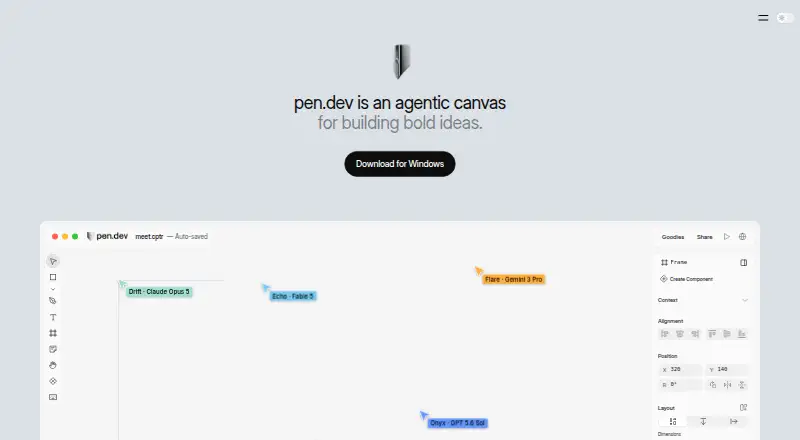
What pen.dev is
pen.dev is an agentic canvas for building software and a vector design tool integrated with development environments. Its editor supports components, variables, themes, scripts, and shaders, with imports from Figma and HTML and exports to HTML, CSS, and Tailwind. Finished work can also be exported as PNG, JPEG, WEBP, or PDF. Users can work with its integrated agent or connect external agents through MCP; documented integrations include Claude Code, Codex, Gemini CLI, Antigravity, OpenCode, Kiro, and Claude Desktop. Integrated provider choices include OpenAI, Anthropic, Google Gemini, Cursor, GitHub Copilot, xAI, OpenRouter, and other API-key providers. The .pen design file is open JSON with an open schema. Tools include a Chrome extension for webpage imports, IDE extensions for Cursor, VS Code, Antigravity, and Windsurf, and an npm-installed CLI requiring Node.js 22.19 or later. The pricing page says the service stays free until plans launch. Its listed Free plan includes 5 Agent days/month, 25 image and SVG generations/month, and 1 agent at a time; Pro is $16 a month and Ultra is $48 a month.
Good
- Imports Figma files and HTML.
- Exports to image, document, HTML, and CSS formats.
- Uses an open JSON design format.
- Offers Chrome and IDE extensions.
- Supports integrated and external agents.
Watch out
- Free plan limits agent days and generations.
- Free plan permits one agent at a time.
- CLI requires Node.js 22.19 or later.
- Plans are described as coming soon.
Who it suits
pen.dev suits designers and developers who want to combine vector design, code-oriented exports, and agent workflows. It may also suit teams connecting external agents or providers through MCP and the listed integrations.
Verdict
pen.dev combines a vector editor with agent connections and development-environment tools. The free plan has defined usage limits, while the pricing page says plans are coming soon.
Plans and prices
From pen.dev's own pricing page, checked 15 Oct 2026.
| Plan | Price | What it gives you |
|---|---|---|
| Free | Free | Unlimited MCP tool calls while designing · 25 image and SVG generations/month · 5 agent-designing days/month · 1 agent at a time · local .pen files · CLI/headless editor · sharing and personal workspaces |
| Pro | $16 a month | Unlimited MCP tool calls while designing · 350 image and SVG generations/month · unlimited agent-designing days · up to 3 parallel agents · organization developer keys · roles, billing and usage tracking · per user / month |
| Ultra | $48 a month | Unlimited MCP tool calls while designing · 750 image and SVG generations/month · up to 6 parallel agents · shared organizational usage pool · team workspaces and roles · per user / month |
| Enterprise | Priced on request | Unlimited MCP tool calls · custom usage, pricing and support |
The facts
Each one read from pen.dev's own pages, with the date it was checked.
What it does
- Agent canvas
- The product combines an infinite canvas with built-in or externally connected AI agents for designing software interfaces, presentations and other content.checked 15 Oct 2026
- AI data handling
- For pen.dev-provided models and image or SVG services, the policy says requests pass through High Agency servers in real time and are not stored, logged, or cached there.checked 7 Oct 2026
- AI providers
- The documented integrated provider options include OpenAI, Anthropic, Google Gemini, Cursor, GitHub Copilot, xAI, OpenRouter, and other API-key providers.checked 7 Oct 2026
- AI workflow
- Users can work with an integrated agent or connect external agents through MCP, and plans allow different numbers of agents to run in parallel.checked 7 Oct 2026
- Backing
- The maker homepage links to a16z Speedrun as its backing organization, whose program advertises first checks of up to $1 million.checked 15 Oct 2026
- Chrome adoption
- The pen.dev web-import extension listing shows 4,000 users and was updated September 23, 2026.checked 15 Oct 2026
- CLI
- The @pen.dev/cli package provides headless creation, editing, MCP-shell access and PNG, JPEG, WEBP and PDF export from the terminal.checked 15 Oct 2026
- CLI requirement
- The current CLI requires Node.js 22.19 or later and authenticates through interactive login or organization-scoped CLI keys.checked 15 Oct 2026
- Code export
- Frames can be exported in one click as HTML with CSS or Tailwind CSS, while artwork can be exported as PDF, PNG, JPEG or WEBP.checked 15 Oct 2026
- Compliance limitation
- Terms prohibit submitting high-risk data such as payment-card, health, biometric, precise-location, minors' or GDPR special-category data without appropriate safeguards.checked 15 Oct 2026
- Components
- Components support reusable symbols, overrides and component slots for composing complex layouts.checked 15 Oct 2026
- Current availability
- The pricing page says plans are coming soon and pen.dev stays free until plans launch.checked 7 Oct 2026
- Data handling
- Text AI requests using a user's own provider credentials go directly from the device to that provider, while hosted-model requests pass through High Agency infrastructure in real time.checked 15 Oct 2026
- Data security
- The privacy policy says account data, operational metadata, cloud files, and shared content are protected with encryption in transit and at rest and access controls.checked 7 Oct 2026
- Design features
- The editor supports components, variables, themes, scripts, shaders, Figma and HTML import, and export to HTML and CSS/Tailwind.checked 7 Oct 2026
- Design variables
- Variables let users define colors, spacing and typography once and reuse those values across a design.checked 15 Oct 2026
- Figma import
- Users can import .fig files with layouts, styles and images, or copy and paste Figma layers.checked 15 Oct 2026
- File format
- The .pen design format is an open JSON file whose schema is fully open.checked 7 Oct 2026
- Format limitation
- The .pen format documentation warns that the schema can change incompatibly and advises keeping original files before opening them in newer versions.checked 15 Oct 2026
- Founder
- The Speedrun profile identifies Tom Krcha as founder and CEO and says he previously worked on Around and co-founded Alter.checked 15 Oct 2026
Where it runs
- Browser and IDE tools
- Pen.dev offers a Chrome extension for importing webpages and IDE extensions for Cursor, VS Code, Antigravity, and Windsurf.checked 7 Oct 2026
The company
- Company facts
- LinkedIn lists pen.dev as privately held software-development company headquartered in San Francisco with 2–10 employees.checked 15 Oct 2026
- Company legal name
- The product terms and EULA identify the maker as High Agency, Inc.checked 15 Oct 2026
- Founded and size
- Andreessen Horowitz Speedrun lists Pen.dev as founded in 2025 with nine employees in California.checked 15 Oct 2026
The full review of pen.dev
Overview
pen.dev is a vector design tool that connects interface work with software development and AI agents. It is best suited to designers and developers who want to shape designs and move them toward code in one workflow. Its open format and broad agent connections stand out, but the free plan’s generation caps constrain regular, high-volume use.
Key features
Components, variables, themes, scripts and shaders support reusable, adaptable design work rather than one-off screens. Figma and HTML import, along with sketch and image input, give users several ways to start. Exports include PNG, JPEG, WEBP and PDF alongside HTML, CSS and Tailwind, so pen.dev can serve both visual exploration and code-oriented handoff.
The .pen format is open JSON with a fully open schema, a practical benefit for teams that want design files in an inspectable format. Users can work with an integrated agent or connect external agents through MCP. Documented integrations include Claude Code, Codex, Gemini CLI, Antigravity, OpenCode, Kiro and Claude Desktop; integrated provider options include OpenAI, Anthropic, Google Gemini, Cursor, GitHub Copilot, xAI, OpenRouter and other API-key providers. This range is useful for workflows already built around those tools, though the number of agents that can run concurrently depends on the plan.
A Chrome extension imports webpages, and IDE extensions are available for Cursor, VS Code, Antigravity and Windsurf. The CLI installs through npm and requires Node.js 22.19 or later, a meaningful setup requirement for developers using it. For text-based AI requests made with a user's own provider credentials, inputs and outputs go directly from the device to that provider rather than through High Agency servers. Pen.dev says account data, operational metadata, cloud files and shared content are encrypted in transit and at rest and protected by access controls. Requests to pen.dev-provided models and image or SVG services pass through High Agency servers in real time and are not stored, logged or cached there.
Pricing
The pricing page says plans are coming soon and pen.dev remains free until they launch. The current plan structure gives readers a useful sense of the trade-offs, but the paid tiers are not yet the active offer.
| Plan | Price | Usage |
|---|---|---|
| Free | free | 5 Agent days/month, 25 image and SVG generations/month, 1 agent at a time |
| Pro | $16 a month, billed $16 / user / month | Unlimited Agent days, 350 image and SVG generations/month, up to 3 agents in parallel |
| Ultra | $48 a month, billed $48 / user / month | Unlimited Agent days, 750 image and SVG generations/month, up to 6 agents in parallel |
| Enterprise | Custom pricing | Unlimited usage, with custom usage, pricing and support for procurement and onboarding |
Free is the sensible way to evaluate the workflow, but five Agent days and 25 monthly image and SVG generations make it a limited choice for sustained production. Pro is aimed at an individual who needs unlimited Agent days and up to three simultaneous agents; its 350-generation cap remains relevant for image-heavy work. Ultra raises the monthly generation allowance to 750 and parallel capacity to six, making it the more suitable tier for intensive multi-agent workflows. Enterprise is for organizations seeking tailored usage and procurement support. No trial is offered.
Platforms
Pen.dev supports API, extension, Linux, macOS, web and Windows. The mix of web, desktop and development-environment access suits teams moving between design and implementation, while the CLI's Node.js requirement may add setup for some developers.
Who it's for
Choose pen.dev if your design work benefits from reusable vector components, code exports and the option to connect an existing AI agent through MCP. The open .pen schema and import/export range are especially relevant to developers and design teams that want editable files and a route from visual work to implementation. It is a weaker fit if you need generous image generation at no cost or expect several agents to run in parallel without moving beyond the free tier.
Pros and cons
Pros
- Open JSON format with a fully open schema keeps design data inspectable.
- Figma and HTML import, sketch and image input, and exports to common image, document and code formats support varied design-to-development workflows.
- MCP connections, multiple integrated provider options and IDE extensions give developers several ways to bring the tool into existing workflows.
- Own-provider text AI requests bypass High Agency servers, while account and cloud data receive encryption and access controls.
Cons
- The free tier allows only five Agent days and 25 image and SVG generations per month, limiting sustained use.
- Free users can run only one agent at a time; parallel workflows require a paid tier once plans launch.
- The CLI requires Node.js 22.19 or later.
- Image and SVG requests using pen.dev's own services pass through High Agency servers, unlike text-based requests made with a user's own provider credentials.
Alternatives
For a broader comparison of tools in this space, see AI UI Design Generators and AI Wireframe Generators.
- UXPin is worth considering if a 14-day trial and a post-trial free tier with two prototypes and 50 AI credits better match your evaluation needs.
- Paper offers a free plan with unlimited viewers and editors and 100 MCP tool calls per week, making it an option when those collaboration allowances matter more than pen.dev's open design format.
- Figma Make is an alternative for readers who want a starter allowance of 150 AI credits per day and 500 per month, or a Professional Full seat with 3,000 monthly credits for $16 a month billed monthly.
- Starry is free to download and use without a subscription; its AI chat requires your own provider API key.
- Coherent is a free, open-source option with unlimited projects, 40+ validators with auto-fix and support for bringing your own LLM key.
- Relume may suit a web-focused workflow: its free Site Builder plan allows one project and one page, with read-only sharing and Webflow and React components.
- Visily offers a free Starter tier with 300 AI credits per month and limited boards and elements, or a Pro plan at $14 a month with 3,000 credits.
- UX Pilot offers the first design free and may suit readers comparing design generation alternatives.
Verdict
Pen.dev is a strong fit for designers and developers who want an open vector design format, code exports and agent connections in one workflow. Its main reason to choose is that breadth; its main reason to look elsewhere is the free plan's tight monthly caps and single-agent limit. It is worth adopting for measured exploration now, with heavier use dependent on the paid tiers launching.
Alternatives to pen.dev
- 1

UXPin
Free planAndroidiOSWebmacOS8.4From $29 a month - 2
Figma Make
Free planAndroidiOSWebAPI8.2Free plan - 3

floow.design
Free planWebAPI7.4From $7.99 a month - 4

Mowgli
Free planWebAPI7.4From $12 a month - 5

Visily
Free planWebExtension7.3From $14 a month - 6
artique
Free planWeb6.9Free plan