pdf-cli
The facts below are what the maker publishes about pdf-cli, checked and dated. Our editors have not written about it yet.
The facts
Each one read from pdf-cli's own pages, with the date it was checked.
What it does
- Audience
- The README describes the tool as suitable for scripting, automation, and batch processing, with no GUI required.checked 11 Oct 2026
- Automation
- It supports batch processing, stdin and stdout pipelines, and JSON, CSV, or TSV output for supported commands.checked 11 Oct 2026
- Installation
- The README recommends installation with Go 1.25 or later and also documents prebuilt releases and building from source.checked 4 Oct 2026
- Integrations
- OCR can use native Tesseract or a built-in WASM backend, which downloads language data from the Tesseract tessdata_fast GitHub repository on first use.checked 11 Oct 2026
- Intended users
- The README describes the tool as suitable for automation and batch processing, and says it works without a GUI.checked 4 Oct 2026
- License
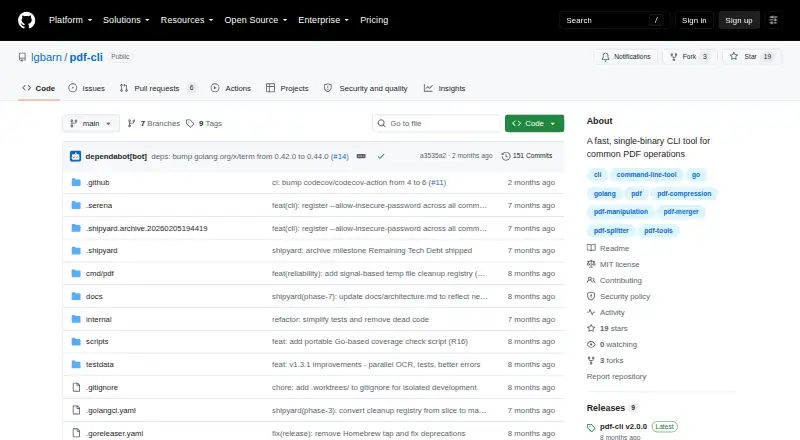
- The repository states that pdf-cli is licensed under the MIT License.checked 11 Oct 2026
- OCR
- Text extraction supports OCR for scanned PDFs using native Tesseract when installed or a built-in WASM fallback.checked 4 Oct 2026
- OCR limitation
- The built-in WASM OCR backend processes images sequentially, and its first use downloads about 15 MB of language data per language.checked 11 Oct 2026
- Password handling
- The README recommends interactive prompts, password files, or the PDF_CLI_PASSWORD environment variable; its security policy says passwords are not logged or stored.checked 11 Oct 2026
- PDF/A limitation
- PDF/A validation and conversion are described as basic and do not provide full ISO 19005 compliance; color-profile validation is unsupported.checked 11 Oct 2026
- PDF/A limits
- The project says its PDF/A validation and optimization are basic and do not provide full ISO 19005 compliance; color-profile validation is unsupported.checked 4 Oct 2026
- PDF operations
- Commands include merging, splitting, extracting, reordering, rotating, compressing, encrypting, decrypting, and watermarking PDFs.checked 11 Oct 2026
- Purpose
- pdf-cli is a command-line tool for common PDF operations, distributed as a single binary.checked 11 Oct 2026
- Security
- The security policy says user-provided files are processed locally and not sent to external services, except for OCR language-data downloads.checked 11 Oct 2026
- Single binary
- The project describes pdf-cli as a fast single binary with no external dependencies and parallel processing for large operations.checked 4 Oct 2026
- Support
- The repository welcomes contributions and directs contributors to its contributing guidelines.checked 11 Oct 2026
- Supported versions
- The security policy lists versions 2.0.x and 1.3.x as supported and versions below 1.3 as unsupported.checked 11 Oct 2026
- Text and images
- It can extract PDF text and embedded images, create PDFs from images, and read scanned PDFs using OCR.checked 11 Oct 2026
- Vulnerability reporting
- The policy asks users to report vulnerabilities privately by emailing the maintainer or using GitHub private vulnerability reporting, and states an initial response target of 48 hours.checked 11 Oct 2026
Where it runs
- Platforms
- Prebuilt binaries are listed for Linux amd64 and arm64, macOS amd64 and arm64, and Windows amd64.checked 4 Oct 2026
Alternatives to pdf-cli
- 1

BentoPDF Hyper Compress
Free planOpen sourceWebAPIExtensionLinux8.3From $99 a year - 2
PDF2Go
Free planAndroidiOSWebAPI8.2$6.42 usage-based - 3

Smallpdf
Free planAndroidiOSWebWindows8.1From $10 a month - 4

Xodo Compress PDF
Free planAndroidiOSWebAPI8.1From $7.99 a month - 5

PDF Candy
Free planAndroidiOSWebLinux7.9From $4 a year - 6

Compresto
iOSWebAPIExtension7.5$49 one-time