
Parallels Desktop
Parallels Desktop is virtualization software for running Windows and Linux virtual machines on a Mac, so you can use Windows apps such as Excel, Power BI, Ac…
What Parallels Desktop is
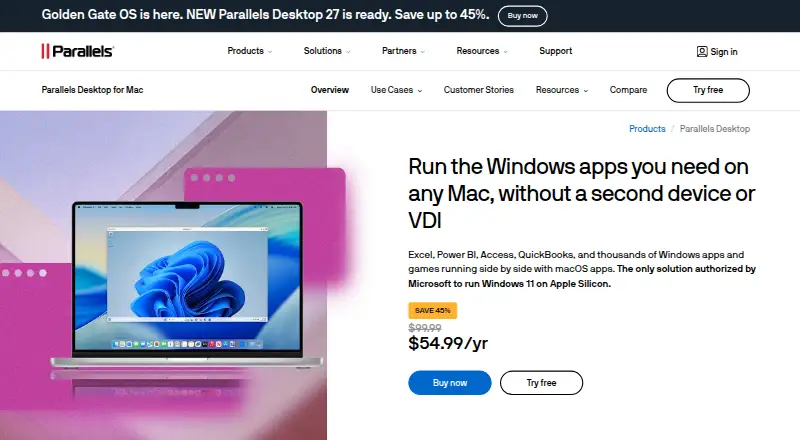
Parallels Desktop is virtualization software for running Windows and Linux virtual machines on a Mac, so you can use Windows apps such as Excel, Power BI, Access, and QuickBooks alongside macOS. It supports Intel Macs running macOS Catalina 10.15 or later and Apple Silicon Macs running macOS Big Sur 11 or later; Microsoft authorizes it for Windows 11 on Apple Silicon. Virtual machines support snapshots, nested virtualization, and GPU acceleration. Standard allows up to 8 GB of vRAM and 4 vCPUs per VM, while Pro raises those limits to 128 GB and 32 vCPUs. Pro also supports command-line workflows and Jenkins and Vagrant integrations. Business adds centralized administration, license management, and Jamf and Intune deployment integrations; Enterprise includes encrypted VMs under organizational control. Standard and Pro include unlimited phone and email support, and subscribers get 24/7 chat. It is paid, with a 14-day trial and a 30-day money-back guarantee on qualifying direct purchases; renewals are excluded.
Good
- Runs Windows apps alongside macOS on supported Macs
- Snapshots, nested virtualization, and GPU acceleration
- Pro supports Jenkins and Vagrant integrations
- Business includes centralized administration and license management
Watch out
- Paid product; no free plan
- Standard VM limit is 8 GB vRAM and 4 vCPUs
- 30-day guarantee excludes renewals
Who it suits
Parallels Desktop suits Mac users who need Windows or Linux virtual machines, including people using Windows applications or developers using the Pro integrations. Business and Enterprise features are aimed at organizations managing deployments and virtual machines.
Verdict
Parallels Desktop brings Windows and Linux virtual machines to supported Macs, with VM limits and management options varying by edition. The 14-day trial offers a way to try it before choosing a paid plan.
Plans and prices
From Parallels Desktop's own pricing page, checked 20 Sep 2026.
| Plan | Price | What it gives you |
|---|---|---|
| Standard Edition | Priced on request | 8 GB vRAM · 4 vCPUs |
| Standard Edition | — | 8 GB vRAM · 4 vCPUs |
| Pro Edition | Priced on request | 128 GB vRAM per VM · 32 vCPUs per VM |
| Pro Edition | — | 128 GB vRAM per VM · 32 vCPUs per VM |
| Business Edition | Priced on request | Centralized administration · License management · CI/CD workflow automation · Mac provisioning tools · Volume licensing |
| Business Edition | — | Centralized administration · License management · CI/CD workflow automation · Mac provisioning tools · Volume licensing |
| Enterprise Edition | Priced on request | Management portal · Golden image creation and deployment · Encrypted virtual machines · Granular VM controls · SSO/SAML with SCIM provisioning |
| Enterprise Edition | — | Management portal · Golden image creation and deployment · Encrypted virtual machines · Granular VM controls · SSO/SAML with SCIM provisioning |
| Student Standard | — | For current students and educators |
| Business Subscription | — | For businesses and organizations |
| Pro Subscription | — | For developers, creators, and power users |
| Pro Upgrade | — | Free upgrades to newer versions |
| Standard One-Time Purchase | — | One-time perpetual license option |
| Standard Subscription | — | For home and everyday use |
| Standard Upgrade | — | For customers with a previous version; discounted upgrade |
| Student Pro | — | For current students and educators |
The facts
Each one read from Parallels Desktop's own pages, with the date it was checked.
The company
- Company History
- Parallels Desktop has been available since 2006checked 28 Sep 2026
- Founded
- 1999checked 28 Sep 2026
- Headquarters
- Schaffhausen, Switzerlandchecked 23 Sep 2026
- Team Administration
- Business adds centralized administration and license managementchecked 28 Sep 2026
What it does
- Deployment Integrations
- Business supports Jamf and Intune integration for automated deployment and updateschecked 28 Sep 2026
- Developer Integrations
- Pro supports CLI workflows and integrations with Jenkins and Vagrantchecked 28 Sep 2026
- Encrypted VMs
- Enterprise provides encrypted VMs locked to organizational controlchecked 28 Sep 2026
- Gaming Limit
- Classic Windows-exclusive games are supported up to DirectX 11checked 28 Sep 2026
- GPU acceleration
- Yeschecked 20 Sep 2026
- Guest architecture
- bothchecked 20 Sep 2026
- Included Support
- Standard and Pro include unlimited phone and email support; subscribers get 24/7 chatchecked 28 Sep 2026
- Management interface
- desktopchecked 20 Sep 2026
- Microsoft Authorization
- Microsoft-authorized solution for Windows 11 on Apple Silicon Macschecked 28 Sep 2026
- Nested virtualization
- Yeschecked 20 Sep 2026
- Pro VM Limit
- Up to 128 GB vRAM and 32 vCPUs per virtual machinechecked 28 Sep 2026
- Refund Policy
- 30-day money-back guarantee for qualifying direct purchases; renewals excludedchecked 28 Sep 2026
- Security Certification
- Standard, Pro, and Business editions are SOC 2-certifiedchecked 28 Sep 2026
- Standard VM Limit
- Up to 8 GB vRAM and 4 vCPUs per virtual machinechecked 28 Sep 2026
- Supported Hosts
- Intel Macs with macOS Catalina 10.15 or later, and Apple Silicon Macs with macOS Big Sur 11 or laterchecked 28 Sep 2026
- Supported Operating Systems
- Supports current macOS, Windows, and Linux versionschecked 28 Sep 2026
Money
- Free plan
- Nochecked 20 Sep 2026
- Free Trial
- The page offers a Try free option and sends trial download instructionschecked 28 Sep 2026
Where it runs
- Host platforms
- macOSchecked 20 Sep 2026
- Supported Apps
- Runs Windows apps including Excel, Power BI, Access, QuickBooks, and thousands morechecked 28 Sep 2026
Alternatives to Parallels Desktop
- 1
Endstate
Free planOpen sourceLinuxmacOSSelf-hostedWindows7.8Free plan - 2
EaseUS Todo PCTrans
Free planWindows6.6From $59.95 a year - 3
PC Migration Pro
Free planWindows6.5$19.95 one-time - 4
PickMeApp
Free planWindows6.5From $10 a year - 5
ForensiT User Profile Wizard
Free planWindows6.4From $3.50 a year - 6

ManageEngine OS Deployer
Free planWebWindows6.4From $645 a year