
Optimate
Optimate is a social media management platform for creating, scheduling, publishing, analysing and improving content, with AI tools that use a brand’s voice,…
What Optimate is
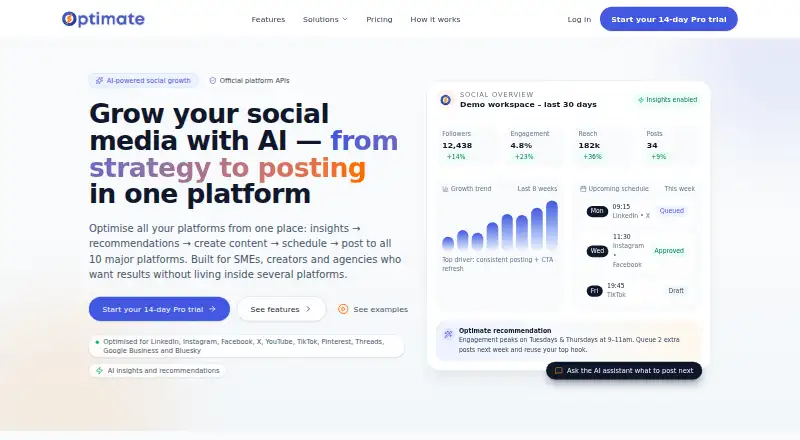
Optimate is a social media management platform for creating, scheduling, publishing, analysing and improving content, with AI tools that use a brand’s voice, audience, content pillars and prohibited words to shape captions and hooks. A shared calendar supports content plans and scheduling across connected accounts, and its dashboard brings together followers, reach, engagement and post performance with recommendations based on account results. It connects to Facebook, Instagram, LinkedIn, TikTok, YouTube, X, Pinterest, Threads, Bluesky and Google Business. Client reviewers can approve work or request changes through a link without creating an account; decisions are logged. Its Claude connector can read account data and draft or schedule content, but publishing needs user confirmation. Optimate is available on Android, iOS and web. The free plan allows three connected accounts, five scheduled posts at a time and five AI text generations. Instagram requires a professional account linked to a Facebook Page; TikTok and YouTube posts need video, and Instagram posts need an image.
Good
- Plans and schedules content across connected platforms.
- Brand controls shape AI captions and hooks.
- Analytics recommendations use the account’s own results.
- Client approvals work through links without accounts.
- Available on Android, iOS and web.
Watch out
- Free plan limits connections to three accounts.
- Free plan allows five scheduled posts at a time.
- Instagram requires a professional account linked to Facebook Page.
- TikTok and YouTube posts require video.
Who it suits
Optimate suits small businesses, creators and agencies planning social content across multiple accounts. Its client approval links may also suit teams that need clients to review drafts without creating an account.
Verdict
Optimate combines content planning, publishing and account analytics with brand-aware AI tools. Check its free-plan limits and the media and account requirements for the social networks you use.
Plans and prices
From Optimate's own pricing page, checked 14 Oct 2026.
| Plan | Price | What it gives you |
|---|---|---|
| Free | Free | 3 connected accounts · content planner · 5 scheduled posts · 5 AI text generations · link-in-bio · profile health · unlimited team members · £0/month |
| Pro | £29 a month | 10 connected accounts · 2,000 AI credits · 30 X posts/month · analytics · CSV/Excel export · inbox · Claude/ChatGPT connector · public API · £29/month; £290/year |
| Studio | £59 a month | 15 connected accounts · 3 clients · 5,000 AI credits · 60 X posts/month · client reports · approval history · £59/month; £590/year |
| Agency | £135 a month | 50 connected accounts · unlimited clients · 15,000 AI credits · 100 X posts/month · white-label approvals · multiple reviewers · priority support · £135/month; £1,350/year |
| Enterprise | Priced on request | More than 50 connected accounts · security review · custom agreements · onboarding · named contact · Contact sales |
The facts
Each one read from Optimate's own pages, with the date it was checked.
What it does
- Account permissions
- Social connections use official OAuth authorization and are limited to permissions the user grants.checked 2 Oct 2026
- AI brand voice
- Optimate can learn tone, audience, services and colours from a website, uploaded guidelines or existing posts.checked 14 Oct 2026
- AI data use
- The privacy policy says inputs are not used to train public AI models and users must review potentially inaccurate AI output.checked 14 Oct 2026
- AI video
- Paid plans include three AI video units monthly, with additional packs available.checked 14 Oct 2026
- AI visuals
- Paid plans provide AI images and branded designs sized for platform formats and carrying the user's logo.checked 14 Oct 2026
- AI writing
- Its generator produces captions, hooks, variations and hashtags adapted to each target platform.checked 14 Oct 2026
- Analytics
- Paid dashboards combine follower, reach, engagement and post-performance data across connected accounts.checked 14 Oct 2026
- API and SDKs
- The site advertises a public API for Zapier, Make and custom code, but no separate REST reference, SDK repository or developer documentation was found.checked 14 Oct 2026
- Audience
- The product is presented for small businesses, creators and agencies.checked 2 Oct 2026
- Brand voice
- Optimate uses brand voice, audience, content pillars and prohibited words to tailor AI generated captions and hooks.checked 2 Oct 2026
- Bulk scheduling
- Paid plans accept CSV uploads and validate problems before creating scheduled posts.checked 14 Oct 2026
- Claude integration
- A custom Claude connector uses an MCP endpoint so paid users can query analytics, generate content and schedule posts with confirmation.checked 14 Oct 2026
- Data processors
- Named subprocessors include Supabase for authentication/database/storage, Stripe for billing, Vercel hosting and third-party AI providers.checked 14 Oct 2026
- Documentation
- The help centre covers account connections, supported platforms, AI content and images, scheduling, analytics, remixing and Claude.checked 14 Oct 2026
- Google Play availability
- Google Play lists an Optimate Social Android app with 1+ downloads and an Everyone content rating.checked 14 Oct 2026
- Google Play data safety
- The listing says the app may share personal and financial information plus three other data types, may collect personal and financial information plus four other types, encrypts data in transit and supports deletion requests.checked 14 Oct 2026
- Google Play developer
- The Android listing names OPTIMATE TECHNOLOGIES LTD as developer and describes AI planning, content creation, scheduling and analytics.checked 14 Oct 2026
Where it runs
- Android requirements
- APKPure lists Optimate Social version 1.0 as requiring Android 7.0 or later and having a 12.3 MB package.checked 14 Oct 2026
- Client approvals
- Clients can approve or request changes through a link without creating an Optimate login, with decisions recorded.checked 14 Oct 2026
The company
- Company activities
- The company's stated SIC activities include software development, management consultancy, advertising agencies and media representation.checked 14 Oct 2026
- Company founding
- Companies House records incorporation on 8 March 2024.checked 14 Oct 2026
- Company headquarters
- The registered office is Suite 8 Stapleford Business Hub, 1 Toton Lane, Stapleford, Nottingham, NG9 7JQ, UK.checked 14 Oct 2026
- Company legal identity
- Companies House identifies the maker as OPTIMATE TECHNOLOGIES LTD, an active private limited company.checked 14 Oct 2026
Money
- Content planning
- Users can generate content plans and schedule posts across connected platforms from one calendar.checked 2 Oct 2026
The full review of Optimate
Overview
Optimate brings social publishing, planning and performance reporting into a single platform, with AI writing tools shaped by a brand’s own guidance. It is best suited to small businesses, creators and agencies that want content operations as well as caption generation in one place. Its breadth is useful, but the free tier is tightly capped and some networks impose media or account requirements.
Users can connect Facebook Pages, Instagram, LinkedIn, TikTok, YouTube, X, Pinterest, Threads, Bluesky and Google Business. Instagram needs a professional account linked to a Facebook Page; TikTok and YouTube posts require video, while Instagram posts require an image. These requirements matter if a workflow depends on publishing across networks from one calendar.
For a narrower focus on AI-written captions, see our AI Social Media Caption Generators list.
Key features
Brand-aware content planning
Optimate can generate content plans and schedule posts across connected accounts from one calendar. Its AI captions and hooks can draw on a specified brand voice, audience and content pillars, while avoiding prohibited words. Caption templates, hashtag generation and bulk generation add useful preparation tools, though the central advantage is having these controls alongside the publishing workflow rather than in a standalone writing tool.
Analytics and recommendations
The dashboard combines followers, reach, engagement and post performance, with recommendations based on the account’s own results. That makes the analytics more relevant to ongoing content decisions than a posting calendar alone; Pro is the first paid tier that includes analytics and reports.
Client approvals and Claude
Clients can approve content or request changes through a link without creating an account, and decisions are logged. That is a practical fit for agencies and Studio subscribers, which includes client approvals. The Claude connector can read Optimate account data and draft or schedule content, but it requires user confirmation before publishing.
Security and support
Optimate describes secure hosting, encryption where appropriate, access controls, monitoring and least-privilege measures. It says user inputs are not used to train public AI models, and social connections use official OAuth authorization restricted to permissions granted by the user. Support is available by email or contact form, with replies as soon as the company can provide them. The Android app supports creating and checking posts and receiving scheduled-post notifications.
Pricing
Optimate has a free plan, paid plans billed monthly via Stripe and a 14-day trial. The free plan is useful for trying the basic planner, but its three connected accounts, five scheduled posts at a time and five AI text generations make it a limited ongoing option.
- Free: free. Includes three connected accounts, five scheduled posts at a time, a basic content planner and five AI text generations. Best for a small-scale trial, not sustained multi-account publishing.
- Pro: £29 a month. Includes 10 connected accounts, 2,000 AI credits per month, 30 X posts per month, analytics, reports, the full planner and scheduler, and the Claude connector. This is the clearest fit for an individual or small business needing reporting and a fuller workflow without client management.
- Studio: £59 a month. Includes 15 connected accounts, three clients, 5,000 AI credits per month, 60 X posts per month, client-branded reports and client approvals. The extra client tools make it the more relevant step up for a small agency; the client allowance remains capped at three.
- Agency: £135 a month. Includes 50 connected accounts, unlimited clients, 15,000 AI credits per month, 100 X posts per month and priority support. It suits agencies managing a larger roster, though X posts still have a monthly cap.
- Enterprise: custom pricing. Adds volume pricing beyond 50 connected accounts, a security review, custom agreements, onboarding and a named contact. It is aimed at organizations needing scale or a tailored commercial arrangement.
Platforms
Optimate supports Android, iOS and web. Its connected social services are Facebook Pages, Instagram, LinkedIn, TikTok, YouTube, X, Pinterest, Threads, Bluesky and Google Business. The Android app is described as a companion for creating and checking posts and receiving scheduled-post notifications; the web product is the broader planning and management workspace.
Who it's for
Optimate is a strong match for a small business or creator who wants a shared calendar, brand-guided AI writing and account-level performance recommendations. Pro is the practical starting point for users who need analytics and more than the free plan’s small quotas. Studio and Agency are better suited to client work because they add approval and client-management capabilities. It is less compelling for someone who only needs occasional caption ideas, or whose publishing needs regularly exceed the stated X post caps.
Pros and cons
- Pro: Brand voice, audience, content pillars and prohibited words give AI generation useful editorial guardrails.
- Pro: One calendar, analytics and recommendations connect planning with performance feedback.
- Pro: Account-free client approvals with logged decisions reduce friction in agency review workflows.
- Con: The free plan allows only five scheduled posts at a time and five AI text generations, so it is a narrow test rather than a robust free workflow.
- Con: Network-specific requirements constrain publishing: Instagram needs a professional account tied to a Facebook Page, and TikTok and YouTube posts need video.
- Con: Paid tiers cap monthly X posts at 30, 60 or 100, which may matter to accounts that publish heavily on X.
Alternatives
Choose PostNext if a simpler free starting point is more important than Optimate’s broader account allowance: its free plan covers one connected account, one user and 10 scheduled posts per month, with unlimited ideas. For site-data access and technical SEO tasks rather than social publishing, Ahrefs is the better fit; its free plan offers limited Site Explorer and Site Audit access.
Copy.ai, HIX.AI, Simplified, TextCortex, CaptionCraft and MediaPostAI are other options to compare.
Verdict
Optimate is a sensible choice for small businesses, creators and agencies that want brand-aware AI writing tied directly to scheduling and performance analysis. Its client approvals and escalating account and AI quotas give agencies a clear path beyond the free tier. Look elsewhere if you need a generous free publishing allowance or your workflow cannot accommodate the social networks’ account and media requirements.
Getting started
- Open the Optimate website.
- Choose the free plan or review the paid plans, which start at £29/mo; a 14-day trial is available.
- Use the web service or install the Android or iOS app.
- Connect social accounts from the supported platforms.
- Build a content plan and schedule posts in the calendar.
Limits worth knowing
The Free plan includes three connected accounts, five scheduled posts at a time, a basic content planner and five AI text generations. The Pro plan costs £29 a month and includes ten connected accounts, 2,000 AI credits per month, 30 X posts per month, analytics, reports, the full planner and scheduler, and the Claude connector.
Questions
Is there a free plan?
Yes. The Free plan costs nothing and includes three connected accounts, five scheduled posts at a time, a basic planner and five AI text generations.
How much do paid plans cost?
Pro costs £29 a month, Studio £59 a month, and Agency £135 a month. Enterprise has volume pricing, with no price listed.
Which platforms does Optimate support?
It supports Android, iOS and web. Social connections include Facebook, Instagram, LinkedIn, TikTok, YouTube, X, Pinterest, Threads, Bluesky and Google Business.
What does the Claude connector do?
It can read Optimate account data and draft or schedule content. Publishing requires user confirmation.
What account permissions does Optimate use?
Social connections use official OAuth authorization and are limited to permissions the user grants. Optimate says user inputs are not used to train public AI models.
Alternatives to Optimate
- 1

Simplified
Free planAndroidiOSWebAPI8.3From $19 a month - 2

TextCortex
Free planAndroidiOSWebAPI8.2From $29.99 a month - 3

HIX.AI
Free planiOSWebExtensionmacOS8.1Free plan - 4

GravityWrite
Free planAndroidiOSWeb8.0Free plan - 5

Ocoya
AndroidiOSWebAPI7.9From $29 a month - 6

Predis.ai
AndroidiOSWebAPI7.9From $19 a month