
GravityWrite
GravityWrite combines AI tools for writing blogs, generating images and videos, building websites, and scheduling social content.
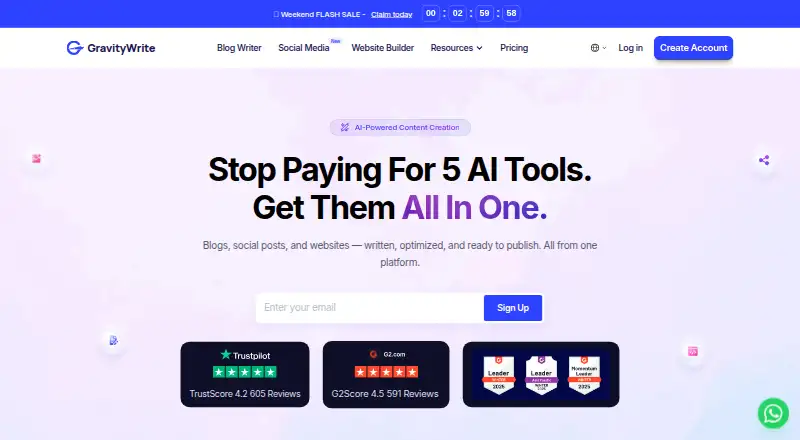
What GravityWrite is
GravityWrite combines AI tools for writing blogs, generating images and videos, building websites, and scheduling social content. Its blog writer can produce structured, SEO-optimized articles and outlines using real-time information, AI, URLs, competitor sites, or manual input. Image and video tools include image generation, text- or image-to-video creation, story illustrations, and controls for refining generated images. The scheduler can generate social posts and schedule them across social platforms. GravityWrite connects to WordPress to import or publish generated blog posts, and its website builder is offered as a WordPress plugin; GravityWrite Social can also connect to YouTube to schedule and publish videos to a selected channel. The service is intended for businesses, marketers, and content writers. Credits are shared across features and deducted according to the tool, AI mode, and output quality. Its free plan lists 50 credits per month, one social account, and five posts per month; Plus is $49/mo. The Android app includes tools listed in the help center.
Good
- Blog writer creates structured, SEO-optimized articles.
- Can import or publish generated posts through WordPress.
- Social scheduler can publish videos to YouTube.
- Supports multilingual content and brand voice controls.
Watch out
- Free plan has 50 credits per month.
- Free plan allows five social posts per month.
- Credits are shared across features.
- Terms prohibit sexual, political, or religious content creation.
Who it suits
It suits businesses, marketers, and content writers who want writing, image and video creation, website, and social scheduling tools in one service. Users should consider that features draw from a shared credit balance.
Verdict
GravityWrite covers several content tasks, from blog writing to social scheduling and media generation. Its free plan is limited by monthly credits and publishing allowances, while Plus costs $49/mo.
Plans and prices
From GravityWrite's own pricing page, checked 15 Oct 2026.
| Plan | Price | What it gives you |
|---|---|---|
| Free | Free | 50 credits/month · AI blog writer · limited image generation · 100+ templates · 20 languages · 1 social account · 5 social posts/month · email and chat support |
| Free Plan | Free | 500 credits per month · 1,000 words · 1 free blog · 3 social accounts · 10 social posts · 1 AI website · $0 /month |
| Plus | $12 a month | 500 credits/month · up to ~400 image generations/month · up to ~25 video generations/month · 5 social accounts · 50 social posts/month · 5 websites · 250+ templates · 50+ languages · mobile app · Billed as $144/year |
| Plus Plan | $12 a month | 500 credits / month · Billed as $144/year |
| Pro Plan | $49 a month | 2,500 credits / month · Billed as $589/year |
| Pro | $49 a month | 2,500 credits/month · up to ~2,000 image generations/month · up to ~125 video generations/month · 30 social accounts · 250 social posts/month · 30 websites · 300+ templates · 50+ languages · elite models · priority support · Billed as $589/year |
| Bundle | $139 a month | GravityWrite Plus · managed WordPress hosting · n8n automation · free .xyz domain for 1 year · free SSL · one-click WordPress install · daily backups · Annual plan only · one-time setup |
| Bundle Plan | $139 a year | GravityWrite Plus · WordPress hosting · n8n automation · Annual plan only · one-time setup |
The facts
Each one read from GravityWrite's own pages, with the date it was checked.
What it does
- AI blog writer
- The terms page says its AI Blog Writer can generate posts of up to 5,000 words.checked 15 Oct 2026
- AI chatbot
- The official feature list includes an AI chatbot interface for completing tasks.checked 15 Oct 2026
- AI image generation
- Users can create images from prompts, with paid plans offering higher quality and multiple image models.checked 15 Oct 2026
- AI training restriction
- The privacy policy says Google Workspace API data is not used to develop, improve or train generalized AI or machine-learning models.checked 15 Oct 2026
- AI video generation
- Plus and Pro include text or image video generation using models including Veo 3.1 and Sora 2.checked 15 Oct 2026
- API and SDKs
- The public support and product pages opened for this research do not present a GravityWrite developer API, SDK package or API reference.checked 15 Oct 2026
- Blog writing
- Its blog writer can create structured, SEO-optimized articles and generate outlines using real-time information, AI, URLs, competitor sites, or manual input.checked 11 Oct 2026
- Brand kits
- Kits can generate brand-related content in bulk, according to the official privacy policy.checked 15 Oct 2026
- Brand voice controls
- Yeschecked 19 Sep 2026
- Credit expiry
- Subscription credits reset each billing cycle and unused credits do not carry over; add-on credits expire 12 months after purchase.checked 15 Oct 2026
- Credit limits
- Credits are shared across features and deducted according to the selected tool, AI mode, and output quality.checked 11 Oct 2026
- Credit system
- Credits are shared across text, image and video generation; official examples estimate about 33 credits for a blog, 6 for an image and 20 for a video.checked 15 Oct 2026
- Google data sharing
- The privacy policy says Google user data is shared only with Google through the YouTube Data API when the user initiates publishing, with no other third-party sharing stated.checked 15 Oct 2026
- Google Play availability
- Google Play lists GravityWrite – AI Summariser by Gravitywrite WL with 1K+ downloads; the listing says it summarizes YouTube, audio and documents.checked 15 Oct 2026
- Image and video tools
- The platform offers AI image generation, text or image-to-video creation, story illustrations, and controls to refine generated images.checked 11 Oct 2026
- Integrations
- GetApp lists draw.io, ChatGPT, WordPress and Lovable as integrations; its overview also mentions Ahrefs and Google Analytics.checked 15 Oct 2026
- Languages
- Official pages state support for more than 30 languages, while the Pro comparison lists 50+ languages.checked 15 Oct 2026
- Language support
- multilingualchecked 19 Sep 2026
- Legal developer name
- Google Play identifies the app developer as Website Learners Private Limited in Chennai, Tamil Nadu, India.checked 15 Oct 2026
- Licence
- The terms state that the platform software, features and functionality are GravityWrite or licensor property, indicating proprietary rather than open-source software.checked 15 Oct 2026
The company
- Company size
- LinkedIn lists GravityWrite as a privately held software-development company with 51–200 employees.checked 15 Oct 2026
- Founded and headquarters
- LinkedIn lists the company as founded in 2023 with headquarters in Chennai, India.checked 15 Oct 2026
Money
- Free plan
- Yeschecked 19 Sep 2026
- Limit: billing complaints
- Trustpilot includes complaints about unexpected subscription renewals and difficult refund experiences, including a reported $97.20 renewal.checked 15 Oct 2026
The full review of GravityWrite
Overview
GravityWrite brings AI-assisted writing, media creation, website building and social scheduling together in one service. It is best for businesses, marketers and content writers who want several of those tasks in a shared workflow. Its range is a strength, but shared credits and two sets of plan allowances make it important to check which subscription fits before committing.
Key features
The blog writer creates outlines and structured, SEO-optimized articles from real-time information, AI, URLs, competitor sites or manual input. That gives writers several ways to start, whether they have a brief or source material to work from. SEO features and brand voice controls add useful direction, but they do not eliminate the need to review drafts before publication.
GravityWrite can generate images, create videos from text or images, produce story illustrations and refine generated images. For content teams, having these media tools alongside writing may simplify production. The cost is less predictable consumption: credits are shared across features, and the amount deducted depends on the tool, AI mode and output quality.
The scheduler generates social posts and schedules them across platforms. GravityWrite Social can also connect to YouTube to schedule and publish videos to a selected channel. WordPress users can import or publish generated blog posts, while the website builder is delivered as a WordPress plugin. The service supports multiple languages and has three native integrations.
The terms prohibit creating sexual, political or religious content and permit account suspension for violations, a significant constraint for publishers working in those areas. The privacy policy says content is handled to fulfill user requests; Google and YouTube OAuth tokens are stored securely while the account remains connected. Support runs from 10am to 10pm IST, with guides and a community also available. GravityWrite’s help center lists tools in its Android app.
Pricing
GravityWrite has two sets of plan descriptions, with materially different free allowances and paid prices. One describes a Free plan at no cost with 50 credits per month, one social account, five social posts per month, 100+ templates and 20 languages. Its Plus plan is $49 a month, billed monthly, with 500 AI credits and the AI blog writer, image and video generation, scheduler, AI website builder and text humanizer. Pro is $79 a month, billed monthly, and raises the allowance to 2,500 AI credits; it also specifies scheduling for 30 accounts and 250 posts per month, alongside the same named tools.
A second set describes a Free Plan at no cost, billed $0 /month, with 500 credits per month, 1,000 words, one free blog, three social accounts, 10 social posts and one AI website. Plus Plan is $12 a month, billed Billed as $144/year, for 500 credits per month. Pro Plan is $49 a month, billed Billed as $589/year, for 2,500 credits per month. Bundle Plan is $139 a year, Annual plan only · one-time setup, and includes GravityWrite Plus, WordPress hosting and n8n automation.
The two free offers differ sharply in credits, words, accounts and posts, while the paid prices and included features also do not align. This makes it difficult to judge the effective cost or quota from the plan names alone. The monthly-priced Plus and Pro offers provide a clearer feature list; the annual Plus and Pro offers state credit allowances, while the Bundle adds hosting and automation. Confirm the applicable offer and limits before choosing a plan. Free is the cautious starting point, but the smaller 50-credit offer and one-account, five-post cap would constrain regular social publishing.
Platforms
GravityWrite is available on the web and Android. Its WordPress connection supports importing or publishing blog posts, and its website builder is a WordPress plugin. YouTube scheduling and publishing requires connecting a selected channel.
Who it's for
Businesses, marketers and content writers with a mix of blog, social and media needs are the clearest fit. It is less suitable for people who need a single predictable credit quota across different kinds of work, or publishers whose subject matter falls under the content prohibitions.
Pros and cons
Pros
- Broad content workflow: Blog writing, image and video generation, website building and social scheduling sit in one service.
- Flexible article inputs: Writers can build from real-time information, URLs, competitor sites, AI or manual input, with SEO features and brand voice controls.
- Useful publishing connections: WordPress import and publishing, plus YouTube video scheduling and publishing, connect creation with distribution.
Cons
- Shared credits: Different tools and output settings draw from the same pool, making it harder to forecast how far a monthly allowance will go.
- Conflicting plan offers: Free, Plus and Pro allowances and prices vary between the two plan sets, so buyers need to verify which offer applies.
- Content restrictions: The terms bar sexual, political and religious content and allow suspension for violations, limiting use for some publishers.
Alternatives
For a more focused social scheduling choice, Optimate has a free plan with three connected accounts, five scheduled posts at a time, a basic content planner and five AI text generations; its Pro plan is £29 a month. PostNext is another social-focused option, with a free tier for one connected account and user, 10 scheduled posts per month, unlimited ideas and 10 MB storage.
For a broader set of social and marketing work, Simplified offers web, iOS and Android access; its free plan includes 1GB storage, while Starter is $79 a month with five campaigns per month, 100K AI words and 100 AI designs. If SEO data and site checks matter more than writing and media generation, Ahrefs offers limited Site Explorer and Site Audit access on its free plan.
HIX.AI, TextCortex, AI Auto Social and CaptionCraft are additional alternatives to consider.
Readers comparing by category can also browse AI Writing Tools and AI Social Media Caption Generators.
Verdict
Choose GravityWrite if you are a business, marketer or writer who wants blog drafting, media generation and social publishing tools under one roof. Its strongest case is the breadth of the workflow, including WordPress and YouTube connections. Look elsewhere if you need predictable per-task costs, a clearly consistent plan structure or permission to create content on subjects its terms prohibit.
Getting started
- Open the GravityWrite website
- Choose the Free, Plus or Pro plan
- Use the web service or its Android app
- Connect WordPress to import or publish blog posts
- Connect YouTube in GravityWrite Social to schedule videos
- Select a writing, image, video, website or scheduling tool and spend credits
Limits worth knowing
The Free plan includes 50 credits per month, one social media account and five social posts per month. Credits are shared across features and deducted based on tool, AI mode and output quality. Plus provides 500 AI credits monthly, while Pro provides 2,500.
Questions
Is there a free plan?
Yes. The Free plan costs nothing and includes 50 credits per month, one social account, five social posts per month, 100+ templates and 20 languages.
What do the paid plans cost?
Plus costs $49 a month, billed monthly. Pro costs $79 a month, billed monthly.
Which platforms are supported?
GravityWrite is available on Android and the web.
Can it work with WordPress and YouTube?
Yes. WordPress can import or publish generated posts, and the website builder is a WordPress plugin. GravityWrite Social can schedule and publish videos to a selected YouTube channel.
Are there content restrictions?
Its terms prohibit creating sexual, political or religious content and allow account suspension for violations.
Alternatives to GravityWrite
- 1
QuillBot
Free planAndroidiOSWebExtension9.1Free plan - 2

TextCortex
Free planAndroidiOSWebAPI9.0From $29.99 a month - 3

Regie.ai
Free planAndroidiOSWebExtension9.0From $41 a month - 4

HIX.AI
Free planiOSWebExtensionmacOS8.9Free plan - 5

Writecream
Free planAndroidiOSWebAPI8.9From $29 a month - 6
Typefully
Free planAndroidiOSWebAPI8.9From $99 a year