OpenFn
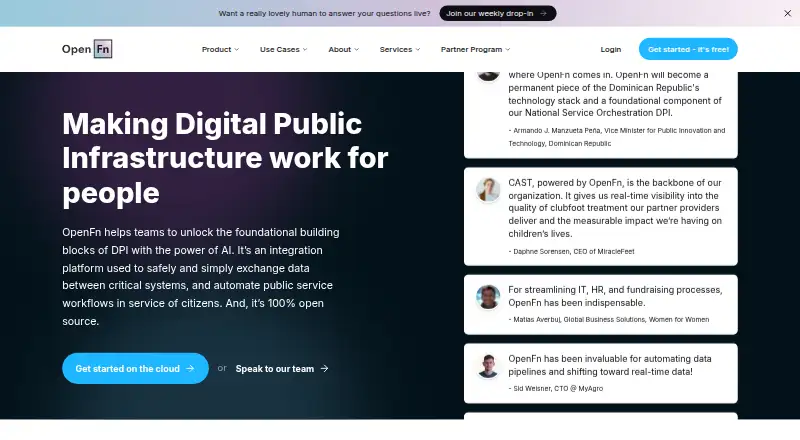
OpenFn is a web-based service for orchestrating workflows, transforming data, and syncing information in real time.
What OpenFn is
OpenFn is a web-based service for orchestrating workflows, transforming data, and syncing information in real time. It also supports connections to on-premises systems. The free plan includes 1 workflow, 100 runs per month, a 60-second maximum per run, 1 user, and 500K AI Assistant tokens. Core costs $49 a month and allows 2 workflows, 2,000 monthly runs, 5 minutes per run, 2 users, and 1.5M AI Assistant tokens. Growth costs $199 a month, with 10 workflows, 5,000 runs per month, a 20-minute run limit, 5 users, and 5M AI Assistant tokens. Scale costs $499 a month and includes 20 workflows, 10,000 monthly runs, 30 minutes per run, 10 users, and 10M AI Assistant tokens. OpenFn was founded in 2014.
Good
- Orchestrates workflows and transforms data.
- Supports real-time syncing.
- Offers on-premises connectors.
- Free plan includes 1 workflow and 100 monthly runs.
Watch out
- Free runs are limited to 60 seconds each.
- Free plan supports only 1 user.
Who it suits
OpenFn suits people who need to coordinate workflows and transform or sync data, including those connecting on-premises systems. Its free plan is an option for a single user with limited workflow and run needs.
Verdict
OpenFn combines workflow orchestration, data transformation, real-time sync, and on-premises connectors. The free plan has tight workflow, run, and user limits; paid plans add capacity at stated monthly prices.
Plans and prices
From OpenFn's own pricing page, checked 5 Oct 2026.
| Plan | Price | What it gives you |
|---|---|---|
| Free | Free | 1 workflow · 100 runs/month · 60 sec limit/run · 1 user · 500k AI Assistant Tokens · community support · Billed annually at $0 |
| Core | $49 a month | 2 workflows · 2,000 runs/month · 5 min limit/run · 2 users · 1.5M AI Assistant Tokens · email support · Billed annually at $588 |
| Growth | $199 a month | 10 workflows · 5,000 runs/month · 20 min limit/run · 5 users · 5M AI Assistant Tokens · email support · Billed annually at $2,388 |
| Scale | $499 a month | 20 workflows · 10,000 runs/month · 30 min limit/run · 10 users · 10M AI Assistant Tokens · dedicated support · Billed annually at $5,988 |
| Enterprise | Priced on request | Volume discounts · dedicated support · country-specific rates · implementation services · private cloud or on-prem deployment · training packages · Custom pricing |
The facts
Each one read from OpenFn's own pages, with the date it was checked.
What it does
- Availability monitoring
- The trust page says independent infrastructure checks message persistence, triggers, and job runners every 60 seconds, with availability and processing times posted to a status site.checked 5 Oct 2026
- Compliance
- The homepage says OpenFn supports compliance with GDPR, HIPAA, and FHIR, alongside flexible configuration, zero persistence, and deployment anywhere.checked 5 Oct 2026
- Data transformation
- Yeschecked 22 Sep 2026
- Deployment
- OpenFn can run as hosted SaaS or be deployed on customer servers, cloud, or local infrastructure.checked 5 Oct 2026
- Developer tools
- OpenFn provides a smart IDE, a CLI for building and testing workflows, documentation, and a community.checked 5 Oct 2026
- Example integrations
- The adaptor directory lists integrations including DHIS2, CommCare, KoboToolbox, HL7 FHIR, PostgreSQL, and Google Sheets.checked 5 Oct 2026
- Integrations
- OpenFn says it offers 70+ open source adaptors for web APIs, databases, SFTP servers, and raw file exports.checked 5 Oct 2026
- Monitoring and audit
- OpenFn provides workflow activity history for monitoring, troubleshooting, retrying failures, and auditing project configuration changes.checked 5 Oct 2026
- Notable limits
- The Free plan includes 1 workflow, 100 runs per month, a 60-second run limit, one user, and a maximum history retention of seven days.checked 5 Oct 2026
- On-premises connectors
- Yeschecked 22 Sep 2026
- Origin
- The founder says OpenFn's automated workflow and interoperability layer was born in mid-2014.checked 5 Oct 2026
- Paid from
- 49checked 22 Sep 2026
- Real-time sync
- Yeschecked 22 Sep 2026
- Security
- OpenFn says its hosted service runs on Google Cloud Platform and uses TLS connections, SSL database connections, and 256-bit encryption at rest.checked 5 Oct 2026
- Support
- OpenFn offers community support, email support on paid plans, dedicated support on Scale, and optional expert assistance and training.checked 5 Oct 2026
- What it does
- OpenFn is an open source integration platform for safely exchanging data between critical systems and automating public service workflows.checked 5 Oct 2026
- Who it is for
- OpenFn describes its audience as governments, NGOs, and impact organizations seeking automation and interoperability across digital systems.checked 5 Oct 2026
- Workflow building
- Users can build workflows by point and click or with AI assistance, then refine, test, and deploy them visually.checked 5 Oct 2026
- Workflow orchestration
- Yeschecked 22 Sep 2026
The company
- Founded
- 2014checked 28 Sep 2026
Money
- Free plan
- Yeschecked 22 Sep 2026
The full review of OpenFn
OpenFn is an integration platform for organizations automating data exchange between critical systems. It is aimed chiefly at governments, NGOs, and impact organizations; its deployment flexibility and developer tools suit complex interoperability work better than casual, small-scale automation.
The strongest case for OpenFn is its combination of adaptable connectors and hosted or self-managed deployment. The free tier is useful for a narrow pilot, but its single-workflow and 100-run monthly caps make a paid plan the practical choice for ongoing work.
Overview
OpenFn orchestrates workflows, transforms data, and synchronizes systems in real time. Its open-source adaptor library covers web APIs, databases, SFTP servers, and raw file exports, with examples including DHIS2, CommCare, KoboToolbox, HL7 FHIR, PostgreSQL, and Google Sheets. That range is especially relevant to teams bridging public-service, health, and humanitarian systems.
Workflows can be built visually with point-and-click tools or AI assistance, then refined, tested, and deployed. A smart IDE and CLI give technical teams a route to build and test beyond the visual workflow, while documentation and a community provide additional support. OpenFn runs as hosted SaaS or on customer servers, cloud, or local infrastructure: the latter options offer deployment control, but are less suited to teams seeking only a simple hosted automation tool.
Key features
- Workflow orchestration and transformation: OpenFn can coordinate processes and transform data across connected systems, addressing interoperability needs rather than just one-off file transfers.
- Adaptors: More than 70 open-source adaptors cover APIs, databases, SFTP, and raw file exports. The examples span health and public-service tools as well as PostgreSQL and Google Sheets, giving teams a broad base for integration work.
- Monitoring and audit: Activity history supports monitoring, troubleshooting, retrying failures, and auditing configuration changes. That is useful for workflows whose failures need follow-up, though the amount of retained history depends on plan.
- Deployment and security: Hosted service runs on Google Cloud Platform and uses TLS connections, SSL database connections, and 256-bit encryption at rest. OpenFn also supports deployment on customer infrastructure and says it supports GDPR, HIPAA, and FHIR compliance alongside zero persistence and flexible configuration.
- Availability monitoring: Independent infrastructure checks message persistence, triggers, and job runners every 60 seconds; availability and processing times are posted to a status site.
Pricing
OpenFn is freemium. Paid prices below are monthly rates billed annually, so the annual commitment matters when comparing the monthly figures.
| Plan | Price and term | Included capacity and support |
|---|---|---|
| Free | free; billed annually at $0 | 1 workflow, 100 runs/month, 60-second run limit, 1 user, 500k AI Assistant Tokens, community support |
| Core | $49 a month; billed annually at $588 | 2 workflows, 2,000 runs/month, 5-minute run limit, 2 users, 1.5M AI Assistant Tokens, email support |
| Growth | $199 a month; billed annually at $2,388 | 10 workflows, 5,000 runs/month, 20-minute run limit, 5 users, 5M AI Assistant Tokens, email support |
| Scale | $499 a month; billed annually at $5,988 | 20 workflows, 10,000 runs/month, 30-minute run limit, 10 users, 10M AI Assistant Tokens, dedicated support |
| Enterprise | Custom pricing | Volume discounts, dedicated support, country-specific rates, implementation services, private cloud or on-prem deployment, and training packages |
Free is confined to one user, one workflow, and 100 runs each month, with a 60-second run ceiling and at most seven days of history retention. It is a constrained evaluation tier, not a comfortable base for continuing operations. Core raises capacity to 2,000 monthly runs and two users, but still allows only two workflows and five minutes per run; its 500-run-per-day average is a meaningful step up for small deployments. Growth is a better fit when several workflows, longer jobs, or a five-person team are needed. Scale doubles Growth’s run allowance and adds dedicated support, while Enterprise is for organizations needing volume terms, implementation help, or private deployment. Paid tiers include email support at Core and Growth, but dedicated support begins at Scale.
Platforms
OpenFn is available as a web service, through an API, or as a self-hosted deployment. The choice between hosted SaaS and customer infrastructure is a material advantage for organizations with specific deployment requirements, while self-hosting entails managing the environment.
Who it's for
OpenFn is best suited to governments, NGOs, and impact organizations that need interoperability across digital systems, particularly where workflows connect public-service or health data. It is also a stronger fit for teams with technical capacity to use its IDE, CLI, or self-managed deployment options. Organizations needing only a few lightweight automations, or more than one workflow but unwilling to pay for additional capacity, should look elsewhere.
Pros and cons
Pros
- Broad adaptor coverage: More than 70 open-source adaptors span APIs, databases, SFTP, and file exports, with examples across public-service and general data systems.
- Flexible deployment: Hosted SaaS and customer-hosted options accommodate different infrastructure needs.
- Operational visibility: Activity history supports failure retries and configuration audits, while infrastructure checks run every 60 seconds.
- Multiple ways to build: Visual authoring and AI assistance coexist with an IDE and CLI, serving both less code-focused workflow design and technical refinement.
Cons
- Very limited free capacity: One workflow, one user, 100 monthly runs, and seven-day maximum history constrain pilots and rule out many sustained workloads.
- Annual billing on paid tiers: The monthly prices correspond to annual totals, which is a commitment for teams that need more than Free.
- Self-hosting adds responsibility: Running OpenFn on customer infrastructure gives control but requires ownership of deployment.
- Support scales with price: Community support is the Free plan’s option; dedicated support is reserved for Scale and Enterprise.
Alternatives
For readers evaluating communication tools alongside integrations, these options serve different needs:
- CallHub is a nonprofit marketing option with a free plan and trial, and supports Android, iOS, desktop, web, and API platforms.
- Text-Em-All (formerly Call-Em-All) is a freemium messaging option; its Starter plan offers 25 credits for testing voice broadcasts and texting, while mass texting requires an upgrade.
- KindEngage is a freemium, web-based option with a nonprofit free plan and trial.
- Flocknote is a freemium web option with a free-for-life Starter tier for 0–40 members; monthly pricing varies with church size above that.
- Text Request is a paid messaging tool with no free plan and a trial, available across mobile, web, desktop, API, and extension platforms.
- Sinch Engage is a paid messaging option with a trial and plans defined by SMS volume, user count, and automation workflows.
- TXTPass is a paid option with a trial; its Basic plan is $9.99 a month and includes one new phone number, templates, auto-replies, keywords, and scheduled messages.
- Beetexting is a paid messaging option with a trial; its Professional plan is $89.97 a month, plus messaging costs and industry fees.
OpenFn is also categorized under Integration Platform as a Service Software and Nonprofit Text Messaging Software.
Verdict
Choose OpenFn if your organization needs configurable integrations across critical public-service systems, a wide adaptor base, and the option to host workflows on its own infrastructure. Its visual and developer tooling support both workflow design and technical control. Look elsewhere if your workload is small and must stay free, or if your priority is messaging rather than interoperability: the Free plan’s caps are tight, and paid capacity requires annual billing.
Getting started
- Visit the OpenFn website
- Choose hosted SaaS or deploy on servers, cloud, or local infrastructure
- Select the Free, Core, Growth, Scale, or Enterprise plan
- Build a workflow with point-and-click tools or AI assistance
- Refine and test the workflow using the visual tools, IDE, or CLI
- Deploy the workflow and monitor activity history
Limits worth knowing
The Free plan includes one workflow, 100 runs per month, a 60-second limit per run, one user, 500,000 AI Assistant tokens, and a maximum history retention of seven days. Core starts at $49 per month and raises allowances to two workflows, 2,000 runs per month, five-minute runs, two users, and 1.5 million AI Assistant tokens.
Questions
Is OpenFn free?
Yes. The Free plan is $0 and includes one workflow, 100 runs per month, one user, and community support.
What does OpenFn cost beyond the free plan?
Core is $49 per month, Growth is $199 per month, and Scale is $499 per month. Enterprise uses custom pricing.
Where can OpenFn run?
OpenFn is available through hosted SaaS or deployment on customer servers, cloud infrastructure, or local infrastructure. Its listed platforms are web, API, and self-hosted.
Does OpenFn provide integrations?
It lists more than 70 open source adaptors, including DHIS2, CommCare, KoboToolbox, HL7 FHIR, PostgreSQL, and Google Sheets.
What support is included?
The Free plan has community support. Paid plans include email support, while Scale includes dedicated support; expert assistance and training are optional.
Alternatives to OpenFn
- 1
CallHub
Free planAndroidiOSWebAPI8.2Free plan - 2
Text-Em-All (formerly Call-Em-All)
Free planAndroidiOSWebAPI8.1From $19 a month - 3
Flocknote
Free planiOSWeb7.8From $10 a month - 4
PureSMS
Free planWebAPI7.3From $10 a month - 5
Sinch Engage
AndroidiOSWebAPI7.2From $99 a month - 6
Text Request
AndroidiOSWebAPI7.2From $575 a month