OpenDNS FamilyShield
OpenDNS FamilyShield is a free home DNS service preconfigured to block adult content.
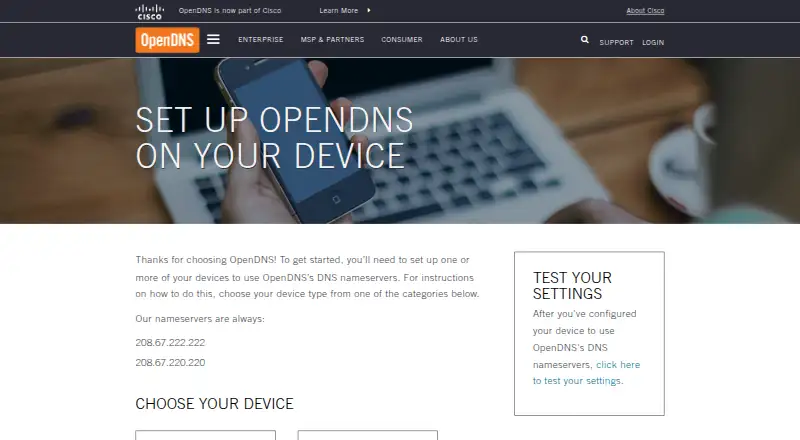
What OpenDNS FamilyShield is
OpenDNS FamilyShield is a free home DNS service preconfigured to block adult content. It also includes protection against malicious phishing, and OpenDNS says its parental controls can cover devices throughout a home. You configure devices to use its DNS nameservers; the setup guide recommends configuring the home router so settings can apply to devices using that network. The FamilyShield nameservers are 208.67.222.123 and 208.67.220.123, and the guide includes a way to check whether the DNS settings are in place. Supported devices connected to the home network can include laptops, phones, tablets, DVRs, game consoles, and TVs. The service is listed for Android, iOS, Linux, macOS, web, and Windows, and does not require signup. OpenDNS provides support forums and documentation, including deployment walkthroughs and API guides. Use of FamilyShield constitutes agreement to the OpenDNS Terms of Service and Cisco Online Privacy Statement.
Good
- Free plan requires no signup.
- Preconfigured to block adult content.
- Includes protection against malicious phishing.
- Settings can cover devices on the home network.
- Setup guide includes a DNS configuration check.
Watch out
- Custom domain policies are not supported.
- Setup requires configuring devices or a home router to use its DNS nameservers.
- Use is subject to OpenDNS and Cisco terms and privacy statement.
Who it suits
FamilyShield suits households seeking a no-signup DNS option configured to block adult content and provide phishing protection. It is intended for home use where DNS settings can be configured on devices or the router.
Verdict
FamilyShield offers a straightforward home DNS option with adult-content blocking and phishing protection. It requires DNS configuration, and use is subject to the stated terms and privacy statement.
Plans and prices
From OpenDNS FamilyShield's own pricing page, checked 8 Oct 2026.
| Plan | Price | What it gives you |
|---|---|---|
| OpenDNS Family Shield | Free | Preconfigured to block adult content · no sign-up required |
The facts
Each one read from OpenDNS FamilyShield's own pages, with the date it was checked.
The company
- Company history
- OpenDNS says it was founded in 2006 and was acquired by Cisco in 2015.checked 8 Oct 2026
What it does
- Content filtering
- Family Shield is preconfigured to block adult content.checked 8 Oct 2026
- FamilyShield DNS
- The FamilyShield nameservers are 208.67.222.123 and 208.67.220.123.checked 8 Oct 2026
- Parental controls
- OpenDNS says its parental controls protect every device in the home.checked 8 Oct 2026
- Phishing protection
- The home service includes built-in protection against malicious phishing.checked 8 Oct 2026
- Setup
- Setup involves configuring devices to use OpenDNS DNS nameservers, and the guide recommends setting it up on a home router.checked 8 Oct 2026
- Setup verification
- The setup guide provides a link to test whether the DNS settings are configured.checked 8 Oct 2026
- Support
- OpenDNS offers support forums and documentation with deployment walkthroughs and API guides.checked 8 Oct 2026
- Terms and privacy
- Using Family Shield constitutes agreement to the OpenDNS Terms of Service and Cisco Online Privacy Statement.checked 8 Oct 2026
- Who it is for
- OpenDNS describes its consumer products as designed to provide safer, faster, and more reliable internet at home.checked 8 Oct 2026
Where it runs
- Device coverage
- OpenDNS settings can apply to devices connected to the home network, including laptops, smartphones, tablets, DVRs, game consoles, and TVs.checked 8 Oct 2026
The full review of OpenDNS FamilyShield
OpenDNS FamilyShield is a free DNS-based filter for households that want a ready-made adult-content block and phishing defense across a home network. It suits families that prefer one fixed policy over detailed per-site controls. The bottom line is simple: broad device coverage and no sign-up, but setup and customization are left to the household.
Overview
FamilyShield works by directing devices to OpenDNS nameservers, with router configuration recommended for a whole-home deployment. Once configured, the policy can cover laptops, smartphones, tablets, DVRs, game consoles, televisions and other devices connected to that network. This is more practical than configuring every device separately, provided the home router can be changed and devices continue using those DNS settings.
The service combines its adult-content block with built-in protection against malicious phishing. OpenDNS supplies a setup guide, a verification link for checking the DNS configuration, support forums, deployment documentation and API guides. Use of the service is subject to the OpenDNS Terms of Service and Cisco Online Privacy Statement.
Key features
- Preconfigured adult-content filtering: FamilyShield arrives with the adult-content category blocked, so parents get a baseline without designing a rule set. That convenience is also the central limitation: custom domain policies are not supported, making it unsuitable for households that need exceptions, allowlists or precise site-by-site decisions.
- Network-wide parental controls: Applying the DNS settings at the router can protect every compatible device on the home connection, including entertainment hardware that may not offer its own filtering tools. Coverage is tied to the network configuration rather than a per-user account.
- Phishing protection: The home service includes protection from malicious phishing destinations, adding a security layer alongside the family filter. It does not change the fixed nature of the content policy.
- DNS configuration and verification: The FamilyShield addresses are 208.67.222.123 and 208.67.220.123. The supplied test link helps confirm that a device is actually using the intended DNS service, which matters because an incorrectly configured router leaves the expected filtering out of the path.
- Encrypted DNS: FamilyShield supports DNS over HTTPS, useful for deployments that require an encrypted DNS transport in addition to the filtering policy.
Pricing
The OpenDNS Family Shield plan costs nothing. It is preconfigured to block adult content and requires no sign-up. There are no paid tiers, seat charges or published usage quotas attached to this plan, so it is a straightforward choice for a household that wants the fixed policy without a subscription. The tradeoff is that there is no paid upgrade within FamilyShield for custom domain rules or more granular controls.
Platforms
FamilyShield supports Android, iOS, Linux, macOS, web and Windows.
Who it's for
Choose FamilyShield for a home that wants a free, no-account starting point for adult-content blocking and phishing protection across a mixed device collection. It is particularly appropriate when one household-wide policy is acceptable and someone can configure the router or individual DNS settings. Look elsewhere if family members need different rules, domain exceptions or detailed policy management.
Pros and cons
Pros
- Free with no sign-up: There is no subscription barrier to putting the preconfigured filter in place.
- Broad home-network reach: Router-level DNS can include computers, mobile devices, televisions and consoles under one setting.
- Security beyond filtering: Malicious-phishing protection complements the adult-content block.
- Verification and documentation: A configuration test, forums and deployment guides help with rollout.
Cons
- No custom domain policies: Families cannot create precise exceptions or individual allow/block rules.
- Setup depends on DNS changes: Filtering works only when devices use the FamilyShield nameservers, so router or device configuration is essential.
- One fixed household policy: The service offers no separate profiles or paid tier for more control.
Alternatives
Browse the DNS Filtering Software category when you want to compare a wider range of filtering approaches.
- AdGuard DNS is a better starting point if you want a freemium service with a free trial, API and self-hosted platform options.
- Comodo Secure DNS fits enterprise or MSP deployments that can use its free allowance of up to 300,000 DNS requests per month.
- NextDNS is the stronger choice when a free plan with 300,000 queries per month, unlimited devices and configurations is preferable.
- NxFilter suits readers considering freeware for commercial or non-commercial use, with an optional paid monthly plan.
- Quad9 is an alternative free DNS service with no contract or sign-up process.
- Technitium DNS Server is intended for readers who want an open-source, self-hosted DNS server.
- AdGuard is the broader product choice when device-based plans, including three-device personal and nine-device family options, matter.
- CleanBrowsing is worth considering when you need paid filtering with support for up to 25 devices or 3.75 million requests per month on its Basic plan.
Verdict
OpenDNS FamilyShield is a solid fit for households that want a free, no-sign-up adult-content filter and phishing protection applied through a home router. Its main reason to choose it is uncomplicated network-wide coverage across many device types. Look elsewhere if your family needs custom domain policies, separate user rules or finer control than its fixed filter provides.
Alternatives to OpenDNS FamilyShield
- 1

AdGuard DNS
Free planOpen sourceAndroidiOSWebAPI8.6From $29.88 a year - 2

NextDNS
Free planOpen sourceAndroidiOSWebAPI8.6From £1.79 a month - 3

Cloudflare Gateway
Free planAndroidiOSWebAPI8.3$7 usage-based - 4

Control D
Open sourceAndroidiOSWebAPI8.1From $2 a month - 5

GoodAccess
Free planAndroidiOSWebLinux8.1Free plan - 6
DNSFilter
AndroidiOSWebAPI7.8From $1 a month