OpenBrief
OpenBrief turns long videos, audio, and recordings into briefs with transcripts, summaries, grounded questions, and notes that can be exported.
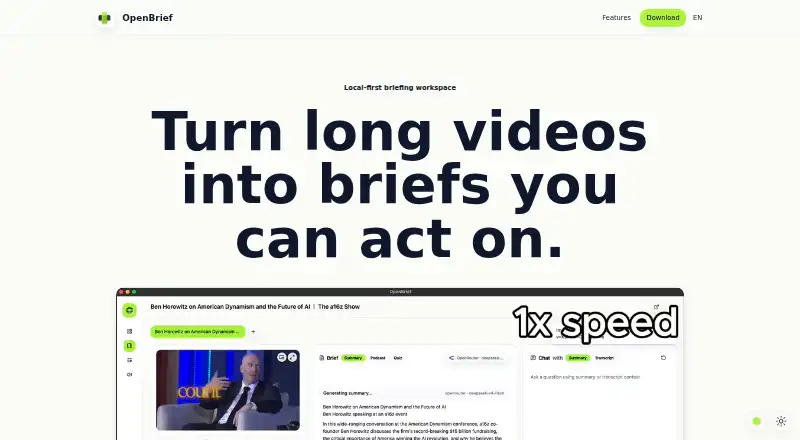
What OpenBrief is
OpenBrief turns long videos, audio, and recordings into briefs with transcripts, summaries, grounded questions, and notes that can be exported. It is aimed at material such as research calls, lectures, product demos, interviews, and screen recordings. Users can add local files or supported web links to a library that keeps source details together. OpenBrief uses existing captions when available and transcribes only when needed. Its transcript chat provides answers tied to the source, and exports can include summaries, decisions, timestamps, and notes in Markdown. The desktop app runs on Linux, macOS, and Windows and does not require an account or sign-up. The homepage says files and generated notes stay on the user's device; the download page says media processing runs locally, with optional cloud AI providers chosen by the user. Optional API keys are supported for OpenAI, Anthropic, Gemini, and OpenRouter. Listed requirements include macOS 13, Windows 11, or a current Linux desktop, local disk space, and a local inference stack for transcription, voice generation, and voice cloning. Available downloads include macOS Apple Silicon and Intel installers, a 64-bit Windows installer, and Debian Linux.
Good
- Creates transcripts, summaries, questions, and exportable notes.
- Uses existing captions when available.
- Transcript chat answers are tied to the source.
- Files and generated notes stay on the user's device.
- No account or sign-up is required.
Watch out
- Requires a local inference stack for several tasks.
- No webpage summarization is listed.
- Requirements specify macOS 13 or Windows 11.
Who it suits
OpenBrief suits people who need briefs and transcript-grounded answers from recordings, including research calls, lectures, interviews, and demos. It may also appeal to desktop users who prefer local media processing and no account requirement.
Verdict
OpenBrief is a desktop option for turning recordings into searchable, exportable briefs while keeping processing local. Check the stated operating-system and local inference requirements against your setup.
Plans and prices
From OpenBrief's own pricing page, checked 7 Oct 2026.
| Plan | Price | What it gives you |
|---|---|---|
| Free | Free | Desktop app; no paid plan or trial clock |
The facts
Each one read from OpenBrief's own pages, with the date it was checked.
What it does
- Account
- The desktop app does not require an account or sign-up.checked 7 Oct 2026
- Available builds
- The download page lists macOS Apple Silicon and Intel installers, a 64-bit Windows installer, and a Debian Linux download.checked 7 Oct 2026
- Captions
- OpenBrief uses existing captions when available and transcribes only when needed.checked 7 Oct 2026
- Export
- Users can export summaries, decisions, timestamps, and notes to Markdown.checked 7 Oct 2026
- Integrations
- Optional API keys are supported for OpenAI, Anthropic, Gemini, and OpenRouter.checked 7 Oct 2026
- Intended users
- The site describes it for research calls, lectures, product demos, interviews, and screen recordings.checked 7 Oct 2026
- Local processing
- The download page says media processing runs locally, with optional cloud AI providers chosen by the user.checked 7 Oct 2026
- Open source
- The download page says OpenBrief is built in the open and links to its source code on GitHub.checked 7 Oct 2026
- Optional tools
- The download page lists optional bundled tools for YouTube and offline transcription.checked 7 Oct 2026
- Privacy
- The homepage says files and generated notes stay on the user's device.checked 7 Oct 2026
- Purpose
- OpenBrief turns long videos, audio, and recordings into briefs with transcripts, summaries, grounded questions, and exportable notes.checked 7 Oct 2026
- Requirements
- The stated requirements are macOS 13, Windows 11, or a current Linux desktop, local disk space, and a local inference stack for transcription, voice generation, and voice cloning.checked 7 Oct 2026
- Source library
- Users can add local files or supported web links and keep source details together in a library.checked 7 Oct 2026
- Transcript chat
- Users can ask questions and get answers tied to the transcript.checked 7 Oct 2026
The full review of OpenBrief
OpenBrief is a free desktop app for turning recordings into searchable briefs, and it suits people working with calls, lectures, interviews, demos, and screen recordings. Its strongest case is a local-first workflow with transcript-grounded questions and Markdown exports; its main trade-off is the local setup it requires.
Overview
OpenBrief brings local files and supported web links into a source library, keeping source details together. It uses existing captions when available and transcribes when needed, then helps users produce summaries, ask questions tied to the transcript, and export notes. That makes it useful for revisiting recorded material without replaying it, though its scope is narrower than a general webpage summarizer.
The desktop app requires no account or sign-up. Media processing runs locally, while users may choose optional cloud AI providers by supplying their own API keys. This gives users control over whether to involve a cloud provider, but local processing and inference requirements make setup less straightforward than opening a browser service.
Key features
Transcript-based briefs and questions
OpenBrief turns long video, audio, and recordings into transcripts, summaries, and grounded questions. Questions tied to the transcript can help users find decisions or revisit details in a call or lecture; the source anchor is useful when a free-form summary would be too detached from the material.
Source library and Markdown export
Keeping files or supported links and their source details together helps organize ongoing research or review work. Users can export summaries, decisions, timestamps, and notes to Markdown, a practical choice for people who want portable text rather than notes locked inside the app.
Local processing and optional providers
The app says files and generated notes stay on the user's device, and media processing runs locally. OpenAI, Anthropic, Gemini, and OpenRouter can be used optionally with user-supplied API keys. This balance will appeal to users who want local processing as the default and provider choice when needed, but it is not a zero-setup workflow.
Pricing
OpenBrief's Free plan costs nothing and includes the desktop app. There is no paid plan or trial clock, so the free option is the product's full stated plan rather than a timed preview. It includes file upload and transcript summarization, but not webpage summarization. That distinction matters: supported web links can be added as sources, but readers seeking a tool for summarizing ordinary webpages should look elsewhere.
There is no separate paid tier to unlock more seats or quotas. The practical cost is the user's own local disk space and the required local inference stack; optional cloud providers also require the user's API keys.
Platforms
OpenBrief supports Linux, macOS, and Windows. Its download page provides installers for macOS Apple Silicon and Intel, a 64-bit Windows installer, and Debian Linux. Stated requirements are macOS 13, Windows 11, or a current Linux desktop, local disk space, and a local inference stack for transcription, voice generation, and voice cloning. Optional bundled tools are available for YouTube and offline transcription.
Who it's for
OpenBrief fits people who regularly turn research calls, lectures, product demos, interviews, or screen recordings into reusable notes. It is especially apt for users who prefer files and notes to remain on their device, want transcript-grounded follow-up questions, or need Markdown exports. It is a weaker fit for people who want instant browser-based use, webpage summarization, or do not want to manage local inference requirements.
Pros and cons
- Pros: No account or sign-up is required, which removes an account step from desktop use.
- Pros: Local media processing and on-device files and notes suit users who prioritize keeping their material on their device.
- Pros: Transcript-tied questions plus exports of decisions, timestamps, and notes make recorded material easier to revisit and reuse.
- Cons: A local inference stack and disk space are required, so setup is more involved than a web-based summarizer.
- Cons: Webpage summarization is not included, limiting its usefulness for readers focused on articles and web content.
Alternatives
For document-focused analysis across platforms, consider ChatPDF, whose free plan allows two documents per day and whose Plus plan offers unlimited document analysis and advanced features. AskYourPDF is another document-oriented option; its Premium plan is $11.99 a year, billed per month and billed yearly, with 2,500 pages per document, a 31MB maximum upload, 50 documents per day, and 1,200 questions per day.
For article summaries and flashcards, Scholarcy has a free plan capped at 10 summaries, with flashcards exportable one at a time. Summify may suit readers who want a mobile and web study workflow: its free plan includes five analyses per day, quizzes, and up to 10 saved analyses, while the Scholar plan costs $4.99 a month and requires an .edu school email.
Aginsi offers a free Margin plan with 10 monthly summaries for articles and PDFs, keeping key-point highlights and citations. For one-click webpage summaries through a Chrome extension, genei has a free Extension plan; its Basic plan costs $5.49 a month and supports PDF and webpage import and summaries.
Paperlayer is a free web option for public arXiv papers, but does not accept private or unpublished document uploads. SciSummary is a paid web and API alternative with a free seven-day trial that includes 30,000 words, five figures analyzed, 100 chat messages, unlimited article searches, and 50 quick-click paper imports. For a broader category directory, see Text Summarization Software.
Verdict
Choose OpenBrief if your work centers on recordings and you want local processing, transcript-grounded questions, and portable Markdown notes without creating an account. Look elsewhere if webpage summarization or a simpler browser-based setup is more important than keeping the workflow local.
Getting started
- Download a build for macOS, Windows, or Debian Linux from https://www.openbrief.app/.
- Check that the device meets the stated operating-system and local processing requirements.
- Add a local file or supported web link to the source library.
- Use captions when available, or transcribe when needed.
- Ask transcript questions and export summaries, decisions, timestamps, or notes as Markdown.
- Optionally provide an API key for OpenAI, Anthropic, Gemini, or OpenRouter.
Questions
Is OpenBrief free?
Yes. The Free plan costs nothing. There is no paid plan or trial clock.
Which platforms have OpenBrief builds?
OpenBrief lists macOS Apple Silicon and Intel installers, a 64-bit Windows installer, and a Debian Linux download. Its supported desktop platforms are Linux, macOS, and Windows.
Does OpenBrief require an account?
No. The desktop app does not require an account or sign-up.
Does OpenBrief process media locally?
The download page says media processing runs locally, with optional cloud AI providers chosen by the user. The homepage says files and generated notes stay on the user's device.
Is OpenBrief open source?
The download page says OpenBrief is built in the open and links to its source code on GitHub.
Which AI providers can I connect?
Optional API keys are supported for OpenAI, Anthropic, Gemini, and OpenRouter.
Alternatives to OpenBrief
- 1

ChatPDF
Free planAndroidiOSWebAPI8.2From $89.99 a year - 2

AskYourPDF
Free planAndroidiOSWebAPI8.1From $11.99 a month - 3
Eightify
AndroidiOSWebExtension7.7From $59.99 a year - 4
Podwise
AndroidiOSWebAPI7.6From $70.80 a year - 5
Scholarcy
Free planWebAPIExtension7.5From $90 a year - 6
SciSummary
Free planWebAPIExtension7.4From $48 a year