
OpenASR
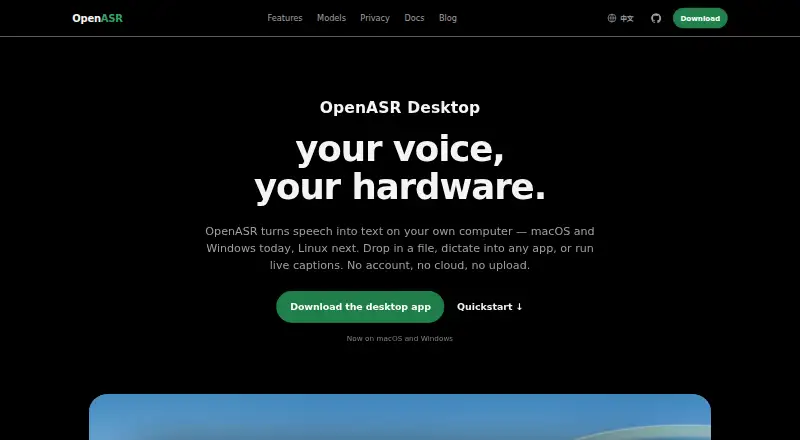
OpenASR converts speech into text on the user’s computer for recordings, dictation, and live captions.
What OpenASR is
OpenASR converts speech into text on the user’s computer for recordings, dictation, and live captions. Audio, models, and transcripts stay on the device, and transcription can continue without a network connection. The product says it has no telemetry, analytics SDK, account, or cloud transcription route; optional text refinement or translation sends recognized text to the chosen provider. The desktop app handles file transcription, dictation into other applications, and live captions, with speaker separation and timestamps. Exports include plain text, structured data, and timestamped subtitles. Users can choose a model from a catalog, and models run locally. Desktop apps are available for Apple Silicon Macs and Windows 10 or later on x64; a native Linux desktop app is planned. The public Apache-2.0 core includes a CLI, local HTTP API, model format, and Docker server, with Linux support for CLI and server use. The local server supports part of the OpenAI audio transcriptions API. The first-use model download is roughly 1 GB, and installed model packs stay on disk until removed. OpenASR Desktop is listed as free.
Good
- Transcribes locally and works offline
- Supports dictation, file transcription, and live captions
- Separates speakers and keeps timestamps
- Exports text, structured data, and subtitles
Watch out
- First-use model download is roughly 1 GB
- Installed model packs remain on disk until removed
- Native Linux desktop app is planned
- Optional refinement or translation sends text externally
Who it suits
OpenASR suits people who need local transcription for files, dictation, or captions, and developers who want a local API or CLI. It is a fit for Apple Silicon Mac and Windows desktop users; Linux users have CLI and server support, while the native desktop app is planned.
Verdict
OpenASR keeps core transcription on the user’s machine and offers desktop and developer tools. Check platform availability and storage needs before choosing it, especially if you need a Linux desktop app.
Plans and prices
From OpenASR's own pricing page, checked 10 Oct 2026.
| Plan | Price | What it gives you |
|---|---|---|
| OpenASR Desktop | Free | Free to start; macOS and Windows desktop apps; Linux desktop app planned |
The facts
Each one read from OpenASR's own pages, with the date it was checked.
What it does
- API compatibility
- The local server supports a subset of the OpenAI audio transcriptions API, and the docs say existing integrations can usually point to its local server URL.checked 10 Oct 2026
- Developer tools
- The open core includes a CLI, local HTTP API, model format, and Docker server, with CLI and server support for Linux.checked 10 Oct 2026
- Exports
- The site lists plain text, structured data, and timestamped subtitles as export formats.checked 10 Oct 2026
- Local processing
- Audio, models, and transcripts are processed locally, and transcription can continue without a network connection.checked 10 Oct 2026
- Models
- Users can choose from a model catalog, and the site says models run on the user’s own machine.checked 10 Oct 2026
- Notable limit
- The troubleshooting page says the default first-use model download is roughly 1 GB and each installed model pack remains on disk until removed.checked 10 Oct 2026
- Offline dictation
- Yeschecked 20 Sep 2026
- Privacy
- The product says it has no telemetry, analytics SDK, account, or cloud transcription path; optional text refinement or translation sends recognized text to the selected provider.checked 10 Oct 2026
- Privacy model
- on-devicechecked 20 Sep 2026
- Product
- OpenASR turns speech into text on a user’s computer for recordings, dictation, and live captions.checked 10 Oct 2026
- Project status
- The Rust core, CLI, local HTTP API, and model catalog are public under Apache-2.0, while the macOS and Windows desktop apps are closed source.checked 10 Oct 2026
- Security
- The site says model downloads are verified and describes a signed model catalog; macOS downloads are signed and notarized, and the Windows installer is signed.checked 10 Oct 2026
- Speaker and timestamps
- OpenASR can separate speakers and keep timestamps beside transcript text.checked 10 Oct 2026
- Support
- The troubleshooting page directs users who remain stuck to open an issue on GitHub with their operating system details and steps tried.checked 10 Oct 2026
- Transcription features
- The desktop app supports file transcription, dictation into other apps, and live captions.checked 10 Oct 2026
Where it runs
- Desktop platforms
- The desktop apps are available for Apple Silicon Macs and Windows 10 or later on x64; a native Linux desktop app is planned.checked 10 Oct 2026
- Supported platforms
- macOS,Windows,Linux (CLI/server)checked 20 Sep 2026
Alternatives to OpenASR
- 1
Speechify
Free planAndroidiOSWebAPI8.3From $10 a month - 2

Superwhisper
Free planAndroidiOSAPILinux8.3From $84.99 a year - 3

Aqua Voice
Free planAndroidiOSmacOSWindows8.0From $8 a month - 4

Dictanote
Free planAndroidiOSWebLinux7.8From $60 a year - 5

Wispr Flow
Free planAndroidiOSmacOSWindows7.8From $12 a month - 6

MacWhisper
Free planiOSmacOS7.4€64 one-time