
Wispr Flow
Wispr Flow is a voice dictation app for Android, iPhone, Mac and Windows.
What Wispr Flow is
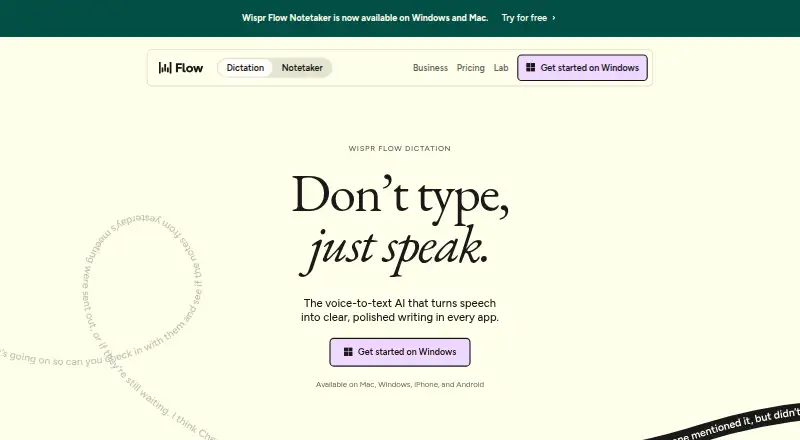
Wispr Flow is a voice dictation app for Android, iPhone, Mac and Windows. It enters text wherever a cursor accepts typing, including email, messaging, note-taking, terminal, code-editing and AI tools. It supports more than 100 languages and can detect the language being spoken. Flow can remove filler words, add punctuation, format writing, and handle corrections and repeated speech; users can also set custom vocabulary and voice commands. Its free plan allows 2,000 words per week on desktop and 1,000 per week on mobile, plus a weekly Notetaker limit. Pro costs $12 per user per month with annual billing or $15 per user per month with monthly billing. Team plans add shared dictionaries, snippets and workspaces, centralized billing and user management. Notetaker provides meeting notes, speaker identification and questions across meetings, but currently works on Mac and Windows; mobile support is planned. Wispr describes Flow as cloud-based and offers controls for data use, sharing preferences and deletion of stored data. It advises against Bluetooth earbuds because they can reduce dictation accuracy.
Good
- Works wherever a cursor can type.
- Supports more than 100 languages.
- Includes custom vocabulary and voice commands.
- Offers controls for data use and deletion.
Watch out
- Free dictation has weekly word limits.
- Notetaker currently works only on Mac and Windows.
- Bluetooth earbuds may reduce dictation accuracy.
- Dictation uses a cloud privacy model.
Who it suits
Flow suits people who want to dictate text across writing, messaging, coding or AI apps. Its Notetaker features may suit Mac and Windows users who want meeting notes and speaker identification.
Verdict
Wispr Flow combines cross-app dictation with language detection and text cleanup. Consider the free plan’s word limits and the platform restriction on Notetaker before choosing a plan.
Plans and prices
From Wispr Flow's own pricing page, checked 28 Sep 2026.
| Plan | Price | What it gives you |
|---|---|---|
| Free | Free | For individuals · 2,000 words/week on desktop · 1,000 words/week on mobile · Weekly Notetaker limit · billed monthly |
| Pro | $15 a month | Unlimited dictations · billed monthly |
| Growth - Dictation only | $23 a month | Unlimited dictation · billed monthly |
| Growth - Dictation + Notetaker | $33 a month | Unlimited dictation · Unlimited Notetaker access · billed monthly |
| Enterprise | Priced on request | Advanced security · SCIM provisioning · Audit logs · Managed deployment · Dedicated support with SLAs · Custom contract terms · Available annually |
| Pro Annual | $12 a month | For individuals and teams · $12 per user per month; 20% discount |
| Pro Monthly | $15 a month | For individuals and teams · $15 per user per month |
| Growth Annual | $18 a month | Basic admin controls · $18 per user per month; 20% discount |
| Growth Monthly | $23 a month | Basic admin controls · $23 per user per month |
| Enterprise Annual | Priced on request | Advanced security · Available annually |
The facts
Each one read from Wispr Flow's own pages, with the date it was checked.
What it does
- Admin features
- Growth and Enterprise add SSO, HIPAA enforcement, usage reporting, provisioning, audit logs, and managed deployment.checked 28 Sep 2026
- Bluetooth limitation
- The page recommends against AirPods and other Bluetooth earbuds because they can reduce dictation accuracy.checked 28 Sep 2026
- Custom vocabulary
- Flow learns names and jargon automatically and lets users add words manually.checked 28 Sep 2026
- Editing features
- Flow removes filler words, adds punctuation, formats writing, and handles corrections and repetition.checked 28 Sep 2026
- Language count
- 100checked 20 Sep 2026
- Language support
- Flow supports 100+ languages and can detect the language being spoken.checked 28 Sep 2026
- Notetaker features
- Notetaker provides meeting notes, speaker identification, questions across meetings, and MCP access for AI tools.checked 28 Sep 2026
- Offline dictation
- Nochecked 20 Sep 2026
- Privacy controls
- Users can choose whether data is used to improve Flow, manage sharing preferences, and delete stored data.checked 28 Sep 2026
- Privacy model
- cloudchecked 20 Sep 2026
- Security certifications
- Wispr Flow states that it is certified for SOC 2 Type II, HIPAA, and ISO 27001.checked 28 Sep 2026
- Support levels
- Plans provide standard, priority, or premium support; Enterprise includes dedicated support with SLAs.checked 28 Sep 2026
- Voice commands
- Yeschecked 20 Sep 2026
- Voice speed
- The page claims Flow works at 4x the speed of typing and compares 220 wpm with 45 wpm keyboard typing.checked 28 Sep 2026
Where it runs
- App compatibility
- Flow works wherever the cursor can type, including Gmail, Slack, iMessage, Notion, terminals, code editors, and AI tools.checked 28 Sep 2026
- Notetaker platforms
- Notetaker currently works on Mac and Windows; mobile is planned.checked 28 Sep 2026
- Supported platforms
- Mac, Windows, iPhone, Android, iOS, and mobile devices are supported across the products.checked 28 Sep 2026
The company
- Company funding
- Wispr states that it raised $81M to build the Voice OS.checked 28 Sep 2026
- Headquarters
- San Francisco, California, United Stateschecked 28 Sep 2026
- Team features
- Team plans include shared dictionaries and snippets, shared workspaces, centralized billing, and user management.checked 28 Sep 2026
Money
- Free plan
- Yeschecked 20 Sep 2026
- Free usage limit
- Free dictation includes 2,000 words per week on desktop and 1,000 per week on mobile.checked 28 Sep 2026
The full review of Wispr Flow
Wispr Flow is a cloud-based dictation app for Mac, Windows, iPhone, and Android. It suits people who want to write by voice across many apps, especially in multiple languages. Its standout strength is turning speech into cleaned-up text; its free weekly quotas and lack of offline dictation are meaningful constraints.
Overview
Flow works wherever a cursor can type, from email and messaging apps to code editors and AI tools. It supports more than 100 languages and can detect the language being spoken, which makes it useful for multilingual writing without confining dictation to one editor.
Rather than transcribing every hesitation verbatim, Flow can remove filler words, add punctuation, format writing, and handle corrections and repetition. Custom vocabulary and voice commands add flexibility. The trade-off is a cloud-only privacy model: users can control whether their data helps improve Flow, manage sharing preferences, and delete stored data, but dictation is not available offline.
Wispr claims a speed of 220 words per minute, compared with 45 words per minute for keyboard typing. That is the maker’s comparison, not a guarantee of an individual user’s pace. For more options, browse dictation software.
Key features
- Dictation across apps: Flow enters text wherever the cursor can type, including Gmail, Slack, iMessage, Notion, terminals, code editors, and AI tools. That broad reach is its clearest advantage for people who move between different kinds of work.
- Speech cleanup: Removing filler words and adding punctuation and formatting can save editing time. Handling corrections and repetition is also useful for speakers who revise their thoughts aloud.
- Languages and custom vocabulary: Support for 100+ languages, spoken-language detection, and custom vocabulary make Flow a stronger fit for multilingual writing and specialized terms than a basic speech-to-text field.
- Meeting notes: Notetaker can produce meeting notes, identify speakers, answer questions across meetings, and provide MCP access for AI tools. It currently works on Mac and Windows, not mobile, so mobile users cannot rely on it for meeting capture.
- Privacy and security: Wispr says it holds SOC 2 Type II, HIPAA, and ISO 27001 certifications. Team and business customers may value those assurances alongside controls for data use, sharing, and deletion; the cloud model will still be a poor fit for anyone requiring offline dictation.
- Audio caveat: Wispr recommends against AirPods and other Bluetooth earbuds because they can reduce dictation accuracy. Users who depend on Bluetooth earbuds should weigh that limitation before making Flow their default input method.
Pricing
The free plan costs nothing and is aimed at individuals who want to try voice input before paying. It allows 2,000 words per week on desktop and 1,000 per week on mobile, plus a weekly Notetaker limit. Those caps are restrictive for routine heavy use, particularly on mobile.
Pro costs $15 a month on monthly billing or $12 per user per month when billed annually, a stated 20% discount. Both Pro options include unlimited dictation and suit individuals or teams who do not need the additional administration and meeting features of Growth. The annual price is a per-user monthly rate billed annually, not a one-time $12 charge.
Growth costs $23 per user per month billed monthly for dictation only, or $18 per user per month billed annually, also with a stated 20% discount. Both include basic admin controls; the monthly option costs more than Pro, so it makes sense for teams that need those controls. Growth with dictation and Notetaker costs $33 a month and adds unlimited Notetaker access. That is the relevant upgrade for teams that need meeting capture without its weekly free-plan limit.
Enterprise has custom pricing and is available annually. It adds advanced security, SCIM provisioning, audit logs, managed deployment, custom contract terms, and dedicated support with SLAs. Growth and Enterprise also add capabilities such as SSO, HIPAA enforcement, usage reporting, and user provisioning; team plans include shared dictionaries and snippets, shared workspaces, centralized billing, and user management. Support ranges from standard to priority or premium across plans.
Platforms
Flow is available on Android, iOS, macOS, and Windows. Notetaker is currently limited to Mac and Windows, with mobile planned. Since dictation relies on the cloud, an offline connection is not an option.
Who it's for
Flow is best for people who dictate across a mix of apps, write in multiple languages, or benefit from automatic cleanup rather than raw transcription. The free tier can suit occasional use; frequent individual dictation points to Pro, while teams needing admin controls or shared workspaces should consider Growth. It is less suitable for anyone who needs offline speech input, expects generous free mobile use, or wants Notetaker on a phone.
Pros and cons
- Pro: Works wherever a cursor can type, so users are not tied to one editor.
- Pro: Language detection and support for 100+ languages reduce friction for multilingual dictation.
- Pro: Cleanup, custom vocabulary, and voice commands give users more than verbatim transcription.
- Pro: Team plans include shared resources and centralized administration; higher tiers add security and deployment controls.
- Con: Free usage is capped weekly at 2,000 desktop words and 1,000 mobile words, limiting sustained use.
- Con: Cloud-only dictation rules it out for offline work.
- Con: Notetaker is not yet available on mobile, and Bluetooth earbuds may reduce accuracy.
Alternatives
Superwhisper is worth considering for someone who wants a free plan with meeting recording and transcription as well as voice-to-text in any app; it supports 100+ languages and also offers a free trial.
Dictanote may suit users who prefer a browser-based option or need Linux support: its free plan allows 60 minutes of dictation a day and up to 50 notes in one notebook, with support for 50+ languages.
Braina is another freemium option for users considering Windows-focused dictation, with a Pro plan priced at $99 a year for one Windows PC.
WakaScribe is a candidate for readers who prioritize a free, unlimited-words plan with no time limit; its Local plan costs nothing.
Voice In offers a free plan with 60 minutes of dictation per day and may suit users who prefer a daily time allowance.
Google Voice Access is a free Android option.
Dragon Professional is a paid Windows alternative.
Lispr offers a free plan with 60 dictation minutes per week and may suit Mac or Windows users who want a weekly time-based allowance.
Verdict
Choose Wispr Flow if you want cross-app dictation that can recognize many languages and turn speech into more polished writing, with team tools available as needs grow. Look elsewhere if you need offline use, a generous free mobile quota, or mobile Notetaker; those are real constraints, not minor omissions.
Getting started
- Open https://wisprflow.ai/
- Choose the Free plan or a paid plan
- Install Flow on Mac, Windows, iPhone, or Android
- Allow dictation in an app where the cursor can type
- Set custom vocabulary or voice commands if needed
- Use Notetaker on Mac or Windows when included
Limits worth knowing
The Free plan allows 2,000 dictation words per week on desktop and 1,000 per week on mobile, plus a weekly Notetaker limit. Pro provides unlimited dictations; Growth Dictation + Notetaker provides unlimited access to both. Bluetooth earbuds such as AirPods may reduce dictation accuracy.
Questions
What does Wispr Flow cost?
There is a free plan.
Which devices does Flow support?
Flow supports Mac, Windows, iPhone, and Android.
Does Flow work offline?
No. Offline dictation is not available, and dictation uses a cloud privacy model.
What does Notetaker do?
Notetaker provides meeting notes, speaker identification, questions across meetings, and MCP access for AI tools. It currently works on Mac and Windows.
Are team controls available?
Team plans include shared dictionaries and snippets, shared workspaces, centralized billing, and user management. Growth and Enterprise add features such as SSO, provisioning, audit logs, and managed deployment.
Alternatives to Wispr Flow
- 1

Superwhisper
Free planAndroidiOSAPILinux9.0From $84.99 a year - 2

Dictanote
Free planAndroidiOSWebLinux8.5From $60 a year - 3

Aqua Voice
Free planAndroidiOSmacOSWindows8.4From $8 a month - 4
WakaScribe
Free planAndroidiOSLinuxmacOS8.2From €1 a month - 5
Voice In
Free planExtensionLinuxmacOSWindows7.9From $59.99 a year - 6

Philips SpeechLive
AndroidiOSWebAPI7.9From $12.90 a year