Dragon Professional
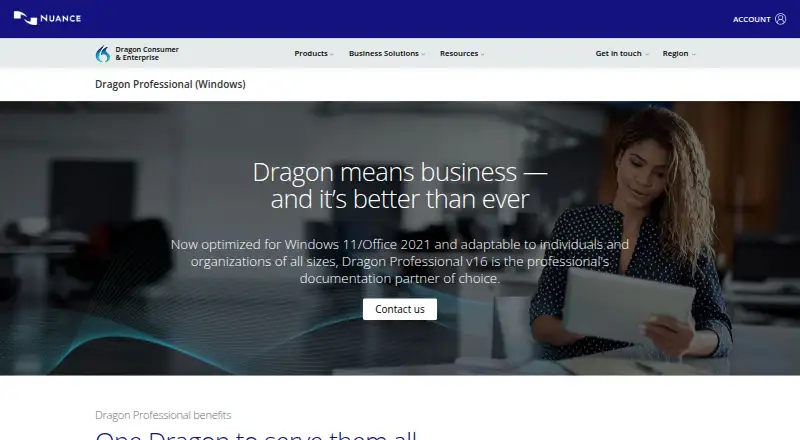
Dragon Professional v16 is Windows dictation and transcription software for individuals, groups, and organizations.
What Dragon Professional is
Dragon Professional v16 is Windows dictation and transcription software for individuals, groups, and organizations. It converts live speech to text and can transcribe existing audio, including batches of recordings through its Auto Transcribe Folder Agent. The product lists custom vocabulary and voice commands; custom commands can insert boilerplate or signatures and automate workflows. Dragon Professional is optimized for Windows 11, compatible with Windows 10, and optimized for Office 2021. Its privacy model is described as on-device. The product states that documents can be dictated up to three times faster than typing and that recognition accuracy can reach up to 99% from first use. Dragon Anywhere Mobile supports creating, editing, and formatting documents of any length. For organizational use, the Management Center distributes disclosures, templates, forms, and legal boilerplate, while volume licensing supports adding users and redistributing licenses. Support resources include technical support, training materials, e-learning, and quarterly reviews. Dragon Professional is paid, with pricing available on request.
Good
- Supports live dictation and audio-file transcription.
- Custom commands can insert boilerplate and signatures.
- Batch audio transcription is available.
- On-device privacy model.
Watch out
- Available for Windows.
- Pricing is available on request.
- Optimized for Windows 11 and compatible with Windows 10.
Who it suits
Dragon Professional suits Windows users who dictate documents or transcribe audio. Its management and licensing features may also suit groups and organizations.
Verdict
Dragon Professional v16 supports dictation, single-speaker audio transcription, and organizational controls. It is a paid Windows product with purchase details available on request.
Plans and prices
From Dragon Professional's own pricing page, checked 27 Sep 2026.
| Plan | Price | What it gives you |
|---|---|---|
| Dragon Professional v16 | Priced on request | Contact us for purchase details |
The facts
Each one read from Dragon Professional's own pages, with the date it was checked.
What it does
- Audio Transcription
- Transcribes audio files or voice files from another single speakerchecked 27 Sep 2026
- Batch Transcription
- The Auto Transcribe Folder Agent transcribes batches of audio recordingschecked 27 Sep 2026
- CRM Population
- Automates the retention of institutional knowledge from client interactionschecked 27 Sep 2026
- Custom Commands
- Custom voice commands can insert boilerplate, signatures, and automate workflowschecked 27 Sep 2026
- Custom vocabulary
- Yeschecked 20 Sep 2026
- Deployment Scope
- Supports individual users, groups, and organizations of all sizeschecked 27 Sep 2026
- Dictation Speed
- Dictate documents up to three times faster than typingchecked 27 Sep 2026
- License Management
- Volume licensing supports adding users and redistributing licenseschecked 27 Sep 2026
- Management Center
- Distributes disclosures, templates, forms, and legal boilerplate across an organizationchecked 27 Sep 2026
- Office Compatibility
- Optimized for Office 2021checked 27 Sep 2026
- Privacy model
- on-devicechecked 20 Sep 2026
- Product Version
- Dragon Professional v16checked 27 Sep 2026
- Recognition Accuracy
- Up to 99% recognition accuracy from first usechecked 27 Sep 2026
- Speech Modes
- Supports live speech-to-text and transcription from pre-existing audio fileschecked 27 Sep 2026
- Support Resources
- Offers technical support, training materials, e-learning, and quarterly reviewschecked 27 Sep 2026
- Voice commands
- Yeschecked 20 Sep 2026
The company
- Company Expertise
- Dragon Professional v16 is built on a quarter-century of expertisechecked 27 Sep 2026
Where it runs
- Mobile App
- Dragon Anywhere Mobile supports creating, editing, and formatting documents of any lengthchecked 27 Sep 2026
- Supported platforms
- Windowschecked 20 Sep 2026
- Windows Compatibility
- Optimized for Windows 11 and backward-compatible with Windows 10checked 27 Sep 2026
The full review of Dragon Professional
Dragon Professional is a Windows dictation and transcription suite for professionals who produce substantial documents by voice. It fits both individual specialists and organizations that need shared templates, controlled workflows, and managed licenses. Its central advantage is accurate, local speech processing; its main drawback is a Windows-only, quote-based purchase model.
Overview
Dragon Professional v16 combines live speech-to-text with transcription from existing recordings. Deployment can cover one user, a group, or an organization of any size, while volume licensing allows administrators to add users and redistribute seats. Because processing is on-device, it is better suited to confidential work than services that require routine cloud processing.
Nuance states that users can dictate documents up to three times faster than typing and reach up to 99% recognition accuracy from first use. Those figures make the software attractive for sustained voice-driven writing, though the value is greatest for people who dictate regularly rather than occasionally.
Key features
Dictation and transcription
Live dictation converts speech as you speak, while the transcription tools handle audio files or voice files from another single speaker. The Auto Transcribe Folder Agent can process batches of recordings, which is useful for offices with recurring interview, consultation, or meeting files. It is not a general multi-speaker transcription solution: the stated audio workflow is for a single speaker.
Commands and vocabulary
Custom vocabulary helps adapt recognition to specialist terminology. Custom voice commands can insert boilerplate and signatures or automate repeated workflows, making the product more useful in legal, medical, administrative, and other document-heavy settings than a basic dictation utility.
Organizational controls
Management Center distributes disclosures, templates, forms, and legal boilerplate across an organization. CRM population automates retention of institutional knowledge from client interactions. Together with volume licensing, these controls justify considering Dragon for teams that need consistency and oversight, not merely faster typing.
Mobile companion
Dragon Anywhere Mobile supports creating, editing, and formatting documents of any length. It extends document work beyond the desktop, but the core Dragon Professional product itself remains Windows-focused.
Pricing
Dragon Professional v16 uses custom pricing: buyers must contact Nuance for purchase details. No public seat price, subscription term, renewal schedule, or trial is provided, so organizations should request a quote that spells out licensing and redistribution terms before committing.
The single listed plan is best suited to professionals and organizations that need the full dictation, transcription, command, and administration set. Individual users gain the same professional capabilities, but the purchase process is less convenient than a clearly priced consumer app. Volume licensing is the relevant advantage for larger deployments because seats can be added and reassigned.
Platforms
Dragon Professional runs on Windows. Version 16 is optimized for Windows 11 and backward-compatible with Windows 10, and it is optimized for Office 2021. Readers working primarily on macOS, Linux, Android, or iOS should choose a cross-platform alternative instead. Dragon Anywhere Mobile provides a mobile document companion, while the desktop product remains a Windows application.
Who it's for
This is a strong fit for professionals who dictate long documents, offices handling confidential material, and organizations that need common templates, disclosures, commands, and license administration. It is especially suitable where single-speaker audio arrives in batches or where client interactions must feed organizational records.
It is a poor fit for casual dictation, buyers who require transparent pricing before evaluation, and households using a mixture of operating systems. Users who need frequent multi-speaker transcription should also look beyond the stated single-speaker audio workflow.
Pros and cons
- Pros: on-device processing supports privacy-conscious work; live dictation and single-speaker file transcription cover both immediate and recorded speech; custom vocabulary and commands support specialist workflows; batch transcription handles recurring recording queues; Management Center and volume licensing support controlled organizational rollouts; Windows 10 and 11 compatibility covers current Microsoft desktop environments.
- Cons: custom pricing makes cost comparison difficult; the product is Windows-centered; audio transcription is specified for a single speaker; the strongest administrative features may be unnecessary for occasional or individual users.
Alternatives
For a broader category comparison, see Dictation software, Speech Recognition Software, and Speech-to-Text Software.
Wispr Flow is the better choice when you want Android, iOS, macOS, and Windows coverage plus a freemium entry plan with weekly word limits. Superwhisper suits users seeking cross-platform voice input, meeting recording, and transcription with a free plan and trial. Dictanote is a lighter freemium option across desktop, mobile, Linux, and web, with its free tier limited to 50 notes in one notebook and 60 minutes of dictation daily.
Voice In fits browser-oriented dictation with a free plan offering 50-plus languages and 60 minutes per day. WakaScribe is an option for unlimited local words with no time limit, while Google Voice Access is a free Android choice. Braina offers Windows-focused plans, including a one-PC annual Pro option. Vito is an open-source alternative with local use and no subscription.
Verdict
Choose Dragon Professional v16 if accurate on-device dictation, single-speaker transcription, custom commands, and organization-wide controls are worth obtaining through a custom quote. Look elsewhere if you need macOS or Linux support, a public price and trial, or a simpler tool for occasional voice input.
Alternatives to Dragon Professional
- 1
Speechify
Free planAndroidiOSWebAPI8.3From $10 a month - 2
Superwhisper
Free planAndroidiOSAPILinux8.3From $84.99 a year - 3

Aqua Voice
Free planAndroidiOSmacOSWindows8.0From $8 a month - 4

Dictanote
Free planAndroidiOSWebLinux7.8From $60 a year - 5

Wispr Flow
Free planAndroidiOSmacOSWindows7.8From $12 a month - 6

MacWhisper
Free planiOSmacOS7.4€64 one-time