NumenText
NumenText is a free, open-source IDE that runs in a terminal and is written in Go.
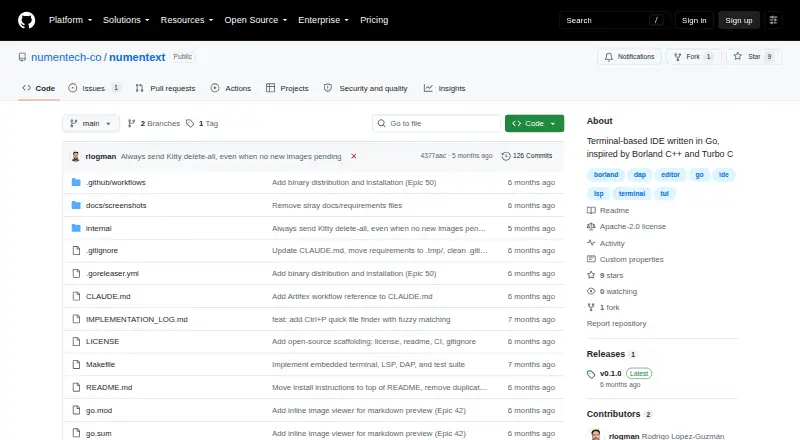
What NumenText is
NumenText is a free, open-source IDE that runs in a terminal and is written in Go. Its non-modal, menu-driven editor has multiple tabs, syntax highlighting for more than 20 languages, and familiar shortcuts such as Ctrl+S, Ctrl+C, and F5 to run. Build and run support covers C, C++, Go, Rust, Python, JavaScript, TypeScript, Java, and Kotlin. The LSP client offers autocomplete, go-to-definition, hover information, and diagnostics, while the DAP client provides breakpoints and step-by-step debugging. A test runner handles output from go test, pytest, cargo test, Maven, and Gradle; configurable formatters and linters are also included. Other tools include an integrated PTY terminal, regex search and replace, Markdown live preview, a binary hex viewer and editor, bookmarks, TODO/FIXME scanning, and Git diff gutter markers. Vi and Helix keybinding modes are available alongside the default mode. NumenText runs on macOS and Linux, is licensed under Apache License 2.0, and is described as a single binary with no runtime dependencies. Building from source requires Go 1.25 or later.
Good
- Non-modal, menu-driven editing
- LSP and DAP language tools
- Test runner supports five named toolchains
- Single binary with no runtime dependencies
Watch out
- Listed platforms are macOS and Linux
- Building from source requires Go 1.25 or later
- SSH clipboard support has stated limitations
Who it suits
NumenText suits developers who want an IDE in the terminal without adopting Vim or modal editing. It is an option for macOS and Linux users who want language tools, debugging, and test-running features in that setting.
Verdict
NumenText combines editing, language tools, debugging, and test-running features in a terminal interface. Its listed platform support is macOS and Linux, and remote SSH use has clipboard and latency limitations.
Plans and prices
From NumenText's own pricing page, checked 5 Oct 2026.
| Plan | Price | What it gives you |
|---|---|---|
| NumenText | Free | Open-source terminal IDE · Apache License 2.0 |
The facts
Each one read from NumenText's own pages, with the date it was checked.
What it does
- Build and test
- Build and run shortcuts cover C, C++, Go, Rust, Python, JavaScript, TypeScript, Java, and Kotlin, and its test runner parses output from go test, pytest, cargo test, Maven, and Gradle.checked 5 Oct 2026
- Debugging
- Its DAP client supports breakpoints and stepping with tools including dlv, debugpy, lldb-vscode, and JVM JDWP.checked 5 Oct 2026
- Editing
- It offers a non-modal, menu-driven editor with familiar shortcuts such as Ctrl+S, Ctrl+C, and F5 to run.checked 4 Oct 2026
- Editor
- It includes a multi-tab editor with syntax highlighting for more than 20 languages.checked 5 Oct 2026
- Extensions
- The maker’s GitHub organization lists NumenText plugins for Jupyter, Git, HTML, and TODO.checked 5 Oct 2026
- Installation
- The README gives Homebrew and shell installer instructions for macOS and Linux and provides prebuilt macOS and Linux binaries for amd64 and arm64.checked 4 Oct 2026
- Integrations
- The README describes LSP and DAP integrations and an integrated PTY terminal; a screenshot caption also mentions Claude Code running inside NumenText.checked 5 Oct 2026
- Intended users
- The README describes it as an option for people who want an IDE in the terminal without learning Vim or modal editing.checked 5 Oct 2026
- Keyboard modes
- The editor includes Vi and Helix keybinding modes alongside its default mode.checked 4 Oct 2026
- Language support
- Syntax highlighting is provided for 20+ languages, and build/run support is listed for C, C++, Go, Rust, Python, JavaScript, TypeScript, Java, and Kotlin.checked 4 Oct 2026
- Language tools
- Its LSP client provides autocomplete, go-to-definition, hover information, and diagnostics, and it lists language servers including gopls, pyright, clangd, and rust-analyzer.checked 5 Oct 2026
- License
- The repository identifies the project as licensed under Apache License 2.0.checked 5 Oct 2026
- Other features
- The README lists regex search and replace, Markdown live preview, a binary hex viewer/editor, Git diff gutter markers, and configurable formatters and linters.checked 5 Oct 2026
- Product
- NumenText is a terminal-based IDE written in Go, designed as a menu-driven editor with familiar shortcuts.checked 5 Oct 2026
- Release
- The repository's Releases page lists v0.1.0 as the latest release.checked 4 Oct 2026
- Remote use
- The README explains how to cross-compile the binary and run it on a remote machine over SSH, and notes clipboard, modifier-key, and latency limitations in that setup.checked 4 Oct 2026
- Remote use limit
- Over SSH, system clipboard shortcuts depend on local clipboard utilities unavailable on the remote machine, and OSC 52 clipboard passthrough is not yet supported.checked 5 Oct 2026
- Runtime
- The project describes NumenText as a single binary with no runtime dependencies; building from source requires Go 1.25 or later.checked 5 Oct 2026
- System requirements
- Installing from source requires Go 1.25 or later, and the project describes the application as a single binary with no runtime dependencies.checked 4 Oct 2026
- Terminal
- The integrated terminal supports PTY and command block mode.checked 4 Oct 2026
- Testing and quality
- It includes a unit test runner for go test, pytest, cargo test, Maven, and Gradle, plus configurable formatters and linters.checked 4 Oct 2026
The company
- Headquarters
- Canadachecked 28 Sep 2026
- Maker
- The GitHub organization is NUMEN Technologies Inc. and lists Canada as its location.checked 4 Oct 2026
Where it runs
- Platforms
- The README gives installation instructions for macOS and Linux and says prebuilt binaries are available for both systems on amd64 and arm64.checked 5 Oct 2026
The full review of NumenText
NumenText is a terminal-based IDE for developers who want editing, language intelligence, debugging, and testing without adopting a Vim-first workflow. It is most compelling for macOS and Linux users who prefer keyboard-driven tools and an open-source license; teams seeking a mature release history or a desktop-centric IDE should look elsewhere.
Overview
Inspired by Borland C++ and Turbo C, NumenText combines a menu-driven, non-modal editor with integrated development tools. Its multi-tab workspace uses familiar shortcuts including Ctrl+S, Ctrl+C, and F5 to run, so conventional editor users can get productive without learning modal commands. Vi and Helix keybinding modes remain available for those who want them.
The project is released under Apache License 2.0 and its latest listed release is v0.1.0. That combination makes experimentation inexpensive, but the early release stage is a meaningful consideration for teams that depend on long-established tooling.
Key features
Editing and language intelligence
Syntax highlighting covers more than 20 languages. Build and run shortcuts support C, C++, Go, Rust, Python, JavaScript, TypeScript, Java, and Kotlin, giving polyglot developers a consistent command surface. The LSP client adds autocomplete, go-to-definition, hover information, and diagnostics, with automatic detection for several language servers. These services bring IDE-style context to a terminal editor, provided the relevant language tooling is available in the development environment.
Debugging, testing, and terminal work
The DAP client handles breakpoints and step over, step in, and step out operations. A built-in test runner parses output from go test, pytest, cargo test, Maven, and Gradle, while configurable formatters and linters support routine quality checks. The integrated PTY terminal and command block mode keep shell work beside code rather than in a separate application.
Project utilities
Regex search and replace, bookmarks, TODO/FIXME scanning, Git diff gutter markers, Markdown live preview, and a binary hex viewer/editor broaden its usefulness beyond source editing. Plugins from the maker’s organization cover Jupyter, Git, HTML, and TODO. The README also shows Claude Code running inside NumenText, indicating that terminal-based agent workflows can share the same workspace.
Pricing
NumenText costs nothing, with an open-source terminal IDE under Apache License 2.0. There is no free trial because the product is already free, and no paid tier, seat charge, usage quota, renewal, or subscription commitment is stated. It suits individuals, students, and teams that can adopt a self-managed open-source tool; organizations wanting vendor support or commercial service terms will need another option.
Platforms
Supported platforms are macOS, Linux, self-hosted environments, and Windows in the product’s platform summary, while the documented installation path focuses on macOS and Linux. Homebrew and shell installers are provided for those systems, along with prebuilt amd64 and arm64 binaries. Building from source requires Go 1.25 or later. The application is described as a single binary with no runtime dependencies, which simplifies distribution once a suitable binary is available.
Remote development is supported by cross-compiling the binary and running it over SSH. Clipboard shortcuts can depend on utilities installed on the local side, modifier keys may not behave consistently, latency affects interaction, and OSC 52 clipboard passthrough is not supported, so remote sessions are less seamless than local ones.
Who it's for
Choose NumenText if you want one terminal workspace for editing, building, language-server assistance, debugging, tests, and shell commands without committing to Vim’s default modal model. Go developers get a particularly natural fit through the Go debugger and go test integration, while its broader build and test coverage serves mixed-language projects. It is less suitable for users who require a polished desktop IDE, deep ecosystem maturity, or frictionless SSH clipboard behavior.
Pros and cons
Pros
- Familiar default editing: Non-modal commands and conventional shortcuts reduce the learning curve for terminal newcomers.
- Broad development workflow: LSP, DAP, build/run commands, test parsing, formatters, and linters cover the core edit-to-verify loop.
- Lightweight deployment: A single binary with no runtime dependencies is practical for self-hosted setups.
- Genuinely free: Apache 2.0 open-source licensing removes subscription and seat-cost barriers.
Cons
- Early release maturity: v0.1.0 may not satisfy teams seeking a proven long-term platform.
- SSH compromises: Clipboard, modifier-key, and latency limitations reduce remote ergonomics.
- Installation emphasis: The clearest installer and binary guidance targets macOS and Linux, despite Windows appearing in the platform summary.
Alternatives
Go IDEs are the better starting point when you want to compare a wider field of Go-focused environments.
CodeDroid is preferable if you need coverage across Android, iOS, Linux, macOS, web, and Windows with a free open-source plan and no stated usage limits.
Pick Neovim for a free, Vim-derived editor spanning Android, API, Linux, macOS, self-hosted, and Windows environments.
Visual Studio Code is the stronger choice when you want a free editor for Linux, macOS, web, and Windows from Microsoft.
Choose Micro for a simpler open-source editor delivered as a single static binary with no dependencies.
Zed fits users seeking a free personal plan with 2,000 accepted edit predictions and external-agent or API-key support.
Consider Theia IDE for an open-source IDE that also supports web and extension-based deployments; its online demo limits sessions to 30 minutes.
VSCodium is another free Linux, macOS, and Windows option when you want that editor family.
Devin Desktop is the alternative for agent-oriented coding, with a free tier offering unlimited inline edits and Tab completions alongside light agent quotas.
Verdict
NumenText is a strong pick for developers who want a free, open-source terminal IDE with conventional editing plus serious language, debugging, and test tooling. Choose it for a lightweight local workflow and broad command-line integration; choose an alternative if release maturity, desktop integration, or reliable SSH clipboard behavior matters more.
Alternatives to NumenText
- 1

IntelliJ IDEA
Free planAPIExtensionLinuxmacOS7.8Free plan - 2

Zed
Free planLinuxmacOSWindows7.6From $10 a month - 3

Lapce
Free planOpen sourceExtensionLinuxmacOSWindows7.4Free plan - 4

Visual Studio Code
Free planWebLinuxmacOSWindows7.4Free plan - 5
Neovim
Free planAndroidAPILinuxmacOS7.3Free plan - 6
GNU Emacs
Free planAndroidLinuxmacOSWindows7.2Free plan