Noise Gator
Noise Gator processes microphone input in real time to suppress noise, then routes the cleaned audio to a virtual audio device for other apps to use.
What Noise Gator is
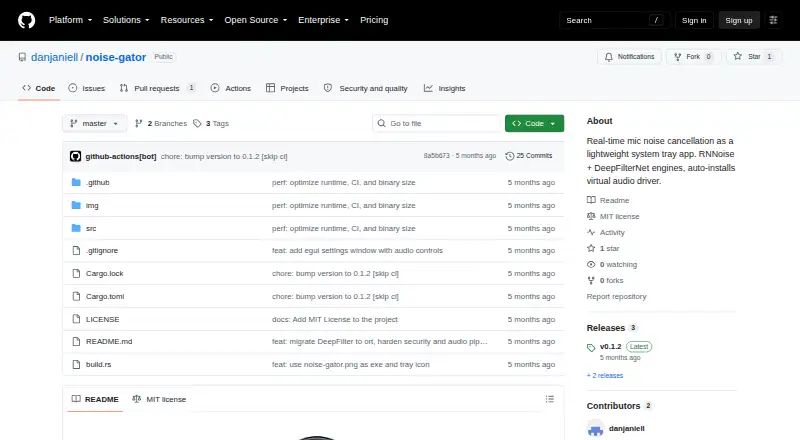
Noise Gator processes microphone input in real time to suppress noise, then routes the cleaned audio to a virtual audio device for other apps to use. It runs on Windows and macOS and is free under the MIT license. Discord, Teams, and Zoom are named as apps that can use the virtual device as their microphone input. DeepFilterNet is the default denoising engine, with dual-pass RNNoise as a lightweight fallback. Audio controls include a highpass filter, suppression control, a voice-activity-driven noise gate, three-band EQ, and automatic gain normalization. Bluetooth headset audio is supported, and the device menu refreshes when devices connect or disconnect. Noise Gator can install VB-Cable on Windows or BlackHole on macOS automatically. Prebuilt binaries are available from GitHub Releases; the ZIP includes the executable and ONNX Runtime DLL. DeepFilterNet’s runtime and approximately 8 MB model download on first use, with SHA256 verification. Settings are saved to a TOML file and restored on the next launch. Headless mode is available for scripted or server use.
Good
- Processes microphone input in real time.
- Offers DeepFilterNet and RNNoise engines.
- Supports Bluetooth headset audio.
- Can install virtual audio drivers automatically.
- Saves settings for the next launch.
Watch out
- Supports only Windows and macOS.
- DeepFilterNet downloads its runtime and model on first use.
- Building from source requires stable Rust 1.85 or later.
Who it suits
Noise Gator suits people who want to clean microphone audio before using it in apps such as Discord, Teams, or Zoom. It also offers a headless mode for scripted or server use.
Verdict
Noise Gator provides configurable microphone noise suppression routed through a virtual audio device. Its supported systems are Windows and macOS, and its default engine downloads its runtime and model on first use.
Plans and prices
From Noise Gator's own pricing page, checked 7 Oct 2026.
| Plan | Price | What it gives you |
|---|---|---|
| Noise Gator | Free | Standalone app · MIT licensed · Windows and macOS |
The facts
Each one read from Noise Gator's own pages, with the date it was checked.
What it does
- Audio controls
- Its DSP pipeline includes a highpass filter, suppression control, a VAD-driven noise gate, three-band EQ, and auto-gain normalization.checked 7 Oct 2026
- Build requirements
- Building from source requires stable Rust 1.85 or later, plus MinGW-w64 or MSVC on Windows.checked 7 Oct 2026
- Configuration
- Settings are saved to a TOML file and restored on the next launch.checked 7 Oct 2026
- Denoise engines
- It includes DeepFilterNet as the default engine and dual-pass RNNoise as a lightweight fallback.checked 7 Oct 2026
- Download
- Prebuilt binaries are available from the GitHub Releases page, with the executable and ONNX Runtime DLL in the release ZIP.checked 7 Oct 2026
- Headless mode
- The app supports a headless mode for scripted or server use.checked 7 Oct 2026
- Integrations
- The README names Discord, Teams, and Zoom as applications that can use the virtual audio device as their microphone input.checked 7 Oct 2026
- License
- The project is released under the MIT license.checked 7 Oct 2026
- Model download
- DeepFilterNet’s runtime and approximately 8 MB model download automatically on first use, with SHA256 verification.checked 7 Oct 2026
- Purpose
- Noise Gator processes microphone input in real time to suppress noise and routes the cleaned audio to a virtual audio device for use by other apps.checked 7 Oct 2026
- Release status
- The Releases page lists v0.1.2 as the latest release.checked 7 Oct 2026
- Security
- The README says DeepFilterNet downloads are verified with SHA256; it does not state a broader security or compliance certification.checked 7 Oct 2026
- Virtual audio drivers
- It can automatically install VB-Cable on Windows or BlackHole on macOS.checked 7 Oct 2026
Where it runs
- Device support
- The app supports Bluetooth headset audio and refreshes its device menu when devices are connected or disconnected.checked 7 Oct 2026
The full review of Noise Gator
Noise Gator is best for Windows and Mac users who want configurable microphone cleanup for calls and other apps that accept a virtual microphone. Its free, open-source approach is appealing, though setup includes virtual-device routing and a first-use model download.
Overview
Noise Gator processes microphone audio in real time and sends the cleaned signal to a virtual audio device for other software to use. Discord, Teams and Zoom are named as examples. It can install VB-Cable on Windows or BlackHole on macOS automatically, which reduces driver setup work but still leaves users needing to select the virtual device in their other apps.
DeepFilterNet is the default engine, with dual-pass RNNoise as a lightweight fallback. DeepFilterNet’s runtime and roughly 8 MB model download on first use, and the model is checked with SHA256. That verification does not amount to a broader security or compliance certification. Noise Gator is released under the MIT license.
Key features
Audio processing
The DSP chain offers a highpass filter, suppression control, a voice-activity-detection-driven noise gate, three-band EQ and auto-gain normalization. This gives users meaningful ways to shape the microphone signal beyond simply turning suppression on or off. It suits people willing to adjust their audio chain; anyone after a single, hands-off control may find the set of options more than they need.
Device handling and configuration
Bluetooth headset audio is supported, and the device menu refreshes when hardware is connected or disconnected. Settings are saved to a TOML file and restored at the next launch, so users do not have to reconfigure their choices each time. Headless mode also supports scripted or server use, extending the app beyond a conventional desktop call setup.
Installation and build
Prebuilt binaries are available in GitHub Releases; the release ZIP includes the executable and ONNX Runtime DLL. Building from source requires stable Rust 1.85 or later, plus MinGW-w64 or MSVC on Windows. The latest release is v0.1.2, so users who prefer a more mature release history may want to compare alternatives before relying on it for a critical audio workflow.
Pricing
Noise Gator is free: its standalone app costs nothing and is MIT-licensed for Windows and macOS. There is no free trial because the app is free rather than a time-limited evaluation. No seat count or usage quota is specified in its plan, making it a straightforward option for individuals who want local microphone processing without a subscription price.
Platforms
Noise Gator supports Windows and macOS, with real-time cancellation for microphone input. It does not support Linux, so Linux users should consider NoiseTorch-ng, which is free for Linux systems running PulseAudio or PipeWire, or DeepFilterNet, a free, open-source option for Linux, macOS and Windows.
Who it's for
Noise Gator fits people who want adjustable microphone noise suppression, virtual-device routing and compatibility with common call applications on Windows or macOS. Bluetooth support and automatic driver installation make it practical for changing headset setups, while saved TOML settings help preserve a chosen configuration. It is less suitable for users who need Linux support or formal security and compliance assurances.
Pros and cons
- Pros: Free and MIT-licensed, with both DeepFilterNet and a lighter RNNoise fallback.
- Pros: A varied DSP toolset and device-menu refreshes support more control over changing microphone setups.
- Pros: Can install the required virtual audio driver and retain settings between launches.
- Cons: A virtual audio device remains part of the routing path, and the default engine downloads its runtime and model on first use.
- Cons: Windows and macOS only; Linux users need another tool.
- Cons: The model download has SHA256 verification, but no broader security or compliance certification is stated.
Alternatives
For a broader set of options, browse AI Noise Cancellation Software. Kleervox is a stronger fit for users who want a free daily allowance with neural cancellation, echo cancellation and a virtual microphone, or a trial of its freemium service; its free plan caps cleaning at one hour per day, and it also supports Linux and web. For a free cross-platform engine rather than Noise Gator’s packaged microphone workflow, DeepFilterNet supports Linux, macOS and Windows under MIT or Apache-2.0 licensing.
Noise Blocker is a Windows alternative with a free version and a business trial that requires a request and approval. NVIDIA ShadowPlay is a free Windows option for users with a supported GPU and GeForce 551.52 driver or later on Windows 10 or 11. Mac users seeking a free option can consider NoNoise Mac, also open source and MIT-licensed, or DeskBroadcast, which has a free tier and a one-time 79.00 USD Pro plan for three Macs. Linux users can also compare NoiseTorch-ng, which supports PulseAudio or PipeWire, and Alt Denoiser.
Verdict
Choose Noise Gator if you want free, configurable, real-time microphone cleanup on Windows or macOS and are comfortable routing audio through a virtual device. Its strongest case is the combination of two engines and a useful set of DSP controls without a paid plan. Look elsewhere if you need Linux support, broader assurance credentials or a simpler workflow without first-use downloads and virtual-device setup.
Alternatives to Noise Gator
- 1

Krisp AI Meeting Assistant
AndroidiOSExtensionmacOS7.8From $8 a month - 2
DeepFilterNet
Free planOpen sourceAPILinuxmacOSSelf-hosted7.6Free plan - 3

DeskBroadcast
Free planmacOS7.3$79 one-time - 4
Kleervox
Free planWebLinuxWindows6.9Free plan - 5

Noise Blocker
Free planWindows6.7$50 one-time - 6

neep
LinuxmacOSWindows6.3From $9 a month